Desert Online General Trading LLC
Dubai, United Arab Emirates
Desert Online General Trading LLC
Dubai, United Arab Emirates


🚀 Elevate your home network to pro-level speed and control!
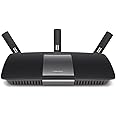
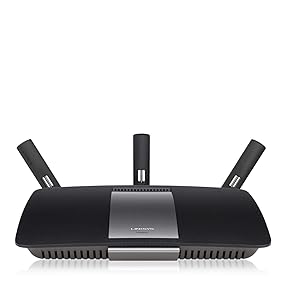
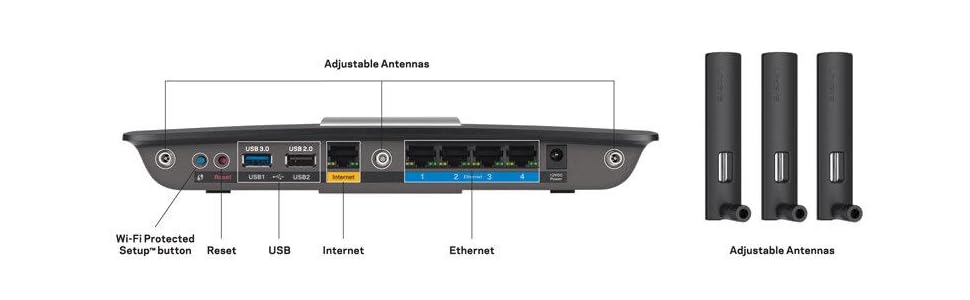
The Linksys AC1900 EA6900 is a high-performance dual-band wireless router delivering combined speeds up to 1900 Mbps. Featuring beamforming technology, 3 external antennas, and a powerful dual-core 800 MHz processor, it ensures robust coverage and seamless connectivity. With 4 gigabit Ethernet ports, USB 3.0/2.0 ports, and a smart Wi-Fi app for remote network management, it’s designed for modern homes demanding fast, reliable internet and easy control.









| Wireless Type | 802.11ac |
| Brand | Linksys |
| Series | EA6900 |
| Item model number | EA6900 |
| Operating System | Windows XP SP3, Windows Vista SP1 or later, Windows 7, Windows 8, Mac OS X Leopard 10.5.8 or later, Snow Leopard 10.6.1 or later, Lion 10.7 or later, Mountain Lion 10.8 |
| Item Weight | 1.18 pounds |
| Product Dimensions | 1.58 x 10.1 x 7.26 inches |
| Item Dimensions LxWxH | 1.58 x 10.1 x 7.26 inches |
| Color | Black |
| Voltage | 12 Volts |
| Manufacturer | Linksys |
| ASIN | B00EXK14S0 |
| Is Discontinued By Manufacturer | No |
| Date First Available | September 5, 2013 |
V**R
A fan of Linksys
I’ve been a fan of Linksys over the years and stay with them because it is easy to configure using the address to the wireless router: 192.168.1.1 on your browser. I’m a computer tech and have my own computer business. Now I’m using this EA6900 for my home and had no problems. I’m getting 3 bars from my shop, which is 75 feet from my base. First of all let me make it clear that your wi-fi speed will always be lesser than the wired speed no matter what.Wi-Fi has gotten significantly faster over the last few years thanks to new standards like 802.11ac and 802.11n, which offer maximum speeds of 866.7 Mb/s and 150 Mb/s, respectively. This is a maximum speed for all the devices on your network to share, and you likely won’t get anywhere near close to these speeds — but Wi-Fi is much faster than it used to be.A dual band wireless router features both a 2.4 GHz band and a 5.0 GHz band, allowing for connections on both bands, and providing higher speeds in general. Dual band routers are important for those who are certain that multiple users will need to be connected to the internet at one time.Generally speaking, many wireless devices run off of the 2.4 GHz signal band, like cordless phones and other electronic devices. Users who have multiple computers, phones, or electronic devices that run on this signal band may experience congestion on their router. There are, in general, only a few devices that run on the 5.0 GHz band, making a dual band wireless router a faster option overall.Now I’m using the Linksys PLWK400 powerline home plug AV kit with Wi-Fi. You use your existing EA6900 and use one of the ports from it to the PLWK400 that’s plug to a nearby power outlet. Take the other to any part of the house and plug it to a power outlet and plug it to your computer or SmartTV using a Cat5. Now it’s connected direct to your Linksys EA6900, in my case is 60Mg across the house. The best part of the second plugin is that its wireless too from the power outlet. It’s an extension from your EA6900.
D**E
Great WAN to LAN speeds, better/further connection over WiFi
I could not have been more pleased with my decision. The setup instructions are literally 4 steps, two of which are simply plug it in the wall, and connect your modem. After that it's just connecting to a actual domain name (no need for using the IP address unless that's your thing), and following the steps to configure the SSID and password.The UI is incredibly simple compared to my old linksys router, and I even suggested my wife install the app on her iPhone so she could check it out. Of course I got the "Why?" response... and I suppose she has no need, but if she did need to, it would be just as simple as reading the 4 step instructions.With gigabit (which I was told is restricted to around 850mb due to the current DOCSIS 3.0 modem) I was able to achieve 840mb while connected directly to the router. My iPhone 6 is hovering about 40mb on wifi, and my computer connecting over wireless is sitting at 105mb on the opposite end of the house. Distance has improved over my previous router as we can now connect to wifi on the backporch whereas it was spotty at best with our previous router. I'm sure wireless speeds could be improved, but I only use it for my phone, and the wife is happy with what she's getting now.
D**L
Works well. Strong replacement for a E4200.
Edit 9/28/17: Both radios died at the same time. After resetting it, the router drops both 5ghz and 2.4ghz radios so no devices connect. Wired connections are fine. Called Linksys and they want $30 to troubleshoot out of warranty. I'm buying a different brand today after 4 Linksys devices.EDIT 12/27/16: And the 2.4 radio is giving me fits on this unit. Very poor throughput even though signal strength is good.Replaced a Linksys E4200 that had the 2.4 channel die. It was easy to install and set up. Working well so far a month later. I am not a fan of the online set up but once done, I don't mess with it any more.The range is better than the E4200 and I am getting 5GHz a good 100ft away. On Comcast blast, I get 80M down within 15ft and at 100ft that drops to 15-20M which is expected but definitively better than the older unit allowing me to stream music at the far end of the yard.The signal is strong enough to maintain good throughput throughout my 2 story 2200sqft house including the basement.
A**M
Linksy
love my Linksy, lasts a very long time, for years I have not had to replace.excellent product
J**B
Good Performer & User Friendly
I recently upgraded my router to the Linksys AC1900. I’ve been very happy with it. Had it about 2 months now.Reasons for upgrading:1. I have a lot more devices connected simultaneously than I used to, and my old router wasn’t cutting it. Devices were getting dropped, and I wasn’t getting good speeds when multiple devices were being used at the same time.2. I wanted improved range.My experience:1. Never had a device get dropped since I switched.2. WAY better range. Garage TV connects with a good signal, fairly far away.3. Tough to say as I never paid too much attention, but I suspect I’m getting better download speeds.4. The Linksys app is wonderful. Definitely recommend setting it up. You can monitor your network and who is on it using the app.5. Device prioritization is a thing, but doesn’t seem to make any difference. I disabled it.6. The AC1900 router offers the capability of a guest network. After reading into it, I disabled that feature as there’s well-documented security issues with the guest network. If a guest network is something you really want, this is probably not the way to go.
Trustpilot
2 weeks ago
1 month ago
1 week ago
3 weeks ago