We remain fully operational. Our teams are working around the clock to ensure your deliveries continue safely.

DOWNLOAD THE APP


Customer Services
Copyright © 2025 Desertcart Holdings Limited
DOWNLOAD THE APP
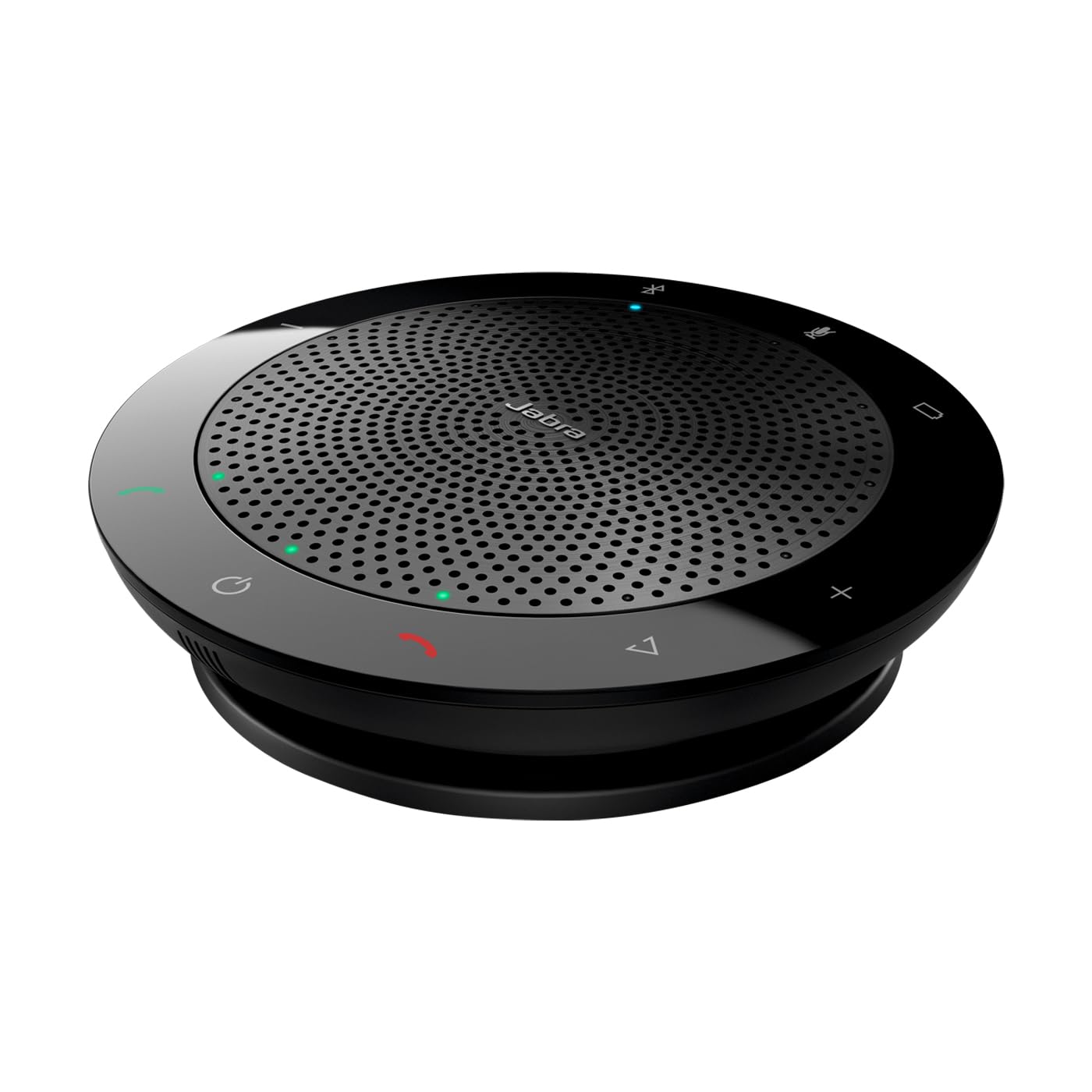
🎤 Elevate every call — sound so clear, you’ll never miss a word!
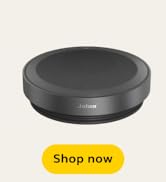
The Jabra Speak 510 (2025 Edition) is a premium portable wireless Bluetooth speakerphone designed for professional meetings and calls. Featuring a 50mm dynamic driver, multi-mode connectivity (Bluetooth, USB-A, and Link 370 adapter), and a 360-degree microphone, it delivers crystal-clear audio for conference calls. Compact and lightweight with a travel pouch included, it’s optimized for Microsoft Teams and compatible with all major unified communication platforms, making it the go-to device for seamless, high-quality remote collaboration.









| ASIN | B0FC37CJRQ |
| Audio Driver Size | 50 Millimeters |
| Audio Driver Type | Dynamic Driver |
| Batteries | 1 Nonstandard Battery batteries required. (included) |
| Best Sellers Rank | #21 in Portable Bluetooth Speakers #1,231 in MP3 & MP4 Player Accessories |
| Bluetooth Range | 100 Feet |
| Charging Time | 2 Hours |
| Color | Black |
| Compatible Devices | Desktop, Laptop, Smartphone, Tablet |
| Control Method | Touch |
| Customer Package Type | FFP |
| Customer Reviews | 4.6 4.6 out of 5 stars (1,590) |
| Date First Available | June 5, 2025 |
| Included Components | Quick Start Guide, Speaker, Travel Pouch, USB Adapter, Warranty Card |
| Indoor/Outdoor Usage | Indoor |
| Input Voltage | 3.7 Volts |
| Is Waterproof | False |
| Item Weight | 6.9 ounces |
| Item model number | 7510-309-01 |
| Manufacturer | Jabra |
| Material | Acrylonitrile Butadiene Styrene (ABS), Metal, Plastic, Polycarbonate (PC) |
| Maximum Range | 1.5 Meters |
| Model Name | JABRA SPEAK 510 MS + LINK 370 |
| Mounting Type | Tabletop Mount |
| Number of Batteries | 1 Nonstandard Battery batteries required. (included) |
| Number of Items | 1 |
| Other display features | Speakers |
| Power Source | Battery Powered |
| Product Dimensions | 4.72"D x 4.72"W x 1.3"H |
| Recommended Uses For Product | For Computers, For Music Players, For Smartphones or Tablets |
| Series Number | 1 |
| Set Name | Jabra Speak 510 with Link 370 USB Adapter |
| Shape | rectangular prism |
| Speaker Size | 120 Millimeters |
| Speaker Type | Portable Speaker |
| Special Feature | Built In Microphone, Hi Res Audio, Portable |
| Special features | Built In Microphone, Hi Res Audio, Portable |
| Specific Uses For Product | Business, Party, Travel |
| Style | Speak 510 (2025) |
| Subwoofer Connectivity Technology | Wireless |
| UPC | 706487026891 |
| Unit Count | 1.0 Count |
| Warranty Type | Limited |
| Wireless Communication Technology | Bluetooth |
J**G
Best in class portable, bluetooth, wireless, mobile speakerphone
I have a reputation among friends, associates, family for doing a deep dive and researching the field when choosing new products. I like to understand the differences between products, state of the art, etc., and generally be an informed buyer. I've also been in "tech" for more than 35 years, with roles from hands on through CIO and CTO, so I've got a lot of experience researching and choosing products, whether for one person or thousands. In short: I tend to be a picky shopper. I researched the field here, and think I've found a winner. At this point in my career, I'm traveling weekly, and I'm meeting -- either in person or remote -- with numerous people each week. Conference calls are the norm, and may involve dozens of people, conference rooms with poor equipment, offices with dreadful 15 year old "speakerphones", hotel rooms, working from my home office, etc. One of the most frustrating experiences is trying to participate in a mission critical conference call when 1) I can barely hear or understand the folks at the other end, and 2) they can't hear and understand me unless I lean over a mic and raise my voice. Cell phone "speakerphones" may be acceptable in an emergency, but haven't proven adequate for routine use. I had recently research Bluetooth speakers for use primarily as audio / music listening speakers (for use, e.g., with Google Play Music from my phone). I researched and auditioned many: Bose, Cambridge, JBL, Shark, Amazon, Phillips, Anker, Jambox, etc. I narrowed it down to those with speakerphone capability, thinking I'd satisfy that need along with the media speaker requirement. After a LOT of research and live auditions, I settled on Nyne Bass, and couldn't be happier with it -- as a media speaker - truly amazing in all respects: sound is stunningly good - even outdoors, and both battery life and bluetooth handling are excellent. Unfortunately, it's only mediocre when turning a phone into a speakerphone, and often quite disappointing -- and I've tried out colleague's products like Jambox for the same purpose, and also found them disappointing. So -- I went on the hunt for a "real" business quality Bluetooth speakerphone. After much research, I homed in on Jabra, and the 510+ looked most promising after reading a LOT of reviews. Buying via Amazon Prime, I knew I had no risk, so I place the order -- and had the package on my desk about 36 hours later. Once again -- kudos to Amazon Prime and the vendors that work with Amazon in this program. The product is perfectly packaged, and beautifully made. It appears to be about 4.5" in diameter, and about 1.25" high when sitting flat on a desk or table. It is a gorgeous, professional grade piece of tech with excellent fit and finish and features. It comes with a neoprene zipper case, the USB cord wraps around the body and tucks into a groove that also holds the cable end in place. Incredibly well thought out and executed. This model can be connected to a phone or laptop via bluetooth, and to a laptop via USB cable. It doesn't come with its own charging brick, but the USB cable can charge from any standard 1A or higher brick. It takes a while for a full charge, but once charged, I can use it all day and into the night, and the charge is only partially depleted. Sound quality is absolutely spectacular for the purpose. I can place this on a table or desk in a room with a dozen people at distances from 3 ft to 15 ft or more, and they are all picked up and easily understand by people at the other end of the call. What comes out of the speaker is superb as well: I'm often on the receiving end of a conference call with two dozen people, all different sound environments and volume levels, and half a dozen international accents -- and this speaker yields clear audio rivaling $400 or $500 Polycom and Cisco equipment (no exaggeration). This is so good, in fact, that I've taken to turning it on when sitting in my office at my current client's site, and using it in favor of the brand new Cisco equipment installed there. It's a better experience. The controls around the perimeter are all touch controls -- no physical buttons to degrade, and they work perfectly. Power, answer / hang up, volume up/down, bluetooth (on/off/pair), mute, battery (to check battery charge level). There are a serious of LEDs around the perimeter of the speaker that are almost invisible when off, but light up as needed to indicate function, e.g., Bluetooth connected, power on, volume level and battery life (number of lights on out of ten around the perimeter), etc. Audio prompts walk you through pairing, connection status, etc -- and these can be turned on and off via preferences. The firmware is easily upgradeable via the USB cable and downloadable PC application. I haven't had need to use the app yet, but it provides deeper control over options and connection to services like Lync. This also provides support for soft phones: this "510+ MS edition" is optimized for Microsoft products like Lync -- the other 510+ is, I believe, aimed more at other soft phone products like Cisco. All in all: a beautifully designed, engineered and implemented product. Every now and then you trip across a gem that defines state of the art in its category - and I believe this qualifies. As you might guess, I'm delighted with this product.
S**A
Great for Teams and Zoom!
The Jabra Speak is a nice speaker for business. As people transition to Microsoft Teams and remote meetings become the norm, having a handsfree solution makes sense. The speaker offers great features such as bluetooth or wired connectivity. Works with a smartphone or computer! The speaker is compact, lightweight and has plenty of controls around the base. You can mute, check battery levels, answer/hang up a call, increase/decrease volume, and even features a custom programmable button. The speaker charges quickly with a USB cable that is a part of the base (not removable). Setting up the speaker is piece of cake and with the Jabra Connect software, you can update the firmware. Sound quality for speech is excellent and clear. I have not tried to listen to music. Headsets work also but you have to constantly remove them or they stay glued on. Jabra quality is evident in the 510. It is a solid speaker. Time to listen to some music!
M**3
This thing is nothing short of awesome
This thing is nothing short of awesome. Sound quality is great. Multiple people talking doesn't seem to create problems. Conference Rooms: We have a very dated phone system at work without a proper conference room speakerphone in our conference room. It's been a topic of aggravation for quite awhile because no one who dials in can hear very well. Last Friday I hosted our staff meeting using one of these connected to my cell phone. A few people laughed. At one point we were playing "can you hear me now" with a person who dialed in and someone whispered, "I'll bet you can't hear this." The employee on the phone responded and identified the person who whispered. It was incredible. To be fair she wasn't able to hear one very soft spoken person in the room who was 8' away from the speaker but then again I could barely hear him sitting 6 seats over. I'm not sure on our actual conference room dimensions but it's fairly large. We stuffed (literally) 28 people in there around a table with 2 rows in some places. The room is at least 18' x 12'. Personal Use: For personal use I connect this thing to my laptop via USB while simultaneously connecting it to my cell phone via bluetooth. If an incoming call comes in from either MS Lync or my cell, I hit the green phone button to answer and use the volume controls/mute button on the speaker itself. It's great. I downloaded the software from the Jabra website. I'm not sure if it's really necessary or not but I would recommend it based on how well my speakerphone is working. It also showed by firmware was up to date. Lastly, I'll add that some of my colleagues liked this thing so much that I just ordered 6 more.
Q**R
Great conference phone but some minor issues
Overall it's a great speakerphone. I love that the cord wraps up when not in use. The sound quality is great and the microphone is also very good. My issues are small but after having used this everyday for 2 years these things irk me: - The mute button works but it only syncs up with the Teams or Zoom mute button if you use the dongle. When using the wired connection, which I sometimes prefer, they are not in sync. - Wish there was a headphone jack. Sometimes I need privacy and it would be super convenient to just plug in headphones on this thing and still be able to use the mic on the Jabra. Also don't like having to switch to a new device in my settings when I do use headphones. - sometimes the dongle has a lag in audio. That's why I prefer the wired connection but then the mute button isn't synced. - wish there was a place to store the dongle when not in use like some of the other speakerphones. That said, I tried several other speakerphone before settling on this and i can say it's better than the rest.
A**E
Bei der Auswahl habe ich mich tatsächlich auf die Rezensionen verlassen, und....., wurde nicht enttäuscht. Hervorragender und einfach zu bedienender Laut-/Freisprecher. Entweder über Bluetooth oder USB-Stecker.
J**S
nice piece of Conferencing kit, can link mobile for conference calls good sound qaulity
R**T
Hello everyone, I was in the market to find the best device for my home office as i was quite tired of using the headset during MS teams calls. I have had a progression in the last 1 year or so going from a wired headset -> wireless headset -> bluetooth speaker and microphone and i pretty convinced that i will be sticking with my existing option. Really makes your life easy if you have your own space at home and privacy is not a concern. Before this purchase, i did research a lot about the available devices in the market and Anker PowerConf and Jabra Speak 510 were the most popular and i ended up trying out both and have decided to keep the Jabra Speak 510 based on my observations below. Both these devices were connected to my laptop via USB that made comparison consistent. Anker PowerConf (APC) vs Jabra Speak 510 (JS): 1. Speaker output and microphone: APC: Speaker output was great but microphone not so much and the voice varies as you move about in the room. It seem to adjust the volume levels that seem to be noticeable to the other user. I am not sure if the 6 omnidirectional mics are really helpful here. JS: Speaker output was great and microphone quality was noticeably superior and does not have any variations in noise levels. WINNER: Jabra Speak 510 2. Noise cancellation: APC: Noise cancellation is just OK as the users on the other end were able to hear pretty much everything in the background so it doesn't really work as advertised. JS: Noise cancellation is noticeable better and it does suppress the background noise slightly better. WINNER: Jabra Speak 510 3. Integration with MS Teams: APC: There is no existing integration with MS Teams and call/disconnect button does not work to pick up and drop off a call. So please keep this in mind if you looking to use it with MS Teams. It was a deal breaker function for me. The mute button however works. JS: Fully integrated with MS Teams and everything works as it should including the call and mute buttons. WINNER: Jabra Speak 510 4. Connections: APC: It connects to laptop via USB Type C which is great and bluetooth connection via version 5+ is also great. Another feature if you like to use is that Anker also acts as a battery back as well for devices. JS: It connects to laptop via the traditional USB Type A and bluetooth connection via version 5 is also great. WINNER: Anker PowerConf 5. Packaging: APC: The packaging is superb and really well presented. The carry bag is much better than that of Jabra's speak and does help in protecting the device in case of a fall as it is not a soft cloth bag. JS: The packaging is so so and the carry back is soft bag that does not provide adequate protection. WINNER: Anker PowerConf So in terms of technical performance, Jabra Speak 510 is much superior device and it's integration with MS Teams makes it a clear winner between the 2 devices. It's a keeper! :)
A**R
Game changer! Meetings with more than 5 people became possible. We can hear everyone easily and people online can hear everyone in the room clearly. Recommend
L**Z
Es un equipo muy útil y con un sonido de buena calidad. Relación valor precio excelente.
Trustpilot
1 month ago
3 days ago