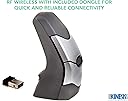
🖱️ Elevate your workflow with precision and comfort — your hand’s new best friend!
The KINESIS DXT2 Ergonomic Vertical Mouse is a physiotherapist-designed, RF wireless mouse that promotes a neutral wrist posture through its unique vertical, fingertip grip. It supports both right- and left-handed users with an easy toggle, offers a reliable 10-meter wireless range, and features a rechargeable battery lasting up to 14 days with rapid charging capabilities. Ideal for professionals seeking to reduce hand and forearm strain without sacrificing precision.


| ASIN | B00F0Y3IIW |
| Additional Features | Ergonomic Design |
| Antenna Location | Office |
| Are Batteries Included | No |
| Are Batteries Required | Yes |
| Battery Average Life | 14 days |
| Best Sellers Rank | #1,554 in Computer Mice |
| Brand | KINESIS |
| Button Quantity | 2 |
| Color | Grey |
| Compatible Devices | Laptop |
| Connectivity Technology | Radio Frequency , USB, Wireless |
| Customer Reviews | 3.9 out of 5 stars 441 Reviews |
| Enclosure Material | Plastic |
| Global Trade Identification Number | 00607998506035 |
| Hand Orientation | Ambidextrous |
| Hardware Platform | PC |
| Item Weight | 3.7 Ounces |
| Manufacturer | Kinesis Corporation |
| Model Name | KINESIS CORPORATION |
| Model Number | PD7DXT-WR |
| Movement Detection | Laser |
| Movement Detection Technology | Laser |
| Number of Batteries | 1 Lithium Ion batteries required. |
| Number of Buttons | 2 |
| Operating System | Linux |
| Power Source | Battery Powered |
| Range | 10.0 meters |
| Special Feature | Ergonomic Design |
| Style Name | Modern |
| UPC | 607998506035 736211309754 |
| Unit Count | 1.0 Count |
C**.
A Magnificent Mouse!
The Kinesis DXT2 Ergonomic Vertical Mouse is an amazing mouse. I do a lot of mousing (frequently all day long) and I used to have problems with my hand and my forearm cramping. This mouse has cured me of both those problems. There's something about it that feels so delicate in my hand that my hand relaxes. You just don't want to squeeze it. It's amazing. In addition, it's a vertical mouse which removes the stress on my forearm. You don't have to twist your arm. You rest your hand on the edge while holding the mouse. I happen to prefer wired mice, but it also comes in a wireless version if that's your preference. It's also a mouse that works for either right- or left-handed people. There's a little button that you press to change it from right to left. There are mice that are less expensive, but this one is worth it! Your hand and arm will thank you.
M**D
A no-nonsense mouse. No additional features needed.
Excellent mouse for lefties. Easy to operate with no strain on hand or wrist. No issues. Recommended.
B**R
Great Ergo but Fails and Lacks Some Basic Features
First, I use a mouse in my left hand, so this review is in regards to left-handed use. I also use Windows PCs (sorry Mac users!). There are few options out there for an ergonomic left-hand mouse. A great feature of this mouse is that it works for right or left hand, which is very nice for those switch hitters! I really like the small and lightness of the mouse. If nothing else, it makes for a great travel mouse. The first left-hand vertical mouse I tried turned out to be too big and bulky for practical use. One thing I did not realize was that periodically when one uses a mouse, one (unconsciously) lifts and recenters the mouse on the mouse pad periodically. With the large mouse I was not able to do this without a conscious effort, often pressing buttons as this was done. The Kinesis mouse does not have this problem. It's small and easy to pinch between two fingers to lift and recenter on the mouse pad. Setup was very easy out of the box. It's wireless, so I plugged in the dongle and charged it and it worked. There are two mouse buttons and a scroll wheel that are used with either hand. A button below the thumb toggles between left or right hand use. For desktop use, the button is probably ok. For travel use, it's easy to accidentally bump the button. A switch might have been a better design. The usability of the mouse is pretty good. I'd say I have medium sized hands. The mouse is small, but you can get a comfortable grip with a relaxed hand, which is the key to the ergonomic use. I agree with another review that a lip at the bottom for your pinky finger would have been nice. In addition to dragging the finger, the mouse edge can get caught and tip as it's moved toward the pinky. This has not been a major problem for me, but could be in some uses such as drawing. As a battery saving feature, the mouse sleeps after few minutes with no use. You have to click a button to wake it. While this isn't a big deal for desktop use, I have another wireless mouse that runs off one AAA battery for months and wakes up when I move it. This does become a big deal for travel use. There's no off switch! When I pack this mouse, whenever a button is clicked, it comes alive and drains the battery. This takes me to my biggest gripe: the battery life. Literature says it lasts for days. After a full charge, I get one day's use out of my brand new mouse. If I don't remember to charge at the end of the day, I have to use the mouse with the charger plugged in in the morning. The charger cable is out of the thumbside of the mouse, so it inhibits full range of the mouse on the mouse pad. My charger also does not reach to my mouse pad, so I resort to a non-ergonomic reach when using the mouse with the charger plugged in. This pretty much defeats the purpose of the ergo mouse. UPDATE 11-29-2014: I did exchange for a new unit. The battery life on the new one is much improved - going on a full week of use without a recharge! This bumps my rating to 3 stars overall. UPDATE 12-2-2014: Battery finally died so I recharged. I continued to use mouse. Halfway through recharge, mouse stopped responding - no point and no clicks. I plugged in another mouse to continue my work. It looks to be a S/W issue, but I'm trying to get work done and this is just a mouse. Dropped my review to 1 star and will return mouse.
A**X
Love this mouse!
I am loving this new mouse. The learning/ adjustment curve isn't bad at all. I had a sprained wrist with probably a mix of tendinitis. This is definitely helping. It's not a miracle worker but it's definitely helping me recover from the pain and within the next few weeks I'm sure I'll be back to 100%. I think the only thing that throws me off is that the mouse will automatically shut itself off to conserve battery so when i pause for too long I'll have to click on the mouse and risk clicking on something while re-activating it. I was a bit apprehensive about spending 100 bucks on a mouse but honestly with the amount of time I spend working on the computer it is a small investment to secure my own health and my tools. Comes with a cable to recharge the internal battery and a pouch to carry the mouse in. Very precise. I do a lot of photoshop and video editing also and I have had no issue on response or precision. I have large hands, I can palm a basketball and I have no problem in comfortably grasping this. Size wise I would compare it to a little bit bigger than a standard travel mouse but smaller than a regular mouse. I still use a wrist pad with it just to help recover from this injury but I feel it works just as good with out it. Very ergonomic shape. It lets you use your wrist at a proper angle. Be wary of those bigger ergonomic mice as they force you to use your shoulder more than your wrist which sounds good at first but you risk even more injury. I am flirting with the idea of trying to switch hands with it but I dont have time to learn to be ambidextrous
S**H
So far, so good!
I've had my eye on this mouse for more than a year now, but initially decided to go with the $20 Anker to see how my hand and arm reacted to a vertical mouse. After a year of use, I can say that it has *helped*, but not solved, my problem. And there were several things about the Anker I didn't like (primarily it's giant size and stiff buttons). So I finally got the DXT. It's been 2 weeks now, and I'm very happy so far. Surprisingly, it's much more "vertical" than the Anker, which I was most comfortable using when my hand was at about a 60° angle. I didn't expect to encounter any learning curve with the DXT, but my hand needs to be much more vertical, more like 80° and it's taken some time to retrain myself to rotate my wrist just a little more when I grab the mouse. The DXT is small enough that I can use it with finger movements only rather than the hand and arm movements required with the large Anker. This has brought some joy back into the CAD work that I do each day. Since it's only been 2 weeks, I can't speak to it's longevity, but I hope those issues have been worked out. Time will tell. I only have 2 gripes with the DXT right now. The first is the extraordinarily low button placement. I've got pretty small hands and I keep wishing for a higher button placement. I'm not sure this mouse would work at all for someone with very large hands. Second, the four little plastic "feet" on the bottom of the mouse don't like to slide on my desk (and there's nothing unusual about my desk, it's a cheap laminate desktop like you might find in nearly every office in the world). I'm hoping time will remedy this problem. If not, I'll probably cannibalize the feet off another mouse. UPDATE: Turns out the "feet" on the mouse were covered by a protective plastic film. It was stuck on there pretty good and only started coming off on its own after a couple of months of use. Once I discovered that, I removed it from all the feet and now it travels around my desk like it's supposed to! I'm just not sure why it was ever there in the first place. What was it protecting? And after 9 months of use, longevity hasn't (yet) been an issue. I have to add that it's been fun to watch someone unfamiliar with these vertical mice sit down and try to use it for the first time (like the IT guy who shows up a couple times a year). Frankly, I'm embarrassed for them as they seem to have NO CLUE how a vertical mouse should be used. So I keep a cheap Logitech wireless mouse in my drawer for those rare moments... UPDATE #2: It's been 13 months and longevity doesn't seem to be an issue. It shows no signs of wear after 8 hr/day, 5 days/week use. And it functions exactly like it did the day I got it. I think we have a winner!
D**A
Great ergonomics but with limited life expectancy (3 yrs max)
After 3 years of use the mouse started to malfunction, making it unusable: phantom clicks, applied double-clicks when you just try to select a file, and the simple task of selecting interface elements such as drop-down arrows or check boxes became very frustrating. The design is great in terms of comfort and precision. But now it's on its way to the recycle bin. So the bottom line it's a very comfortable mouse but with a limited lifespan, which makes the value for money (30 USD per year) questionable.
B**J
much cheaper and better than doctors
Having tried and disliked several larger ergonomic mouses, I bought my first wireless Kinesis DXT2 Ergonomic Vertical Mouse in July 2017. It was easy to learn and use, highly responsive, and comfortable in my average-sized woman's hand. It had a 2-year warranty, and worked perfectly for 3 years and 51 days of very heavy use. When it died, I immediately replaced it with a duplicate. $99 is a lot to spend for a mouse, but before I invested in this life-changing gadget, I was spending much more than that every month for the treatment of constant pain in my back, neck, and especially my shoulders. None of the treatments relieved my pain, but using this mouse eliminated it completely. When my mouse died 3 days ago, I was in the middle of a big project, so without thinking about it, I switched to a regular mouse and kept working. Within a couple of hours, I was surprised but not shocked that my shoulder was aching. Soon I had pain in my neck, and then my back began hurting badly, and I developed a headache, which is very rare for me. My new mouse arrived 4 hours ago, I began using it immediately, and my headache is gone. This mouse has spared me years of suffering, and I'm very grateful for it.
C**A
Constant G-L-I-T-C-H-I-N-G
Is...t...h..is....anno...ying? Yeah, that's what it feels like to use this mouse that constantly glitches. Two weeks. Not holding up. Slide, click. Basic requirements of a mouse. You want your customers to be pay nearly a hundred bucks for a mouse, step it up. I had the last one for nearly 15 years. Looks like quality went down the drain. This is just the reseller, but tell your mothership to do better. This one's going back in the box and back to the North Pole. p.s. Also, Kinesis. Treat your loyal customers better or you'll lose them like me.
Trustpilot
2 months ago
3 days ago