🚀 Elevate your AV game with flawless 4K streaming—because buffering is so last decade.
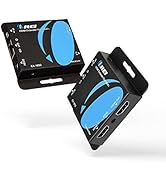
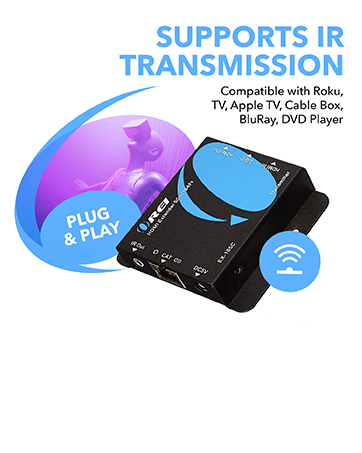
The OREI BK-EX130-K HDMI Over Ethernet Extender delivers ultra-high-definition 4K video at 120Hz over a single CAT6/7 cable up to 130 feet, featuring HDR support, 4:4:4 color fidelity, and bi-directional IR control for remote device management. Designed for professional and home AV setups, it ensures low latency, lossless transmission, and easy plug-and-play installation, making it ideal for gaming consoles, media players, and more.


| ASIN | B0D5FDPRTL |
| Best Sellers Rank | #59,296 in Electronics ( See Top 100 in Electronics ) #166 in Satellite TV Splitters #270 in Satellite Television Products |
| Brand Name | OREI |
| Cable Type | HDMI |
| Color | Black |
| Compatible Devices | DVD/Blu-ray Player, Gaming Console, Projector, Television |
| Compatible Phone Models | Likely compatible with smartphones, specific models not listed |
| Connectivity Technology | HDMI |
| Connector Gender | Female-to-Female |
| Connector Type | HDMI |
| Customer Reviews | 3.2 out of 5 stars 28 Reviews |
| Ethernet Cable Category | Cat 7 |
| Frequency | 120 Hz |
| Global Trade Identification Number | 00850031132948 |
| Included Components | IR Cables |
| Indoor Outdoor Usage | Indoor |
| Item Shape | Round |
| Item Weight | 14 Ounces |
| Manufacturer | OREI PRODUCTS |
| Manufacturer Contact Information | [email protected] |
| Model | BK-EXB330EAU-K |
| Model Name | BK-EX130-K |
| Number of Items | 1 |
| Number of Pins | 27 |
| Other Special Features of the Product | Data Transfer |
| Packer Contact Information | [email protected] |
| Recommended Uses For Product | Home entertainment systems, Professional AV setups, Office/commercial environments |
| Specification Met | Hdmi 2.1 & Hdcp 2.3 |
| UPC | 850031132948 |
| Unit Count | 1.0 Count |
E**I
More frustration than actual uptime
Pros: If doing basic features, such as 1080p @60hz, it works. Not much set up. Cons: If trying to get 4k @120hz (in my case, less than that, at 3440x1440), then it won't work consistently. Screen flickering. Misalignment? with some colors. Most things on the screen look crisp, while some item colors are blurry and aliased really bad. The device has two EDID modes, one TV and one STD. The STD mode is the one needed for 4k @120hz, but it doesn't work. I've tried multiple monitors at the same resolution, and it simply won't display an image. When changing it back to TV mode, I get an image sometimes. When I do get a full image, like I said earlier, some colors are off. This causes certain icons, certain parts of the screen to look like they are a lower resolution than everything else. When trying to troubleshoot this, the screen will sometimes not display on my full monitor. Even though it's detecting everything the same way, displaying at the same resolution, it has huge black bars on the sides and top and bottom. So I see the whole image, but only using about 2/3 of my screen. When trying to fix this issue, it usually requires unplugging the hdmi cable in my computer, and resetting both the transmitter and reciever. Since the computer is in a different room, this is a pain to do every time I have issues. Even doing all 3, it won't consistently fix the problem. Sometimes I will get the same thing, or just a blank screen. When I say I get a blank screen, the monitor light indicates it's on, and the reciever lights indicate it is getting a signal, but nothing displays. Usually, this requires resetting of both devices, removing and reinserting the hdmi, AND restarting the computer to fix. When it comes back up, it's a crap shoot on which of the 3 states it will come back up in (full screen, partial screen, blank screen). As far as trying to get 3440x1440 @120hz, it never has worked. Always a blank screen when switching to STD mode. I've tried multiple cat 6 and cat 7 cables. I've tried multiple combinations of hdmi cables (I have tried about 6 different ones, switching which ones are plugged into which device). I have tried different monitors. The results are consistent. Overall, if you just want 1080p @60hz, this works fine. But you can problably save money by going with a different device. In fact, I've tried another brand of hdmi over ethernet adapter, and I've not had anywhere near the issues of this one, albeit that one does not claim to do 4k @120hz.
K**S
Replaced my existing set up.
Works great. It was easy to install since I was swapping this out for another setup.
K**R
Don’t buy if you actually like graphics or refresh rate.
Had nothing but issues. After running back in forth from my basement to my upstairs countless times, I finally decided to see what was happening. Plugged both boxes in right next to each other and lo and behold, they worked terribly. I figured that if it can do 4k at 120hz, then surely 1440p@120 would be nothing! Nope. Had nothing but screen tearing, terrible res, and 0 luck with any hdmi longer than HALF A METER. Just sad that the return window is no longer in the picture. Don’t buy it unless you couldn’t care less about quality.
T**B
Technically does everything it says, but maybe not all at once
edit: I've changed my rating from 3 to 4 stars. After initially publishing this review OREI offered a refund for running into the issues described in my original review. I didn't take the refund since I'd have to send them back, and I still plan on using these extenders for now. I think the product itself still deserves 3 stars for not being able to do everything in the product description (4k 120hz 444 12bpc) at the same, but OREI was quick to offer a solution and I think that deserves another star. --Original Review-- I'm currently using these extenders to get my hot and noisy PC out of my office. And while these extenders do support 4k 120hz 4:4:4 at 8 bits color depth, using those settings gives me some occasional visual glitches while watching videos in a windowed browser. Fortunately these visual glitches don't last very long, and don't happen at all when using apps/watching stuff in Fullscreen mode. I initially thought that this may have been a cable issue so tried two different 40 foot CAT 8 cables and ran into the same issue with both. Another thing worth mentioning, NVIDIA Control Panel (I'm using an RTX 3080ti) lets me use 12bit 4:4:4, at max 60 hz when using the (native) 4k resolution option. If I want to hit 120hz I have to use the "PC" 4k resolution which limits me to 8bpc for color depth. I also noticed that using (native) 4k 444 12bpc @ 60hz seems more stable, since the visual glitches do not happen at all with those settings. So while yes, these extenders do technically support 4k 120hz 4:4:4 and 12bit color depth, I wouldn't say they support all of those options at the same time (at least not in my system). But for what they are they work decently well so I'll keep using them and stick with 60hz while I wait for the day a proper CAT8 4k 120hz 444 VRR 12bpc extender comes around.
C**S
Does not actually do 4k 120hz.
If you only need/want 4k@60hz, this is a functional extender. Company claims that it can do 4k@120hz seem to border on false advertising. I ran into the same issues as the other negative reviews, where trying to enable that leads to the signal being dropped completely. Made sure to use quality cables capable of 120hz, checked them against my consoles to be extra sure, tried two different CAT6 cables. If 60hz will get the job done for you, this does otherwise seem to be functional. But if you're going to name your device as being capable of 4k@120hz, then it should actually be able to achieve that.
C**D
These actually work! ...and support 1080P 3D!
I've tested a fair number of these devices - since my home theater projector install used Cat5e cable way back in the day. Originally carrying VGA resolution it's nearing the end of its usable life, and so I've been trying devices like these. Most don't work worth a darn even with a short high-quality run of Cat7 between them, but these OREI extenders *DO*. Unfortunately I see some flickering (generally due to transmission errors) when running 1080p 3D (which is an oddball frequency) across my old long Cat5e run but that's a bit outside their claimed support range, so I can't really fault the devices. Unlike other extenders though, they DO support 3D mode. From what I can tell, these are "passive" in that they just convert the HDMI signal to something electrically compatible with 10baseT wiring as opposed to "actively" reformatting it into packets for transmission via HDBaseT or WiFi - which probably explains both their wide compatibility (e.g. 3D support) and their not handling my poor wiring environment as well has HDBaseT units do. Power supplies are needed on BOTH ends - I wish they supported power over cable (PoC) but the included power bricks are pretty small, as are the extenders themselves. The extenders are fairly compact and lightweight, so easy to install in tight spaces. If you're using known high-quality Cat6 or Cat7 wiring then these will likely do the trick. If your wiring is lower quality then perhaps splurge on HDBaseT units - but test out ALL the resolutions you'll ever want - I'm working with tech support on trying to get 3D to work on another such unit.
C**E
4k@120hz is not true. It will 4K and 120Hz, but not at the same time.
While it does all of what it advertises, it doesn't do it all at the same time. I made sure I had all the right equipment, but it will not do 4K over 120hz; it wouldn't even do 1440p @120hz. It would do 1080p at 120hz though. I had this, 2.1 hdmi cords, and Cat 6. If they branded this as a 1080p@120hz and that's what I was looking for I would probably give it 5/5
J**S
OREI does it again with a fantastic HDMI extender
This is a well-built and very slim HDMI extender. The chip that drives it is an LT86121EX HD 2.1 repeater chip designed to push up to 8Gbps over long distances. This is why you need to use a cat6 or preferably a cat7 cable, low-quality cables just are not designed to carry those kinds of speeds, they are made for 1 maybe 2.5Gbps. To achieve this, it looks like the chip is using all four pairs for data transmission, likely at 2Gbps each. I put my unit through a bit of a torture test: - Low quality 100ft cat 5e cable did not establish a connection - High quality cat7 cables with low-quality extenders was limited to about 20ft - High quality cat7 cables with high-quality cat7 extenders functioned perfectly up to 50ft before periodic snow appeared Based on these results I'm very pleased with the performance of this unit. A word of caution though: if you connect these extenders to cheap cable, cable that isn't wired correctly, or cable that is damaged you may not get a signal or you may get a poor-quality signal. Use good wire and you will be fine. If you need something that is cheap and can take abuse, use SDI converters instead. 4/5 stars; great tool however it cannot be daisy chained as stated in the manual and it's not clear if accidentally connecting to standard networking hardware would cause damage as there is no documentation about it.
Trustpilot
1 month ago
1 week ago