

🔒 Unlock the Future of Home Security—Smart, Sleek, and Always Connected!
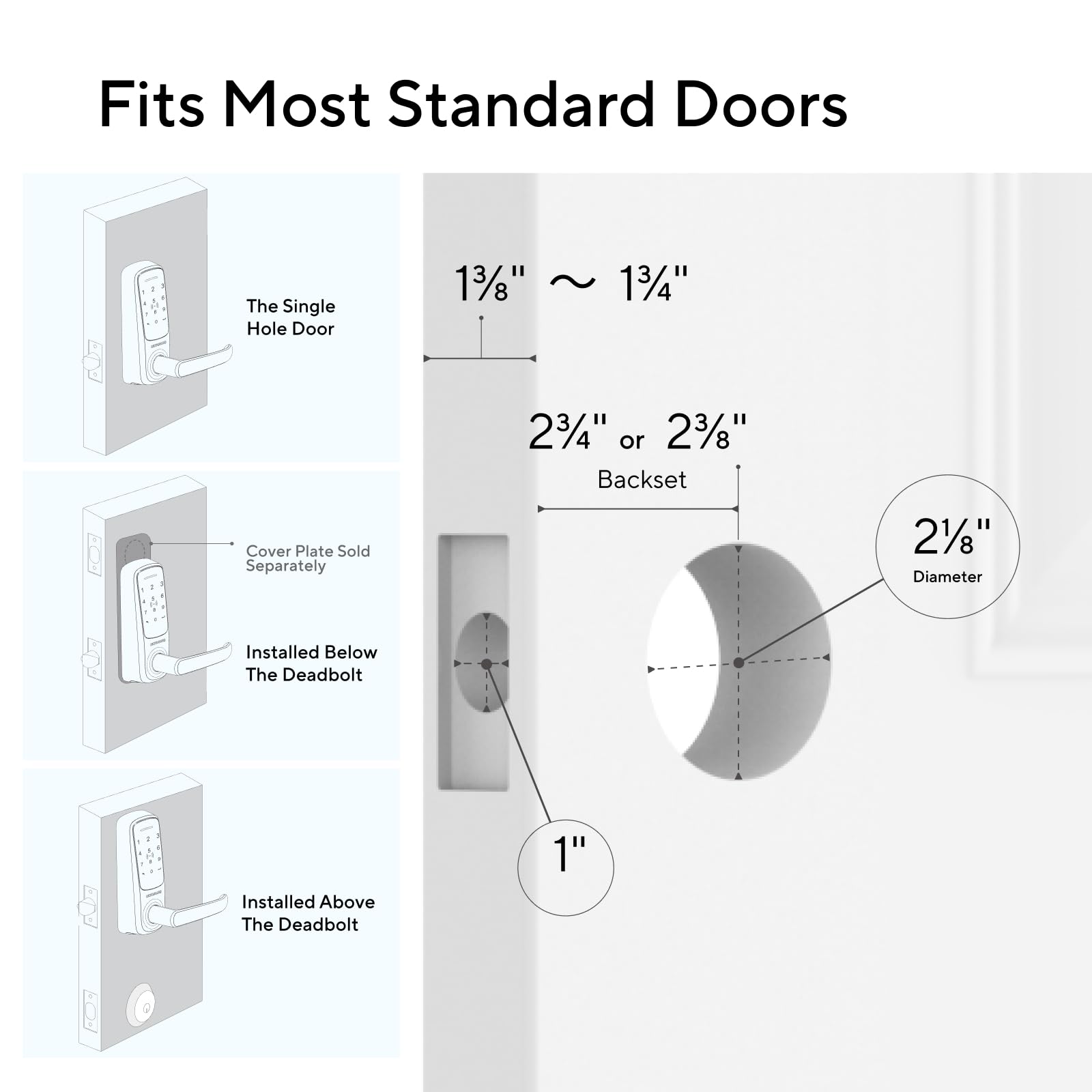
The ULTRALOQ Latch 5 is the world’s first built-in WiFi smart lock combining 5-in-1 keyless entry methods including fingerprint, app control, and touchscreen keypad. Crafted from sturdy zinc alloy, it offers weatherproof durability and seamless remote management without requiring a gateway. Designed for easy DIY installation on any US standard door, it’s perfect for homeowners and rental hosts seeking advanced, flexible, and secure access control.




| Brand | ULTRALOQ |
| Item dimensions L x W x H | 3.5 x 6.5 x 7 inches |
| Lock Type | Biometric, Built in WiFi Smart Lock, Combination Lock , Keypad |
| Material | Zinc |
| Recommended Uses For Product | front door, back door, garage door, side door, rentals & Airbnb Doors |
| Special Feature | Sturdy Zinc Alloy Construction, Built in Wi-Fi & WiFi 6 Supported, Remote Control, Touchscreen Keypad Special Feature Sturdy Zinc Alloy Construction, Built in Wi-Fi & WiFi 6 Supported, Remote Control, Touchscreen Keypad See more |
D**N
Easy to install, use and program.
Seems like a good lock so far. Haven’t used it much yet. Able to program multiple codes like we need to. Has multiple ways of unlocking. Easy installation.
M**S
Upgrading from a older model and would do again
I would by again! I was replacing a older model and the holes were exactly in the same spot. During first instalation wifi did not setup, but it worked when I logged with the app. It is not clear on setup that you must hold 1 for 5s to enable Bluetooth. Every thing else worked just fine. App got better, notifications, fingerprint setting and use were perfect. They also upgraded to 4 AA batteries and the handle holding system is way better with inner screws.
S**N
I am locked out in less than two months usage, even the physical key failed!
I bought this digital lock on 11/23/2025 (less than two months ago) on Amazon with a price of $140. After installation, seems working okay. But the connection and control is not easy, and my wife complains with this and that problems. We even tried the physical key and that works fine without problem. But yesterday, the lock stopped working, our finger and the code can't open the door and we are locked out of my home. We tried to use the physical key, to our surprise, even the physical key can't open the door. The lock seems cranking, meaning that it seemed receiving the finger print or code but the handle not engaged and it is not moving the lock. If the physical key not working with the lock that is a disaster. After 20 to 30 minutes frustration in the cold outside warm home, we decided to break the lock (see the attached picture). After breaking the lock, thank God we finally get into our house. In less that 12 months, I have tried two digital locks, first one, stopped working after about 6 or 8 months. The problem with that one is that it can't lock the door any more, no matter what you try. That is better than this situation at least we were not locked out. But this one, in less than two months it can't open the door, causing locking out and even the physical key not working. Physical keys seems to me should bypass all the digital stuff and open the door directly, how that can happen? What is wrong with the physical key design? After two digital lock failures in such a short period of time, I just think this thing is not ready for the market. Very disappointed!!!
I**E
(Was a ) Great Smart Lock - Issues with current version
Update (1/5/2026) On the issue with my two new Latch 5 units, support was able to add me to the beta for the latest software update (like 1.52.0018) and it solved the WiFi issue. However, shortly after the upgrade one of my locks died. Support is sending me a new one to replace it (after troubleshooting with me). Fortunately the dead lock was on an interior door which is usually in passage mode (i.e. mostly always unlocked). Kudos to the vendor and support team for standing behind their product. The remaining upgraded lock is still solid with its wifi connection. To contact support, I used the support option in the Xthings app and got a reply back within a day. I was very specific about everything I’d tried so as to head off the basic troubleshooting. It paid off and we were able to reach a consensus on the issues quickly. Upgrading back to 4 stars. Update (1/1/2026) Ordered 2 of the latest version of the Latch 5 and they won’t stick on the Wifi network. My older deadbolt and Latch 5 work great and are solid. The new ones with the v49 (1.49.0018) firmware just won’t stay connected, it’ll last up to several hours but once it falls offline it’s done. Additionally, with the newer Latch 5 locks, you need to hold down the 1 key for 5 seconds to activate Bluetooth which is also annoying if I just want to add a user or change a code. I know my WiFi is solid since it works great with the older Ultraloq products and I did all the tuning needed to make that happen (dedicated 2.4g SSID, strong signal, etc.). Kind of disappointed these updated locks are a step backwards. Opened a ticket but I believe they need to improve the firmware to correct the issue and I’m on the latest update available. — Original review: The smart lock itself was easy to install and setup. If you have a deadbolt 6-7" above it, you'll likely need to remove it. Ultraloq makes an extended steel plate which covers both sides of the deadbolt hole from the door latch hole. Some quick notes: * WiFi is 2.4 GHz only - many routers will allow you to name your SSID (network names) differently for 2.4 GHz and 5 GHz. * It's been installed several weeks, and the batteries are still good. * Fingerprint reader works great. It's quick and will get it on the first or second try. * App is easy to use, every now and then it'll time out on connecting but with a retry it'll connect. * Alerts work great, I know when people come unlock the door. * If your lock falls off your network, try updating the firmware, this can be done from the app. After doing that it's been solid. Overall, a great product for the price.
I**F
Great features, nice looking, not as large as I feared (updated)
Update 2: Loose handle? See below... Updated---added the fifth star: The secret to the finger print reader working nearly flawlessly is do not grab the handle while using the fingerprint pad. It may seem natural to grab the handle while pushing your thumb onto the reader, but that extra contact with the lock apparently affects getting a good reading. Once I stopped grabbing the handle my readings work on first touch nearly every time. I got this lock to use between the garage and dining room. I am beginning to use the Amazon Key Delivery feature to allow deliveries into my garage, and I only feel comfortable doing that with 1) a camera in the garage and 2) a lockable door between the garage and house. A normal keyed locking knob does not fit my situation because I have friends that need access to my house while I'm away, and they enter through the garage. With this lock I have given them separate codes to access the house and will add their thumb prints next time they visit. This lock was a Wirecutter best pick for lever handle locks, which is how I discovered it. I think this is the best value, with many great features for the money. Installation was super simple. The instructions were easy to follow. If you have to drill holes, the lock comes with some templates to help with positioning. Before you install, look for instructions about the optional Extra Security bolt on one of the templates. If used you will need to drill a small hole through the door above the normal knob hole. If you have a door over 2" thick and up to 2-3/4" thick, you will need to order the Thick Door Kit from U-tec. This is mentioned in the User Guide. Set up was a bit of a test, but it worked in the end. I knocked one star off overall partially due to how finicky the Bluetooth connection is to the phone. Only two feet away yet it has trouble connecting and reconnecting. One trick I found is to turn Bluetooth off/on at the phone before reconnecting. Bluetooth is used for setup, so it shouldn't be an issue during day to day use. Installing the app and adding rooms, locks, users was simple and intuitive. Be sure to check out the lock settings to set your default lock mode and add any notifications. When connected to the lock, the app can show a log of lock use...up to 1000 entries per lock, after which it will delete older log entries as it adds new entries. Notifications: You can choose to add notifications on your phone to let you know when specific users unlock the lock. Fingerprint reader (see update at the top): The star I knocked off was also partially due to the fingerprint reader being finicky. My left thumb worked fine, but it didn't seem to like my right thumb during initial testing. I found that by double-tapping and holding it seemed to work much better. When I arrived home today the right thumb worked just fine, so perhaps all is well after all. One more note: According to Wirecutter, the fingerprint scans are stored locally on each lock and are not saved in the phone app or uploaded to the cloud. That is a nice-to-know feature. Codes for entry: You can assign separate codes to different users, and the codes can be permanent or temporary. I've not set up a temporary code yet so I cannot speak to that, but setting up codes in general is a piece of cake. A minor shortcoming is that the display pad does not have the alpha characters next to each number (ala phone keypad and garage door opener keypad) for those whose code is based on a word. Backup physical key: The lock comes with three physical keys that can unlock the door using a hidden key slot on the bottom, outside. The only minor shortcoming here is that the keys are rather large. But it's a nice-to-have feature Google Home: I was able to add the lock to Google Home, but so far that feature seems mostly useless at this time. I really hope the manufacturer builds the Google Home integration out more to allow changing the Lock Mode based on my home/away settings in Google Home. It would be nice to have the lock in Passage mode when I'm home (unlocked) and in Normal Mode (locked) when I'm away. As it is, about all you can do is lock and unlock the door manually, but at least it's something. Battery life: I've only had the lock installed one day so I cannot speak to battery life...yet. The lock comes with four alkaline AA batteries, however for important equipment like this I prefer to use the more reliable lithium AA batteries. Alkaline batteries are too prone to leaking when they begin to get weak so I am phasing them out of all devices, starting with the pricier gadgets. Once my initial lithium batteries run out in the lock, I will try rechargeable batteries. I've been having success with the Tenergy brand batteries and charger so far. Loose Handle update: Over time my exterior handle became loose/wobbly. The set screw holding the handle on was fully tight and was not the problem. It turns out the screw holding the handle base (spindle) was loose. A call to customer service was all it took. The rep was helpful and understanding and sent PDF instructions on how to tighten the screw. The fix involved removing the lock and accessing the guts of the exterior piece, but all-in-all it was quite a simple fix. Good customer service retains 5 stars!
M**A
A GREAT DOOR LOCK!!!
I'm thoroughly satisfied with the Latch 5 that I purchased. I upgraded my door locks with the Latch 5 Fingerprint and paired it with the Lock Deadbolt. The ability to program from the app how I want them to work is a gamechanger. I can have either of them open once either 1 is unlocked. The setup and installation is super easy, the instructions provided are detailed and you really can't get lost or mess it up if you follow step by step. The real shining star though is the support from the company that you receive. They are on top of any issues you may have and are dedicated to making sure that you are satisfied with their product and respond promptly to any questions or issues. I would definitely suggest investing in their products. The only drawback is, they don't have enough products yet, lol. I'm really interested in the upcoming camera system they are working on. Also, their products work seamlessly with Samsung Smart Things (low-key the reason I tried them), so itz good to be able to utilize the Smart Things app and be able to control the locks and get notifications. Also, the notifications of who and when the locks unlock is nice. You can also setup a bypass mode where the locks remain unlocked and you can use the door as if it didn't have any locks on it period. Inverse you can also lock it so all remain locked no matter if a code is input or not. You can also give out temporary codes for people to use. They have really taken the time and invested quality improvements into bringing a great product to market! I can't say enough about the company and the products that I have, TRULY SATISFIED!!!
I**.
Good Luck with some software bugs
UPDATE 2 - December 2025: The service support has been excellent. The U-tec team stayed on top of the problem until everything was fixed. Thank you. UPDATE: The fingerprint began to work, and my users were able to scan their fingerprints using the U Home app on my phone! The problem may be related to the Wi-Fi getting disconnected frequently. After many tries, I removed/reinstalled the batteries, and the scanner began to work after the Wi-Fi reconnected. Coincidence or not, that took care of the problem. We have an excellent 2.4 GHz service in the office, but for some reason, the lock keeps getting disconnected from Wi-Fi. In contrast, everything else in our office stays Wi-Fi connected without interruptions. It's the third time I've had to reconnect the Wi-Fi in a week of use. Initial Review: So far, the product has not worked as promised. The fingerprint registration only works if you are an "administrator". The fundamental problem is that the app cannot record the "normal user" fingerprint on the user's smartphone app, even when they are allowed to use my administrator phone. The U home app does not have an interface for a "normal user" to register their fingerprint using the app. The tech support rep told me, "For now, normal users have to use the PIN code method or the telephone app to open the lock. You can make them an administrator too". Making every employee an administrator is a silly suggestion because it will defeat the purpose of having an administrator. Today, I spent almost an hour with technical support troubleshooting the problem. It required removing the batteries, taking off half of the lock to unplug the internal cable, deleting and reloading the app, and repeatedly deleting and reentering all users' information. We conducted at least 10 trials with different employees, but NOTHING worked. After exhausting all her tricks, the support lady said she could not do anything more and would open a ticket for higher-level support. She advised me, "Please wait for an email within 24 hours." The app is not very user-friendly when it comes to creating new users, either. Mechanically, the lock is rugged and works well with a PIN code, but I paid extra to purchase a fingerprint lock. Please SAVE your money and buy their regular lock.
I**0
Frustrating as hell
Sheesh what a pain in the butt this was to install. Not the mechanical part - that was as easy as anything like this can be. This is a pretty sturdy (but mot as sturdy as the older, not as "smart" model it replaced) lock that I used for entry to a server room in a commercial building. The app pairing and WiFi setup was insanely frustrating. I mean REALLY bad. It took an hour and a half or more to get this thing to the point where I could start adding users. The bluetooth pairing and discovery process failed at least a dozen times. It timed out so quickly that I had to start over several times. Once past that, I could not get it to connect to WiFi - it took another 8 or 10 attempts and I even had to verify that my APs were allowing 2.4Ghz connections since the app and instructions mention that about a million times - it doesn't support 5Ghz WiFi. But changing nothing, it finally decided to connect to WiFi (door is about 12 feet from an AP, BTW, so was not a signal strength issue). So it was hard enough to get going that I can't recommend it, but it was the only thing on Amazon that didn't seem like a total piece of junk except for the Schlage which had terrible reviews. Oh and as for ergonomics - why the hell would you put the fingerprint reader so close to the handle? I also found that you have to tap/smack the keypad area multiple times to get the think to wake up to allow for a PIN entry. The backup keyway is in a horrible spot too - just like the old model. Not happy so far. Note that these things EAT batteries, so you will be replacing them a lot. I'd suggest rechargeable Li-Ion or Eneloop Pros
Trustpilot
2 months ago
3 days ago