
DOWNLOAD THE APP



Desert Online General Trading LLC
Warehouse # 7, 4th Street, Umm Ramool, Dubai, 30183, Dubai
DOWNLOAD THE APP
Desert Online General Trading LLC
Warehouse # 7, 4th Street, Umm Ramool, Dubai, 30183, Dubai

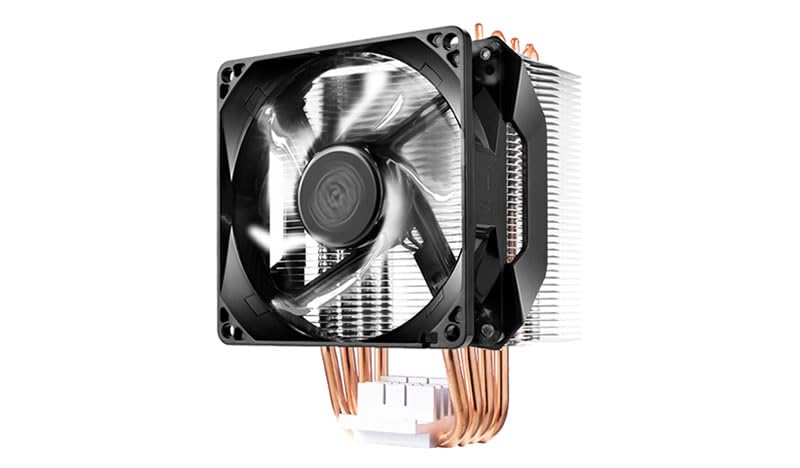


Cool down in style! ❄️
The Cooler Master Hyper H411R is a low-profile CPU air cooler designed for high-performance cooling in compact spaces. Featuring Direct Contact technology with 4 copper heat pipes, a precision-engineered aluminum heatsink, and a silent 92mm PWM fan with white LED illumination, it ensures efficient heat dissipation while maintaining a sleek aesthetic. Compatible with both AMD and Intel sockets, this cooler is the perfect choice for gamers and professionals looking to enhance their builds.





| Brand | Cooler Master |
| Product Dimensions | 10.2 x 88.34 x 13.6 cm; 500 g |
| Item model number | RR-H411-20PW-R1 |
| Manufacturer | Cooler Master Europe B.V. |
| Series | Hyper H411R |
| Colour | Hyper H411R |
| Processor Socket | LGA 1150 (Buchse H3), LGA 1151 (Buchse H4), LGA 1155 (Socket H2), LGA 1156 (Socket H), LGA 1366 (Socket B), LGA 2011 (Socket R), LGA 2011-v3 (Socket R), LGA 2066, LGA 775 (Socket T), Buchse AM2, Buchse AM2+, Buchse AM3, Socket AM3+, Buchse AM4, Socket FM1, Socket FM2, Socket FM2+ |
| Voltage | 12 Volts |
| Wattage | 2.4 watts |
| Are Batteries Included | No |
| Item Weight | 500 g |
| Guaranteed software updates until | unknown |
J**C
Good replacement CPU fan, as quiet as previous cooler which had a 120mm fan
My previous AM4 CPU cooler had a 120mm fan and I was worried this would be louder since the fan is smaller at 92mm - however this proved not to be the case and I really couldn't tell the difference in sound levels.It did take some planning on my side and fitting took about 30 minutes including removing the old CPU cooler.Note that you do need access to the underside of CPU area of the motherboard, which thankfully my case allowed access too, which meant I didn't need to remove the motherboard from the case. Just check beforehand whether you do or not, otherwise the task becomes somewhat trickier.Note that both intel and AMD chips are supported, with slightly different attachments. Do read the instructions carefully!Once installed, the CPU temperatures are nice and low and the fan noise is very quiet, so overall I'm very happy with this.
K**B
i5 13th
Built a new PC for my son, he doesn't do any intensive stuff yet, this has done a good job so far of keeping temps down, and it is not so loud.Little bit basic and old school, nothing fancy about it, just does its job well. Installation was simple enough if you follow the instructions.
E**.
Great Performance, But A Few Minor Issues
The Cooler Master Hyper is an excellent cooling solution for my PC! It performs great, keeping my CPU temperatures low even during heavy usage. Installation was straightforward, and the build quality is solid. My system runs noticeably quieter, and the cooler does a great job at maintaining consistent temps.However, the reason for 4 stars instead of 5 is due to the size, while it's not too big, I did have to rearrange a few cables in my case to ensure everything fit properly. It could also benefit from a slightly more intuitive manual for first-time users, but that’s a minor inconvenience.Overall, it’s an excellent cooler that does its job well and doesn’t break the bank. Highly recommended!
H**N
Better than expected.
I recently upgraded my pc from a old1050 Ti gpu, AMD 6300fx CPU, and DDR3 ram. Although this has done well over the years, it was well overdue some new parts. I added a MAG b650 mbd, Ryzen 9 9900x cpu, rx7800 amd gpu, and DDR5 ram. I was hoping to use a fan from my old build, but the heat generated by the new parts, was far to much. I bought this thinking it would be a quick short term fix, but after an easy installation, the cooling fan is working above and beyond what I thought I was getting. A lot quieter than my old fan, easy installation and a good solid build. Great value for money and would definitely recommend.
D**L
CPU cooler fan
Very easy to fit. Compact design and particularly suitable for small cases. Performance is great, affording significant CPU cooling. Great purchase.
Z**Y
Great cooler on a budget!
I upgraded to an Intel I7 7700K and I amazed! I have overclocked the CPU to 4.5 GHz from a stock 4.2 GHz (4.5 GHz turbo) combined with 'Artic MX 6 thermal paste' Under normal it runs 28 -35 oC. Under load it stays around 70 oC which is fine!It's a bit fiddly to attach (LGA1151) but once secured it's fine. I like the fact that the screws have springs so you adjust the tension! It's a good solid fit and the fan is super quiet!DON'T FORGET to remove the sticker from the heat sink before applying! :-)
K**N
HAPPY Customer from Wales
guys budget pc cooler doing job like it supposed to, keeping my cpu in max 50 smth C, worth any money cheap doesnt mean bad 5 stars from me
W**R
Massive drop in CPU temperatures over stock fan.
After fitting an Intel Core i7 870 in place of my old i3 540 on my old Foxconn Socket 1156 motherboard I "upgraded" the cooler to an Arctic Alpine but the CPU was still running too hot for my liking. It would idle at up to 50 degrees C and under load it would hit 70 degrees. Maxxed out with all four cores under load it would hit 90 degrees plus! Now I know the Lynnfield chips run hot but this was way too much. Searching the internet for better cooling solutions the Cooler Master N412R got decent reviews so having checked that I could access the rear of the motherboard behind the CPU without removing it from the case I bought it. Having fitted this cooler and run Geekbench over and over as well as rendering video I'm pleased to say my CPU temps are back in the zone. It idles at less than 35 degrees C, light load takes it up to 50 degrees max and a full sustained load sees temperatures fail to exceed 60 degrees...well within the safe zone for this CPU. That's a huge drop in temp. Hugely impressed. Moreover, if I run Foxconn Smart Fan so that fan speed varies according to CPU load, it is much quieter too. Win win. One major point of note: To fit this fan you must be able to access the rear of the motherboard in the area behind the CPU as it uses a special backplate to support the cooler and fan rather than the (rather rubbish) standard Intel push clip system for Socket 1156. If you can't do this or don't want to remove the whole motherboard to fit it then this cooler is not for you. Also, you must read the fitting instructions really carefully. They are not the best but after a few read throughs it all made sense. Top tip: Lay all the parts out as per their numbers / letters in the contents section before assembly so you can see which piece is which as some are quite similar. Finally, it is quite tall so it's no good for slim cases so check the height of your case to make sure it fits. For me, it's one of the best PC upgrades I've ever made. Really, really effective cooling for the price and probably good enough to support some modest overclocking too. Highly recommended. Will buy one for my AMD socket AM4 Ryzen gaming rig too as it fits most AMD sockets too! P.S: I used Arctic MX-4 paste.
Trustpilot
3 days ago
1 month ago