We remain fully operational. Our teams are working around the clock to ensure your deliveries continue safely.

DOWNLOAD THE APP


Customer Services
Copyright © 2025 Desertcart Holdings Limited
DOWNLOAD THE APP
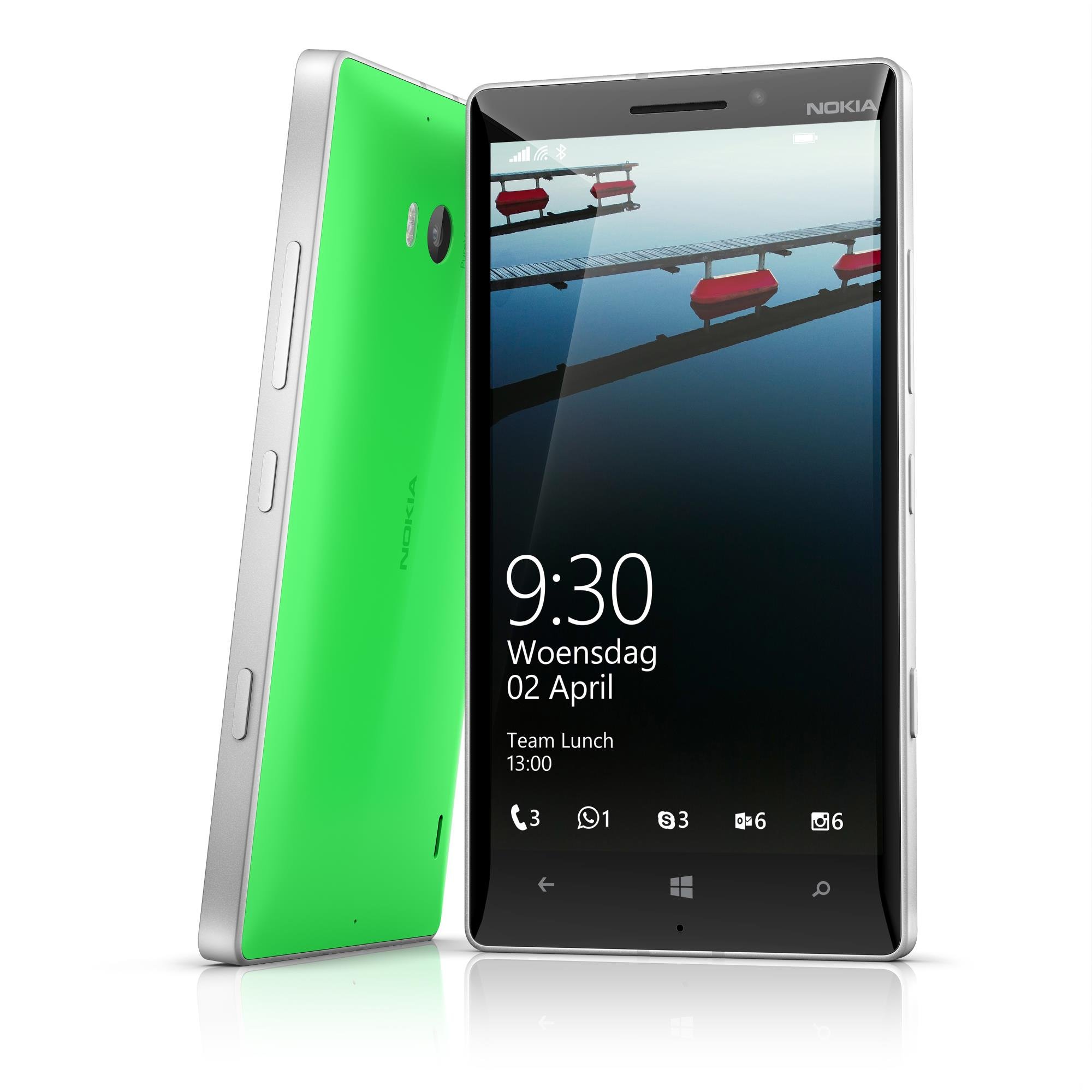
📲 Elevate your mobile game with Nokia Lumia 930 — where power meets style and productivity.
The Nokia Lumia 930 is a premium 5-inch SIM-free Windows smartphone featuring a 20MP PureView camera with advanced audio capture, a fluid Windows Phone 8.1 OS with rich app support, and business-friendly tools like Office and OneDrive. Designed for millennials who demand style, productivity, and seamless ecosystem integration, it offers offline navigation, NFC smart tagging, and a vibrant display, making it a standout choice for work and play.
| ASIN | B00KM10PMA |
| Best Sellers Rank | 128,173 in Electronics & Photo ( See Top 100 in Electronics & Photo ) 5,036 in SIM-Free & Unlocked Mobile Phones |
| Guaranteed software updates until | unknown |
| Item model number | A00018879 |
| Manufacturer | Nokia |
| Product Dimensions | 1 x 7.1 x 13.7 cm; 167 g |
T**W
Unique simplicity and modern is best to describe this phone
Unique simplicity and modern is best to describe this phone. Excellent quality build that comes with a top camera and fluid and very elegant OS. The touch screen is the best I've used that can be used with ease even with gloves on. The sound is excellent too with great audio recording features: Nokia Rich Recording with four microphones, Nokia Rich Recording with Surround Sound. With W8.1 now having 'Swip' keyboard which feels more accurate compared to all Android phones I've used, inc my now Xperia Z2. Live tiles are informative and look great. Apps are plenty with less bloatware apps compared with Android/iOS where many apps do the same thing, but still W8P still has all the popular apps: Facebook, What's App, Netflix, BBCiplayer, 4oD, Spotify, Instagrams...etc. The store continues to add new apps with some excellent Nokia apps already built into the Lumia. Bing apps are great too: News, Weather, Sport, Fitness & Health, Travel, Food are all very clean and polished looking and very easy to navigate. Standard lockscreen is informative - this can be further altered and customised using the Lockmix app. NFC is built in and can be useful(Use Nokia apps for writing NFC tags - I use it for Nokia Mixradio to go to a 3 different chosen artist radio mix and then send it to a NFC speaker, also cab number on with tag on home phone if ever needed). Accessories from Nokia like the wireless speakers that has a 15hr charge where you can send you music by Bluetooth/NFC, speaker wireless phone charger - listen to your Lumia music while charging phone, and the upcoming tags where you attach tags to personal items, eg: keys, bags, phones, bike, lap-tops, tablets, phones..etc; so if you forget them or leave them behind your Lumia can be set to alert you, and can be tracked if lost by using the Lumia 930(plus other W8 phones)...Updates now seem to arive quicker from MS with other feature/improvement updates also coming at a faster rate. The exciting Contra(Speech assistance + info-cards)is soon to arrive to W8P, but even with the now already standard W8P voice assistance(not Contra)does a good job by doing the usual speech commands: Call, note, search, msg, open app; but can also, for certain apps, do certain things a little more extra compared to google/siri eg, say "Flixster top ten": It will show top cinema movies playing, . Tell 'Wikipedia' search "Star Trek" it will give info about your search request from the app and read the first part to you!. Tell Go To "-Insert Name/Place-" the app take you to those addresses if in your contacts: Simply double press the Search-Key and press See More to see what apps can be used in this way (you may have to open some apps first for voice to attach itself): Here are some apps that can be used - Calculator Toolbox, Go To, Wikipidia, Hey Dj, WP Central, Shazam, Foursquare, Facebook(MS), Flixster, Domino's Pizza, Nokia MixRadio, Voice Butler, UCBrowser, Earth Time..etc. Lumia phones do have the ability to have your txt msg's read out to you (it will ask you first - just answer after the beep)which can be handy (go into Settings and then Speech). Another nice feature is pressing the Search-Key which takes you to Bing Internet search with options for Scout Local Area, Music Search(like Shazaam), and Barcode Scanning which allows you check barcodes such as price checking, download apps or info from barcode(s) and also translate text if needed by holding the phone over the required text to be translated - all very quick easy fast access at a press of the search icon. Rooms/Groups/People Hub on W8Ps allows easy quick access plus communication to who ever you put in them. This allowing grouping individuals together or who you choose for sharing or sending photos/videos, txts/chats, contacts, emails. Pins is another unique feature that allows you to pin most things to the screen such as apps, articles from the web, individual notes, sport/news/app pages, albums/artist/songs, address/map/route(s), page from web, photos, contact(s), group(s)..etc; for later or just keep them there for quick access for when you want/need them. Another simple but very useful function for people with/around children is 'Kids Corner'. Simply swipe right from lockscreen, put in code, which will now not allow a child to enter any other part of the phone except those apps you put in 'Kids Corner'. For travellers there's Nokia HERE Maps/Transit/Drive - also maps/directions can be used off-line too. Just download the map before you go!..TIP: In Nokie HERE Maps you can pin the app Places to the screen(It like more closer local Local Scout). Better still get HERE Explore Beta: This is where City Lens, Local Scout, Places all come together in one place and which actually more useful and accurate with your surroundings, plus better options (I think Nokia will drop City Lens, Local Scout, Places and use Explore - which does make sense). The phone seems suited for business users too as W8P' come with Office which can also be connected to mobile Office365 for setting up Office documents, with also Office Lens to capture pictures of whiteboards, documents, photos and then share them or just save them onto OneNote. Also Skype is also part of the phone that can be used for 'Facetime' and group chats as well as cheap calls abroad. Onedrive gives you plenty of free cloud storage, and with blackberry messenger soon to be released for W8P's too. Combine all this and with Lumia's smooth OS operation group/people hubs, live tiles, and the ease of use and to navigate really helps for people who do need a phone with a business use edge...Not forgetting all those XboxOne owners, there's 'Smartglass'. Entertainment from movies/sport/music/games can be beamed/shared on your Lumia screen. Smartglass can also be used to navigate and control functions on XboxOne too as well as be used to send msgs to Xbox friend lists, invite people for gaming, control apps on the console..etc. Experiencing Lumia WP8 is really different and does shine in areas above Android and Apple, and that's coming from a well used Android user(used SG1 and SG3, now using Xperia Z2 as my contract upgrade phone, bought a 2nd hand Lumia 920, and got the 930 recently. Have used iPhone too as my partner has it). WP8 may still miss some functions of Android or iOS missing on W8P - but its vice versa on Android and iOS too. Its the new kid on the block, new OS, so just remember iOS and Android when they started - it took ages to reach what we have now! But it seems MS have caught-up faster, is listening to users, and pushing ahead in updates and quality. Looks feels and operates like a premium modern phone too. A few excellent Lumia apps that might interest you: PLEASE NOTE SOME APPS BY NOKIA MIGHT BE UNDER MISCROSFT, ALSO 'HERE' IS FOR TRAVEL APPS - JUST TYPE 'HERE' FOR 'HERE EXPLORE BETA' TOO! *ALBUM RELEASES (keep track/updates of all your fav artists new releases and the option to buy them directly from digitally from XB store or physical digital from Amazon) *1#TOOLKIT (all tools and conversions in one place and cam pin individual to screen) *627.AM (alarm, notes, weather on one rotating tile) *CALCULATER TOOLBOX (all the variety of different calculators in one place) *CHRONOAS CALENDAR (great informative and customizable calendar) *CONNECTIVITY (info on battery, data roaming, remaining hours, network, Wi-Fi/Bluetooth/gps/data/setting toggle on/off all on one tile) *CAR DASH (if your driving you need this with easy access to contacts, home address, destination, music(can use voice commands), weather info, apps, on/off switch for data/Wi-Fi/rotation lock/bluetooth) *GMaps+ (for all those who need Google Maps) *Go To (just say Go To and name - you will be directed there) *LOCKMIX (excellent for various info/rotating photos you can put on your lockscreen *myTube (Youtube but better) *MUSIC+(free music streaming) *NOKIA MIXRADIO(excellent app for a vast selection of music with on and offline listening options. Keeps you updates with artist you like) *(NOKIA) HERE EXPLORE BETA (Excellent all in one local places and interests with HERE Maps integration - on market app type HERE to find it!) * HERE CITY LENS -does the same as Here Explore with city view features. Improved and now replacing Here Explorer, *NOKIA APPS FOLDER (put apps eg:Video apps, Music apps, Note apps in one sizable tile) *NOKIA STORYTELLER (shows you where photos where taken, timeline, story video, favs, photo folders) *NOKIA JOBLENS (jobs around your area) *NOKIA PHOTOBEAMER (Excellent in sending photos/video to any device that is web compatible. On device eg: Tv, PC, Tablet, Console..etc; type www.photobeamer.com, open app and simply choose what you want from camera and then scan device screen. Simple!!) *NOKIA EXPLORE BETA (everything around you - shops, restaurants/take aways, atm/banks, hospitals..etc. This app seems much better then Local Scout) *NOKIA NFC WRITER *NOKIA SENSIE (keep track of where you been with places and time by walking, running, or been stationary or idle. Does not use battery life too amazingly!) *POUCH (save web pages to read later when no network is available) *OYSTER BUDDY (informative app and great for glance at your oyster credit on tile) *SKINERY THEMES also START PERFECT (great for simply adding a spacer between tiles or customizing tiles - use your imagination and you can have some cool looking tiles and screens to suit yourself) *TRANSPARECY TILES (does what it says) *UCBrowser (excellent for downloading from web and browser too - use this on my Xperia Z2 too, though W8P is better designed) *BING - Food & Health, Fitness(great for counting steps), News, Weather, Finance, Sport *WEBAPPS- Find web pages in apps form, then pin them if wanted. *WINDOWS PHONE CENTRAL (all the latest news and info for Windows Phone) Hotels 4D, Hey DJ, Flixster, EasyNotes, Earth Time, Artist Info, iFixit, Some great accessories for Lumia phones: http://www.nokia.com/gb-en/accessories/speakers/ http://www.nokia.com/gb-en/accessories/accessory/ws-2/ http://www.nokia.com/gb-en/accessories/accessory/dc-19/ This is really cool from the demo I've seen - soon to be released MS Lumia Screen Share. http://www.microsoft.com/en-gb/mobile/accessory/hd-10/#RecommendedDevicesWidget CAMERA HINTS: *Using Nokia Camera then viewing the photo(s)and pressing edit will take you to Nokia Creative Studio app. This will allow you to edit photos manually with a variety of options. Using MS-Camera or going into Photos app will allow an option when of different apps can be chosen to edit(depending what can be used) and also quick fix. *Pressing date on photo app will bring up a month/year list. *You can use MS or Nokia camera as default by going into setting/application/photo+camera. *In Nokia camera go to settings where you can set Capture Living Images/Play Living Images - this will show CLI in Nokia Storyteller *Nokia Camera - you can use one finger going up/down or left/right to zoom in/out. No need to us pinch screen method. PHONE OPTIONS *DISPLAY: Adjust default brightness level for Low, Medium, High setting - go into Settings/Display then Brightness Profile and adjust each scale bar. You can also do Colour Adjust in same setting. *SPEECH: For the phone to read out your incoming txt msgs or not, and also allows you answer or not, or ignore (please wait for bleep when answering). Go into Settings/Speech/Read incoming text messages (choose option). *DEVICE HUB: This is found in Settings/Systems near bottom - Can be pinned to screen from here (Good when having NFC/Bluetooth synced or to see devices already synced) Do check this phone feature Nokia videos introduction - some cool interesting features: http://www.trylumiaphone.com/#en-GB BACKGROUND APP ON/OFF: For saving battery simply switch off apps that don't really need to be running the background or notifications. Go to Settings, under System go to Battery Saver, then Usage - tap top option to choose. UPADATE 8.1 25/09/14 *You can now make Windows live folders to put apps in. The folder and app tiles can be re-sized both folder and apps inside folder, Hint: Creating a Windows folder you can then put Nokia App folder with apps in them, into Windows folders. This allows you to create folders within a folder. To name Windows folder just long press top bar. You can also put Pins(fav music albums/genres/songs or web pages or anything else you can pin to screen)into folders and resize them. *Music Tile now is live when playing music. System is smoother in places. *Cortana is now added - but not quiet ready! Please note certain apps may need to be open for Contrana to recognize. UK/USA have different app recognition at moment. *Apps Corner - Only share the apps you wish on your phone: Go into Settings, Apps Corner(choose apps), press ON on next to Action Centre, choose apps and then press Right Key. To disable it keep power key pressed, then swipe right when prompted.
A**R
Happy
Fantastic phone, did have one issue with Office which was resolved: Initially loved the phone, for many reasons, screen, camera, interface etc. and I was able to edit Excel docs on OneDrive, using MS Office, which was free. When I upgraded to insider tech preview Windows 10, Excel suddenly required a subscription to edit docs, so I gave it a big thumbs down and a really bad rap everywhere. Despite loving the phone, it was a deal breaker for me, free editing using Office was the main reason I bought the phone, to integrate with OneDrive, and the already paid for version of Office on my laptop. After a lot of complaining, I received an email from MS indicating that it is free again, so I reinstalled and yippee I can edit docs for free again! Thanks MS for making it free to edit docs again on my phone. Office is an unbeatable app, even though I only make minor edits on my phone (not enough to warrant a subscription), the functionality is excellent, and all the Excel charts etc. work really well. It's really handy being able to create shortcuts to each doc on the desktop, grouped easily together just by dragging one over the other, then one click and I'm back to the place where I was editing the last time, even on a different device. Another plus is that more and more apps, available on other platforms, are appearing in the store. The integration between the apps was great, but in the new updates to Windows 10 is getting better all the time e.g. the calendar now syncs with all my Gmail and Hotmail accounts, so all my reminders are in sync on my devices. I use the navigation constantly and offline maps with Here maps is a real bonus, invaluable on a recent trip to Australia, when out in the boonies. OneNote is excellent, easy to use and organize different sets of notes, synced across devices. Haven't paid for an app yet and really happy with all the ones I use. I have now changed my mind about selling my Windows phone, which was going to be hard because I love it!!
T**Z
Ho voluto aspettare un po' prima di scrivere la recensione per assicurarmi che tutto funzionasse a dovere! Il cellulare non ha pecche, la fotocamera è spettacolare e il sistema operativo è aggiornabile a Windows 10 mobile.
C**N
El movil tal como esperaba es estupendo, fácil de usar, cómodo, y muy útil, no tengo queja alguna sobre este producto. Gracias.
S**O
Ne ho acquistati 3 e restituiti 3 nel giro di un mese e mezzo. Al primo non funzionava il vivavoce. Al secondo funzionava il vivavoce ma si e' staccato il pulsante della fotocamera dal secondo giorno. Al terzo non funzionava il vivavoce. Da aggiungere che il primo Lumia 930 supportava windows 10, mentre i successivi 2 supportavano solo windows 8. Ho avuto per 4 anni il Lumia 925 e ad oggi non ha nessun problema, tranne che per la velocità (Smartphone obsoleto), ma il 930 e' un buco nell'acqua.
S**E
Il prodotto è arrivato integro e nella data prevista,da un mese dell'arrivo posso dire di essere soddisfatto,il venditore ha risposto tempestivamente alle mie domande,le descrizioni sono esatte e rispettano il prodotto
Trustpilot
3 weeks ago
2 weeks ago