⏰ Time is on your side—embrace effortless living!
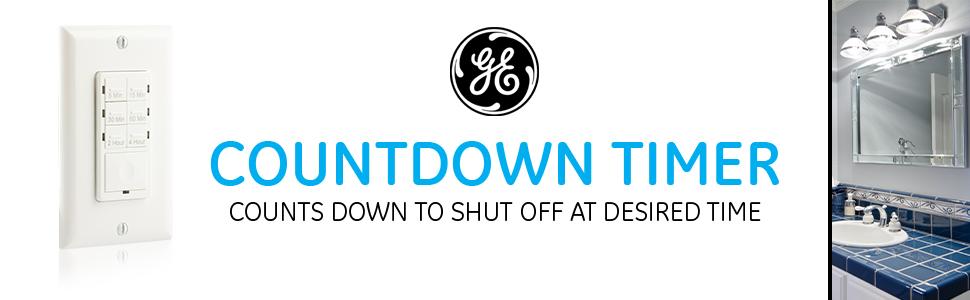
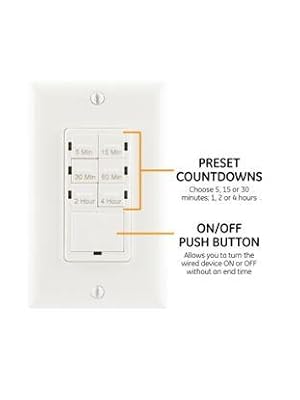
The GE In-Wall 6-Option Countdown Timer is a versatile and user-friendly device designed to enhance your home automation experience. With six preset options, it allows you to control connected equipment for various durations without the need for a neutral wire, making it suitable for both older and newer homes. The included wallplate ensures a quick and easy installation, while its compatibility with multiple bulb types and quiet operation make it a perfect addition to any space.





| ASIN | B007BJULYS |
| Brand | GE |
| Color | White |
| Customer Reviews | 4.3 4.3 out of 5 stars (5,525) |
| Date First Available | 8 August 2012 |
| Item Weight | 132 g |
| Material | Tungsten |
| Model Number | 15318 |
| Product Dimensions | 5.84 x 11.94 x 17.27 cm; 131.54 g |
S**T
Funciona de forma óptima, es fácil de programar! Solo les recomiendo que le busquen una tapa para mayor estética!
N**Y
This review is for GE SunSmart Digital in-Wall Timer 32787. Easy to install. Make sure your electrical box has a neutral wire before ordering. Installed this to control our front porch light. The light has a photocell in it but is in an area that gets little sunlight especially on cloudy days, so it sometimes stays on all day. This switch solved that problem. We live in the Pacific Northwest so have very long dusk and dawn. Dusk and dawn don't really describe when the light should be turned on and off. It should be sunrise and sunset which would better describe when the light should cycle. Set ours to turn on 5 minutes before sunset and turn off 5 minutes after sunrise. Just Google to find when sunset and sunrise times are in your area. FYI, dusk and dawn times are not the same as sunset and sunrise times. Not sure why all the complaints about programming. I had no issues at all programming the switch following the instructions provided. To avoid frustration, make sure to read and understand the instruction before installing, setting up and programming the switch. The instructions are actually very well written. I found it was easy too setup and program. There is one major error in the instructions which could be confusing. Right above "A. Programming the ON/OFF days" it states "Setting the dawn/dusk region (zone):". This line should not be there and describes the previous step. Main thing is, don't confuse the "PRG" button with the "SET" button. The "SET" button is only used for initial setup of Time, Year, Month, Day, DST (on/off), Zone, Dusk (time), Dawn (time) and to select and set to memory settings in the programing steps. For programming there are 7 "PRG" that can be used. I only used "PRG 1" since all I want is to turn the light on and off at sunset and sunrise and nothing more. Press "PRG" until the PRG number you want to use is displayed and then press "SET". Now select the days using the arrow keys. There are 6 preprogrammed to use or also individual days. I used the one that displayed "MO, TU, WE, TH, FR, SA, SU", and pressed "SET" too select it. Then using the arrow key to scroll to "DUSK" for the on time and press "Set" which than goes to the off time. Then using the arrow key scroll to "DAWN" and pressed "SET". That's it, programming completed. It may be a good idea to make sure PRG 2-7 are empty of all settings if you do the same type of setup as I did. Found it was easy to program the switch on the workbench before actually installing it in the electrical box. The back light does not turn on if not installed but the LCD screen is still easy to read. Also, the instruction sheet that comes with the switch requires a microscope to read. Googled the part number and found the online PDF instruction sheet. It too has pretty small print. Used my computer and zoomed in on the pages needed, took screen shots and printed them so they could be read clearly during setup and programming.
T**M
Was a breeze to setup, still working a year later and looks great. I always trust GE to make a good product.
K**E
Al principio me preocupo por que no funcionaba pero realmente fue mi culpa en la instalación, pero funciona excelenre,muy útil.
O**N
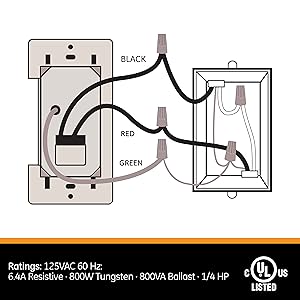
This thing works just perfectly for this old house with no neutral wire. I'm using it to control a bathroom vent fan. Here are some things to know: 1) You do need to connect this exactly as the instructions say even when you have two black wires that aren't labeled properly as to which one is hot and which one leads to the load (light, fan, etc.) 2) The earth ground is required for operation and not just for safety! if you don't see a green wire, look for a naked copper wire which is probably connected to the wall box. You can attach the green wire either directly to the naked wire or screw the green wire to the wall box if the naked wire is screwed to it. 3) if you have two black wires, and don't know which one leads to the load, just try to guess based on where the wires are coming into the box. If you know the path through the walls to the load device then that will help. If you guess wrong, the switch won't work properly. In this case just shut off the circuit break and swap the black wires. After that it should work. 4) When you restore power, the switch might start up in the "on" state and your load (fan, light) might be running. Just wait a minute or less and it will shut off as soon as the capacitor in the switch charges up. Then wait a few more minutes and the switch should be working as expected. I think the switch probably uses a design like US Patent US5903139A. This charges a capacitor, not a battery, so should have a decently long lifetime. If you do have a neutral wire in your house (2 phase AC power) like most modern houses, then you're probably better off with a design that makes use of the neutral wire and the 2nd electrical phase to power itself. That will avoid the start up delay.
Trustpilot
3 weeks ago
1 week ago