
DOWNLOAD THE APP


Customer Services
Copyright © 2025 Desertcart Holdings Limited
DOWNLOAD THE APP


🎮 Elevate your command center with the Corsair K60 RGB Pro SE — where speed meets style in every keystroke.
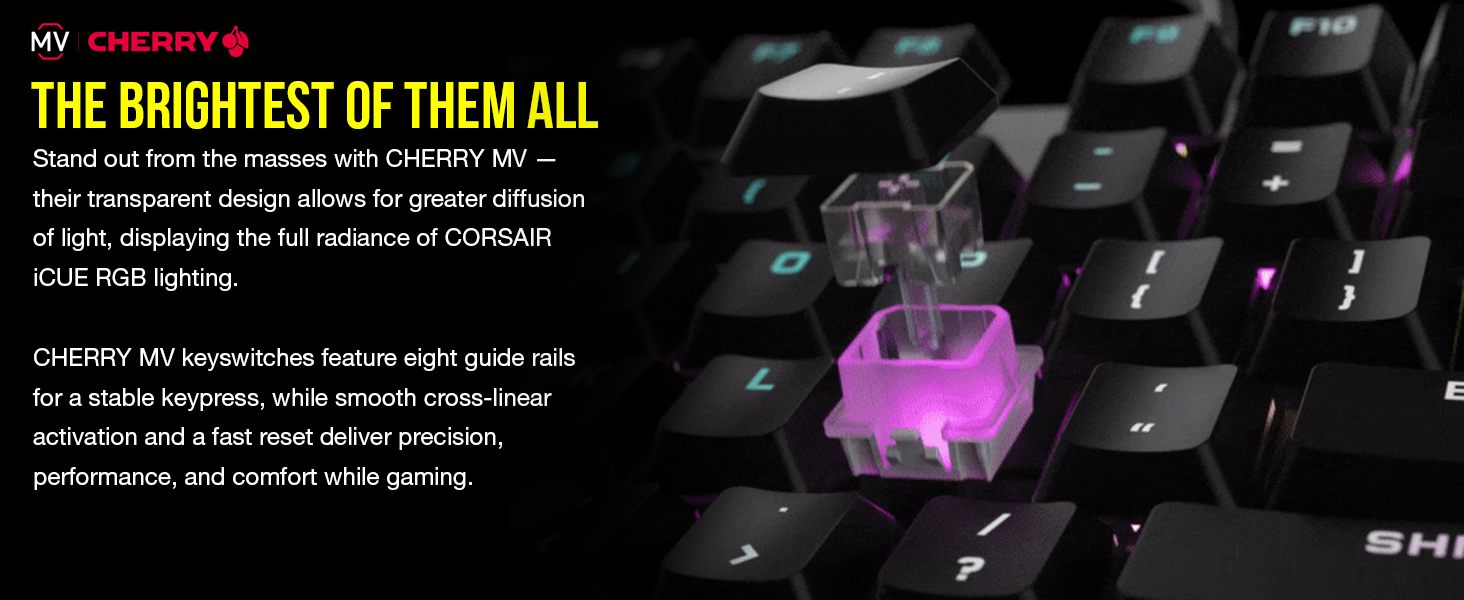
The Corsair K60 RGB Pro SE is a premium mechanical gaming keyboard featuring 100% German-made CHERRY VIOLA linear switches with ultra-fast 1mm actuation, a durable anodized aluminum frame, and precision-molded PBT double-shot keycaps. It boasts fully customizable per-key RGB backlighting controlled via CORSAIR iCUE software, a magnetic detachable memory foam palm rest for ergonomic support, and full N-key rollover with anti-ghosting for flawless input accuracy. Designed for gamers and professionals seeking a blend of durability, comfort, and immersive lighting effects.


| ASIN | B08N5DTKDW |
| Best Sellers Rank | #23,515 in Video Games ( See Top 100 in Video Games ) #1,290 in PC Gaming Keyboards |
| Brand | Corsair |
| Color | Black |
| Customer Reviews | 4.2 4.2 out of 5 stars (2,797) |
| Date First Available | November 16, 2020 |
| Hardware Platform | PC |
| Item Dimensions LxWxH | 17.36 x 5.39 x 1.46 inches |
| Item Weight | 1.94 pounds |
| Item model number | CH-910D119-NA |
| Language | English |
| Manufacturer | Corsair |
| Operating System | Windows 10 |
| Power Source | Corded Electric |
| Product Dimensions | 17.36 x 5.39 x 1.46 inches |
| Series | CH-910D119-NA |
R**M
As a typing keyboard, hard to bottom out the keys - spacebar sucks
Update after a month of use for typing and programming: When it comes to typing and other textual documentation, I like the the apple keyboard since, that's much faster as there is little movement of fingers required. However when it comes to coding, since one would be pressing multiple (combination keys) at once, a lot; mac keyboard fails here as it's hard to hit the keys right without looking at the keyboard. Membrane keyboards are better but the mechanical keyboards are the best since one can feel the keys before accidentally hitting them. I liked the brown keys keyboard that I used earlier, the good this with this particular K60 from Corsair is, it's a lot silent than the cherry mx keys, so I can enjoy my music playing on the desktop speakers while typing. Only thing that I didn't like that much on this keyboard is, the actuation distance is very short, like 1mm, which is apt for gaming for typing, when I rest keys, I need to ensure that I don't press the keys accidentally (there is not tactile for actuation). I kind of got used to it. Below is the recommendation: Not recommended if you - like clicky sound - use this for typing AND have heavy hands Recommended if you - like more silent keyboard (as silent as a membrane keyboard) - quick actuation (gaming/ arrow key navigation etc) - for coding and do not have heavy fingers (so you avoid accidental actuation) - for typing and do not have heavy fingers - like funky full-color back lights (this keyboard has best back-lighting) The space-bar was noisy, I noticed this is happening at the time of releasing the key fast, the momentum of the space bar hitting the pasting limiter/stoppers on the top. I fixed it by pasting some petroleum jelly between the metal supporters and plastic groves/limiter that are on the either ends of the space-bars, and not to the mechanical transparent switch. Now the space bar is as pleasant as the "enter" key. Hardening silicone gel is another option, but I couldn't locate that on time. If you use silicone, you need to be super precise with it as you don't want to obstruct the motion of the keys with hardened silicone. I am getting one more of K60 RGB Pro SE for my 5th grader daughter, cuz I like this keyboard for my needs and she likes it too bumping up to 5 star. I can provide pictures. ------------------ Update after a week of heavy use: This *sounds* more pleasing than the brown keys. Keys still feel harder to bottom out (I know keys don't change but I can get used to it). The actuation point is roughly at 1mm, so there is no need to bottom out the keys except for a sense of satisfaction. Still keeping 4 stars. Would upgrade to 5 stars when/if this becomes my go to keyboard and when I start recommending to my friends. Currently I still recommend a keyboard with "brown keys" for typing use. Original Review: Cherry MV (MX Viola) Keys (transparent ones) - not blue, brown, red. Feels like a variant of MX Red. Should be better than MX Red when it comes to gaming. This keyboard was a total surprise to me, in a good way and a bad way both. Softer than expected. Heavier than expected. Colors look cooler than expected. Space bar more wiggly and noisy than expected. Quality of material, better than expected. Ergo - rather a flat keyboard - not as expected. Wrist pad --- integrated magnetic wrist pad is better than an independent one. Hopefully I will get used to it soon. This is a next level of engineering, I don't know if the effect is good or bad, so far so go. Will update the review after a few 1000s of lines of code.
D**Z
Suprisingly great gaming keyboard
Very light weight, feels cheap but also sturdy at the same time, its an odd feeling. Sits perfect on the desk no movement. The keys feel very weird to type on, they are MX speed so not clicky & if they did click I swear that would make it feel way more out of place, its the low profile that makes it feel weird. The keycaps are fine, they shine more over time. Key input is very responsive, I cannot stress this enough input is lightning fast & easy to game with. Lot of LED color options, has a thin USB 3.0 or higher cable which is hardwired! no USB pass through. Perfect for competitive gaming, but ever user has different opinions & needs for these things. Issues: I ran into with this keyboard Randomly not working on my PC. Turns out the keyboard can remember devices it has been plugged into or tested on in the past causing issues due to the lack of a bios setting switch. Anyway to fix unplug it, Hold the Escape key then plug it back in while still holding the Escape key for about 2 seconds, you'll see the keyboard react so you will know when , Then release the escape key & No more problems. But just in case download & run Corsair Ique & update firmware or Reflash the firmware. Edit/Update: If you change the RBG & still get the issue during start up, do the above method to get it working, pick the lighting profile you want because you will be stuck with it, Unplug keyboard & hold S+B, now plug it back in while still holding S+B. All the lights should light up, this is bios mode & should fix that problem of it not being recognized during start up. To change the lighting after this Do the Esc method, pick new lighting, then do the S+B method again. This is actually all in the manual it just doesn't say its for fixing this specific issue! So if you run into this issue, now you know! Overall cost, performance & features. I highly recommend this keyboard in 2022.
L**G
Buy "used - like new" for the same great product at $40
TL;DR: Some minor things that don't detract from the amazing price point if bought "used - like new." I got this keyboard "used - like new" for $42 (incl. tax). It arrived in the original box; though the outside packaging was a bit damaged, the keyboard was still wrapped and looked completely untouched to me. Some background: college CS student, gamer, ~100wpm if it means anything. Have been using this keyboard (my first mechanical one) for 3 months now. Pros: - RBG lighting - no clunky software needed, various options all controlled via the F keys. I really didn't think I'd enjoy the lighting but have definitely grown to appreciate it. - Great for gaming - keys are very responsive and I do think it makes a difference (coming from a regular membrane keyboard) - Seems study/durable - basically no signs of wear and tear after 3 months (though I have been doing my best to keep it in good condition on my part) - Price - I paid $40 for what was essentially a new $100 keyboard Cons: - The cherry viola switches are kind of loud, the spacebar in particular - haven't gotten complaints when using Discord or Zoom (since they have good background noise filtering), but it's definitely very audible in-person if you're not being careful - Not hot-swappable - Rather sensitive keys; I find myself accidentally typing the same key twice or more sometimes (but you do get used to it) Other: - Keys come off quite easily, you don't even really need to use a keycap puller - could be good or bad? It was convenient for me when I was putting o-rings on my keys to make them a little quieter. I haven't pulled any off accidentally, but I'd be careful when handling/moving it around. Overall, for ~$40 - an amazing deal. I still see "used - like new" options for <40, so I'd definitely recommend picking it up!
G**L
Este teclado al inicio no queria por el precio pero al ver las reseñas me anime a comprarlo, y vaya que valio la pena cada centavo, ya que las teclas son muy comodas al tacto y los switches del teclado son muy buenos. Lo recomendo ampliamente ya que aparte de lo anterior comentado es comodo en todo sentido, el tamaño compacto que tiene hace pensar que tienes un teclado de 75% asi mismo el hecho de que se pueda personalizar cada una de las teclas y funciones que tiene lo hace mejor aun, ya llevo usandolo mas de 1 año y no tengo ninguna queja.
A**R
Super pour le gaming
L**R
parem de ter preconceito com teclados low-profile, o teclado é muito bom, tempo de resposta insano, A unica coisa ruim é o software da corsair q é horrivel, as iluminações e efeitos de cores são muito bons, o problema é que quando você entra e sai de um jogo, os leds simplesmente apagam, e para arrumar isso é só resetando no software
M**R
صوت الازرار هادء اضائاته جميله عملي وحلو
N**L
El teclado es muy bueno en general, las teclas se sienten bastante comodas y encajan bastante bien con los dedos,algo a notar es que siento que se sacan demasiado facil, no es algo que moleste ya que no es como que usando el teclado vayan a salior volando las teclas pero si necesitas de muy poca fuerza para sacarlas , ademas despues de varios meses de uso no se han puesto brillosas. Los switches son bastante buenos y super responsivos lo cual puede ser una ventaja si buscas que responda sin casi aplicar fuerza de una manera rapida, pero tambien puede ser algo de desagrado si no estas acomstumbrado, ya que al necesitar tan poco peso para presionarse es comun que al inicio presiones varias veces por accidente algo que no quieres, solo es cuestion de acostumbrarse. Lo que es tal cual la base del teclado es de muy buena calidad, es de un tipo aluminio que se siente muy rigido y es bastante pesado por lo que no habra ningun problema con que el teclado se ande deslizando por la mesa. Aqui llegamos a mi punto favorito, la iluminacion, esta es super buena el nivel de intensidad es bastante acertado ya que se puede controlar y llega desde el apagado a muy brillante, ademas de que su rgb es de los mejores, ya que con el sofware de icue puedes personalizarlo de manera extrema podiendo cambiar tecla por tecla el color y tiene una gama de colores casi que infinita.Los puntos que si hay que notar es que a pesar de ser un teclado de perfil bajo, al no traer reposamuñecas se llega a sentir incomo despues de varias horas de uso continuo; otro punto a notar es que siendo alambrico es un punto a restar el que no traiga filtro de ferrita. Pero en conclusiones generales es un excelente teclado por su precio ademas de ser de una marca muy reconocida la cual casi que significa calidad.
Trustpilot
1 month ago
1 month ago