
DOWNLOAD THE APP



Desert Online General Trading LLC
Warehouse # 7, 4th Street, Umm Ramool, Dubai, 30183, Dubai
DOWNLOAD THE APP
Desert Online General Trading LLC
Warehouse # 7, 4th Street, Umm Ramool, Dubai, 30183, Dubai
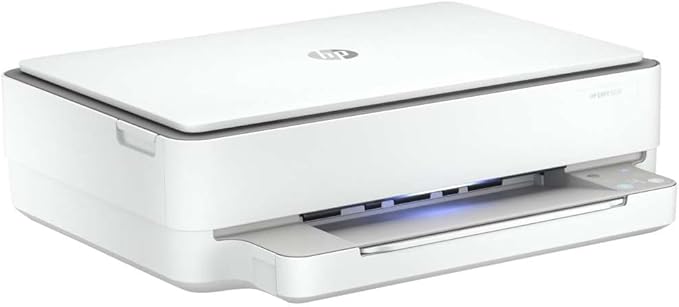


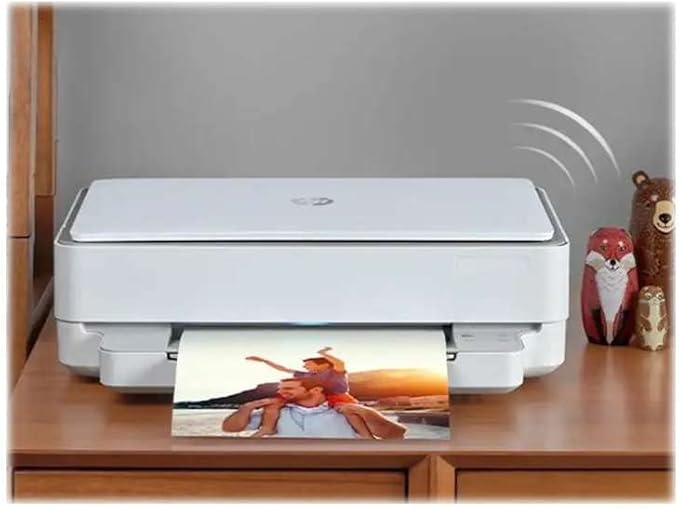


🖨️ Print smarter, live better — stay connected and save with HP ENVY 6020!
The HP ENVY 6020 All-in-One Printer combines wireless convenience with high-resolution printing, scanning, and copying. Featuring self-healing Wi-Fi™, automatic duplex printing, and an exclusive 3-month HP Instant Ink trial, it’s designed to keep your home or office productive while cutting ink costs by up to 70%. Compact and compatible with smartphones and major OS, it’s the perfect smart printer for the modern professional.
| Product dimensions | 14.2D x 17W x 5.2H centimetres |
| Controller type | Android |
| Maximum Supported Paper Size | 216 x 297 mm (DIN-A4) |
| Power consumption | 4 Watts |
| Included components | HP ENVY 6020 All-in-One Printer; HP 305 Setup Black Cartridge; HP 305 Setup Tri-Color Cartridge; Regulatory flyer; Setup guide; Reference guide; Power cord. |
| Print media | Paper (plain) |
| Scanner type | Flatbed |
| Max input sheet capacity | 100 |
| Max copy speed (black and white) | 10 ppm |
| Compatible devices | Smartphones |
| Maximum colour print resolution | 4800 x 1200 optimised dpi color |
| Sheet size | 8.5 inches |
| Maximum black and white print resolution | 1200 dpi |
| Warranty type | Limited Warranty |
| Colour depth | 24 bpp |
| Dual-sided printing | Yes |
| EU Spare Part Availability Duration | 2 Years |
| Maximum copies per run | 8 |
| Wattage | 6.4 watts |
| Batteries | 1 Lithium Ion batteries required. |
| Item model number | 6020 |
| Manufacturer | HP |
| Form Factor | All-in-One |
| Standing screen display size | 15.6 |
| Screen Resolution | 1920 x 1080 pixels |
| Processor Count | 1 |
| RAM Size | 8 |
| Memory Technology | DDR4 |
| Computer Memory Type | DDR3 SDRAM |
| Graphics Card Description | Dedicated |
| Connectivity Type | Wi-Fi |
| Voltage | 13.2 Volts |
| Hardware Platform | Smartphone |
| Operating System | Mac, Windows |
| Are Batteries Included | No |
| Lithium Battery Energy Content | 4.9 Watt Hours |
| Lithium Battery Packaging | Batteries contained in equipment |
| Lithium Battery Weight | 0.9 Grams |
| Number Of Lithium Ion Cells | 5 |
| Number of Lithium Metal Cells | 5 |
| Item Weight | 5.22 kg |
| Guaranteed software updates until | unknown |
A**R
straightforward, good looking and good job
I managed to install my new HP ENVY 6020 in a couple of minutes using my phone and subsequently my computer. I put the printer in the same room where the wireless hub was so there was no issue with connection. Start printing was extremely easy and even subscribing to the monthly ink service. The first three months are free so it's a good way to test it and see if it's worth it. When you link to the account it tells you how many prints you have done, when, and how much ink is left in the cartridges. Printing on normal paper is of very good quality both colour and black and white. Printing on special paper is of good quality. Finding the right Coulour Managment hasn't been easy but that's an issue also of the software you print from, not necessarily related to the printer. Scan is of very good quality and since it's a flat scan you are allowed to scan books. Copy is easy too I tried only one double side print so far and when the printer picked up the sheet to print it again it folded a corner a little bit, but besides that it worked perfectly fine. The printer is not so small, but it looks nice and has a pleasant light, which changes colour, coming out of it to show what's going on. It even plays a jingle when it has finished certain tasks. I think it's an ideal printer for the suggested 100-300 prints per month.
M**.
Best Printer
I have had this printer for about a year and it is by far the best printer I have owned.
G**N
Beware the HP Smart software
This is a very smart piece of kit which prints at a high level of quality. I bought it as the replacement for an Epson all-in-one bought around 2014 but wifi was flaky and the scan function went pop. The HP was to use on my excellent Lenovo all-in-one PC running Win 10. Set-up of the HP was not easy with a lot of to-ing-and fro-ing on the HP Smart app. So how's it in day-to-day use? 1) It drinks ink like a camel after a week in the desert which means that cost of ownership is going to be significant (£30+ quid for a pair of cartridges) when like me you're doing 10-20 page document drafts on a regular basis. My old Epson just chugged away and cartridges - when needed - cost very little .... those were the days! 2) The HP Smart App is used to manage everything (scan, copy, print) the printer does, there being no display/control panel. On my Win 10 PC closing the app when not needed resulted in the app forgetting the printer existed and I had to set-up the app again and re-create my HP account. The app on Android works seamlessly, so I'm now using my smartphone (Redmi Note 7 BTW, excellent device - as are all the Xiaomi phones) which means I'm less-stressed about getting things done in a hurry and wasting time on fighting the Win version. Summary. Nice-looking and well built. Weird set-up logic. HP have made using a simple device un-necessarilly over-complicated. Manage it with your phone. Save-up for ink.....
M**N
great home printer
Ideal for a small, at home printer that can scan and print in colour. Very easy to connect to and also allows for remote printing via the manufacturers app. Fast printing and good colours, easy to change ink cartriges, plus it also looks sleek and fits nicely on my shelf
B**R
A Nightmare to Setup
Once it's setup the printing quality is okay. It does not have a scan button so you cannot scan from the printer, you have to do that from your device. There is a print in colour and a print in black & white button so you can print an item placed on the scanner bed directly from the printer. There is no display window so you have to monitor ink levels and conduct all maintenance from your device using HP Smart. Setting it up was a nightmare. The instructions that come with it tell you go online on and do everything. That's it. I went online, tried to download HP smart and all the correct drivers etc. but it failed. I spoke to two HP technicians by phone. To say they were worthless would be flattering them. They were downright incompetent. I could not get the printer to connect to wifi. The first tech told me to press and hold the wifi button on the control panel. There is no wifi button on the control panel, it is just an indicator light, but he would not believe me, (the button is at the back of the printer). He also told me to press the power button on the control panel (again this is at the back of the printer). In the end I hung up. They said they would call back the next day at 11:00 AM. They didn't call back. I connected the printer to my computer by a cable, watched a few YouTube videos and somehow got it working and connected to wifi. I really don't know how. I did eventually get HP smart to download but again I don't know how. All in all it took 6 hours to get it connected and working. Even now it still looses wifi connection and I have to mess about with it. The printer's default is to print or scan everything in colour. Most things I scan or print are black & white documents so this is a little annoying as I have to reset it to B&W for every page. There maybe a way to set the default to B&W but I have not found it. Have I mentioned HP instructions are rubbish? After this experience I shall be staying well clear of other HP products.
G**S
It gives 15 prints and ink is over
G**E
Du kan inte "bara skriva ut" med den här. Det er ett mjukvaruprodukt som vill att du loggar inn och betalar varje månad. Ganska krångligt att skriva ut även med HP konto. Den vill också gerna ladda upp ala data till molnen. Efter ca. 6 månader kunne den inte äns skriva ut i svart. Hadde användt den 2-3 gånger. Mistänker felaktig mjukvaru lås.
M**.
Funziona bene sia da PC Windows 10 e sia da smartphone Android e ios. Molto utile la funzione di stampa fronte/retro.
A**O
Llevo unos días probando la HP Envy 6020 y el servicio Instant Ink y no puedo estar más contento y satisfecho. Por un lado la impresora me ha sorprendido en cuanto al diseño; sus lineas son sencillas es muy compacta, con el papel en un compartimento cerrado evitando la acumulación de polvo y le han incorporado luces leds que le dan un toque muy moderno y además iluminan los controles que están totalmente integrados sin botones. Con la nueva HP Envy 6020 podemos escanear o digitalizar documentos, hacer fotocopias en blanco y negro o color y por supuesto imprimir fotos con una buena calidad y documentos a una velocidad sorprendente y a doble cara de manera automática. Una de las cosas que más me ha gustado es su conectividad Wifi que nos permite imprimir desde cualquier dispositivo sin cables y de manera rápida y sencilla. Sin duda esta posibilidad que evita cables y hace que con un solo click puedas imprimir desde tu móvil o tablet se vuelve indispensable ya que se convierte en una manera muy cómoda y ágil de operar. Uno de los puntos fuertes que ofrecen esta y otras impresoras conectadas HP es el servicio Instant Ink, de hecho la impresora en este caso venía con 6 meses de este servicio totalmente gratis. Se trata de varias opciones o planes de impresión que te ofrecen 10,50,300, 500... páginas al mes por una cuota mensual muy ajustada, en este caso yo escogí 300 paginas impresas al mes durante los próximos 6 meses totalemente gratis! Durante ese tiempo cuando la impresora detecta que algún cartucho se va a acabar los solicita de manera automática y llegan a tu casa sin ningún coste más que la cuota mensual correspondiente al plan escogido( cuota que como comentaba estos 6 meses me regalan). Si algún mes no llego a las 300 copias se me acumulan las que no he gastado y tendría más copias disponibles para meses sucesivos.Además pasados los 6 meses, o en cualquier momento realmente, puedes sin ningún coste escoger otro plan o darte de baja en cualquier momento. La verdad es que me recuerda a alguna plataforma de series en streaming, con ellas nos olvidamos de alquilar pelis, comprar pelis,... simplemente ves lo que quieres cuando quieres por una pequeña cuota y sin compromiso, pues así me siento; imprimo lo que quiero cuando quiero no me preocupa el gasto de tinta ni su reposición por lo que le doy más uso a diario y de manera mas natural a mi impresora sin todas las molestias que supone la reposición de la tinta. SIN DUDA ME DECLARO FAN DE INSTANT INK!
C**N
Llevo unas semanas probando mi nueva impresora multifunción HP Envy 6420 junto con el servicio de HP Instant ink. Tengo que decir que siendo usuaria tanto a nivel profesional como personal de ordenadores e impresoras, estoy muy contenta con mi nueva adquisición. El tamaño de la impresora multifuncion es bastante reducido, a pesar de que tiene escaner y fotocopiadora, ademas de impresión. ES manejable, no pesa demasiado y es comoda y sobre todo facil de usar y tiene una calidad muy aceptable para ser una impresora de uso domestico. he probado a imprimir documentos y queda perfecto, tanto en b/n como en color, pero tambien he probado a imprimir fotos y la calidad es bastante buena, sobre todo si para estos casos usas el cable, con la wifi parece que se pierde algo de calidad. dE cualquier manera, en mi casa solo se va a usar para documentos, escaneos y fotocopias. Las fotos las imprimimos en tienda que ademas hay que contribuir a reflotar la economia. En cuanto al servicio HP Instant Ink, me parece una idea fabulosa, siempre me pasaba que el tipico dia que tienes que imprimir algo "bien" resulta que el cartucho empezaba a estar vacio y se imprimia regular. Con este servicio, nunca te va a ocurrir esto y no tiene que preocuparte de como estara el cartucho ni de tener recambios ocupando espacio "para por si acaso". Ademas, tengo que mencionar el ahorro de dinero y tiempo que esto me supone, que tampoco es la primera vez que he ido a poner un recambio que tenia comprado de hace unos meses y estaba medio seco...Asi te llega, lo pones y reciclas el anterior. rapido, sencillo y sin complicaciones. Siempre tienes tu impresora lista y sin preocuparte de ello. Ademas, el plan no tiene permanencia, si un mes no vas a usarlo(por ejemplo en verano si vas a casa de vacaciones), siempre puedes cancelarlo o si un mes vas a imprimir mucho mas, cambias de plan rapidamente gestionandolo tu solo con un par de clicks. Me parece que tiene un precio muy razonable y que ademas, te puedes gestionar muy bien en funcion de cuanto imprimes. El envio de los cartuchos has sido bastante rapido y han llegado muy bien embalados. Tambien me gusta mucho que sean reciclables, hay que colaborar con el medio ambiente todo lo que podamos. En resumen, habeis ganado una nueva clienta, la verdad que no se como esto no se habia inventado antes, es muy comodo y sin complicaciones. Los cartuchos con muy faciles de poner y quitar y la misma aplicacion te va enseñando.
Trustpilot
2 months ago
1 month ago