
DOWNLOAD THE APP


Customer Services
Copyright © 2025 Desertcart Holdings Limited
DOWNLOAD THE APP


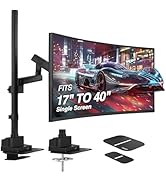
🖥️ Elevate your workspace, elevate your game — the ultimate ultrawide monitor arm for pros who demand more.
The AVLT Single Ultrawide Monitor Arm supports screens from 17" to 49" weighing up to 50 lbs, featuring a premium aluminum build with adjustable pneumatic height (10"–23"), full motion swivel, tilt, and rotation. It includes built-in USB 3.0 and AUX ports for easy connectivity, a compact heavy-duty base that saves desk space, and offers versatile mounting options with VESA compatibility. Designed for durability and ergonomic comfort, it comes with a 3-year warranty and lifetime tech support.



| ASIN | B0819BLM2Z |
| Best Sellers Rank | #395 in Computer Monitor Arms |
| Brand Name | AVLT |
| Color Name | Black |
| Customer Reviews | 4.5 4.5 out of 5 stars (1,222) |
| Date First Available | November 11, 2019 |
| Is Discontinued By Manufacturer | No |
| Item Weight | 25.3 pounds |
| Item model number | AVLT-DM40-1 |
| Product Dimensions | 29.53 x 22.64 x 4.72 inches |
| Special Features | Curved, Height Adjustment |
M**S
The Best Monitor Arm I’ve Ever Owned
I bought this monitor arm back in February 2022, and I’ve used it daily for over 3 years. It’s hands down the best Amazon purchase I’ve ever made. I have it holding up a 32-inch LG HD monitor, and it’s mounted on a glass surface attached to an electronic standing desk. Because of the glass, I had to install it using a reinforcement plate, but once set up, this thing has been completely solid. No sagging, no slipping, no issues. The adjustability is incredible. I can move my monitor around freely depending on whether I’m working, gaming, or watching movies. It’s still smooth after all this time. I honestly thought the moving parts would loosen up or wear out, but they haven’t at all. One of the surprise features is the built-in USB ports. I assumed they would eventually stop working, but I’ve used them consistently for years and they still work flawlessly. That kind of longevity is rare. Cable management is also excellent. My setup looks super clean, even with multiple devices connected. I don’t usually write reviews. In fact, I never do. But this is the first time I’ve bought something where I truly feel like I got more than I paid for. It’s a high-quality, long-lasting product that deserves real recognition. If you’re on the fence about which monitor arm to get, or you’re worried about mounting on non-standard surfaces like glass, I can say with full confidence that this one delivers.
H**S
It WILL Hold Your Super Ultrawide, but...
Monitor: Samsung CRG9 (the 49" Super Ultrawide behemoth that weighs nearly 30 pounds) For those worried that their monitor will drop down and become one with their desk: it won't, IF you set it up correctly. Out of the box, there will be some significant assembly especially for a monitor arm, do not worry about this, all the tools required will be provided. One of the Allen wrenches has a flat head at the end, just in case you need one for the VESA mount screws, but it will also be important for the flathead screws on the joint pieces that hold the mount together. (There are two joints. One is between the base and the "bicep", the other is between the bicep and the "forearm". These are the joints that you must tighten the flathead screw to ensure that these parts stay together.) The base is the densest part of the mount, it is very heavy, boasting two poles on the clamp that are adjusted with the Allen wrench to ensure a steady hold on the edge of your desk. This thing isn't going anywhere. Some have complained how you must use the Allen wrench to tighten these poles. Don't worry, you want the Allen wrench, there is no other way to ensure a stronger clamp without them if you aren't using the grommet. There are a couple parts that you must assemble for your base. It is very straightforward inside the instruction manual. What they don't tell you in the instruction manual, is that the plate for the clamp that sits on the two tightening poles DOES NOT lock in to the tightening poles for the clamp. It freely sits on top of them inside two concave cuts on the face of the plate. This does not, by my observation, hinder the ability of the clamp to hold the mount steady. NOTE: There is a piece of thin rubber with a sticky side that you can use to stick to the plate of the clamp to ensure a steadier hold, and a scratches desktop. The base acts as a middleman between two of your USB, audio + mic connections and your PC. There are cables that come directly out the other side of the base that can connect into your PC. This can be useful for a mouse and a keyboard, as well as your headset. Then, you will attach the bicep to the base. There is a flathead screw that you must adjust at the joint. The tighter it is, the harder it will be to turn your monitor arm via that joint. The looser it is, the easier. Do not make this too loose or it may pop off. This is the most important part: When you attach the forearm to the bicep, at the bicep joint, turn the big Allen wrench screw COUNTER-CLOCKWISE! This is what ensures your monitor stays off the desk and in the air. When thinking like an airplane, this is what ensures the altitude of the monitor. Try to turn this a few times until it is somewhat loose before attaching the monitor. The second most important part: Before attaching the monitor, especially if it is a large, heavy monitor like mine. Tighten the mount itself, the portion that your monitor will actually sit on. Tighten this screw significantly. This is what holds your monitor from pitching downwards automatically. Overall: I've had this monitor arm for a few days now. And I wrote this review almost like an instruction manual because it took me two months to find one. I did NOT want to flush 300 dollars down the drain on an Ergotron. It's a great mount, very sturdy, will certainly last a while. For my purposes, which are to set the monitor in a fixed position and moving it periodically, this is perfect and has freed my desk of an incredible amount of space. It is not the easiest to turn especially on the bicep and base joint, but it is easy to yaw and roll, in case you ever needed that. A couple downsides: the fact that the plate for the clamp does not screw into the poles, and I cannot pitch my monitor. However, this is negligible to me as I will never need this feature. 5 stars.
K**.
Stylish and sturdy
It does as a monitor arm should. I have had monitor arms before. I tend to set it and forget it. So as long as I can move it about just the once to get a good spot, while freeing up desk space I am happy. This one moves well and supports the Acer Z35 monitor, which I think is just over 20 lbs. I have attached the arm to a glass desktop. I am NOT recommending it for that. I have reinforced the desk in a few ways to support this extra weight. The cable management is good but the space is limited. Screw in panels are used to hide cables. Setup was easy. The unit feels sturdy and well made. The video on how to set tension was clear. Rotation of the screen (portrait/landscape) is a bit wonky but maybe better/smoother on a flat panel. It is very easy to set the tension a little high, it takes a minute to get it right. Once setup though it's really nice. Also this one came with audio jacks and usb cables, but they made it very easy to remove the extra cables if you dont need them.
P**D
Worth every penny! Excellent quality and sturdiness. Excellent instructions. Do not take a chance with a cheaper support. This one will make you very happy!
J**A
I wanted to mount my 34" ASUS curved monitor above my laptop to replace two 27" monitors on either side to free up tons of desk space without compromising screen real estate. The arm had no problem holding up the monitor (7.7 Kg/17 lbs) and hid all the cables nicely. Other than the covers for cable management covers, everything is metal. I was a little concerned with some of the negative reviews, but everything worked out great.
J**P
EVERY picture in product description shows USB and 3.5 hub but that is not true.
C**C
Well packaged and relatively easy to install. Very sturdy for holding my 40inch ultra-wide, pretty good looking too, and the USB and Audio ports are valuable features. The cable management cover was the one that took me the most time to screw back on and could be improved by making the compartment larger, and also by making the cover a clip on instead of screws. Other than that: 1. a USB C port to replace one of the two USB A ports would be good to be kept up to date with current technology. 2. Cable management that can completely hide the cables from view (see photo 3) would be good. Overall I am happy with the purchase.
B**R
El soporte es de muy buena calidad, intuitivo para armar, el problema que encontré es la parte donde van los cables, es realmente ajustado, el cable que uso para conectar el monitor es un DP de un grueso normal, queda demasiado apretado, apenas cabe con mucho esfuerzo y en entre los ángulos del brazo quedaba con unas curvaturas que francamente parece que se rompería el cable por la tensión, por lo que me vi en la necesidad de dejarlo por fuera en la parte superior del brazo (como en la foto); Es el único punto de mejora/queja , podrían mejorar esa parte de la gestión de cables, hacer más espacio para cables gruesos ya que los tornillos que lleva para sostener los plásticos de los sujetadores ocupan casi el 70% del interior y no dejan pasar los cables libremente. Pongo unas fotos de lo que incluía la caja para los que compren sepan como viene y que incluye Por último, mencionar que los puertos USB del brazo no son un hub , literal cada puerto trae su propio cable , asi que serían más una extensión , lo cual me agrado bastante, me costó encontrar uno que soportara los 12kg de mi monitor, es algo caro! pero seguro durara mucho tiempo y creo que si lo vale
Trustpilot
4 days ago
1 month ago