Desert Online General Trading LLC
Dubai, United Arab Emirates
Desert Online General Trading LLC
Dubai, United Arab Emirates


🚀 Elevate Your Storage Game!
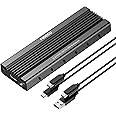
The FIDECO M.2 NVME SATA SSD Enclosure is a high-quality aluminum adapter designed for 2230, 2242, 2260, and 2280 NVME/SATA SSDs. It features a USB 3.2 Gen 2 interface for lightning-fast data transfer speeds of up to 10Gbps, supports multiple operating systems, and includes a user-friendly plug-and-play setup. With its shock-resistant design and effective cooling system, this enclosure is perfect for professionals seeking reliable and efficient storage solutions.


I**R
Great Product - Did the job
I purchased the FIDECO M.2 NVME External SSD Enclosure to clone a WDC PC SN530 250GB NVME to a Corsair MP510 960GB NVME. Along with the Corsair SSD Toolbox this was completed very easily. The Fideco is very well made and it was easy to install the Corsair. They even provide a screwdriver to assist with mounting your drive. The black aluminium case looks the part and serves to conduct the heat away from the NVME drive. The enclosure has a USB-C female connector and comes with two cables USB-C to USB-C and USB-C to USB-A. Both cables are roughly 25cm in length.Once I had cloned my system to the new drive, I wanted to use the old WDC drive as additional storage. I removed the partitions (diskpart was required) and created a single partition. My Windows 10 desktop has both 5Gbps and 10Gbps USB ports, so I used the CrystalDiskMark tool to benchmark the drive in its Fideco enclosure. Below are the results I obtained in a both types of USB ports and the internal M2 performance as a comparator (the full data is in the images).5 Gbps SEQ1M Read 443 MB/s, Write 408 MB/s10 Gbps SEQ1M Read 974 MB/s, Write 889 MB/sM2 SEQ1M Read 2474 MB/s, Write 967 MB/sI was very impressed by the results, especially the 10Gbps USB port that blows away a SATA 3 (6Gbps) SSD drive performance.It is early days, but I am very impressed with this enclosure in terms of quality and performance.
G**H
Great Solid Feeling Enclosure
Been using this for over 18 months now. It works well.I use it on a very old M2 1TB nvme I inherited from a friend's dead laptop.It's built like a heat sink; nice and sturdy and compact.Good solid feel.Can't attest to smoking performance as I haven't anything to compare it with. I use it to mainly cart videos and data around when travelling.On my old 2016 i7, Manjaro Linux it rattles along copying/writing to internal SSDs at 400-500mb/s on USB3.
I**N
Well made , good value
Easy to install the m2 drive into this enclosure. The screws are small & fiddly but it works ok & is compact. I am using it with a 500gb m2drive to record & pause on my smart tv.
C**S
Works great, installation a bit funky
The drive caddy works really well. USB3.1 speeds on my WD Blue SN550 1TB NVMe drive are around 950MB/s read and write (from a theoretical maximum of 1500MB/s on the drive), but this could also be due to limiting factors in my set up.I went for this one as it seemed to have one of the bigger heatsink spreaders of all the caddys available on Amazon at the time of writing. This proved a prudent choice as you can tell the NVMe drive does get warm in use, the housing is warm to the touch, but the drive inside remains stable in both temperatures and operation.The only thing worthy of note is the installation process. Peeling back the plastic protective film on the included thermal pad is a bit tricky, but this is universal of thermal pads. Inserting the sled into the housing feels a bit janky as you have to slide the drive in with the pad on (there is quite a bit of friction whilst doing this), however it does make good contact with the housing once in.This is a great way of getting ridiculous read/write speeds on a drive at a reasonable price.
A**R
An excellent NVMe ssd enclosure
When it comes to NVMe ssd the problem is the heat. This is unavoidable when one in transfer files 1 to 2 TB across for hours. I used to wrap up the NVMe ssd enclosure with a wet towel and got the towel dried up at the end.The Fideco enclosure addresses the heat dissipation well by supplying a thermal pad between the NVMe M2 ssd and the external casing. Two are supplied but only one is used so the other is a spare.Another heat dissipation measure is the 6 elongated ventilation holes on each vertical side of the enclosure. That will also help to dispose the heat. The NVMe ssd when installed leaves an air gap with the circuit board so having 12 ventilation holes is a robust designI had it on several hours operation with a 2 TB NVMe M2 ssd inside and could still hold the enclosure which was warm but not hot. The 0.5 TB Plextor NVMe M2 ssd I have is too hot to handle after the same duration of operation.The unit comes with a USB C to USB C in addition to a standard USB C to USB -A.As an accredited engineer myself I consider this NVMe ssd enclosure has been designed effectively to dissipate the heat.
M**E
It probably works OK, but very fiddly to put together
The whole enclosure is ridiculously fiddly with microscopically small screws that were very hard to undo. So hard in fact that the supplied screwdriver wouldn't undo the rear two and I had to resort to a chunkier driver of my own. As other reviewers have pointed out the heat dispersing strip did not reach the top, so what was the point. On the positive side it did include two spare screws and a second strip, but unfortunately adding two strips made them crumple as you pushed the SSD inside. Anyway, I nearly pulled my hair out trying to get this to initialize a WD Blue SN570 M.2 NVME SSD without success. However, to be fair to this enclosure it probably would have worked if the SSD hadn't turned out to be duff. So it has been returned with the SSD and I have started again with different makes as at the time I had no idea what the problem was and wanted to start again with a clean sheet. In hindsight I am sure it would have worked fine with an SSD that wasn't faulty, but I prefer the design of the Beikell Tool-Free 10Gbps M2 SSD Enclosure I have replaced it with, which is fiddle free and looks better.
Trustpilot
1 month ago
1 month ago