Some deliveries may take a little longer than usual due to regional shipping conditions.

DOWNLOAD THE APP


Customer Services
Copyright © 2025 Desertcart Holdings Limited
DOWNLOAD THE APP
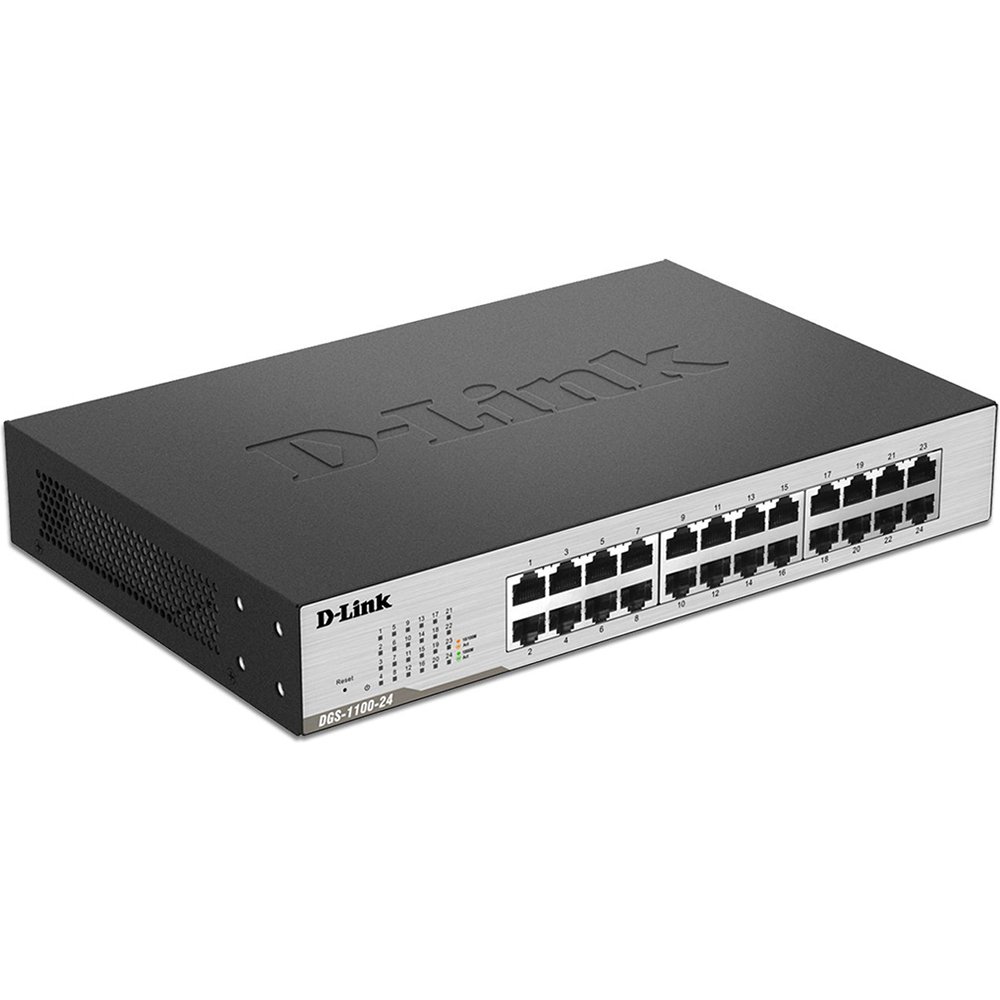
🚀 Elevate Your Network Game with D-Link’s 24-Port Powerhouse!
The D-Link DGS-1100-24 is a robust 24-port Gigabit EasySmart Ethernet switch designed for small to medium businesses. It features advanced VLAN, QoS, and bandwidth management capabilities accessible via an intuitive web interface. Its fanless, energy-efficient design ensures silent operation and longevity, while flexible desktop or rack mounting options make it ideal for dynamic office setups. Backed by a lifetime warranty, it delivers reliable, scalable networking without the need for dedicated IT staff.




| ASIN | B004SUO1S0 |
| Best Sellers Rank | #3,036 in Computer Networking Switches |
| Current Rating | 1.2 Amps |
| Customer Reviews | 4.2 4.2 out of 5 stars (164) |
| Data Transfer Rate | 1000 Megabits Per Second |
| Date First Available | March 19, 2011 |
| Department | wired networking |
| Flash Memory Size | 2 |
| Global Trade Identification Number | 00790069349584, 00809185812145 |
| Interface Type | RJ45 |
| Is Discontinued By Manufacturer | No |
| Item Dimensions LxWxH | 11.81 x 8.66 x 7.87 inches |
| Item Weight | 3.68 pounds |
| Item model number | DGS-1100-24 |
| Language | English |
| Manufacturer | D-Link Systems, Inc. |
| Product Dimensions | 11.81 x 8.66 x 7.87 inches |
| UPC | 071030620988 914824894526 804993409037 778890629273 803982749499 642125166140 809185812145 163120807116 132018279700 807030493204 809186268750 172302745238 809385663714 790069349584 |
| Upper Temperature Rating | 40 Degrees Celsius |
J**N
Great little switch with advanced features
First of all, this is the DGS-1100-24 Easysmart 24 port gigabit switch. It was released on March 19, 2011, so it's newer than some of the other well-rated switches sold on Amazon. Similarly to the DGS-1024D switch, this switch is also fanless, quiet and energy efficient. This switch provides an easy to use web interface to manage advanced features. Features include VLANs, link aggregation, cable diagnostics, IGMP snooping, VLAN traffic segregation, port mirroring, security, etc.
R**H
Great capacity for the price and easy to set up.
Plug and play. Has been working great for several months now. I haven't used any of the "smart" features but for a simple, inexpensive and good sized (for home) system this was just the ticket.
A**D
Excellent switching performance, but doesn't support LACP!
I was very happy with this switch until I tried to bond the two connections of a Synology NAS to this switch. It doesn't work! Turns out the switch only supports static port bonding, while the Synology requires dynamic bonding, or LACP. If you don't need LACP this is a great buy.
J**V
Satisfied with the product
Brought this for my home environment. There are about 30 -40 devices connected on my network and was previously choking my bandwidth when used with a smaller switch. I have some devices connected to my WIFI accesspoint, which is connected to a switch and switch is connected to a hardware firewall and router. I was experiencing frequent disconnections with older smaller switch, so brought this one. This is a nice switch, which is manageable via Http as compared to usual expectation of cli. It has lot of options, which might not be used by a normal home user. However it has options to configure a trunk, VLAN and packet capture or to see traffic stats for any errors etc. It also gets view of MAC addresses attached to the device. I am satisfied with the switch and would surely recommend it for a small environment without any issues
J**.
Good switch
Easy to set up and works well. Quiet too. Auto-senses PoE devices.
A**L
You may want to rethink this purchase.
This switch and the entire line of D-Link EasySmart managed switches are targeted at the small home office user and the prosumer market. Unfortunately these switches fail to work properly with the most popular devices in the market segment for which they are intended. I am like many customers who are unable to use bonding on my Synology devices. Bonding allows the use of more than one network adapter and cable to increase reliability and boost throughput of the connected device. After about a year of working with D-link to identify the problem and find a solution, I received the response below from their customer service rep. "I have researched on this issue and confirmed with my product management team that the switch only supports static trunking and not LACP (dynamic). This is the reason why you can not establish communication between the switch and Synology NAS. Thank you for all your patience and time that you have accorded us in an effort to ascertain the cause of the LACP failure. D-Link appreciates your business and promise to continue providing any other support with the DGS-1100-24 switch. Thank you for networking with D-Link ..." In simple language: you are on your own if you own a Synology device or similar device and you are trying to use the two or four ports that the device comes with. Most other managed switches that I have researched in this segment support the IEEE 802.3ad Standard for dynamic bonding aka link aggregate control protocol (LACP). Dynamic bonding is more reliable than static bonding which the EasySmart line of switches only supports. With more and more network devices being manufactured with two or more network interface cards to handle the increasing demands of the wired home, sooner or later you will bump into this fatal flaw.
T**D
OK but LOUD
This is a decent switch but it's LOUD. According to the specs on the website 44.5db just from a little case fan! This is not an enterprise switch; a switch like this is unlikely to end up in a datacenter or server room. It might end up in a networking closet, but it's much more likely to end up as the single switch for a small company, a small office or retail store, or in a home. Basically, it'll end up in places where it won't necessarily be isolated from the rest of the environment. Considering that, I don't know why this would come with such a loud fan. For those looking to replace it, it's a 40x40mm normal 3 wire case fan. The plug on the board is a normal plug for a fan. I looked up the specs for the one in my case and it is a 12 volt fan, uses .1 amp, runs at 7000 rpm, and moves 9.9 CFM. I'm not going to be using 100% of the POE available power, so I'm going to replace it with a 5cfm fan that runs about 15db. 9.9cfm is a lot of air movement for such a small case, and I don't think I'll have any issues. That being said, I'll keep an eye on it and will install a second fan if it runs too hot. If anyone is curious as to how this turned out for me, leave a comment and I'll let you know.
T**B
Good performance, dependable, and a good value.
The switch has been in service for nearly a year. It sits in a room that is subject to extreme heat and cold, and has continued to perform without issue.
S**L
Sehr schneller und völlig geräuschloser managebarer Switch für den SOHO-Bereich (Bezeichnung DLINK DGS 1100-16), der mit einem Stromverbrauch von 5 -7 W auskommt. (Abschalten nicht benötigter Ports). Die Einstellungen erlauben die Einrichtung von VLANs und sind somit zukunftssicher. 16 Ports sind meist völlig ausreichend, Portscanner, etwaige Broadcaststürme und irrtümliche Schleifenbildung werden dabei wirkungsvoll durch Portabschaltung im Zaun gehalten. Der Preis ist o.k., ein internes Netzteil erleichtert den Anschluss, ebenso die nach vorne gerichteten Anschlüsse für die Patchkabel mit optischer Kontrolle, grün ist 1000 MBit und gelb ist 100 Mbit. Die mitgelieferte Software auf CD ist verzichtbar, das Protokollieren von Datentransfer interessiert glaube ich niemanden. Die Konfiguration erfolgt über das Webinterface, nur mit diesem ist auch eine Änderung der IP des Switches möglich. Ich löste das Problem in dem ich die interne NIC aktivierte und dann eine 10er Adresse zuteilte. Anschließend erst konnte die Wunsch-IP zugeteilt werden. Empfehle dieses Gerät - wenn längere Erfahrungen vorliegen melde ich mich wieder... ------------------------------------------------------------- Nachtrag: Leider unterstützt dieser DLINK keine Jumbo-Frames größer als 4K. Hinzu kommt, dass auch bei dieser Größe hin und wieder dann keine Internetverbindung mehr möglich ist, da offensichtlich alle Pakete verworfen werden, anstatt dass diese sauber zu 1,5KB-Pakete "fragmentiert" werden. Fahre nun wieder die 1,5K Frames (MTU=1500). Schade... Werde wohl irgendwann auf den HP ProCurve Switch 1410-16G wechseln müssen, um schnellere Sicherungen auf meine Synology NAS212+ machen zu können. Eigentlich bin ich davon ausgegangen, dass alle modernen Gigabit-Switches Jumbo-Frames beherrschen. Bei DLINK ist das nicht so, erst das nächsthöhere Modell (D-Link DGS 1210-16) unterstützt dies wieder.
K**U
parfait pour le poe en Switch 1G. faite attention au watt global pour les caméra sinon ça va pas marcher. sinon interface parfaite un peut lourde mais sinon fait sont taff. depuis 4 ans ça tiens.
S**O
Prodotto ottimo
P**H
Fits perfectly into my rack with the aid of adapter brackets
M**E
Perfecto!!!
Trustpilot
3 days ago
4 days ago