💧 Stay dry, stay connected — leak alerts that keep your home one step ahead!
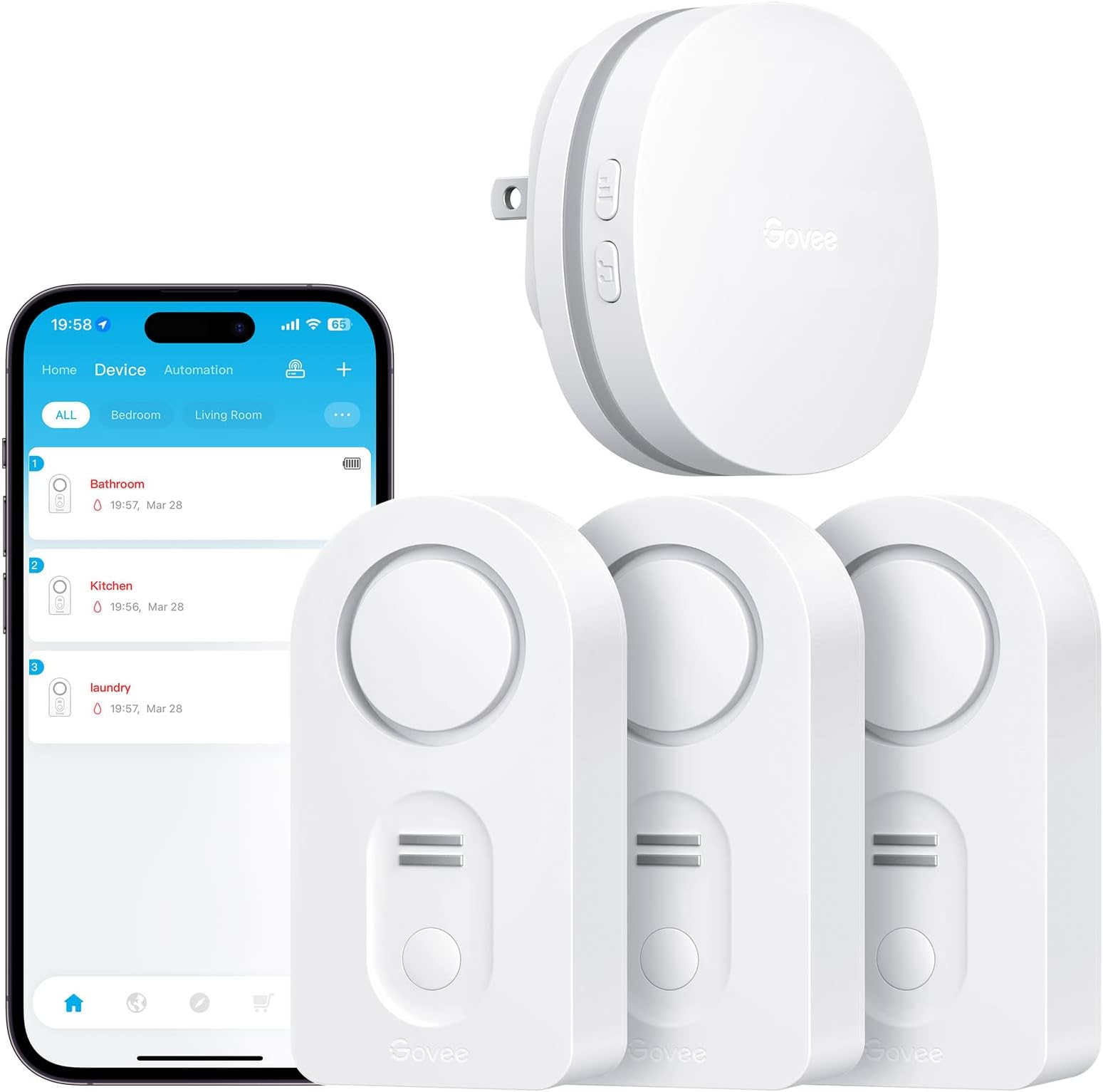
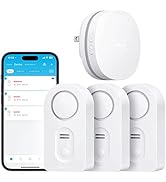
The Govee WiFi Water Leak Detector 3-Pack offers a smart, connected solution to protect your home from water damage. Featuring a robust WiFi gateway that supports up to 10 sensors, it delivers instant app and email notifications alongside a powerful 100dB adjustable alarm. Designed for easy setup and precise leak location with customizable sensor names, this system is ideal for basements and homes seeking proactive water protection.


| ASIN | B07J9HZ5VN |
| Batteries | 6 AAA batteries required. (included) |
| Batteries Included? | Yes |
| Batteries Required? | Yes |
| Battery Cell Type | Alkaline |
| Battery Description | Alkaline |
| Best Sellers Rank | #2,980 in Tools & Home Improvement ( See Top 100 in Tools & Home Improvement ) #5 in Water Detectors & Alarms |
| Control Method | App |
| Customer Reviews | 4.2 4.2 out of 5 stars (14,899) |
| Date First Available | October 10, 2018 |
| Description Pile | Alkaline |
| Is Discontinued By Manufacturer | No |
| Item Package Quantity | 1 |
| Item Weight | 12 ounces |
| Item model number | H5040+H5054 |
| Manufacturer | Govee |
| Mounting Type | Tabletop Mount |
| Noise Level | 100 Decibels |
| Number of Batteries | 6 AAA batteries required. (included) |
| Part Number | B5040101 |
| Product Dimensions | 3.46 x 1.77 x 1.04 inches |
| Sensor Technology | Contact Sensor |
| Style | 3 sensor + Gateway |
| UPC | 799953927983 |
| Voltage | 9 Volts (DC) |
S**K
It works, be patient
The instructions are pretty weak. It took me several tries to get everything connected. The key is connecting your phone to 2.4 and then connecting your phone to the gateway and then connecting up your sensors. After that everything was great. The app works fine for me. Tested out a sensor and it sent an alert to my phone. Running the latest IOS.
D**H
easy to use and setup
nice product. very economical and it works great. easy to setup
G**E
Impressive, would buy again. (Take time to read other reviews to make your installation easier.)
We bought this sensor kit with some extra sensors two weeks ago to help monitor the house while we were on vacation. Setup was easy after an hour of unnecessarily confusion. Included batteries worked fine, it's a new installation so I cannot comment on battery life. The manufacture's directions are unclear ... THANK YOU to the Amazon reviewers who wrote terrific explanations to help the rest of us. How well does the Govee app protect privacy? This is not an accusation, it's just an unknown. So I didn't want it installed on the phone I use everyday. Here's an option that also makes it easy to connect to the required 2.4 GHz wifi: I installed the app on an old iPhone that's connected to our router's 2.4GHz "guest WiFi". Using the old phone, and after struggling with the unclear directions, the Gateway connected to guest WiFi and all six detectors paired to their gateway. I also assigned the detectors to location names (e.g. "Water Heater"), so any alerts would immediately direct me to the problem. Then I tested one detector; SUCCESS!!! The audible alarm sounded immediately. Then, within a minute this email arrived: "Your "H5054_48C5" has detected water leakage. Check the area soon to avoid water damage." Glad that the alert system works, I know there's a problem somewhere, but that cryptic serial number doesn't help to find it. Suggest that Govee add "location" to their alert messages. So I like this product. If Govee adds clarity to the installation directions and alert messages they would fully earn a five-star rating! ****
M**M
After almost 5 years, still working great!
These Leak Detectors have worked great. I bought an extra set and have them all over my house. They definitely go off if there is a leak. I also get an alert in my email, which is helpful since I have a large, old house. In addition, you get an email alert when the batteries are getting low, which has just started after 4 and a half years. It actually works as advertised, unlike my smoke alarms.
E**.
Please read my recommendation
I received the item and a box of five more sensors about an hour ago. I am professional at home construction, including the plumbing trade. Here's what I found. After setting up the first sensor to the internet, I proceeded to place that one under my kitchen sink. I looked under the sink with a flashlight and didn't notice anything on the bottom of the sink cabinet, so I slid the sensor to the back of the cabinet. On doing so, I felt a dampness on the palm of my hand as I placed the sensor. There was a film of water on the bottom of the cabinet. I waited to see if the sensor would go off, as it did when I tested it by wetting a finger and putting it across two of the terminals on the bottom of the sensor. Well, that film of water did not trip the sensor. Wondering why, I placed the sensor on a flat piece of plastic on my work bench and I could see there is a 1/16 inch or so of space between the sensor probes and the flat plastic sheet I put it on. That's the problem right there. A film of water on the bottom of a cabinet will not set the sensor off. The probes will not contact the water surface. Here's what I did. I removed the little rubber plugs from each of the four feet of the sensor. Use a sharp object. I placed the sensor on a piece of sand paper on a very flat surface. Rubbing down on the sand paper I sanded the plastic feet down to the same level of the metal probes under the sensor. Now the probes will touch the surface the sensor is resting on. I tried the sensor under the sink again and it immediately tripped the water alarm. A slow drip will not make a puddle of water in a cabinet. It will most likely coat the bottom of the cabinet as it's being absorbed into the wood or leaking out at the seems of the cabinet. Something about kitchen cabinets: The bottom of kitchen and bath cabinets is usually made of cheap particle board or some material equally water absorbent. A small drip will not form a puddle of water as you might think. The bottom of the cabinet will absorb a small water leak, like a very slow drip, for MONTHS. Probably until the bottom of the cabinet is ruined. You will be able to tell by the bottom of the cabinet sagging down. But here's what I do with my sink cabinets. I put a heavy bead of caulk around the edge of the inside of the cabinet where the bottom of the cabinet meets the sides. Then I apply two or three coats of varnish to the bottom of the cabinet (we're talking INSIDE the cabinet here). What this does is make the bottom of the cabinet somewhat water proof, enough that the cabinet material will not absorb a small leak. And a larger leak will run out the FRONT of the cabinet, rather than down the seams between the bottom and sides of the cabinet. And you will notice it before damage is done. Now, the Govee setup. I did find the setup a little confusing I'll admit. Especially when setting up to the internet. The app wanted me to connect my phone to the wifi of the gateway unit that comes with the sensor. I'm thinking, do I want to do that? And lose my home wifi on the phone? I ended up backing out of the setup. But going back into the app again, I found it was working. I pushed the buttons as directed and setup the 6 sensors I had without issue. As you do each one, and are looking for it in the app screen, pull down the screen to refresh it and you'll see the device you connected. I gave four stars because: The directions could be a little more precise with the wifi setup of the gateway. The sensor probes should be lowered to pick up any amount of water. Note: The first sensor I installed saved me a big headache had the dripping fitting decided to break sometime down the road. This one find paid for the sensors I put in today. An overall excellent product. Just sand down the feet. UPDATE: 6/29/21 - I had a sensor alarm in my bathroom vanity sink cabinet. I removed the stuff stored under the sink and didn’t see anything around the sensor. I moved the sensor and carefully felt the area with my fingers. With no visible water, the area felt slightly damp to the touch. I took a closer look at all the plumbing with a flashlight, and sure enough, one sink supply connection was the slightest bit wet. Maybe one drop per hour. My description above on how I modified the sensor probes to touch the surface (floor, etc.) had allowed the unit to alarm well before any water started to puddle and soak into the wood and ruin the cabinet. I highly recommend these water sensors and that you modify them as I suggested above.
M**G
Resolvio todos mis problemas con fugas avisandome en tiempo real cualquier accidente
F**A
After 9 months of use, the gateway keeps on disconnecting without connecting back to the WiFi. Became useless. Contacted the seller for warranty. Was told to contact Govee directly, who said this seller isn’t an authorised one and warranty is void... A joke... Avoid this seller by all means. The product itself is nice. Buy directly from Govee and you’ll be on the safe side.
K**M
I recently installed the Govee Water Sensor 3-pack, and it has been a game-changer for monitoring potential water leaks around my home. These sensors are small, unobtrusive, and give me peace of mind knowing I’ll be alerted immediately if water is detected. Setup & Ease of Use Setting up these sensors was quick and straightforward. The app walks you through connecting each sensor to Wi-Fi, and placement is flexible—you can use them in basements, under sinks, near water heaters, or behind appliances. Once placed, they work instantly without any additional setup. Performance The sensors are highly responsive. Even a small amount of water triggers an immediate alert to my phone, giving me enough time to address the issue before it becomes a bigger problem. The notifications are reliable, and the sensors seem very accurate. Build Quality These sensors feel solid and well-built. They’re compact enough to place discreetly, yet durable enough to last for years without issue. Battery life is excellent, so I don’t have to worry about frequent replacements. Final Thoughts Overall, the Govee Water Sensor 3-pack is a must-have for anyone who wants to protect their home from unexpected leaks. Easy to install, reliable, and highly effective—these sensors give me confidence and peace of mind.
L**Y
Govee WiFi Water Sensor 3 Pack, Water Leak Detector 100dB Adjustable Alarm and App Alerts, Leak and Drip Alert with Email, Wireless Detector for Home, Basement(Not Support 5G WiFi) These are cost-effective Wi-Fi enabled water leak sensor devices. This pack comes with three wireless sensors that check in to a single Wi-Fi plug-in hub. This type of design allows you to buy many sensors for a cost-effective price. There are other water leak sensors that have Wi-Fi built into the leak sensor itself however the obvious trade-off here is that each of those are typically 40 to $70. With this type of design each water sensor uses a 433 MHz RF signal to the central hub. And the hub itself connects to Wi-Fi using 2.4 GHz Wi-Fi. Because of the low RF range it is quite capable to be placed pretty much anywhere in your house and reach the Wi-Fi hub. The water detection is very quick and it notifies your phone and sends an email. Within 10 seconds of detection you will get a phone app notification as well as an email and obviously you will hear the siren go off loudly. The water leak sensors have three volume levels for the siren. Basically you would want to set this to the high level. Each of these sensors uses two AAA batteries. The anxiety that one day you will run out of batteries on a sensor is eliminated by the fact that it checks into the app and your phone app displays the battery level of each sensor independently. Each sensor can be labeled to however you want to be descriptive. In order to figure out which sensor is which, you basically trigger the water sensor and the app tells you which one is firing and from that point on you know which sensor to label. This is a very nice water leak detection system not only because it works quickly, but it being wifi enabled to your phone with minimal notification delay, is just invaluable. Disclosure: I own a few dlink water sensors which are all stand alone wifi enabled detectors and they cost 70$ each!!! Quite frankly this govee system works better and notifies you quicker even! I also own non connected water detection sirens..they work great too , you just never know when the battery is dead ... And you never know if it's going off when you're not home. I recommend this over D-Link and any other non wifi enabled devices. . Hope this helps
I**W
Pros - Loud Alarm with 3 volume levels and mute. - Compact and Portable - 1 sensor on top and two on the bottom - works with Alexa - sends email when leak detected - so far now issues when testing. Alarm goes off right away but needs to be about .5mm deep. It won’t go off if it is just on a damp surface. - Decent phone app, but a little overcomplicated for my use case, I just want the sensors support, not all the other smart devices. - Option to add more sensors to the hub (or smart devices). Cons - App does not tell you the battery level of the sensors or even if the sensors are connected. This is really terrible. You’ll need to manually test both of these periodically and I’m sure I’ll forget once the battery actually dies. But note units are supposed to start beeping on low battery. - Battery door has 4 screws you need to remove. I can see one, but four? Comments - Added Alex routine to announce “Water leak detected at Kitchen Sink” to all my echo’s in the house. You’ll need to set this up for each sensor, but it’s great that it works. - You need to create an account. Most devices require this nowadays I find. If you have a water leak (I have), these sensors can easily save you far more than they cost. My buddy had over $20K damage when his fridge water leaked and he was at work. Overall it’s a great set and I got it on prime days for $66 but is regularly around $90. The only thing I really dislike is that it doesn’t tell any information about your sensors (battery, connectivity). I understand that they want to preserve battery life, but even if it only checked once a day that would be fine. I only added one device to start off with (left the battery tab in for the other two). But according to the app all devices were operational, even though 2 had never been connected.
Trustpilot
1 week ago
3 weeks ago