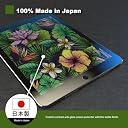
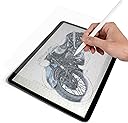
![Made in Japan Paper Texture Paper-Like Anti Glare Matte Screen Protector for New iPad Pro 2018 A1876 A1983 A1895 A2014 [1 Pack] [12.9 Inch]](https://m.media-amazon.com/images/I/71UesHO81ZL._AC_SL3840_.jpg)

Desertcart purchases this item on your behalf and handles shipping, customs, and support to Senegal.
🖋️ Elevate your iPad Pro experience with the ultimate paper-like screen protector — because your creativity deserves the best!
This Made in Japan paper texture screen protector for the 12.9-inch iPad Pro (2018 models) features a matte, anti-glare finish with 9H hardness TPU material. Designed to mimic the feel of real paper, it enhances Apple Pencil precision while reducing glare and fingerprints. Easy to apply with a humidity trick for a dust-free, bubble-free installation, it offers durable protection without compromising screen clarity.


| ASIN | B07KCGN8XW |
| Best Sellers Rank | #603 in Tablet Screen Protectors |
| Brand | Green Onions Supply |
| Brand Name | Green Onions Supply |
| Clarity | 90 |
| Color | Transparent |
| Compatible Devices | Tablet |
| Compatible Phone Models | for 2018 iPad Pro 12.9 inch |
| Compatible Tablet Computer Models | Apple iPad Pro 12.9-inch (3rd generation), Apple iPad mini 6 |
| Customer Reviews | 4.4 out of 5 stars 1,628 Reviews |
| Finish Type | Matte |
| Included Components | Paper Texture |
| Item Dimensions L x W | 6.6"L x 4.9"W |
| Item Hardness | 9H |
| Item Weight | 0.1 kg |
| Manufacturer | Green Onions Supply |
| Material | Thermoplastic Polyurethane |
| Model Name | RT-SPIPADP1812909 |
| Model Number | RT-SPIPADP1812909 |
| Number of Items | 1 |
| Part Number | RT-SPIPADP241309 |
| Product Dimensions | 6.6"L x 4.9"W |
| Screen Size | 12.9 inches |
| Screen Surface Description | Glossy, Matte |
| Special Features | High Definition Clarity |
| UPC | 872621009829 |
| Unit Count | 1 Count |
| Warranty Description | NO |
L**L
Content Customer :)!
Pros: -Installing was easier than I thought it'd be. Only trouble was me worrying about getting it on, but overall theres nothing that you can't go back and fix -Really love the toothiness of this product, honestly surprised it has only 35 reviews right now (I did get it on sale) -The paper like texture is really fun to play with, makes drawing and writing a lot more enjoyable than I had with ICarez Tempered Glass screen protector -Overall the product you're looking for if you really want a thicker paper feel Cons: -Can get annoying when swiping with your finger, it's just like how it'de sound if you were to swipe your hand on an actual paper which gets sort of loud. I'm not bothered by it too much, still worth the paper texture -I wish the installing process was more clear, instructions were vague and I was struggling to know what to do next -Makes the quality of the screen look slighty grainy, but very subtle. Personally, I kind of like the look, gives it sort of an aesthetic -The cut of the shape, atleast from my order, does not exactly line up with the ipad, but I managed to get it on the best I could. The cut of the circle is lopsided to the home button and the edges seem to not be completely straight. Not much of a problem now that I have it on, but def made the application process a little bit of a drag.
L**E
GREAT PAPER-LIKE SCREEN PROTECTOR! MUST HAVE!
I love the texture from apple pen to the paper like screen protector. I do not not how it feels when I slide my fingers on it though. However, over all I would highly recommend it if you are looking to make less mistakes and slips and slides when writing or drawing, whatever it is that you use it for and need more of a grip when doing it. When I applied it to my Apple iPad mini 5, I did it in the bathroom. I turned on the hot shower and also I turned on the hot water in the sink. I waited until it got a little humid and then I started wiping it down and followed all the rules that were provided within the package. I am so glad the application was perfect to each tiny spec and corners. No lint or dust particles were entrapped. It was a super clean application and it took about five to ten minutes to apply. Additionally, the bathroom trick with the hot water running to make sure the humidity vapor engages on dust particles dropping them down to the floor worked splendidly. I highly recommend this tip to anyone applying any screen protector to any of their devices!
J**N
Works on a Huion Kamvas 13
I bought this because I personally like a rough/paper like texture on my tablets. I figured the Wacom and Huion had a similar work space area and I was right! The cover fits perfectly over the working area so no problem there. Was easy to install but I take the time to make sure I work out all the bubbles. Bubbles happen its just air you can easily work them out with a credit card by pushing them out to the edges. Some of the smaller bubbles I couldn't work out BUT went away after I started using the tablet. SO The common factor here is it WILL wear down your pen nibs. Almost like if you were really using a pencil on paper. I don't really mind this, I use my tablet everyday and I don't apply that much pressure and I've only gone through one nib ( after three months of almost everyday use ) this doesn't bother me personally but it will wear down your nibs quite a bit. The seller did reach out to me to reiterate that fact so it really shouldn't be a surprise. Overall I love it. Its the exact texture I want when working on a tablet and I feel like the surface area is being protected since thats what I wanted in a protector. The texture and preventing the actual tablet screen from the scratches from wear and tear!
C**D
Great feel (with a couple caveats)
I always found the iPad screen way too slippery, which is fine when I’m inking something, but it made it extremely uncomfortable to sketch on the screen. The paper texture of this protector is no joke, it really does feel like paper. Although it’s not exactly like drawing in a sketchbook because the stylus nib is not nearly sharp enough, the protector makes sketching at least bearable now. It’s also feels very satisfying to rub my hands on the screen just because. There are two things to be aware of before buying this that you must keep in mind. First, there is a noticeable grainy texture across the entire screen (refer to photos. That’s not part of the art, that’s the effect of screen light through the protector). However, it’s rather easy to tune out once you get used to it. Second, it wears the nib of the iPad Pencil over time. I’ve had this screen protector on my iPad for about 6.5 months, and the result is the nib has sharpened to a point (third pic: normal nib on Left, worn nib on Right). The pros outweigh the cons for my situation since it allows me to actually sketch on the screen, but every person’s situation is different, so choose whether or not buy based on your own needs and preferences.
J**.
Feels, if not like paper, as close as you'll get!
I draw on my iPad for 4-6 hours a day at times, and had been using a regular matte screen protector until now. That worked okay, but I found even the mattes still felt "glassy." So I tried this protector out despite it being 3x as expensive--and was not disappointed! From what I've found, it lasts longer than the cheaper protectors I was using, and it has at least twice the grain. While it doesn't feel exactly like paper (it has slight rubberiness to the feel) it provides enough resistance for my Apple pencil that its close enough, and I've found it much more enjoyable to use than other options. I also watch a lot of TV on my iPad and this protector hasn't interfered with screen quality in any really noticeable way. In a month of use I have not noticed any smudging, scratching, or glare. This will be my go-to protector for now, and I recommend it to anyone using the iPad for art.
B**.
Exactly as expected, a bit noisey when swiping, but writing is great on it!
Title clearly states it’s for 12.9 WITH the home button. You should ignore reviews from people saying it doesn’t work on their 3rd gen iPads. Installation is not the worst I’ve ever done (I worked at that blue/yellow electronics retail store installing screens all day for a couple years), but not as easy as the tempered glass ones that are popular now. I had a couple of pieces of dust under the screen, but I just lifted a corner, stuck in a piece of paper with scotch tape hanging off the edge a bit, pulled out the dust, and pressed the air bubbles back out of the screen protector. Looks great. Getting it aligned perfectly took a couple tries (mainly, the home button and camera hole were tough to “center” both). The feel when using the Pencil is MUCH better than the bare screen. DOWNSIDE: It’s noisey when swiping your finger across it. Minor annoyance, but an annoyance nonetheless. It’s well-made, and works as intended. I recommend it.
L**Z
Works really well
This protector was exactly what I needed. I use this on the 12.9 2018 IPAD pro and it was easy to place and easy to remove any dust or particles if it got on the sticky side. Just used scotch tape to remove any along the way to place it on the display. I even transferred it another IPAD Pro at the apple store with no issues. It did not ruin it and it was still sticky. I used tape they gave in apple and did it right there in the store. They were impressed I could and no bubbles. I gave them tips how to do it for their customers too. The texture is matte and it writes nice using the apple pencil.
G**O
Excellent buy
Install is about as easy as can be but like any other screen protector, is nerve racking. I found that with a VERY light spray of windex on a lint free micro fiber cloth, cleaning the glass is superior to the sticky tape it came with. Additionally, any tape, including the one included can leave a residue on the screen which can be cleaned off with the included cloth. Also, some high quality clear tape (like in the video) is helpful for removing dust but not for lifting the screen protector off the iPad. For that I use a plastic razor (see photo and buy on Amazon). Once any dust is fully removed, use the plastic razor to push any remaining bubbles off. About as close to paper as you can get. FYI this is indeed made in Japan but cut in Taiwan. No biggie. Go slow, apply in a clean environment and you’ll be fine.
R**O
Agradable
No se siente como dice la descripción pero me gusta la textura.
J**U
LA MEJOR COMPRA DEL AÑO
en verdad es una maravilla te facilita mucho el hacer la transición de ilustrar de físico a digital!!! vale cada centavo
L**N
Excelente cubierta
Necesitaba una protección para la pantalla de mi iPad y está cumplió con mis expectativas. La textura es un poco rugosa para simular la textura del papel, lo cual me gusta más que una lisa. Se ve de buena calidad y grosor y hasta la fecha me ha servido bien, no la he cambiado todavía y uso bastante mi IPad.
B**D
Gives much better feel on palm and finger.
My review in bullet points: - No bubbles. Depends how it's put on ofcourse. - Feel wise: Pleasure to touch the screen now. No more sticky, cold, hard feeling against glass. Now it has level of softness (like dampening that hard glass feel). - Quietened Wacom Bamboo Pen noise against screen. (I don't use MS Pen as Bamboo more accurate). - It adds grains (as any matt layer does), however I prefer it, even on iPad. Because the rougher visuals give brain feeling of looking at paper, rather then pixel perfect screen. - Writing accuracy: Literally went from 4/10 pleasantness to 9/10 pleasantness with this cover. The writing experience so much closer to what you'd say "I wish this felt more like down to earth paper". Also straight lines retain their angle. With glass, the pen goes out of it's trajectory. With protector, the pen stays on path. - Brightness: Yes, it will dim brightness of screen by 15%. Meaning have to keep screen brightness higher. But totally worth it as matt finish deflects reflections by extra 50% then without the finish. Overall: No way I'm taking this off! Literally made me want to use SPro for sake of touching it's screen with either finger or pen.
J**Z
La sensación de escribir sobre papel
Me gusta mucho la sensación rugosa que es similar a escribir sobre una hija de papel.
Trustpilot
3 weeks ago
2 weeks ago