๐ Elevate your drive with next-level connectivity and sound.
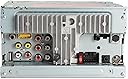
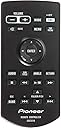
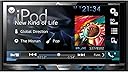
The Pioneer AVH-2500NEX is a double-DIN in-dash car stereo featuring a 7-inch WVGA LED touchscreen, built-in Android Auto and Apple CarPlay for seamless smartphone integration, Bluetooth hands-free calling and audio streaming, and a 13-band graphic equalizer for customizable sound. It supports multiple media formats including DVD/CD playback and comes bundled with Alphasonik earbuds for premium audio on the go.


| ASIN | B00O8B7AXW |
| Brand | PIONEER |
| Built-In Media | CAR STEREO |
| Color | Multi-color |
| Compatible Devices | iOS & Android |
| Connectivity Technology | Auxiliary , Bluetooth, RCA , USB |
| Customer Reviews | 4.3 out of 5 stars 430 Reviews |
| Display Type | Resistive Touchscreen |
| Global Trade Identification Number | 00884938260282 |
| Item Dimensions L x W x H | 11.1"L x 9.6"W x 6.4"H |
| Item Weight | 3.7 Pounds |
| Manufacturer | Pioneer Electronics USA Inc |
| Media Type | SD |
| Mfr Part Number | AVH-X5700BHS |
| Model Number | AVH-X5700BHS |
| Native Resolution | 800x480 |
| Screen Size | 7 Inches |
| UPC | 804067301090 778547963309 012304926894 884938260282 |
| Unit Count | 1.0 Count |
| Warranty Description | 1 YEAR |
S**T
Simply Amazing
This stereo is absolutely amazing. You'll need to process this review with the context that I have an iphone 5S. So, everything I am saying is based on my experience with this unit interacting with my iphone. Based on other reviews, I understand it can be a bit glitchy with other phones. That being said, if you don't have an iphone, you may want to save up for one of those and have this be your next purchase after that. On that note, this is the second best piece of technology I have EVER owned, second to the iPhone. I purchased this, the Sirius 300 tuner, the parking brake bypass (so DVD's can be watched while driving, hopefully just by your passengers), a dash kit, and an amp bi-pass wire harness. I paid $200 to have it professionally installed. Honestly, the unit looks like it was always meant to be there now that it's installed. Really clean looking and didn't clash with my car's dash much at all (Lexus GS300). The microphone is mounted near my rear view mirror and is barely noticeable. My car has a factory amp, which was bypassed as part of the installation. The sound quality from the unit is quite good. Crystal clear actually. The bass is definitely weaker than when I had the factory amp, but the other elements (mids and highs) sound better - more crisp. I wonder if my car might have had a factory sub woofer in it and perhaps it is now completely bypassed as well. The bass has really disappeared. So, if you like bass, you'll probably need to run through an amp. The best part: The bluetooth integration with my iphone is seamless. I get in the car and it connects automatically every time. Although, it seems like I have to hit the phone button to sync my contacts every time I get in the car. Not a huge deal, but it would be nice if it just did this automatically. Pandora works seamlessly. You do have to bring up the app on your phone each time you get in the car if you want to listen to Pandora. But once you're in, it stays connected, even if you switch to XM Radio and then back to pandora on the head unit. The Pandora interface is completely on the head unit, so I don't have to take my phone out to change stations, add stations, thumb up or down a song, or skip to the next song. It shows the name of the artist, album, etc. Sound quality is excellent via bluetooth and pandora. When a call comes in, the music stops and I can answer it from the head unit. If my contacts have synced up, I see who is calling. If I forgot to do that, I just see the phone number. Phone/talk quality is very good. I can hear people perfectly and they say that I sound clear as well. To place an outgoing call, I can either initiate it from my phone or the contact list on the head unit (assuming I've synced it since getting in the car) or I can place a call using a voice command. This can be initiated very easily from the head unit itself and basically just functions through Apple's Siri, but everything is heard over the car speaker system and picked up through the head unit's microphone (mounted wherever you end up mounting it). So, you press that voice command button on the head unit (icon of a person talking) and then say "call so and so mobile" or whatever and it works perfectly everytime (for me). I use voice to text a lot and I have to say there are more misunderstandings (typos) when I do it through the head unit microphone than when I'm doing it directly with just the phone. Not a huge deal. The XM radio works seamlessly as it should. Nothing controversial there. I've used navigation through my phone while connected. It interrupts my music to give me the next turn, etc. I can't seem to figure out if any of the compatible apps provide a visual on the screen. The DVD player works great and without issue. Didn't use the backup cam feature (I already know how to park a car without crashing into other cars/objects), but that's cool that it's offered. The "APPS" appear to be totally useless, but perhaps I'm missing something. I have no need for them anyhow - the unit is doing everything I need already. I had the unit professionally installed for $200 (labor only - I provided the parts, dash kit, etc.). It took 3 guys about 90 minutes to connect everything. The cost was much higher than a standard install because there was a satellite radio tuner and antenna to install, a microphone, an amp bypass, a parking brake bypass, and a dash kit. It would have been $150.00 without the amp bypass. When I was a kid, I used to install these things myself - it's not very hard to do. So, if you've got more time to burn than money, I don't imagine this would be too tough to self install. In conclusion, if you have an iphone, you will not regret purchasing this unit. I honestly feel like I have a new car again. So worth it!
L**E
Excellent radio deserving of a long review. Highly recommend!
Excellent radio. Did a lot of research with all brands on what features I wanted and needed. I drive a lot to and from work. So hands free calling and a mic were necessary. Bluetooth audio was also a must. After researching and trying to stay in a budget I settled on Pioneer and the found this model had everything I wanted and was the newest model available (2015). I installed it in my 2005 Yukon Denali. I got the GMOS-04 Bose wiring harness, the parking brake bypass, and a Clarion reverse camera with the lines in it. At the time I thought I'd like the lines, now they're useless and get in the way. My mistake though the camera is great quality and serves it's purpose. I asked a local shop first how much it would cost to install it all. Their pricing for parts was close to the same, a little higher, the labor was almost 300$. I decided to install it myself since I have done several car radios and a few flip up touch screen monitors. I'm not professional but am good at figuring things out. With that said this install was on the tougher side, definitely will make you think. I would not recommend doing it yourself if it's your first or your not all that comfortable or willing to go without a radio for a day or two while you think about it, in pure silence. Another thing for the people installing it in the denali and quite possibly the yukon, Tahoe, suburban, Silverado, Sierra. There is a piece of plastic you will have to cut out behind the radio for it to fit. It is simple and if you need help, if there is a way to respond to this please feel free to contact me. Back to the radio, I've had it for 3 months now and love It. I haven't had any issues with the Bluetooth or calling. I do notice if you lose service while listening to Pandora it won't always pick back up when you regain service. Sometimes restarting Pandora on your phone is required. It has a bunch of options for audio. It will take some time to fine tune to your listening, but I like that it's so broad with its EQ, crossover, and other settings. The option to have the camera on while driving or sitting does come in handy at times. It has an option for a second camera, which I plan on taking advantage of for the front. As well as I will probably place one on the tailgate of my trailer since the connection for the camera is at the back of my truck. I have never used the app radio feature since I do not have an iPhone. I have a Samsung Note 4 after reading reviews about Mirror link not working with the note 4, I held off on my purchase of the extra USB cable. I'm glad I did I feel as if the phone with Bluetooth works well enough that Mirror Link wouldn't matter anyways. The head unit has a rear USB port and comes with an extension to run it from the back out to the front. Right now mine runs down behind the 6 disk changer and under the cup holders in the center console and out to the cup holders where the cup holder lid opens and closes. I have plans to build it in to one of the empty plastic covers beside the traction control to give it the built in/factory feel. I did not purchase the steering wheel adapter yet will update once I install it.
B**S
Great receiver with a few drawbacks.
I'm loving this receiver but it does have some drawbacks. I've been a SiriusXM subscriber since 2004 (Sirius at the time before the merger), so the add-on SiriusXM tuner was a must as well. The functionality is very nice but I do have a few gripes about it. I had a Sirius Starmate receiver in my truck before and it had artist and song alerts. Let's say you really love The Beatles - when a Beatles song comes on you could press the memo button. It would ask if you wanted to store the artist or the song. Next time it comes on, the Starmate would alert you to that artist or song, whichever one you chose. I've looked all over the manual and through the Pioneer AVH-X5700BHS' settings and can't find how to do that anywhere. The SiriusXM tuner, SiriusXM SXV300v1 Connect Vehicle Tuner Kit for Satellite Radio says it supports that functionality but I guess Pioneer has chosen not to implement it in the receiver. That's a shame, but something I can live with. There are other things that bother me, such as only having 6 channel presents per screen. 10 would've been nicer. But there are other things that I absolutely love about the SiriusXM integration that I didn't have with my old receiver. This one will buffer the audio on your first 6 presets. So if you switch to a preset, you can rewind it to see what you might've missed. I love that feature and use it a lot - mostly with the Tune Scan button - it will go through and play a few seconds of all the songs in the buffer. When it starts playing one you like, you just click play to stop scanning. Very cool. Random thoughts... The ability to play from a USB stick is nice but in practice, this receiver doesn't exactly shine. When playing from USB, the interface becomes very laggy and slow. It works... but the interface isn't nearly as responsive. A one-button access to the camera would be nice to have. I installed the micro bypass switch MicroBypass ALL AVH-X Video In Motion Interface for Select Pioneer Receivers with this unit so that I can see video in motion. In order to see the rear camera I have to go into settings, camera and turn it on. To turn it off you just click the X on the image when it's displayed. But to turn it on again, you have to go back into settings, camera, and on again. HD Radio is nice to have. I had no idea it sounded so good. I live in the Atlanta radio market, which has got to be one of the worst in the country, especially for rock music listeners. But it's nice to have this option even though there are very few listenable stations. All in all, this is a great receiver with a few drawbacks but I'm loving it. January 14, 2016 - For the most part I still love this receiver but playback from a USB flash drive continues to be frustrating. I even bought a high speed stick (SDCZ73-128G-G46) hoping to see a performance boost but no such luck. Even after having the head unit build a database on the stick, the interface is so slow it's barely usable. And album art is very hit and miss on whether or not it'll show while playing. The AppRadio stuff is pretty worthless and I've given up trying to see any value in it. One good thing I have discovered though is that when connected to your phone via Bluetooth, the navigation buttons work with all the music services I've tried. Pandora, Google, Amazon music... the play, pause, forward and back buttons work from the head unit though album only displays from Pandora far as I can tell.
R**D
Great headunit for Sequoia with JBL premium stereo
I like the product very much. Startup time is relatively quick Mirrorlink and appRadio works very well with my HTC M8 but my wifes Note 4 only works with Appradio. I used Maestro SW to interface with my steering wheel and Metra TYTO 01 to JBL amp and everything works perfectly. Calling using voice command though works intermitently (pressing the voice button on the steering wheel sometimes brings out the voice icon in green and working fine or icon is red and would not accept voice command) ,handsfree calling is a charm people think I am not on speaker they say the sound quality is clear like I am directly speaking on the phone. Pandora radio works seemlessly It connects immediately everytime I start my car. All controls and selection can be done on the screen.Bluetooth reception is a little weak, connection is fine if my phone is in my front shirt pocket or outside my body but as soon as it gets a few feet away just outside the driver side or the back seat the reception stutters (just leave the phone in direct sight to the HU). The same phone can actually maintain a good connection up to about 25 feet away with the OEM headunit the same goes with my wifes note 4. There are a few wishes I would like to have with this headunit. First is Messaging integration, i would like to be notified if a message is recieved and be able to hear the message read. Appradio is very limited at the momment I hope to have more apps avialable. Mirrorlink is a little better although you can adjust the display to enlarge the mirrored phone display I wish the display can be enlarge to full screen without the home button and return button being displayed and taking up real state.Lastly I hope Pioneer update their software to include vehicle info since they advertise that its compatible with Maestro RR otherwise just advertise that its compatible to SW since you only get steering wheel control .
A**Y
Great BT model Super easy to install. Lots of features.
Super easy to wire up. Just make sure you get the correct harness for your car and get the bypass to watch video and metra axxess steering wheel adapter to retain your steering wheel controls and do it all at the same time. This was my first install and it was very straight forward and everything works great. The shop wanted $200 to wire it all up so I decided to give it a shot myself. Just bought all metra products and some butt connectors and had it done in about 2 hrs. Blutooth is a must these days. Pairs perfect with iPhone 6. So much more convient and safe. The mic was also easy to run to my steering column. This is my 3rd Pioneer head unit and this one is my fav for sure. HD radio sounds super clear compared to regular am fm. That's the only difference between the 4700. You get cd quality for your local stations. App radio live is only ok. Prefer to run Apple maps from my phone. Also can only use iTunes when using maps in app radio. Cool idea just not there yet. This unit makes your speakers sound way better. Also great eq to customize everything. Can't beat the price.
W**A
Notning but technical flaws.
Nothing but technical trouble, and no help from Pioneer! I had this professionally installed, and have had nothing but trouble with it. I have made SIX return trips to the installer for service, and nothing has helped. At first, the stereo would arbitrarily decide not to produce any sound at all, even though it connected to my Bluetooth, or would accept CDs, radio, etc.--all the music data appeared on the screen and time would elapse as the songs played, but no sound. The only workaround was to completely turn my car off and re-start; turning the Pioneer off wouldn't reset it. Once I had sound (cheers!), it would persist as long as my car was running. If I stopped, the gamble began again. The failure rate was over half. Pioneer emailed me back that it sounded like a bad bluetooth circuit, but when I replied that this happened to ALL forms of audio, not just Bluetooth, Pioneer stopped replying. Their last reply was July 31, 2015 (Product Support|A00002|4052191384). Since then, the stereo has manifested other problems. It will randomly drop out the sound entirely for several seconds. I have verified that this is not the fault of the music source, i.e. my phone or CD, nor it is the fault of any wiring (I've had the entire harness and control module both replaced TWICE). Then it began dropping out the front or back speakers at random (again, I've tested and verified that the speaker circuitry is NOT at fault). If I bump the dashboard above the stereo, the speakers come back--which sounds like a wiring flaw, but after replacing all circuits twice and testing the connections, including manually shaking the harnesses to see if they disconnect, the fault is entirely with the stereo. Pioneer's initial advice was to use their website to find a warranty service provider, but there is NONE anywhere in my state, so Pioneer won't actually provide warranty repairs. I've demanded a replacement from Pioneer, who has stopped replying to my support tickets. Next step: small claims. As to the unit itself, be aware that the screen is so reflective it washes out entirely in sunlight--you WILL have trouble seeing it at all. UPDATE (Nov. 2015): Pioneer has now written me back to say that since they don't provide warranty work in my state, I must--AT MY OWN EXPENSE--have the stereo uninstalled, then ship it (insured) to Utah. I would drive around with a hole in my dash (for who knows how long? They don't say), and eventually pay to have it reinstalled again (I have reinstalled this stereo twice already in an effort to fix flaws). Remember, I get to pay these expenses myself because Pioneer's warranty insists I get service through authorized providers, that Pioneer then doesn't even offer in my state (Colorado). Remember, I've written to Pioneer since Week One (Late July) about problems, and this what it's like to deal with them. I wish I had never bought a Pioneer.
D**B
Album Art (YES)
I am very happy with this head unit. I initially purchased a 2015 model JVC. It wouldn't display any album art via bluetooth/pandora. It wouldn't call out via bluetooth when trying to initiate the call from the head unit. The good news is this model Pioneer displays album art via Pandora, iPod, Sirius, USB etc. I can make phone calls initiated form the head unit and thus far when I've called folks they tell me it sound very clear and loud. I did purchase a DIYBypass, which also works great with this head unit. Video looks beautiful (no I won't watch it while driving) Overall I think this is one of the best head units I've ever owned. One issue I did have is upgrading the firmware. I own a Mac computer and apparently Pioneer requires that the flash drive not have any files other than the firmware file. I finally had to just format the flash drive on my work PC, then add the firmware file to get it to actually upgrade. What an upgrade it was. It actually added features AppRadio, Sirius Features and overall seems to speed up the system overall. Very pleased about that. Update: 1/1/15 I feel I need to update my review; I have a Samsung Galaxy Note 4 running Android version 4.4.4 I have experienced a lot of studdering out of audio on bluetooth audio and Pandora. I tried turning off anything on my phone that I thought remotely maybe causing this. Then I did some research and discovered that this version of Android seems to have bluetooth issues. I can confirm that the issue here is NOT the AVH-X5700BHS because I have connected my iPad Mini via bluetooth and it never stutters. I am very disappointed by this, but I cannot blame the head unit. For as much as I like my Note 4, I sometimes wish I would have gone with the iPhone 6 Plus. I just wanted to let you all know what I had encountered. Really wish Samsung or Google would fix this issue on the Note 4. Update: 1/2/15 Here is another update, come to find out if you leave the Galaxy Note 4's display on the stuttering bluetooth completely goes away. It seems that when the display goes to sleep, the Note 4 goes into some sort of reduced power mode and this also impacts processor thereby causing the stuttering. I am not really a fan of leaving my display on as this will greatly impact battery life. I did download a little program (Keep Screen on Free) that will allow for this. MirrorLink, thus far I have not been able to get MirrorLink to work, this isn't really a big deal to me, though I think this issue needs to be resolved because this is likely a big draw for most Android phone owners. I was told there is an adapter that is required, but I have no way of confirming that information. Overall, I am still loving this head unit. I plan to keep it! 11/23/15 I am still trucking along with this head unit. I have finally decided to give up on Android Phone though and switched to an iPhone. I like the way the iPhone works with this head unit much better. No more stuttering/skipping bluetooth. Album art works great too. I just recently picked up a 2nd vehicle and I am considering buying the new 2015 model for it.
F**E
On a good note, they are all the same color
I graduated from an old Pioneer 3200 to this unit last weekend, and I am very impressed. It is light years ahead in features and quality compared to the old unit, which was no slouch itself. If you've owned a Pioneer head unit in the last 5 or 6 years, it won't take you long to figure out the menus and options on this one - it is a familiar Pioneer interface. In almost every HU I've owned, I could make a short list of things I wished the manufacturer had done differently, or done at all. This is truly the first one I've owned that seems to have covered all the bases and done it with competence. The only "warning" I will give is a minor one. If you are replacing an older Pioneer HU with this one, you should be aware that Pioneer has changed the wire arrangement in the chassis plug at the back of the unit. In other words, don't expect to just remove your old unit and plug your adapter harness into this unit because Pioneer has rearranged the order of the wires coming out of the plug. On a good note, they are all the same color, so it's a simple matter of cutting and re-splicing and you're good to go. In short, I am very, very pleased with this unit. Money well spent.
Trustpilot
2 weeks ago
3 weeks ago