🖨️ Don’t let clogs kill your workflow—clean smarter, print sharper!
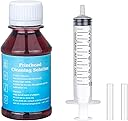
TBTeek Inkjet Printhead Cleaner is a 100ml high-performance fluid designed to dissolve printhead clogs causing streaks and incomplete prints on HP OfficeJet Pro 8600 series and compatible models. With an 80-90% success rate, it restores print quality without disassembly, supporting multiple ink types and saving you costly repairs or replacements.


| ASIN | B07HN32LL8 |
| Best Sellers Rank | #646,411 in Office Products ( See Top 100 in Office Products ) #21,788 in Inkjet Printer Ink Cartridges |
| Brand | TBTeek |
| Built-In Media | Printhead Cleaning Fluid (100ml), Syringe (10ml), 2x Syringe Tube, Instruction Manual |
| Cartridge Type | Genuine |
| Color | Red |
| Compatibility Options | OEM |
| Compatible Devices | Printer |
| Customer Reviews | 3.7 out of 5 stars 945 Reviews |
| Ink Base | Water |
| Ink Color | Red |
| Ink Colour | Red |
| Manufacturer | TBTeek |
| Mfr Part Number | 4A-015-10037-HPQ001 |
| Model Number | 4A-015-10037-HPQ001 |
| Model Series | 8600 |
| Number of Items | 5 |
| Number of Packs | 1 |
| Other Special Features of the Product | Refillable |
| Printer Model Compatibility | HP Officejet Pro 8600 |
| Printer Type | Inkjet |
| Special Feature | Refillable |
| Specific Uses For Product | Inkjet printer maintenance, printhead cleaning |
| Unit Count | 1 Count |
E**Y
Worked perfectly for HP 8620 Printer
We love our now 5+ year old HP 8620 All in One Printer. However it had recently started acting up and not printing correctly if at all. I did a test page from within the HP Print Doctor App (now you can do the same thing within the HP Smart App) and could see that the Magenta and Yellow colors were not printing, meaning a clog somewhere in the system. Rather than replace the print head ($175+) or buy a new printer ($300+), after researching the internet for solutions it was recommended to try to clean the print head first. As we are way beyond the warranty period, I figured what have we got to lose. I paid $14.99 for this kit. While you can find the recipe for the cleaning fluid on the internet, I think there is plenty of fluid that comes in the bottle with the kit, so you should not have to make it. The directions are in color and very helpful. I only needed about half the fluid or less to clean out the clogs, but while I was there, I opted to clean all four colors, and use all the fluid as I don't envision redoing this process if successful. The only problem I had was dealing with the dreaded "Ink system failure" error that is prevalent on this series of HP printers. None of the solutions I searched on the internet worked, but I eventually was able to see in the HP Smart App that for some reason the printer thought my new HP factory black ink cartridge was very low. I swapped it for another one I had and although I got a warning about using a previously used cartridge, I could at least get past the error. I'm not sure I will buy another HP printer again, as that particular error won't let you access the menu and conduct any kind of a hard reset. Extremely annoying. I hope to get another year or so use out of this printer and then move on to a new one. If it lasts that long, this cleaning kit was more than worth the money.
V**Y
Read the Instructions all the Way through before you Start
The product worked and cleaned my printer head on my HP OfficeJet Pro 8600. The instructions are worded a little funny which had me wondering if I was doing it right or not. For example: Step 2. ". . . Heat the water in the glass cup in the microwave to 130 F . . ." Huh? What cup and what water. This is the first mention of any cup or water. Later it is explained that you are to heat the cleaning fluid. That being the case, they would have been better off saying. . . "Heat the cleaning fluid by first heating water in a glass cup to 130 F. . ." Step 3. "Select a container slightly longer than the print head. . . " then goes into detail about how deep the container should be. I mention this because this would have been better if they started with the goal of the step which is. . . Soak the Printhead in the warmed solution. Step 4. "Leave the printhead soaked in the solution for 8 hours." What? 8 hours of soaking. Didn't see that in the description on the Amazon listing. At this point I decided the instructions were more like guidelines as they are full of assumptions that the manufacturer just sort of hopes you figure out. I set them aside and push forward on my own. I let the print head soak for oh. . . 20 minutes, then fill the syringe and pumped the fluid through each port. Let it sit for a few minutes, then did it again. used the remaining fluid and a soft cloth to do a general clean up, and inserted the printhead back in the printer. Re-loaded the ink cartridges, then turned the printer on. The printer immediately went in re-alignment mode. RESULTS It printed without the streaks and blank spots I had been getting. . . So IT WORKED!!! One final note. When I was cleaning up my drip pan, I found that the ink was water soluble. Hot water broke down the ink and solution in the drip pan leaving no visible residue in the pan itself. This did make me wonder if I could just clean the printhead with hot water and the syringe. Try this at your own risk!
Z**K
Worked great for my Epson 8600 Pro
This product actually worked for me. I warmed a glass of water to allow the solution to warm to the 140°f as the instructions suggest. I kept it at temp by placing a pot inside of a pan of water.. (look at pics). I didn't let the head soak for 8hrs like it says. I left it for about 45 min. I flushed all the passages with warmed solution.. Also re-secured the air bladder film because mine was separating (which is probably why I had the "problem with ink system error". I used LOCA UV activated glue used for cell phone glass replacement.. Worked perfectly) I also resoldered all the leads for pins and connections because some looked questionable. My print head definitely had a small blockage on the black ink which is why my printer kept quickly eating certain other colors up. I'm glad I spent the time to do all this.. It finally allowed the error to clear, also when doing this.. Make sure you start off with new fresh ink cartridges to do the system print page test, and alignment test. The ink cleaner solution is enough to do the cleaning,however another bottle would make it easier so you aren't trying to ration it so much. I flushed each passage 2x and also did a push /pull on the last. Take your time. Printer prints just like when it was new. Very crisp. Great value.. The syringe with tube fits perfect on my Epson 8600 pro
A**R
Buyer Beware!!!
My HP Officejet 8625 was not printing any black ink after changing the cartridge. I did some quick research online and thought I would give this cleaning kit a try. Upon taking apart the printer head I noticed that one of the plastic tabs had not been fully removed from the black ink cartridge which explains why I was not getting any ink in the first place. I decided to clean the printer head anyway and followed the instructions as described which were easy to follow. I installed the printer head and ink cartridges the next day and now my printer does not function at all. According to HP, I need to buy a new printer or a new printer head which is not a guaranteed fix.
B**Y
Didn't Work For Me
Torn deciding what rating so I split the difference. Ordered this product when my HP 8600 began to give me printer head issues. After using the product, I printed two documents, then the printer head errors began again. Decided to just replace the printer head, but when direct from HP after reading all the negative reviews from suppliers on Amazon. Happy to say, once I installed the new printer head, no issues.
K**H
It worked! Here's some tips!
We had clogged yellow and cyan jets in an HP OfficeJet Pro 8610 printer we've had for years, and I had doubts that this cleaning kit would work. Was preparing to buy a new color inkjet printer, but this kit saved me hundreds of dollars. Kit contains enough solution for at least 2-3 cleanings, depending on how many jets are clogged. Our first cleaning didn't yield great results, so we tried a second time. Per the instructions, it helped to heat up the plastic tray of solution a little bit (we put it in the microwave for intervals of several seconds each until it felt warm to the touch, not hot). Also, it helped to gently agitate the print head in the solution after soaking, which we did at brief intervals numerous times during the second soak. By agitate, we mean lifting and lowering the print head in the solution numerous times in the shallow tray of solution to move fluid in/out of the jets. Both of our soaks lasted at least 8 hours (e.g., overnight). After our second soak, which included warm solution and physical agitation, printed pages looked much better but not yet perfect. We ran the printer's built-in Print Head Cleaning Tool patiently several times until the results looked great with no noticeable clogged jets. In the end, full-color, full-page, and even photographic test prints looked very good. Be sure to try your highest-quality print setting while testing to use maximum ink and to see the best possible job your newly cleaned print head can do. In the end, ours came out like brand new or very close to it! Good luck!
V**R
Didn't work!
Did not work. There is no way to tell what is wrong with the print head, which is why I give this 2 stars. Very messy. If you buy this, wear gloves.I wouldn't waste my money on this again. Just ordered a new printer.
S**3
This kit is really easy to use and will save you money. Keeps print head in shape ‘til the new.
The kit is worth the price and time to clean the print head. It’s best to try this first if you don’t have it to buy a new print head. My head was printing small white lines on the cleaning pages. So, after I went through head cleaning process it went back to normal. Will be purchasing the kit again to do periodic cleaning. Great product but you will have to go to the dollar store to buy some accompanying products like small shallow plates for soaking the print head, plastic wrap for the print cartridges, and maybe some paper towels for excess ink. Other than that this is all you’ll need to get the print head back on track.
M**N
Doesnt work
Not work May be it works for some printer head but for my printer nothing happened and i buy new printer
P**E
Did not solve my problem
This did not solve my problem, despite very carefully following the instructions.
M**R
Persistence pays off
This kit really worked for me.I have an HP Officejet 6978.. Followed an online video using strips of paper towel versus removing the print cartridge as the instructions showed, and it worked great. It did take three applications, so don’t give up. My printer works perfectly now. Good product.
A**R
As Advertised
as promised it worked
B**E
It worked as it was explained
When the product arrived did the print head clean now my printer is like new again.
Trustpilot
4 days ago
2 months ago