Desertcart purchases this item on your behalf and handles shipping, customs, and support to Senegal.
🚀 Elevate your connection game—never miss a beat or a byte!
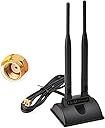
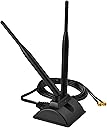
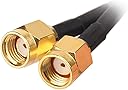
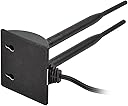
The Eightwood WiFi Antenna features a powerful 6dBi gain and dual-band 2.4GHz/5GHz support, with a 6.5ft magnetic base extension cable for flexible, omnidirectional placement. Compatible with WiFi 6/6E and Bluetooth devices, it significantly improves signal stability and speed, making it ideal for routers, PCIe cards, security cameras, and FPV equipment.


| ASIN | B07JVDNDCR |
| Antenna | Radio |
| AntennaDescription | Radio |
| Best Sellers Rank | #6 in Computer Networking Antennas |
| Brand | Eightwood |
| Color | RP-SMA Antenna |
| Customer Reviews | 4.5 out of 5 stars 3,800 Reviews |
| Impedance | 50 ohm |
| Item Dimensions L x W x H | 3.15"L x 2.95"W x 8.66"H |
| Item Weight | 8.47 ounces |
| Manufacturer | Eightwood |
| Maximum Range | 200 feet |
| Mfr Part Number | EWAN0114GE |
| Model Number | EWAN0114GE |
| Number of Channels | 10 |
| Number of Items | 1 |
| UPC | 607841575423 |
| Unit Count | 1 Count |
| Warranty Description | 12 Month Manufacturer |
B**Y
Much better reception on Bluetooth, would guess it would work for wi-fi as well
I picked this up after getting a new PCI-E card with bluetooth and wifi and having some issues with the signal being weak and cutting out. Things like streaming music or playing games via bluetooth earbuds cutting in and out, or a connected bluetooth controller cutting out intermittently. I figured it was due to the antenna being behind the case and almost against the wall. Installing these were super easy. It comes all put together. All I had to do was unscrew the old antennas, screw in the antenna connection wires, the put the antennas in a place that would pick up signals better. The antenna base is magnetized so it'll stick to the side of a metal case or any other metal surface. It also has a couple of screw mounts in case you wanted to hang it on a wall which is what I elected to go with. Very pain-free. Bluetooth reception was MUCH improved. Had no issues with with any devices connected via bluetooth even using them at the same time. The range increased dramatically (I think I was actually a bit farther than the advertised range of the earbuds I have) with no issues to quality. The wifi signal was just as good as the original antennas, maybe a touch better. I should be getting better speeds, but I think the issue is more ISP or older modem/router than this item (or the PCI-E card) so I won't take anything off since there was no decline in reception. If you're having issues with bluetooth reception due to poor antenna placement, I can say with certainty this will fix the issue. Totally worth the investment.
P**T
Significantly Increased My Wi-Fi 6e Speed & Stability
I recently installed the Cudy AX5400 WiFi 6E PCIe Card (Model WE4000) in my desktop computer. The router and the computer are 60’ apart in different rooms. There are 2 walls, a refrigerator, microwave, and two OTA television antennas between the router and computer. The antenna that came with the WiFi 6E PCIe card is very similar to this antenna, it’s on a magnetic base with ~ 4’ of extension cable. That original antenna worked but even after I determined the optimal location and position, the signal strength and WiFi speed kept jumping up and down from one minute to the next. With no other devices connected to WiFi, the speed would fluctuate between 55 – 191Mbps (up), and 100 – 260Mbps (down.) I thought a different antenna with a longer extension cable might reduce those wide 150Mbps swings in up/down speed, so I purchased this. This antenna is SO much better, but not because the extension cable is 2 ½ feet longer. This antenna and the original antenna had the strongest signal in the same position and location. This antenna not only increased my up/down speeds by more than 30%, but it also brought those wide 150Mbps speed swings down to a tight 20Mbps. With this antenna in the same position and location as the original antenna and no other devices connected to WiFi, the speeds constantly stay between 290 – 310Mbps (up), and 300 – 311Mbps (down.) When I made this purchase, I wasn’t very optimistic. I thought it might even make my WiFi signal less stable and/or reduce my connection speed. I figured it would probably be another cheap imported piece of junk that I’d have to pack up and send back to Amazon. But this cheap import actually works! Thanks to this antenna, I’m finally seeing maximal benefit from my upgrade to WiFi 6E.
D**N
great for relocating wifi antennas to improve reception
So far this antenna extender is working well. My pc was not getting a great connection due to the case essentially sitting inside a metal box, right next to a bunch of other equipment. This cable is has plenty of length that allowed me to get it out of the way, and still have enough to do some cable management. The wifi signal was much better, but I only have 2.4 and 5ghz, so I can't say if wifi 6 or 7 would be effected. My bluetooth connectivity also improved. The magnet on the base could be stronger. I've had wifi antenna's that came with motherboards that had stronger magnets. However they do the job well enough. This won't magically make your signal better, or boost the strength of your wifi. But if your stock antennas are poorly positioned, you can use these to better position your antenna to get slightly better signal.
A**E
Better than stock!
I've been wanting to try a better antenna system than what comes stock on my computer, and I'm glad I did. So far, the main dead spot that has plagued me for a long time is gone (there's a stainless steel refrigerator in the way). There is still one dead spot but I'm rarely there, and everywhere else is better reception.
D**S
Recommended: Simple and GOOD antenna extension with a base
If you are having trouble with your PCI mounted wireless card antennae being pushed back among cables and behind a tower causing a degradation of your wireless signal, this is the answer. All it really consists of is a pair of leads that extend to the antennae mounted to a magnetic/weighted base. There is no extra circuitry and no magic involved, it simply allows you to position the antenna in a better place. In my instance, my connection was 5X faster after simply hooking it up and putting the base on top of the CPU. I am old school about magnets (I go back to the days of audio and video cassettes, un-shielded speakers and hard drives) and even though I've researched and read that even moderate strength magnets cannot affect modern hard drives, I still do not like to get any magnet near my tower... and that's with my operating system being on a SSD, so you see how careful I am! All that being said, under the foam pad on the base are four screws that attach the metal base to the plastic top. The metal base has two very weak magnets which act more like weights than anything. I removed the base and discovered that the magnets are not permanently attached. I so simply removed the magnets, cleaned the base off and reattached.
R**S
Works great!
I broke and subsequently lost the antenna that came with my ROG Crosshair VIII Hero. With the base broken, I wasn't able to position the antenna, which meant poor signal; also, the cable was too short. This antenna has a good plastic base with a hefty magnet that lets the antenna attach to the case side so it doesn't block the top case fans. Also, the cable is nice and long, meaning I can mount the antenna with quite a bit more flexibility than the original. Signal strength is much better than the OEM, at least for bluetooth. I haven't tested Wifi, I have an ethernet cable for that because we have 1gbit fiber. The PC is on one end of the house and I walked clear to the other end (about 25 feet or so) and no dropouts). I really like this antenna and won't hesitate to buy more if I need them.
J**B
For the price-point, cheapest immediate improvement of signal strength
I've recently moved to a larger house/space, and with that a router whose location has grown from my desktop. Typically my signal has been at the maximum I subscribe to from my provider, but upon moving its been incredibly sporadic given the distance the signal now has to travel (additional feet, floors, walls). Prior to using this larger antenna I was at about a third of my maximum data speed, but immediately after installing these and *positioning* the antenna in the direction of the router, its has consistently been at maximum speed once more. Before this I was spending hours positioning my router as best I could for the sake of my desktop's signal, but to be honest this inexpensive purchase took all the headache and guesswork out of the equation. The added benefit of this antenna beyond the ample cable length provided is the magnetic base. I have it on the side of my desktop's tower and it's incredibly sturdy for everything its holding. I honestly have no cons with this product and would recommend it if your signal is sporadic or giving you issues. Hope this helps everyone in their future shopping!
K**W
Average Performance
I bought this antenna based on favorable reviews but was disappointed with its real-world performance. I used this antenna on a Linksys Range extender and a desktop using WiFi on board the ASUS motherboard. In both cases the Eightwood antenna was unable to match the performance of the original antennas. The range Linksys Range Extender saw a drop in signal strength, quality for receive and transmit when using this antenna. That resulted in a loss of throughput and slower downloads speeds for the clients connected to the range extender. The desktop saw a drop in signal strength and significant loss of download speed compared to the original shark fin antenna. With a longer cable, the Eightwood antenna provided more options to find ideal location but even so the best signal I could achieve was -70dBm compared to -59 dBm for the original ASUS sharkfin that is limited by its short cable. Regardless of where the Eightwood antenna was placed, best download speed I could achieve was 185 Mbps compared with 435 Mbps using the stock antenna. Download speeds were tested using Ookla Speedtest.
G**R
Perfette per il mio scopo, risolti i problemi di connessione.
Semplicemente perfette. Ho il pc (con wifi integrato sulla motherboard) in una scrivania chiusa, e le antenne dietro il case non riuscivano a prendere quasi nulla.... impossibile anche aprire una pagina web, speed test a poco più di 1 Mbps... tirando fuori il case dal "buco" andavo a poco più di 10 Mbps, con queste antenne appoggiate sulla scrivania vado in media sui 50 Mbps!! I miei soldi meglio spesi. :) E questa è una recensione vera, non come le tante farlocche Vine e simili che si leggono purtroppo spesso. Straconsigliate.
N**O
goed product
doet wat hij moet doen, ik merk wel dat mijn controllers waar ik het voornamelijk voor gebruik beter en sneller verbinden. heb het net een paar dagen dus over duurzaamheid kan ik nog niks zeggen.
Ü**R
Cevap
Cevap bekliyorum
C**S
Great to extend your Bluetooth range!
I have a PCI-e wifi/bluetooth adapter with two antennas on it. Wifi never had issues, and while the BT range was good, it wasn't perfect: my main PC is on the 2nd floor and my bluetooth headphones would cut out just short of the basement, along with a few other blind spots. It would also completely cut out if I went outside. I knew that the problem was likely due to my PC being in a bad spot for antennas to get a clear signal through. I ordered this set hoping I would be able to place my antennas in a more optimal spot. I connected it and set the antenna cluster about 6ft away from my PC, facing towards the rest of the house. I then tested to see if range had improved. It can reach the basement, now. All the blind spots are gone. Wait... it's also working outside. I walked across the street... still working. Walked two houses down... and finally it started cutting out a bit. Bottom line, this antenna cluster has extended my bluetooth range by a factor of five. Impressive how much antenna type, placement and diversity makes a difference!
M**U
Augmente l’intensité du signal … dans certains cas !
Mon PC est sous un bureau en bois, à l’angle de deux murs épais, et assez loin de ma box. J’avais un débit wifi de 5Mbps (fibré 300Mbps à la box) En déportant les antennes sur mon bureau, je suis à 240Mbps ! L’intensité du signal est passée de -85dB à -62dB, et il est stable. Quelques remarques : - Testez plusieurs orientations (antennes parallèle à la box, perpendiculaires, horizontales ou verticales), l’intensité du signal peut en dépendre - l’aimant est assez faible, mais la plaque dessous est pré-percée pour être fixée au mur si on le souhaite. Elle est en feutre la rendant antidérapante - les câbles coaxiaux sont assez rigides, mais collés entre eux ce qui simplifie le routage.
Trustpilot
5 days ago
3 weeks ago