🎮 Capture Every Frame, Stream Every Moment — Stay Ahead of the Game!
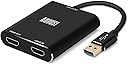
The August VGB500 HDMI Gaming Video Capture Card delivers smooth 1080p60 gameplay capture with lag-free HDMI passthrough. Compatible with all major consoles and both Windows and Mac, it offers effortless USB 3.0 plug-and-play setup, making it the perfect entry-level streaming and recording solution for gamers seeking professional-quality streams without the hassle.


| ASIN | B07JMCM9T7 |
| Best Sellers Rank | 45,770 in Computers & Accessories ( See Top 100 in Computers & Accessories ) 51 in External TV Tuners & Video Capture Cards |
| Guaranteed software updates until | unknown |
| Item model number | AUG VGB500 |
| Manufacturer | August |
| Product Dimensions | 20.6 x 6.1 x 1.5 cm; 71 g |
B**K
Easy to use, minimal issues
I was torn between buying this or an elgato, i saw the proce difference and tookthe gamble. I have never heard of this company before so i was a bit unsure how to feel. But after it arrived i hooked it up and gave it a little test, it was easy to setup and was pleasantly surprised to find how easy it was to use and the quality was smooth and looked just how it did on my ps3 screen. I havent tested it streaming yet but recording worked perfectly. All u need for this is a pc, a console you wish to record/stream from and OBS on your pc/laptop The usb plugs into your PC, and you connect hdmi from console to the hdmi input on your capture card, and connect hdmi from the hdmi output on the card to your monitor/tv. Then boot up obs and set up a source for "video device capture" set to "FHD capture" and also a source for "audio input capture" also as "FHD capture" Then tweak settings how you like and click record/stream then boom, away you go recording watever your console sees through your obs software
S**S
Works as intended, can have a few problems
I've been using this capture card for roughly 5 years. And it has stood the test of time. It's perfectly designed for me so that I can view my games on source (as if I was playing it on a TV or monitor) while also being able to capture the screen, making any lag issues when watching on OBS obsolete when streaming. It does disconnect easily, although that might be because of age more than anything. The USB wire is fixed to the device, and is quite inflexable unlike shown in the product images
M**E
Best In Class
For the cost of this, there's simply no better capture card your money can buy. I haven't tested at full 60fps 1080p yet, but running at 720p/60fps I can record for two-plus hours without a single video artefact. That said, there are a few moments throughout the recording where the audio almost seems to be playing catch-up, but that could just as likely be related to OBS as it could with the device itself. It's worth noting that you do not need to output HDMI if you don't want to, and in fact in terms of recording video and audio over USB while simultaneously overlaying mic audio it's preferred (at least by me) not to. It's also very handy that it's used over USB rather than PCI, since it means I can use it on either my laptop or desktop depending on which room in the house I'm recording in. Overall, incredibly happy with this purchase. [Obligatory disclaimer: I did not receive this product for free, and I was not paid for this review]
A**R
Worked But With Green Hue On Picture
Right out of the box I got a picture in OBS on my PC. There's no doubt, in principle, in worked. However, when examined against the camera straight into the same monitor on the same settings there was a distinct green hue over the picture when using this product.
B**7
Some problems with it
I purchased this capture card as a means of streaming my gameplay onto my Facebook gaming page, but I have had some problems with it, sound has dropped of it from OBS, the video quality isn't the best, it struggles to capture 60fps which for streaming is very bad. I then thought about streaming on twitch but the capture card is not supported on twitch and I may be looking to get a new capture card, possibly an elgato capture card
L**S
Works and is very cool, but seems to lose quality
I've actually used this to use a Mac on a pc using the camera app, and share via zoom. Hilarious awesome tool. Needs usb3
T**M
Overall okay
I like the idea of working with plug and play sadly this didn’t work to well. Tech support was email or on a paid phone line. Overall I’d just stick with elgato wasn’t really worth the money. Picture quality wasn’t as good as advertised this for sure needs work!
G**N
Good Build Quality
Works straight out of the box with OBS Studio, good picture quality. OBS is a power hungry app.
T**.
Die Karte funktioniert mit etwas rumprobierem einwandfrei. Wer Probleme mit dem Sound oder dem Bild hat sollte sich diese Rezension durchlesen. Ich habe die Karte das erste Mal an meinem Front USB 3.0 angeschlossen. Erstes fazit war hierraus das es zu einbußen in der Übertragung des Bildes, aber vorallem des Sounds kam. Da ich jedoch aus Erfahrung weiß das front usb nicht immer gleich gut überall funktioniert, versuchte ich das ganze am front USB 2.0 Anschluss. Da wurde die Bildqualität dann wenigstens stabil, jedoch der Sound war immernoch sehr hakelig. Im Endeffekt schloss ich es dann am dem usb 3.0 HUB meines monitors an, dieser ist direkt an einem USB 3.0 rear-port verbunden. Hier lief alles einwandfrei, Bild sowie Tonübertragung Top und sehr flüssig, und in OBS einwandfrei einbindbar. Da auch ein seperater Sound Anschluss in Windows angezeigt wird, kann man diesen dann auch als Wiedergabequelle am PC einstellen, so dass man beim zocken keine zusätzlichen Lautsprecher oder ähnliches benötigt. Fazit, endlich eine Leistbare günstige Alternative zu den teuren Karten für Gelegenheitsstreamer :)
O**R
J'en ai acheté deux pour pluguer des caméras en HDMI ca fonctionne très bien. Détecté aussitôt par tous mes logiciels d'acquisition video. Ils fonctionnent très bien en FULL HD. Les petits boitiers sont chauds a l'utilisation mais rien de catastrophique. Je recommande vraiment
Y**4
It works as advertised, picture quality is decent. Something that we all need to remember is when you are streaming a video game you are only streaming in 1080P you are not streaming in 4k. so a card like this is good enough for the most part unless you're picky and you want to see 4k on the other end while you are gaming. something to remind yourself you can only stream mostly in 1080p so you are going to be seeing what your audience sees with this. now if you're using this to record videos to produce in 4k thats not what this is made for. For beginning streamer this is a great device. OBS and Streamlabs OBS had no problem seeing it and working with it. I'm using it with my GoPro Hero 8 and it works Amazingly. If your color is off you might want to check your lighting, so much can be fixed with good lighting
U**R
El funcionamiento del dispositivo es muy correcto, W10 y OS X lo reconocen sin necesidad de instalar ningún driver, es compatible con todos los software de captura de imágenes como OBS, pero si lo que buscas es mucha calidad de imagen no es tu producto, funciona correctamente, pero la calidad de video que ofrece no es 1080p reales, le falta mucha definición y nitidez a la imagen que se recibe comparado con la fuente original de video. Lamentablemente se va de vuelta.
F**A
perfetto per il mio utilizzo cioè per registrare dalla nintendo switch quando gioco in TV collegando il tutto al PC. Semplice da usare. Io la uso col programma gratuito obs studio. Consigliato!!!!
Trustpilot
2 months ago
3 days ago