Buy anything from 5,000+ international stores. One checkout price. No surprise fees. Join 2M+ shoppers on Desertcart.
Desertcart purchases this item on your behalf and handles shipping, customs, and support to Senegal.
❄️ Cool, Quiet, Compact — The Ultimate Ryzen Sidekick
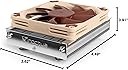
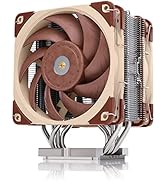
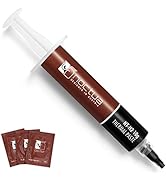
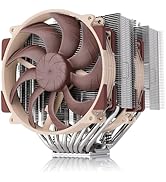
The Noctua NH-L9a-AM4 is a premium, ultra-low profile CPU cooler designed specifically for AMD AM4 sockets. At just 37mm tall, it fits perfectly in slim HTPC and mini-ITX cases without compromising RAM or PCIe compatibility. Equipped with a quiet NF-A9x14 fan delivering 57.5 m³/h airflow at only 23.6 dB, it ensures efficient cooling with minimal noise. The package includes award-winning NT-H1 thermal paste and an easy-to-install SecuFirm2 mounting system, backed by a 6-year warranty. Ideal for Ryzen CPUs and APUs with moderate heat loads, it supports light overclocking while maintaining safe temperatures.


| ASIN | B075SG1T3X |
| Air Flow Capacity | 57.5 Cubic Meters Per Hour |
| Best Sellers Rank | #149 in Computer CPU Cooling Fans |
| Brand | Noctua |
| Brand Name | Noctua |
| Compatible Devices | Desktop |
| Cooling Method | Air |
| Customer Reviews | 4.7 out of 5 stars 2,836 Reviews |
| EU Spare Part Availability Duration | 6 Years |
| Global Trade Identification Number | 09010018000092 |
| Included Components | 1 Piece |
| Item Dimensions L x W x H | 1.46"L x 3.62"W x 4.49"H |
| Item Type Name | Cooler |
| Item Weight | 465 Grams |
| Manufacturer | Noctua |
| Material Type | Copper (base and heat-pipes), aluminium (cooling fins), soldered joints & nickel plating |
| Maximum Rotational Speed | 2500 RPM |
| Model | NH-L9a-AM4 |
| Noise Level | 23.6 Decibels |
| Number of Items | 1 |
| Part Number | NH-L9a-AM4 |
| Power Connector Type | 4-Pin |
| Product Dimensions | 1.46"L x 3.62"W x 4.49"H |
| UPC | 841501100093 |
| Unit Count | 1.0 Count |
| Voltage | 12 Volts |
| Warranty Description | 6 year manufacturer’s warranty |
M**E
Perfect for an APU build. But hear me out. I have some details that may help you.
Will it fit? This is obviously a very low profile cooler. But please do check out the dimensions. It fit even on my mini-ITX motherboard (that's TINY), but do have some oversight with how things are spaced on your motherboard. The heatsink is short, but fairly spread out. Temperature talk/overclocking: Firstly, let me address something at least I was concerned with while I was researching this. YES, you can lightly overclock your APU while using this, just test stuff out until you find something that works. And please do be careful, your computer is a sacred baby, go easy on it. Anyway, for example, I overclocked my Ryzen 3200g CPU to 4000mhz, and my GPU to 1500mhz. At least in games I play (GMOD at 1080p full settings, Payday 2 1080p medium), I get 60fps while also staying around 55 degrees Celcius. That's about 30 degrees BELOW what would be considered ALMOST dangerous for an APU. But what about idle/light workloads for non-gamers? Idle Noise and the noise adapter: The fan is much more quiet than any stock AMD cooler, and although it can be made even more quiet with the noise adapter, that's because the adapter slows the fan down. In essence, the adapter WILL affect cooling performance, but most often that's not even necessary. The fan is very quiet and cool on idle or with light workspace stuff. Installation: Installation is easily the only "flaw" this cooler had in my case (even then I still gave it five stars). To install it, I recommend taking the fan off the heatsink, place the heatsink upside down atop a well balanced, sturdy cylindrical object. Apply thermal paste to your CPU (or APU ; ) ), then with your motherboard upside down, line up the heatsink holes with the holes on your motherboard. Keep your motherboard pressed down and balanced on the heatsink. Then take that metal plate included and put the PLASTIC side on your motherboard's bottom. Keep it balanced, and lightly screw it in the with "cross" method. Once the heatsink is secure, flip your motherboard. Not which direction the fan blows the air. You can screw the fan back into the heatsink so that it will blow the majority of air where you want it to. Now, clearly, that's much more complicated, and arguably more risky than a standard installation. But with patience, top-of-the-line thermal paste, and some luck, it will be so worth it. Appearance: People say Noctua fans are ugly, but there's a charming, almost nostalgic look to the fan. It will hardly match any color scheme at all (for instance, mine is red and black, and this fan looks like the nerdy kid at a party), but there's an eccentric, signature feel to that. Extras: You get some extra fan screws and a cool little metal Noctua pin. This looks quite nice and adds character to a PC case. Mine is proudly located above my Ryzen 3 and Vega Graphics stickers.
C**.
Super quiet and fits around components great. Kind of annoying to install.
Used this to replace the AMD supplied cooler in a small home media server. Seems to keep the CPU p,entry cool, but it is only a 65W AMD CPU. Pros: Super quiet. At the speed it normally runs I can’t even hear it and barely noticeable even at full speed. Low profile, plenty of clearance with the top of the case in this small server case. Plenty of cooling for this CPU and could probably handle COUs in the 125 watt range just fine as well. Cons: Nothing major but kind of awkward to install. You need to take the mother board out of the case since unlike other AMD coolers which mount from the top (though the stealth wraith that came with the COU dies need a new bottom plate under the mother board. This one screws in from the bottom. Not a big deal, especially if you’re just building things anyway. Unlike most coolers I’ve used, this one comes with a tube of heat transfer compound you need to apply rather than pre-applied to the cooler. Again, not a big deal, just something to be aware of. Overall, I like it and plan to buy another one for another server I’m building.
D**N
Small cooler for small environment
I bought this cooler to put on an ASRock X300W who's max CPU cooler height is 46mm and I was not thrilled about the stock cooler included with the X300 series and the AMD Ryzen 5 3400G Wraith Spire does not fit in this case. The Noctua comes in at about 36mm with a 14mm x 92mm x 92mm fan. Installation was a cinch, or should have been, but managing the back plate (under the cpu) and installing the thermal paste and the cooler was a bit of a challenge, but that was because of the design of the X300W, not the fault of the Noctua. You have to remove the motherboard from the case tray (it has no access to the back of the CPU, underside of the motherboard otherwise). The plate does not hold on without screws, so you have to install the thermal paste, then the cooler (lining up the screw holes as best you can by sight, I did pretty good first try), then turn over the X300 motherboard and use the included screws to attach the heat sink through the back plate while holding the heat sink in place and the motherboard (to keep from shifting). I did it first try, but then I'm experienced, so just keep that in mind if you are using this on an X300 or X300W. Cooling performance isn't bad at all. Using Prime95, Small FFTs, and AVX2 Disabled, the temp normalized around 70.1* C, the cooling fan was turning about 2300RPMs and was whisper quiet. I also did a test with Furmark, 1280x720 for the on board Vega 11 graphics, and the Noctua kept the temps to around 50* C. So effective cooling solution for the size, quiet, and idle temps were about high 30s (37* C) with ambient temps around 81* F. This machine is going to be used for everyday tasks like web surfing, listening to music, watching movies/videos, and playing some games that don't require a beefy rig/processor, like Minecraft, old games from GOG, dosbox, Diablo 2, Starcraft and this cooler seems to be handling it just fine. Would buy this again for tight case designs.
J**S
Another solid cooler from noctua
It is better than a stock cooler in most cases. Dropped temps on my Ryzen R5 5600 (non X) by 15c from 93c to 78c while under load (Battlefield 6). Easy to install but also very, very easy to accidentally over tighten. I recommend using the "two fingers" method when using a screwdriver. Pretty much only use your index and thumb to twist and when you feel resistance, only do a quarter turn more.
S**2
Works amazing for its size
This well built tiny cooler does an amazing job at keeping my Ryzen 5 4600G at an awesome 40 C at idle. Just at silent mode it is great, at Normal mode which turns the fan speed up, cools it down to 37.5 C at idle. I can see the fan spin, but it is dead silent. This is in a mini ITX case with not too much room to spare. Wonderful product. I highly recommend it. Oh, and did I mention that this is SO EASY TO INSTALL? Backplate and 4 screws after applying thermal paste and then snug it up with a screwdriver for even pressure. A walk in the park.
L**C
Good Low Profile Cooler for Mini-ITX Builds
Needed a low profile cooler for my HTPC build in a Cooler Master 110 case. The stock cooler that comes with the Ryzen 3400G was just too tall for the case. I knocked off a star due to how this cooler installs. As has been pointed out by other reviewers it is a little tricky to get this cooler installed on to the motherboard. It does come with a backplate but getting it screwed on is a little tricky. I am using my HTPC primarily as a PLEX server and this cooler keeps the CPU cool and is quiet.
T**E
Works well in supermicro CS825 case
I bought this so I could put an AM4 motherboard in my CS825 servermicro case. Seems to work well; tge cpu temps are nice and cool.
A**R
Cool and Compact
Insanely good cooling for the size. Cools my Ryzen 3700X perfectly and fits inside the Dan A4
A**I
Noctua quality, expect nothing less
You get what you paid for. Price is much cheaper on Amazon compared to other sources
T**S
Mehrfach überzeugt
Ich habe den Noctua L9a mittlerweile schon dreimal für verschiedene Systeme gekauft und bin jedes Mal aufs Neue überzeugt. Als jemand, der früher bei einem Mitbewerber im Bereich Kühltechnik gearbeitet hat, kann ich sagen: Noctua setzt seit jeher den Standard. Die Qualität und die Leistung dieses Kühlers sind einfach herausragend. Der L9a ist besonders für kompakte Builds oder HTPCs ideal. Trotz seiner geringen Größe liefert er eine sehr gute Kühlleistung und ist dabei unglaublich leise. Der Einbau gestaltet sich dank der klaren Anleitung und der durchdachten Konstruktion problemlos – auch in engen Gehäusen. Was mich besonders beeindruckt, ist die leise Laufweise. Selbst bei längeren Belastungen bleibt der Kühler nahezu unhörbar. Als jemand, der viele Kühler verschiedener Hersteller getestet und eigene mitentwickelt hat, kann ich sagen, dass Noctua immer der Maßstab für hochwertige und zuverlässige Kühlungstechnologie war und auch heute noch ist. Fazit: Der Noctua L9a ist ein exzellenter Kühler, der in jeder Hinsicht überzeugt. Ich werde ihn auch in Zukunft wieder wählen und kann ihn jedem empfehlen, der auf Qualität, Leistung und geringe Lautstärke setzt!
M**S
OUI OUI JE CONSEIL ! DE TRÈS BONNE QUALITÉ !
Livraison rapide et professionnels, la marque paraît être de confiance, le ventilateur radiateur est vendu dans un coffret de qualité avec une pipette de pâte thermique, un adaptateur 4 pin plus gros, et tout le matériel nécessaire à l'installation, qui est simple et efficace. Grâce à ce produit j'ai remplacé le ventilateur d'origine de mon barebone A300. Il le refroidi plus efficacement et beaucoup moins bruyamment, je conseille fortement !
J**L
Bra och tyst kylning för am4 i kompakta pc
Tyst och med bra kylning för en kompakt bygge med am4 socker och ryzen 5600Gt
E**.
One of the very best low profile AM4 CPU heatsinks on the market with a customer service that is second to none.
Exceeded my expectations for the low profile AM4 CPU heatsink, Noctua's customers service is second to none! I first bought the L9a heatsink and had Noctua sent me the AM4 kit free of charge because the at the time the L9a-AM4 wasn't not available yet, the AM4 kit for the L9a arrived at my door in a week but unfortunately I could not remove the bottom plate screws that held the older bracket in place in order to replace it with AM4 one without circling the screws (they were on too tight which is a good sign of build quality but a nightmare to remove in my case). I contacted Amazon and returned the L9a without hassle just as the L9a-AM4 was available on Amazon sold by Noctua and I ordered the L9a-AM4 as the replacement, the heatsink arrived very fast through Amazon's shipping service and I this time around had not trouble mounting the heatsink (which included Noctua excellent NT-H1 thermal compound) on my Ryzen CPU. I needed a low profile cooler which does not exceed 57mm in height and this heatsink did and exceeded the job being both efficient at cooling all the while being quiet on noise, currently I'm able to get a 3.9Ghz overclock on my Ryzen CPU with max temperatures of 70 degrees Celsius under full load and 60 - 65 degrees Celsius when gaming which is quite feat on it's own considering the size of the heatsink and the size of my mini ITX case (which is a Cooler Master Elite 110). All in all a great buy considering Noctua's great customer service, the cooling performance, form factor and noise this heatsink offers for AM4 adopters who need a low profile heatsink...no need to look elsewhere this heatsink is one of the very best.
Trustpilot
3 weeks ago
2 months ago