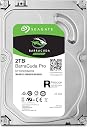
💾 Power your productivity with Seagate BarraCuda Pro – where speed meets reliability.
The Seagate BarraCuda Pro 2TB is a high-performance 3.5-inch internal hard drive designed for desktop PCs, featuring a 7200 RPM spin speed, 128MB cache, and SATA 6 Gb/s interface. It delivers sustained data transfer rates up to 195MB/s, making it ideal for creative professionals needing reliable, fast, and spacious storage. With a 5-year warranty and bundled Rescue Data Recovery Services, it ensures your data is protected and accessible when it matters most.


| Asin | B07H24QRS1 |
| Best Sellers Rank | 21,420 in Computers & Accessories (See Top 100 in Computers & Accessories) 57 in Internal Hard Drives |
| Box Contents | Barracuda Pro HDD 2.5 Zoll Pro 2TB, The actual capacity may vary. |
| Brand Name | Seagate |
| Cache Memory Installed Size | 128 |
| Color | Silver |
| Compatible Devices | Desktop |
| Customer Package Type | Standard Packaging |
| Customer Reviews | 4.4 4.4 out of 5 stars (446) 4.4 out of 5 stars |
| Data Transfer Rate | 195 Megabits Per Second |
| Digital Storage Capacity | 2 TB |
| Form Factor | 3.5-inch |
| Global Trade Identification Number | 00763649129555 |
| Hard Disk Average Latency | 4.17 Milliseconds |
| Hard Disk Description | Mechanical Hard Disk |
| Hard Disk Form Factor | 3.5 Inches |
| Hard Disk Interface | Serial ATA |
| Hard Disk Rotational Speed | 7.2E+3 RPM |
| Hard Drive Size | 2000 GB |
| Hardware Connectivity | SATA 6.0 Gb/s |
| Hardware Platform | PC |
| Installation Type | Internal Hard Drive |
| Item Type Name | Seagate 2TB BarraCuda Pro 3.5" internal hard drive (7200 RPM, 128MB Cache, Up to 195MB/s) |
| Item Weight | 549 g |
| Manufacturer | SEAGATE |
| Manufacturer Part Number | ST2000DMZ09/DM009 |
| Media Speed | 150 MB/s |
| Model Name | BarraCuda Pro |
| Model Number | ST2000DMZ09 |
| Network Connectivity Technology | sata_6_0_gb |
| Number Of Items | 1 |
| Product Features | Portable |
| Product Warranty | 5 year warranty |
| Read Speed | 195 Megabytes Per Second |
| Specific Uses For Product | Creative, Professional |
| Unit Count | 1.0 count |
| Upc | 763649129555 |
User
Review of the 8 TB Barracuda Pro
This is a review of the 8TB Barracuda Pro (7200 rpm) drive, very fast, very quiet and huge amount of storage for those who need it I am using it as a primary storage for my Camera work, I use two 5800rpm 4 TB Baracuda's as backup for this drive and also have two offline copies as well, as this is 30+ years of photography you cannot have enough backups. Expensive (£33 per TB) but very fast and 7.2TB of usable storage. I have used seagate drives for years and have had very few issues reliable storage is a must.
User
Lots of space for a good price!
I had 3tb of storage on my pc and wanted to add this to prevent any future installs. Gutted to find out that my case only supports 2 drives though so I had to get rid of my 2tb and keep the 1tb ssd. In terms of installation, no, it wasn't easy. But that's because I'm really new to stuff like this. I assume it's just a standard install. Really pleased with it! Not so pleased having to download everything again though!!
User
Fast and easy
Open the box, install into well. Lucky I did not forget to order some harddrive mounting screws as well. Installed it works perfectly, no fuss or driver innstalls on win 10. Noise level is less than I feared.
User
Works great
Can’t comment on if it’s easy to install as I had someone else do it but works great and haven’t had any issues
User
MINE WAS DEFECTIVE - DON'T BUY
When you spend £260 you don't expect to buy a defective piece of equipment. And because the was a delay in me using it, as my project was delayed by Covid, I now can't get refund as it timed out. What an amazing waste of money. Absolutely livid.
User
Big fast 6GB drives intended to mirror each other
With 2TB of M.2 memory I’m assuming we have enough fast memory for gaming etc and these two fast 6GB drives will suffice for everything else, including mirroring each other! Sadly it was only AFTER purchasing and installing HOME windows 10 that we realised we could only have these drives mirror each other in RAID had we purchased windows 10 pro. Previously told this was not required! Laugh - I nearly jumped out the window! Anyway bags of memory and we will still use the one to back up the other in the manual grandfather, father, son way. Had drives fail before - these have a good reputation.
User
Installed in a New Drobo
Arrived on time, well packed and good value for money.All inserted into the drobo with ease and 3 weeks on working well
User
Great value
Great value and reliable.
User
PARFAIT, merci
Il y a 2 ans 1/5, j'avais acheté les mêmes mais en 6To, 1 est tombé en panne (pour un produit "pro", ça la fout mal), en espérant que ceux-ci seront beaucoup plus fiables.
User
The 14TB model is very good!
I own two 8TB and one 14TB. The 14TB one seems faster, more reliable, and even quieter than the 8TB one. I’m surprised but not only do you benefit from more storage, you get an overall better drive. Wow I’m impressed! I recommend this product to anyone.
User
Great
It performs great and will likely be the last mechanical drive I buy before SSDs take over. It makes a little noise when writing which is to be expected from a 7200 rpm. It isn't overbearing though and my external drive is much more annoying. You need to create a new partition in order to able to use it which you can look up how to do on YouTube but you don't need their software to do it.
User
Smooth Operator - quiet and reliable
I have four disks in my computer and since I work a lot with both videos and images, there is always need for more hard drive space. I purchased the 10TB Seagate Barracuda earlier and now I replaced one of my other 4TB drives with Barracuda's 16TB version. I used Windows Computer Management to install the disk (Storage > Disk Management). Someone mentioned they had to download and install software from Seagate to find the disk. For me, it worked fine directly from Windows own Computer Management, but it is good to know that Seagate also has software to find the disk if issues.From "Disk Management", I created a partition and quick formatted it as NTFS default. If your intention is to save a lot of smaller files under 1MB, I would recommend a lower cluster size than the default to get more space out of the disk. I chose Windows default, as I also have many larger files, which gives larger cluster size. That means less space, but faster read and write from the disk. After formatting, the disk ended up around 13TB (because of bigger cluster size).I am now moving images and videos from my 10TB Barracuda disk to this new 16TB one. I would not say it goes super fast, as the average speed seems to be around 50MB/s during a transfer of 4TB of data. I guess 200,000 smaller files from the Lightroom catalog is causing the average speed to drop down, as the bigger files seem to go faster.The Barracuda disks are really quiet. I read a complaint about noise, but that is absolutely not the case for me. I can hardly hear anything and the copying process has been running for about 4 hours.I have had the 10TB Barracuda since November 2016 and never had any issues with it. I expect nothing less with this new 16TB one.
User
Good drive, solid, quiet, and very raid-able - but really bad warranty games
The drives work fine and in RAID just fine, and for me never having an issue, running 24x7, though less workload lately, but...My suggestion:ALWAYS verify your warranty at Seagate as soon as they arrive after purchase,and if the warranty is off, send it back.4 of these drives models that I bought (elsewhere at that other HD purchasing place) 4 years ago, had warranty expatriations from nearly expired to just 1 year. I hadn't checked the warranties before the return window closed.I bought 2 of these exact models from this specific seller in late 2020 and they each have 1 year warranties as verified at Seagate.So this implies, the statement:"Enjoy long-term peace of mind with the included five-year limited warranty"is only true, if you accept that you will have to spend a lot of your time arguing with the seller and Seagate (which tries to be hands off) when and if the time comes. I tend to do this out of principle but one does have to keep the $ in perspective. For low volume purchases, always verify your warranties and even photo your drive and store it with your invoice.I am amazed that this issue hasn't been headlines news over the years - other than a few sites noting it at times, and of course all the online reviews.I just purchased one last spinning HDD (IronWolf NAS) and I hope to never purchase another spinning HDD and have the duty of verifying warranties. My overall warranty validation with my NVMe SSDs has been good, so far.
Trustpilot
2 weeks ago
3 weeks ago