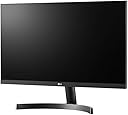
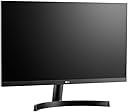
🚀 Elevate your workspace with LG’s sleek, smooth, and smart 24-inch powerhouse!
The LG 24MK600M is a 24-inch Full HD (1920x1080) IPS monitor featuring a 3-side borderless design, 5ms response time, and 250 cd/m² brightness. It supports AMD FreeSync for tear-free visuals, includes Flicker Safe technology to reduce eye strain, and offers versatile connectivity with 2 HDMI ports and VGA. Ideal for professionals seeking vibrant colors, smooth performance, and a stylish, minimalistic setup.


| ASIN | B07GNNDLJS |
| Aspect Ratio | 16:9 |
| Aspect ratio | 16:9 |
| Brand | LG |
| Brand Name | LG |
| Colour | Black |
| Contrast Ratio | 1000:1 |
| Customer Reviews | 4.6 out of 5 stars 470 Reviews |
| Display Technology | LED |
| Display Type | LCD |
| Hardware Connectivity | HDMI, VGA |
| Image Brightness | 250 ANSI lumens |
| Image contrast ratio | 1000:1 |
| Item Type Name | Monitor |
| Item Weight | 3.1 Kilograms |
| Manufacturer | LG Electronics |
| Maximum Display Resolution | 1920 x 1080 |
| Model Name | 23.8 (60.4cm) Full HD 3-Side Borderless IPS Monitor |
| Model Number | 24MK600M |
| Mounting Type | VESA Standard - 75 x 75 |
| Native Resolution | 1920x1080 |
| Network Connectivity Technology | HDMI |
| Product Features | VESA 75 |
| Product Warranty | Manufacturer Warranty 2 Years RTB |
| Refresh Rate | 60 |
| Resolution | FHD 1080p |
| Response Time | 5 Milliseconds |
| Screen Finish Type | Flat |
| Screen Size | 60.4 Centimetres |
| Screen size | 60.4 Centimetres |
| Screen surface description | Flat |
| Specific Uses For Product | Gaming |
| Total HDMI Port | 2 |
| Viewing Angle | 178 Degrees |
D**E
Great Monitor at a great price!
LG 24MK600M 24 inch IPS - Great Monitor at a great price! I’m not usually one for posting reviews but on this occasion I felt it justified, three days ago my old 24 inch iiyama suddenly packed in, and was forced to then surf for a new monitor using an old 14 inch screen which was hard work. Not being in the market for a monitor then taking a crash course o the new specs and brands was both time consuming and complicated. Worse still was the conflicting reviews on the web, on competing brands in the budget ranges I was forced to be looking at. My price range was between £80 to £120 and looking at 24inch HD to replace my old monitor I was happy with before it died, although I had many happy years using this and it never failed once. So I began looking at iiyama models and to my surprise there was a much better spec for the money these days. So then I checked out more brands in this price range, searching video reviews, tech reviews and gamers reviews I soon narrowed down between a couple of models and brands I liked. Trouble was the negative reviews I always look at put me off some of them, even the one I chose, I went for it with a bit of doubt in my mind. I discount negative reviews if it’s just a customer experience and not about the monitor it’s self like late delivery etc, and I look for a high star rating with low negative reviews in relation to the number of reviews on the product. I always look at the date of the reviews as many are years old and so not current, so I look for current months old reviews for up to date information. I don’t play many games these days so that spec didn’t bother me too much, although I have a good graphics card and system spec. I always liked The LG Brand, I have a large screen tv of theirs that I love. So I was deciding on this brand of monitor. I opted for the LG 24MK600M 24 inch IPS, some reviews said they can see lines between the pixels especially in the blue colours? Well that’s not my experience mine is very crisp, clear and very sharp indeed. I will say also that other reviews said the matt screen made it dark and washed out? Again mine was the total opposite of that, in fact it was too bright, so bright in fact I had to reduce the contrast and brightness and the colours was enhanced and very vivid indeed. Everything was fine with the package, turned on and set up in minuets, the monitor wakes up almost instantly from sleep mode, much faster than my old monitor did. No dead or flickering pixels and everything was a great experience for me with this purchase. I paid a little extra than my top end budget price, and I am glad I did, it has been well worth what I paid and is excellent value for the spec and features I now have. I am a very happy customer indeed! I used a dvi to HDMI lead, and the menu was easy to use and navigate, the cd was easy to install the drivers, and a neat program to set the monitor options on screen once installed was very handy to tweak things around to my liking. The stand was easy to set up, I wanted a tilt up and down was all I needed, and the borderless feature is very impressive indeed. I gave it 5 stars because this monitor exceeded my expectations, and took a chance knowing amazon will replace it or refund me, as a prime member it was delivered on Sunday from a very late (midnight) Friday night ordering after many models and researching. I am delighted with the LG 24MK600M 24 inch IPS for my surfing, videos and movies, I do a lot of image and photo work too, and this monitor is perfect for me and my needs. I hope this helps to alleviate some of the negative reviews you may find or have doubts about this monitor, but they were deemed invalid and not the case in my experience purchasing this model. Will highly recommend!
J**O
Good quality 24-inch IPS panel - recommended!
I purchased this as a stop-gap monitor as my previous monitor had developed a fault. For what I wanted, this LG is absolutely spot-on. For £125 (October 2019) you get a lovely 24-inch IPS panel with a resolution of 1920x1080. For me, colour settings are down to personal preference but I didn't have to tweak too much out of the box and there are plenty of Gamma, Colour, Contrast, Black Level, etc, menu settings to play with should you desire. I am running a Nvidia GTX 1070 and the monitor has no issues in running at it's native 75Hz refresh rate, although you will have to change this in Windows as it will default to 60Hz. I did wonder if FreeSync would work with my Nvidia card, but I can confirm that it does not - this is because the monitor only has two HMDI inputs. In order to use FreeSync on an Nvidia card you need a DisplayPort input (and the latest Nvidia drivers of course). The build quality is also good and the stand seems particularly sturdy - the screen pivots as you'd expect but the stand is not height adjustable. The bezels around the three sides of the panel are minimal and the main bottom bezel has a discreet LG logo - no gamer inspired RGB lighting here (phew). All in all, I'm impressed. I've never purchased an LG monitor before but given this experience, I'd certainly consider them again.
A**S
Good monitor, slightly wobblily stand.
Been working really well so far, you get good picture quality through this and the response times are great (would be fine for gaming you would only notice lag if you are playing pro) As a home office monitor, it is great the included stand has a nice base to it allowing for things like speakers to be placed underneath. You can easily navigate the menu with the button under the screen which is simple to use but can be a little annoying sometimes. My main downside its that the design of the stand can lead to the monitor wobbling very slight if speed typing but this could be fixed with a desk attached arm to hold the screen.
S**S
Excellent bang-for-buck monitor.
I bought this to replace an ageing Ilyama (who don't seem up to snuff these days) TN panel screen. It wasn't dead yet, but it just seemed 'tired' and started responding differently to power on/off situations. Moving to this IPS panel has been an eye opener as I hadn't realised how brightness and maybe equivalent contrast ratio was different. It may also have helped that connection is now HDMI where on the Ilyama I was still using DVI-I! Colours, brightness, pretty much everything looks great to me. No dead pixels or significant bleeds. I do not need 4K (for this screen) or a zillion Hz. There are a couple of issues, but these should not be a surprise if you have done your research. In my case:- 1) solid blacks aren't perfect. 2) profiles are not spot on to me. E.g. "Gaming" is what I use for "general purpose" and when gaming I used the Custom option and tweak. But that is maybe subjective?
W**0
Value for money, slim and sleek.
I’m giving it 5 stars regardless, however it came with a scratched/damaged stand. Pros: - Value for money. For 131, you get many features, IPS display, full HD and vesa compatibility. - Sleek, modern design that fits in any environment. - It’s ‘almost’ borderless frame gives it a bezleless look. - IPS display has gorgeous 1080p FULL HD visuals. - It is a matte finish all round, including the screen, which people say defeats the purpose of an IPS screen because it has to be “glossy”, however, if you want a glossier looking screen, you can use LG’s onscreen software to increase the brightness and activate “ultra visual mode”, which enhances the pixels on the screen and emboldens them, giving your screensaver a “glossy look”. - Why is this beneficial? You get best of both worlds. A matte screen with anti glare, meaning that the light won’t hurt your eyes as much as a glossy screen would, while having the benefit of ultra looking graphics. (trust me, if you have trouble looking at screens for too long, you will notice the difference and you won’t get tired staring at the screen like you would with a glossy one). - It has many on screen features such as gaming mode, cinema mode, reader mode which adjusts the screen brightness/colour to match the environment of said modes. - Joystick feature below the screen makes it easy to navigate through different settings unlike buttons do. - Has PIP, a feature that lets you split the screen to other with other inputs, for example, you can use this feature to split the screen between your console and your PC. - It has AMD free sync, meaning if you have an AMD graphics card you can run this monitor at 75Hz, increasing the refresh rate which is good for gaming at 75FPS. - Plug and play. Once plugged in it starts straight away, no software required unless you want the on screen control, however this can be accessed by the physical joystick. - Aluminimium black stand is great, sleek and actually not ugly looking. It has a matte base which makes it nice to hold. - it’s a very light monitor at about 2.1kg without the stand. - Vesa compatible meaning you use it with third party stands. - 178 degree viewing angle, meaning you can see the screen perfectly from all sides. - Experienced no backlight bleed like you would with other IPS monitors, perhaps because of the matte display. - Has 2x HDMI + 1 xVGA Port + 1 Audio Jack Input Cons: - Lacks built in audio speakers - Limited inputs to 2 HDMI + 1 VGA - Lacks display port, if you’re for gaming, you will have to settle for HDMI or use an adapter. - Aluminium stand is good, but lacks swivel or other tilts - Isn’t as bright as other monitors, but with ultra graphics on and 100% brightness, it can get pretty bright. Overall, this monitor is great. You probably won’t find another IPS display that’s vesa mountable with many of the features it offers at this price range. I suggest this to people who want a monitor for home, office work and like to casually game. Edit: Editing my review months later and I bought another to add to my setup.
D**C
had a few monitors
had a few monitors in my time and this one was not bad at all the price is good and the quality was great the besel is small and overall it has a good stand with a pretty nice size
R**M
Great monitor for the price
Fantastic for the price. Easy setup, good config options. Really impressed with the picture quality and clarity, beats my expensive laptop screen hands down. Good for gaming, I suppose if your a hardcore fps gamer then you'd want a 144 but for me who uses it for both work and games it's excellent
C**S
Great updated version to the 23MP68VQ
My previous LG 23MP68VQ broke from an accident (not malfunction/defect) so I bought this to replace it. -This monitor does not wobble AT ALL compared to the 23mp68vq thanks to what feels like a much higher quality stand (very rigid, no flex, screws fit better). -Colour is great, same as the 23mp68vq - new UI now prevents you from accidentally turning the monitor off as you have to push the mini joystick in the opposite direction as was found in the 23mp68vq, - Turning on freesync (and the 75hz) is still the same, 1) press joystick 2) go right for settings -> Picture -> Game Adjust -> Freesync -> On 3) press joystick once more to select ok (this will turn the screen off) 4) Restart monitor by turning it on again by pressing the joystick (no need to move it ) Definitely worth my 5 stars
Trustpilot
3 weeks ago
2 months ago