


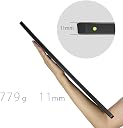


GeChic 1503E 15.6 inch FHD 1080p Portable Monitor with HDMI, VGA Input, USB Powered, Ultralight Weight, Built-in Speakers
Product ID: 78820529
GeChic 1503E Portable Monitor Specifications: Monitor Panel: 15. 6” FHD AAS (16: 9 Wide) LED Backlight Resolution: 1920x1080(262, 144 colors) Pixel Pitch: 0. 179mm (H) *0. 179mm (V) Brightness: 220(cd/m2)(Typical) LED Backlight: Lifetime: 15, 000 hours (Brightness Declines 50%) Contrast Ratio: 700: 1(Typical) Response Time (GTG): 15(ms)(Typical) Rating Voltage: 5V-DC Rating Current: 2A Speakers: 2x 1. 5W(Max. ) (Rated Impedance 5. 1Ω at 2KHz) Connectivity: Headphone outx1/ Micro-HDMI x1/ VGA x1 (Optional)/ USB(C)x1 Resolutions of PC inputs including HDMI and VGA input: 1920*1080(60Hz); 1600*900(60Hz); 1440*900(60Hz); 1366*768(60Hz) 1280*1024(60Hz); 1280*960(60Hz); 1280*800(60Hz/50Hz); 1280*768(60Hz/50Hz) 1280*720(60Hz/50Hz); 1024*768(60Hz); 800*600(60Hz); 640*480(60Hz) (Caution: If video output frequency of computer graphic card is out of the above range, it may cause the panel damage. ) HDMI Video Display Capabilities: 1920x1080P (50Hz/59. 94Hz/60Hz); 1280x720P (50Hz/59. 94Hz/60Hz) 720x480P (59. 94/60Hz); 640x480P (59. 94/60Hz) Authorized Protection: HDCP Compliant View-Angle of Stand: 52°/62°/72° Accessories in Package: USB-A to USB-C power cable(1. 2m) *1 HDMI-A to micro-HDMI video cable(1. 2m) *1 Protective Cover*1/ Stand*1/ 5V-2A adapter*1 Dimension: 382mm*246mm*11mm(Monitor);389mm*251mm*10mm(Cover) Color: Front: Gunmetal Grey; Rear: Starry black; Cover: Black ; Stand: Black Weight: 779g (Monitor); 282g(Stand); 290g(Cover) Certification: BSMI, CE, FCC, VCCI, RoHS. Environment = Operating :0~50 Degrees Celsius ; Humidity:20~90%RH, Storage:-20~60 Degrees Celsius ; Humidity:10~90%RH. Review: Works well - I bought this portable monitor to complement my rather old laptop - a Thinkpad X201, which is great but has a rather small screen. The GeChic 1503E portable monitor helped me work remotely without loss of productivity with a dual monitor setup. The monitor is well built and everything just works. Gechic also sells a nice protective sleeve that one can buy separately. The only complaint I have is that it did not come with a VGA input cable per the "Accessories in Package" description on desertcart, and I had to scramble to order it separately. Review: Great laptop add-on for general computing - I've purchased 2 of these, one for my laptop and one for my wife's. They are thin, lightweight and have a decent picture. I had to buy an hdmi to displayport adapter for mine, but it still works well. They fit nicely in both our laptop bags and the included detachable cover is nice to have when bagging them up. Being able to power the monitor from a USB port is also a huge convenience. The adjustable, built in stand seems fine. It sits at a slight angle but not bad and doesn't sit beyond a comfortable viewing angle. We're both using these as second monitors for work, and I would say they're perfect for that. I wouldn't expect great gaming or graphics performance from these but they're great for standard computing.


| ASIN | B07FXXQYW8 |
| Additional Features | Built-In Speakers, Portable |
| Aspect Ratio | 16:9 |
| Brand | Gechic |
| Connectivity Technology | HDMI, VGA, usb |
| Customer Reviews | 4.0 out of 5 stars 72 Reviews |
| Display Resolution Maximum | 1920 x 1080 pixels |
| Display Technology | LED |
| Display Type | LED |
| Global Trade Identification Number | 04718785840884 |
| Hardware Connectivity | HDMI, USB, VGA |
| Included Components | USB-A to USB-C power cable(1.2m) *1 HDMI-A to micro-HDMI video cable(1.2m) *1 Protective Cover*1、 Stand*1、5V-2A adapter*1 |
| Item Weight | 1.7 pounds |
| Manufacturer | GeChic |
| Model Number | GeChic 1503E |
| Mounting Type | FALSE |
| Native Resolution | 1920x1080 |
| Refresh Rate | 60 hertz |
| Resolution | FHD 1080p |
| Response Time | 15 milliseconds |
| Screen Finish | Glossy |
| Screen Size | 15.6 inches |
| Screen Surface Description | Glossy |
| Specific Uses For Product | business, gaming |
| Total Number of HDMI Ports | 1 |
| Total Usb Ports | 1 |
| Viewing Angle | 170 degrees |
| Voltage | 5 volts |
| Warranty Description | 1 year limited parts and labor |
E**G
Works well
I bought this portable monitor to complement my rather old laptop - a Thinkpad X201, which is great but has a rather small screen. The GeChic 1503E portable monitor helped me work remotely without loss of productivity with a dual monitor setup. The monitor is well built and everything just works. Gechic also sells a nice protective sleeve that one can buy separately. The only complaint I have is that it did not come with a VGA input cable per the "Accessories in Package" description on Amazon, and I had to scramble to order it separately.
B**R
Great laptop add-on for general computing
I've purchased 2 of these, one for my laptop and one for my wife's. They are thin, lightweight and have a decent picture. I had to buy an hdmi to displayport adapter for mine, but it still works well. They fit nicely in both our laptop bags and the included detachable cover is nice to have when bagging them up. Being able to power the monitor from a USB port is also a huge convenience. The adjustable, built in stand seems fine. It sits at a slight angle but not bad and doesn't sit beyond a comfortable viewing angle. We're both using these as second monitors for work, and I would say they're perfect for that. I wouldn't expect great gaming or graphics performance from these but they're great for standard computing.
J**N
Not worth the hefty price tag!!
I bought one of these for gaming on my ps4, but was disappointed with what you get for the high price tag. It definitely is a nice monitor, but to me it just wasn’t worth 275 dollars after tax. The design is rather plain and boring, bezel on the screen is pretty huge by modern standards, and I did not care for the bulky plastic case and stand. I really wanted a leather case that folds into a stand, so I ended up returning this. I went with a 13.3” eleduino portable gaming monitor instead, and despite the fact that it was smaller, it was an amazing deal at 149. Beautiful design, very well made, and perfect little case it comes in! If you want more bang for your buck, skip out on this and go for a eleduino! You won’t regret it. If you are using this as a second monitor for work, or a travel monitor, I would go with this one. But if you are using this for gaming, the eleduino blows this out of the water.
A**Y
Great for travel!
I bought this monitor to assist me in working away from my home office. It's easy to set up and works great! I'm glad I went with this item over some cheaper options.
M**M
Not plug and play
NOT plug and play and does not work if you are stuck running Windows 7 corporate computer. Much more than what a traveling business person needs. Seems very sturdy.
T**E
No VGA Cable included and cannot buy from Amazon
I was looking for small VGA monitors we can deploy in our datacenter. Instead of pushing around a crash cart (a Cart with Monitor, Keyboard and Mouse), I wanted to add a Small VGA monitor with a small USB K/B with a trackpad. in each rack. Almost all servers today still have VGA (or DVI) video ports (not HDMI or DP). So I need a native VGA Monitor where the technicians can see the BIOS POST messages when a server is booting up. A USB, DP or HDMI Monitor with a VGA converter/adaptor will not work, since the adaptor cannot convert the video from VGA to USB or HDMI until the OS comes up. I was very excited to see this 15-inch monitor with the description that says it has a VGA Port. Even though I noticed that it requires a Proprietary VGA cable, I did not realize that the VGA Cable is not included, nor it can be bought on Amazon or any other US-Based Site. The seller has a responsibility to disclose this in the item listing. I had no choice but to return the item.
J**N
worked great
easy to set up, nicer picture than my monitor on my laptop
J**R
Excellent screen clarity, easy to set up
I did a lot of research on a portable screen and this had the least negative ratings and the most positive. Still I was surprised at the ease of set up and the quality of the video on this device. I use it with a 2017 MacBook Pro. It came with everything I needed to make it work with my own USB-C to HDMI dongle. I have only used it a few days (I use it when I travel). I'll update this review in a few months to rate the durability.
の**り
NINTENDO Switchで使ってます。
スプラトゥーン2を出先で遊ぶために使用。 ノングレア液晶かつ、目的のゲーム自体が明るめの発色の為、ゲーム中の映り込みは比較的少なく快適にプレイ出来ます。 付属のコードの接触が悪いとのレビューを他で見ましたが、当方全く問題なく利用しております。 スピーカーは小さいですが、静かな環境下で遊ぶのであれば全く問題ない音量かと。 耐久性に関しては、専用のケースに入れて緩衝材を巻き、キャリーケースに入れてゴロゴロと引いて歩く事が何度かありましたが、購入後半年現在、不具合はありません。 セール価格で2.5万円程度での購入でしたが、値段以上の満足度です。
A**R
Love it
I needed a portable 15 inch monitor to carry in my back pack particularly for work. I was concerned that it may be too thick but received it today and it's fine. Not as thin as one would like but fine for me. Comes with a magnetic stand and screen plastic cover, a USB power cable, power adapter and HDMI cable. I bought a VGA to HDMI adapter separately which works fine with the cable provided.
D**E
Ideal for travel
Use it for Nintendo switch on the plane. Run it of a 20000mAh battery. Works great. Kids are happy.
ア**じ
エントリーモデルで十分です。
タイムセールで28500円から1割引だったのでタッチパネル非搭載エントリーモデルのOn-Lap 1503E を購入しました。 これまではFHD解像度のノートパソコンのサブモニターとして、WXGA解像度のOn-Lap 1302/J を使用していました。 主にそれと比較してのレビューになります。 1302/Jは光沢液晶でしたがこちらは非光沢です。 まずそれにより圧倒的に映り込みが少なく見やすくなりました。 まさに雲泥の差です。 それだけでも買い替えて良かったと思いました。 そしてメインのノートパソコンと解像度が揃ったことにより操作性が向上しました。 解像度が違うモニター同士だと当然ながら表示領域が異なるため、二つのモニターの間でポインタの移動がスムーズに行こなえません。 メインのモニターの解像度を1302/J に合わせてWXGAにすることで解消もできますがさすがにそれでは表示領域が小さすぎます。 この問題も1503E 導入により解消しました。 それから1302/Jは 液晶のパネルが TN 方式で 視野角が狭くて設置角度がシビアでしたがそれも解消されました。 ハイエンドモデルが IPS と記載されているのに対して1503Eは FSS と記載されており、パネルの種類には疎いものでFSSというのは初耳で何のことやらと思って調べてみたら、IPS パネルの種類の一つだそうです。 どうりで IPS パネル同様に視野角が広いはずです。 ハイエンドモデルと見比べたわけではありませんが私の主観では使っていて何の問題もありません。 ハイエンドモデルではボタンの不具合が何件かレビューで報告されていますが、少なくとも私の個体ではそのようなことはないです。 ボタンのストロークは浅めですが押し込んだ時のノッチ感もあり、押したのに反応しないということも無く、今のところ操作性に問題はありません。 音は有名スピーカーブランドの名前がついたノートパソコン内蔵のスピーカーよりは劣って聴こえます。 音楽の視聴などには向かないでしょうが、でもちょっと YouTube の動画を見たりとか普通に使うぶんには十分だと感じました。 直接比較したわけではありませんがエントリーモデルで十分だと感じました。 モニターとしては相変わらず単価が高いですが、タイムセールで良品を普段より安く買えて満足しています。
A**ー
VESAのネジ穴がない!
画質も接続の容易さも想定通りだったのですが、唯一想定外だったのがVESAに対応していなかったことです。正確には別売りのマルチマウントキットを背面に取り付けたらVESA100のネジ穴が使えるのですが、ものを見るまでそれに気が付きませんでした。 ただ、十分薄くて軽いので、昔タブレット用に購入していたスタンドで立たせることにし、VESAのモニターアームは使わないことにしました。もちろん付属のスタンドでも自立(しかも若干高級感あり!)しますが、ベースの奥行の分(10cmくらい)だけ壁から離す必要がありピッタリつけられないので、使わないことにしました。
Trustpilot
2 weeks ago
5 days ago