


Desertcart purchases this item on your behalf and handles shipping, customs, and support to Senegal.
🚀 Elevate your craft with the RAY5: Fast, fierce, and flawlessly precise!
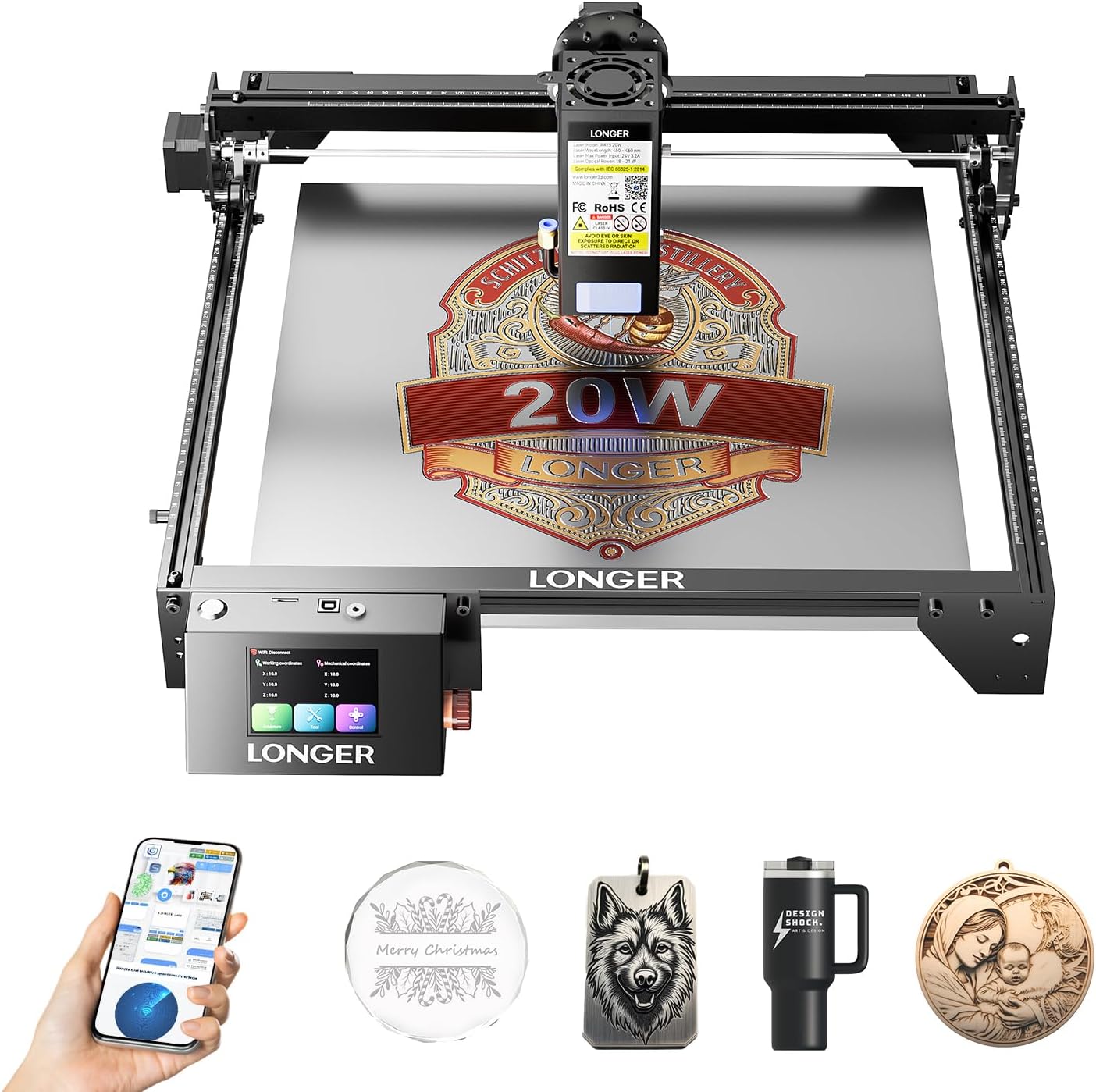
The Longer RAY5 New Upgrade Laser Engraver is a professional-grade 20W laser cutter and engraver featuring ultra-fast 24,000 mm/min speed, a 3.5” color touchscreen, and versatile offline/app control. It cuts thick wood, acrylic, and even stainless steel with precision, supports multi-machine control for continuous operation, and includes comprehensive safety features—perfect for millennial makers and managers seeking efficiency, quality, and scalability in their creative projects.


| Best Sellers Rank | #118,366 in Arts, Crafts & Sewing ( See Top 100 in Arts, Crafts & Sewing ) #288 in Jewelry Making Engraving Machines & Tools #4,748 in Craft Cutting Tools |
| Customer Reviews | 4.4 out of 5 stars 381 Reviews |
S**R
My Review of The Longer Ray5 10 Watt Laser
Longer Ray5 10 Watt Laser, purchased 3-2023 from Amazon. I wanted to add a few lines to my review after using the Longer Ray5-10 laser. I have been having a blast with it. I can now make things I never could prior to purchasing this laser. In conjuction with Lightburn laser software it is a great asset to my shop. There is a learning curve but so much help is available on the Youtube channels. I am amazed by this machine. When I received my Longer Ray 5-10 Watt Laser, I found it well packaged and arrived in perfect condition. Assembly was easy. I purchased this Longer Ray5 10 Watt Laser to help my daughter with a production laser engraving job she was working on. To accomplish this, I mounted the laser to a 3/4 in. thick hard flat compressed wood board and covered that with a 20 gauge steel plate. I made custom legs as I needed the rigidity and placed them so I could use them to align my engraving fixutre plate. I also moved the touch pad control up higher as I needed to slide my fixtrue in and out from the front. After installing lightBurn on my computer I quickly discovered that this is some great software. It was easy and intuitive to use. I was able to create her logo and engrave it on the first try. I almost couldn't believe it. I was able to adjust the power and speed easily. I am engraving on the top of a 2" diameter ABS plastic ball where the graphics are 1 1/2 inch wide. The Longer Ray5 10 Watt Laser was able to do this easily. I adjusted the height on the laser modual to just clear the ball and pushed start and was pleasantly suprised to see it engraved the logo on top and down the sides of the ball witout a rotary table or a Z axis move. The precise laser beam does a great job. The ease of use of this laser and software is amazing. This is the first laser machine I owned. Before I began assembly, I had a couple of questions and Longer customer service was attentive and answered my questions in a timely manor. I was very impressed by the touch screen and its functions. I have a touch screen on my 3D printer and wanted one on my laser machine, and the Longer Ray5 10 Watt Laser comes with one standard. I highly recommend this Longer Ray5 10 Watt Laser. To show you how the Longer Ray5 10 Watt Laser engraves on a ball I clipped the Longer logo and imported it into Lightburn and engraved it on one of the 2 in. diameter balls. See pictures. I still have to make 2 slide in fixtures and may include those after completion. Each fixture plate will hold 36 2 in. ABS balls. I also will make an enclosure wit a vent. Dale
P**L
Great Product
Now have the ray 5 20w, and the ray 5 40w. Both are outstanding machines. Endless possibilities.
P**R
Good Quality Entry Level
I had my husband put the engraver together for me, and I'm glad I did. The written instructions weren't fantastic, so he used the video aids. He said the guy in the video kept inadvertently covering what he was doing with his hands, which made it hard to see, but he did get it figured out. I had a bit of trouble getting started with engraving because even though I followed the directions for setting it up with LightBurn, the laser head kept trying to move out of bounds, which caused the machine to error out. I found that I had to actually manually position the laser head to my starting point and use the "frame" button in the software to make sure I was staying in bounds. I am not sure how it would work with the computer-less functionality though, and I'm not brave enough to try it. It takes a bit of playing with the settings to get a nice even burn without it being too light or too dark, but once you figure it out, it works really well and I'm really happy with the quality, especially considering this is an entry-level engraver. I very well may decide to upgrade in the future.
N**L
Great product that is able to make so many things
This has been a great product for me and I have been able to make a ton of amazing projects from Valetine's day cards for my granddaughter's class, coaster for a ladies tea, and photo frames for a father daughter dance at my granddaughter's school, gift card holders and so much more. It is very user friendly, was easy to set up and get started. It does the cuts in a very timely fashion. I am so glad to have this product and all the things that I am able to make with it.
E**D
Great budget option
I use this laser everyday. There is a learning curve to all lasers, but overall this is very easy to use, especially with lightburn. Build quality is good, and the cutting bed is large, and expandable. I use the 10W version for all my 5mm plywood cuts, and it does a great job, often without using all the available power. The cuts are accurate and it replicates complex shapes well.
W**K
Excellent machine
The machine was well packed and all the pieces needed to assemble the unit were well marked as to what they were for. The instructions were clear and precise and assembly went without any problems. I made some test pieces and was very happy with the results, I do, however, highly recommend getting the air assist unit if you are going to cut, it makes a big difference in the cut, and it had no problem cutting 6mm Baltic Birch. I did, however, drop and lose a small screw and bushing. I contacted support and was surprised at the quick response and resolution of my problem. Support is outstanding, as well as the machine, I highly recommend this unit.
R**D
Set your expectations before purchasing
I've had the Longer 10W Ray5 for a few weeks. During this time I've been doing some testing to see if it is suitable for my needs. I have started the return process with Amazon and will be sending it back. Pro's: Well packaged Nothing missing for assembly Assembly was easy Added air assist and that was easy to add Instructions were o.k./ good enough for me Sturdy material Quality was good Not all fasteners threaded easily-there were burrs present at a few assembly points Had the safety lens on the laser Laser safety glasses included Very fine and accurate laser burn line (was really surprised at the accuracy and how small of detail it will do) Cons: First off- If you are thinking about buying the Longer Ray5 10W laser you need to have reasonable expectations at what you are hoping to achieve with this laser. Apparently I didn't. If you look at the material test photos you will see that the speed and power interact. 100mm/min - means that this laser will move approximately 3.9 inches per minute(that's slow folks). I know that it has a maximum working speed of 10000mm/min but realistically from my test anything over 1000mm/min and you lose most of your power due to the laser carriage moving quickly over the work material. NOW I was using 3/4" pine board for my testing because that's what I primarily work with in my shop. Other clear-fine grain woods may produce different results (I assume they will). The image with the eagle on the US flag was approximately 1.86" high and 3" wide and that took around 11 minutes to burn (not acceptable for me). I ran this job several times with various settings for speed, power, and line intervals and the run time really didn't deviate much. The monogramed letter is about a 5"x5" job and that took about 21 minutes and I had the speed at 1000, power 100% and set the line interval to .250mm (line interval is the distance between each pass of the laser). It was able to burn through a 1" wide x .290" thick piece of yellow pine with the speed set at 75mm/min, power 100%, burning one straight line. It took 8 passes. 75 mm/min =2.9" min x 8 passes = approximately 24 inches of cutting to cut through that small piece of wood(unacceptable for me). Overall, if you are wanting something to tinker with and you have PLENTY of time to wait for a job over 4 square inches to be completed then this may be a good laser for you. If you are thinking that you will be able to customize wood products in a reasonable time then I wouldn't recommend this 10W laser. One other thing: If you only need to burn outlines then your time/performance will increase. Filling in the design takes the most amount of time for a project and that is where the time/performance will decrease. Chose wisely and make sure and buy it through Amazon so you can return the darn thing if it doesn't work out.
J**A
Resolving Issues
The seller is working with me to fix the issues with the device so it can be used during the day. This has potential but it not as good as I was expecting. They do not provide support for the software which is what is most important. I had many issues getting it to work and when chatting with the seller they would give me different configuration setting in the software to change to make the device work. I asked for a full file of the config settings but they said they did not have info on the settings since they do not support the software. They must have some of this information because they are telling me to change settings to get their product to work. I cannot use this during the day. Even in the shade any sunlight will set off the flame sensor. I then have to reset the machine to be able to use it again and abandon the burn. I have wasted many pieces of nice wood because of this. I am currently waiting on a new flame sensor to be sent. In the meantime, they said to turn the sensor off, place a sticker over it, or turn the threshold down so low it cannot be tripped. I have not been able to work with it as much as I want to since I cannot use it during the day. Hopefully I can do further tests once the replacement sensor arrives.
M**L
Missing parts
Does anyone know the dimensions of the focus tool (the meta cylinder to adjust the height if the laser)? My guess is the manufacturer forgot to package one or.sent me a used one. Everything looks brand new so I'm assuming one just was not packaged
D**Y
Works well until it doesn’t
This machine took some figuring out and made me crazy in the beginning and then I figured it out and it was working well…for a while. It was seamless and I was really excited. And then it started to have issues uploading the file so I would have to restart each time to get it to work, and then slowly but surely it stopped uploading the files at all. I can only assume it’s a firmware issue but when I try to update the firmware, I can’t do it because it’s a .exe and I only have apple products. So this machine that I had purchased so that I could make a side income is sitting and collecting dust. I’m beyond frustrated with this. If anyone could help, I’d be most grateful.
A**A
Longer Ray5 10W
Ottimo laser, potente e veloce, facile da utilizzare sia da remoto che in locale. Tagli precisi sia su legno che su materiali tessili. Consigliato
A**T
Toller Lasercutter, wenn man weiß wie man ihn bedient, macht das richtig Spaß
Ich war skeptisch, da „oft zurückgegebener Artikel“ dabei stand. Also ich bin von dem Laser begeistert. Ich nutze ihn aktuell mit einem iPad mit der Hersteller App. Demnächst dann mit einem Laptop, ddamit sind die Möglichkeiten noch größer. Es gibt einige kleine Kniffe, wenn man die mal raus hat, macht der Laser extrem viel Spaß. Ich habe bislang 4mm starkes Pappelsperrholz graviert und ausgeschnitten, eine alte Küchenfliese graviert und Acrylglas graviert. Wichtigster Hinweis meiner Meinung nach: vor dem Einschalten des Lasers das Modul händisch in die untere linke Ecke schieben. Das ist der Nullpunkt. Dann den Laser einschalten und alles funktioniert perfekt.
R**O
Excelente producto
El producto está excelente, pero ya me empezo a fallar uno de los motores de unos de los ojos, aún no cumple el año, tiene garantía el motor aún? De ahí en fuera el producto está súper...
Trustpilot
1 month ago
1 month ago