🎮 Capture Every Frame, Own Every Stream!
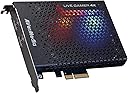
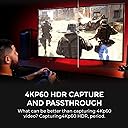
The AVerMedia GC573 Live Gamer 4K is a high-performance PCIe capture card designed for professional-grade streaming and recording. It supports 4K60 HDR10 video with ultra-low latency zero-lag pass-through, and can capture gameplay at up to 1080p240fps. Compatible with all major next-gen consoles and popular streaming software like OBS and Twitch, it also features customizable RGB lighting and flexible resolution/frame rate settings via dedicated software. Ideal for gamers and content creators seeking flawless, high-fidelity capture with minimal delay.


| ASIN | B07DHSZC4K |
| Best Sellers Rank | 16,018 in Computers & Accessories ( See Top 100 in Computers & Accessories ) 24 in Internal TV Tuner & Video Capture Cards |
| Guaranteed software updates until | unknown |
| Item model number | GC573 |
| Manufacturer | AVERMEDIA |
| Product Dimensions | 14.99 x 12.45 x 2.03 cm; 208.65 g |
T**E
Excellent purchase for retro gamers
I can only speak for my personal use case, and for what I bought this for, it's perfect. I bought the 4K Live Gamer for capturing 4K footage of retro games for my youtube channel and it's handled everything I have thrown at it with almost zero lag. If your intention is to use this capture card in a similar way to me, then it will do everything you want. I originally used this with the OSSC, with the 4K Live Gamer accepting every signal I input. I have since bought a Retrotink 5x, and while researching before buying the Retrotink, I saw many not getting the 1440 signal detected by the 4KLG. I bought it anyway, as 1080p was acceptable, and I wanted the composite signal the Retrotink accepts. I was pleasantly surprised when the 4KLG accepted every signal the Retrotink x5 output. This is the same for the OSSC, I saw scaremongering of the same type about OSSC not accepting signals, but unless I received some magical version of the 4KLG, everything works great. Consoles I have tried are as follows; NES, N64, SNES, Megadrive, Mastersystem, PS1, PS2 and OG Xbox. Note though, consoles that require it, have been modded to output an RGB signal (which most stock retro consoles will not do), and I have spent £100s buying the best quality retro cables and modding my consoles which helps the signal quality. Regardless though, at the end of the day, all these consoles signals are being processed through the OSSC or Retrotink 5x, so if you are planning to use these upscalers, this is the ultimate capture card. I cannot speak for older Retrotinks or the Framemeister, but I have seen people struggling with the signal swapping delay and video output of the Framemeister as it is old tech now. Not all is positive though, I found the customer support incredibly unhelpful. I don't believe English was the first language of person I was emailing, so I will go easy. I was getting a popping sound in the audio, and support E-mail reply I got was along the lines of "these are the common fixes, if it doesn't help, we won't offer any further support". I'm paraphrasing of course, but considering the fix had nothing to do with what they offered, I have very little trust in them to offer genuine support. I'll quickly run through some technical setup tips and problem fixes that I had in case it helps someone else. First off, PCIe has become far more complicated, so you might have speed problems based on the age and spec of your PC. PCIe has individual lanes that shares bandwidth when multiple devices are used. I would suggest not buying this if you don't have at least a gen 2 PCIe board, and even then, due to the bandwidth 4K uses, you might have issues if using less than Gen 3. Assuming your 16x lane is housing your GPU, you will probably be using the x8 lane for this card. This is important, because some motherboards will only allow either a M.2 NVME drive, or use of the PCIe slot not both. My point is, it's worth seriously looking into your motherboards specs and how you have configured it before you buy this as the 4x lane will probably be too slow for capturing 4K. Since buying this I have upgraded to an ASUS ROG x670 EXTREME motherboard, which is a top end £1k board paired with a Ryzen 9 7850x3d, if you have anything like this, this card will be no problem at all no matter how you configure it. My second point is related to the problem I was having with the audio cracking. Little embarrassing but make sure you are using good quality HDMI cables and I suggest not using a cable longer than 2m max. After I bought a high quality 4K cable, I realised there was a cable in the 4K Live Gamer box, so fool on me I suppose but it did fix the issue. I can confirm that long HDMI cables will lead to an unstable signal. For me, anything over 2M would cause the picture to keep dropping out. Regardless of the poor customer service, I still give this 5 stars as it really is a fantastic card. I had an Elgato 4K card and it was a nightmare, very picky about signals and cables, making it pretty much trash for what I wanted to use it for. So, in summary, if you are looking for a card that works great with OSSC and Retrotink 5x, this is a must buy over anything Elgato offers. I haven't tested it with modern consoles like PS5 and Xbox series X, but I really can't see it having any issues as they are the modern standard of video signal. Just to be clear, I am using this with a RTX4090, but I was using it in my backup rig with a 2080 Super, and it works just as good rendering a 4K capture. I cannot speak to the compatibility with AMD or Intel GPU's. Hope this helps. *UPADTE* Just a small update, I have since upgraded to the Ryzen 9950X3D, RTX 5090 and most importantly, the RetroTink 4k. Everything still works fine with the new hardware in 2025. As for the RetroTink 4K, the 4KLG handles everything just as good as the RT5X. I will probably upgrade to one of Avermedia's newer capture devices soon, not because the 4KLG is no longer usable, just because I need a second device. This card is still brilliant as of May 2025.
F**L
Great bit of Kit!
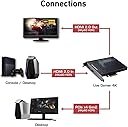
FYI - I bought this for £180 in Feb 2020) For a 2PC stream/capture set up, this is great. Pretty much the Elagto 4k60 Pro Mk2's competitor. Before going further, remember that it is YOUR reponsibility to check your PC can run this. You'll need a mid-tier PC to be able to encode decently anyway - don't expect to run this on any old thing. It is a PCIE card, and you'll need a free x16 or x4 slot on your motherboard. Installation: Pretty easy - Mine slotted into the x16 slot on my motherboard just fine, but it was a tight squeeze under my GPU! Then you just fasten it to the exterior of your case. Connect your PC/Console/Video device to the left slot, and use the optional pass-through to connect to your display if needed (this is mainly for consoles or monitors without DisplayPort). (I connect my gaming PC to my monitor via DP, and to the capture card via HDMI, so I don't use the passthrough slot.) Set your Windows/NVIDIA control panel to duplicate you display to the capture card. Then you just download the software form Avermedia's site. Use the ReCentral software to program the RGB as well as the encoding settings. You can then use ReCentral or other software such as OBS, to capture gameplay. Functionality Modes: 4k up to 60Hz, 1440p up to 144Hz, 1080p up to 240Hz. You can record at 60fps whilst playing at up to 240! Supports HDR if you use that Can go way over 100k bitrate if you want (though.. why?!) RGB lighting can be changed in ReCental, but it seems like an afterthought - it's not really customisable - can't even just change it to a solid colour. Just off, or cycling through colours. Quality It does take a bit of tweaking to get the performance just right. Recording 144fps gameplay is taxing, so most systems will struggle with the bitrates required. Best to stick to 60 anyway, as YouTube/other stereaming sites can't support over 60fps (unless you do some fancy manipualtion) Quality is very good - colours look nice (and you can adjust these if needed) Performance is smooth - no frame drops when I used reasonable encoder settings. Comapred to NDI (the no capture card 2 PC method), it is better, but don't expect a monumental change. NDI actually holds up very well, and if you're happy with that, then don't bother with the £180 on this! See this video to see the capture card in action, and comapred to NDI at 1440p60: search "NDI vs Capture Card. How it looks in 4 Games" --- Change the quality to the max your device will support! --- Overall, I do recommend this product, but WAIT FOR A GOOD DEAL! I wouldn't have paid more than the £180 I did, especially when NDI is a viable alternative. Feel free to comment any questions!
J**R
Lovely capture card
Good value, good lag I don't even use the through mode, I just run it in preview in OBS, video quality is good, just run it at 4k if your going to do what I do, hasn't crashed and records well. Audio stability is amazing too.
A**Y
Awesome recording equipment
Its great, I had a Elgato4kmk 2 before this, on paper the Elgato is a better card, but it keeps changing the resolution with a high refresh rate blanking the screen. with this card I have no problems. I am using the software that come with it, its great and easy to use on a 1 PC setup or a 2.
A**N
Excellent. Handles all I need and more
I got this specifically because I wanted to capture retro consoles which are kinda hard to do these days. However, this card will accept a 240p or 480p signal so it CAN handle old consoles when pushed through something like the OSSC. Included SW is good, worked right out of the box and does it's job very well. very stable. Wish there was an easy way to turn the RGB "fluff" off but that's minor.
M**N
So amny issues with this card
I'm trying to capture from a PS4 Pro in 4K. The PC the card is in slows down to the point you can't use it when the software is running. The video that is recorded stutters very badly and is not worth using. The PC is not the issue as it's a modern I7 with 32GB of RAM. It's compatible with the card but is totally unusable when RECentral 4 is running. Going to return the card if AverMedia can't resolve issue. Other users having same issue and it looks like no fix.
D**T
I recently upgraded to the **AVerMedia GC573 Live Gamer 4K** and I couldn't be more impressed. As someone who streams regularly and creates gaming content, this capture card has been an absolute game-changer! ### **4K Ultra HD & HDR Support:** The quality is unmatched! Recording and streaming in **4K at 60FPS** with **HDR** is mind-blowing. The colors are vibrant, and the footage is silky smooth, making my content look professional and polished. Even at 1080p, the card handles **240 FPS**, perfect for those who prefer ultra-high frame rates. ### **Low Latency Performance:** One of the standout features is the **ultra-low latency**. There's virtually no delay between the game and the captured footage, which is crucial for fast-paced games like shooters. It’s perfect for live streaming and ensures you’re always in sync with your audience. ### **Easy Setup & Integration:** Installation was a breeze, and it integrates seamlessly with OBS and other streaming software. The RECentral software that comes with it is intuitive, though you can use other programs if you prefer. The card also handles multi-tasking very well—stream, record, and play all at once without a hitch. ### **Perfect for Content Creation:** The AVermedia GC573 isn’t just for gamers; it’s perfect for anyone doing live event capture, video editing, or streaming. Whether you're doing gameplay, tutorials, or live shows, this card has all the professional-level features you need. If you're serious about quality and performance, the **AVerMedia GC573 Live Gamer 4K** is worth every penny. Highly recommended for gamers, streamers, and content creators who want the best!
O**E
Graba tus partidas, emite directos, todo con gran calidad y sencillez de uso. La instalación también es intuitiva y muy sencilla, prácticamente plug and play. No requiere de grandes conocimientos previos y captura todo tipo de aparatos (PlayStation, Nintendo Switch, consolas retro...). Es una excelente herramienta que da una calidad de imagen y sonido realmente buena sin necesidad de grandes ajustes. Ahorra espacio al ser interna. Se acompaña con un programa de edición y captura de video como es el Power Director, en una versión algo antigua eso sí, pero permite trabajar y editar en la mayoría de las situaciones más habituales, con lo que no es una gran pega esta versión, se le puede dar un uso mucho más que aceptable con muy buenos resultados. El programa sí requiere de algo más de práctica, pero como cualquier otro editor de video, una vez conocidos los pasos básicos es muy fácil de usar y conseguir los resultados que buscas.
A**I
Ótima qualidade
L**.
Je l’ai acheté pour l’offrir. D’après coque j’ai pu voir en terme de rendu, la qualité est vraiment là. Cette carte d’acquisition est l’équivalente de son concurrent mais moins chère. Je recommande
A**X
Ich bin ziemlich zufrieden, ich habe die Karte nicht zum Streamen gekauft, sondern damit ich die Konsole am gleichen Bildschirm zocken kann und trotzdem Desktop Zugriff habe, ohne ständig umzustecken oder die Quelle zu wechseln. Das Ergebnis ist richtig solide, bei mir komplett ohne spürbare Verzögerung. HDR ist auch echt praktisch und sieht meiner Meinung nach sogar besser aus als der normale HDR Modus der Konsolen.
Trustpilot
1 week ago
3 weeks ago