Desertcart purchases this item on your behalf and handles shipping, customs, and support to Senegal.
🔴 Touch the Future: Elevate Your Screen, Empower Your Space!
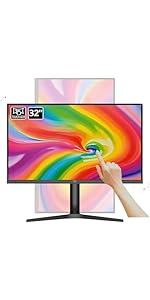
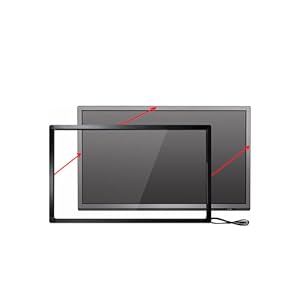
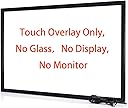
The Chengying 60-inch 10-point infrared touch frame is a sleek, high-precision touch overlay designed to convert any compatible 2K, 4K, or 8K monitor into an interactive touchscreen. With ultra-fast 10ms response, USB plug-and-play connectivity, and broad OS compatibility, it’s perfect for business, education, and digital signage environments. Its developer-friendly SDK and multi-touch support make it a versatile tool for modern professionals seeking to upgrade their interactive display experience.








| ASIN | B07D23JX6Z |
| Amazon 売れ筋ランキング | パソコン・周辺機器 - 25,233位 ( パソコン・周辺機器の売れ筋ランキングを見る ) ディスプレイ - 627位 |
| HDMIポート数 | 1 |
| UPC | 673169391373 |
| USBポート数 | 1 |
| resolution | 32768 x 32768 pixels |
| おすすめ度 | 5つ星のうち4.2 417 レビュー |
| アスペクト比 | 16:9 |
| カラー | ブラック |
| カラースクリーン機能付き | はい |
| コンポーネントアプトプット数 | 1 |
| シリーズ番号 | 60 |
| スクリーン表面の仕上げ | 光沢 |
| ディスプレイの種類 | 液晶 |
| ディスプレイ方式 | 液晶 |
| ディスプレイ最大解像度 | 32768 x 32768 ピクセル |
| ネイティブ解像度 | 32768 x 32768。 |
| ハードウェアインターフェイス | USB 2.0 |
| ブランド | Chengying |
| ブランド名 | Chengying |
| メーカー名 | Chengying |
| リフレッシュレート | 450 Hz |
| 互換デバイス | Windows OS搭載デスクトップまたはノートパソコン、ビデオ会議OS搭載ポリ会議デバイス、Macコンピューター、AndroidまたはLinuxマシン、Chrome、Raspberry Pi、またはTV内蔵OS。 |
| 同梱商品 | USBポート。 |
| 商品の用途 | ビジネス, 教育 |
| 商品の追加説明1 | タッチポインティングデバイス、モニターなし、画面なし |
| 商品の重量 | 1 キログラム |
| 型番 | CYS-60-p |
| 形状 | 長方形 |
| 応答時間 | 10 ミリ秒 |
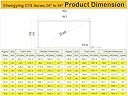
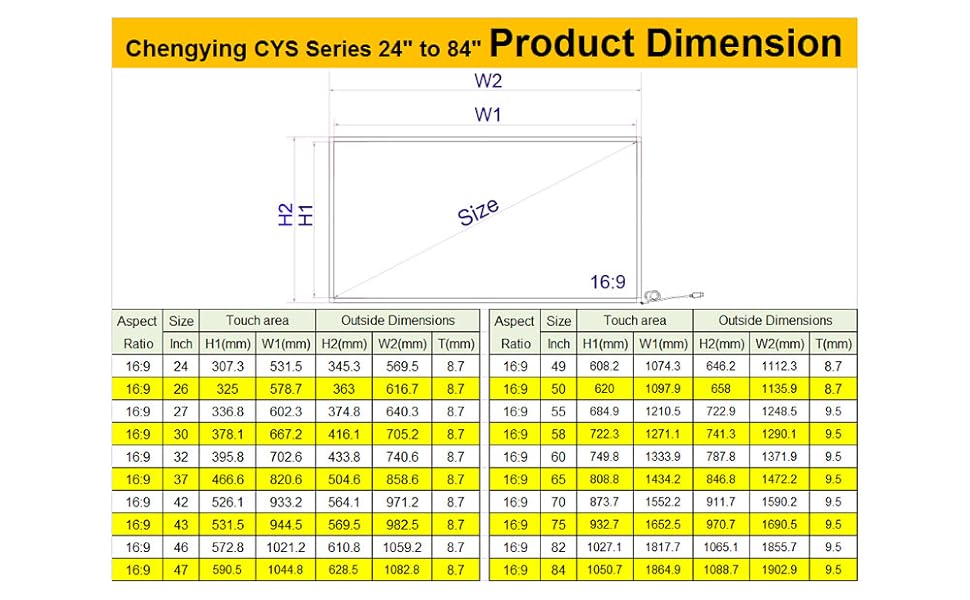
| 画面サイズ | 60 インチ |
| 画面サイズの単位 | 60 インチ |
| 画面表面の説明 | 光沢 |
| 縦横比 | 16:9 |
| 解像度 | 32768 x 32768 pixels |
| 通信・接続インターフェース | USB |
| 電圧 | 5 ボルト (DC) |
| 電気 | はい |
A**ー
27インチモニターをタッチパネルにする
27インチモニターがタッチパネルなり面白いですね。 ノートパソコンのような操作まではいかなくてもそれなりの動きをしてくれます。 マウスのポインターが何処へ行ったのか一瞬分からなくなってもペンでタッチできるので助かります。
A**R
安価で新しい発見
安価なのに使いやすい。ダブルクリックやキーボードが出せる方法があったらよい。今のところ模索中
す**ま
動いた。こういう機械があるんだね程度の印象
製品の枠の幅がもっと狭くなって欲しい。テレビのベゼルよりデカい。 感度は描画するほどには向いてないと思う。画面をタッチして操作するにも、慣れが必要だと思う。 Windows11PCに取り付け後、なんの設定もなく操作を開始できた。
.**.
限定用途なら一応使えるが過度な期待は禁物
使用環境 Macmini M2バージョンで使用。 ParallelsでWin11上とMac上で使用。 Macではマルチポイント使用できず、HIDドライバーが必要とあるが何処から入手するのか今ひとつ不明。 ブラウザなど縦のスクロールもできず。 アプリケーションの横スクロールなどでは動く。 範囲選択もできるが画面すみはタップ検出率が悪く上手く動かないことが多い。 例:アップルマークやファイルメニュー、アプリウィンドウの上部メニューなど。 Win上ではデスクトップでのダブルタップできず。 ポイントのみ可能だが、アプリウィンドウ上ではタップで操作できるがスクロールせず。 スクロールバーを使えばスクロール可能。 マルチポイント使用不可。 この条件はデバイスをMacに直接繋ぎ接続先をMacとして登録後、システム終了をいたらこの動作となった。 因みにMac・Winどちらもタッチデバイスとして認識されていない状態となっている。 単体接続時はWin上でスクロール・デスクトップ上でポイント、ダブルタップで操作できていた。 使用環境が特殊なのであまり参考にならないかもしれないが、少なくとも何方か単体でデバイス再登録すれば一応シングルタップ、ダブルタップ、縦横スクロールは出来ていた。 自分の使用用途はモニターをアームに繋いで電子書籍アプリのスクロール、動画視聴アプリのタッチ操作だったので一応叶っている。 23.8インチ4Kモニターをごろ寝しながらタッチモニターの様に操作をする。 iPadでは画面が小さいので大画面を試してみたかった駄目人間。 因みに 枠サイズとモニター表示サイズが合致していれば(実際の寸法)基本キャリブレーションの必要はないはず。 Win11ではOSにデバイスドライバーが含まれている模様で特別なインストール操作は基本不要のはず。 OEMで各社から同様の商品が販売されているが、各社のHP等にキャリブレーションツールなど有ったりする。 ドライバーらしき物もあるが未使用につき不明。
M**S
5 star seller
Perfect and well packaged
S**N
Great service and product
I was nervous about ordering this product but after doing so I am very happy with the product. After placing the order I was contacted to confirm that the sizing was correct and that I was happy with the actual item in the order, in case it wasn't what I expected, I thought this was excellent, saving them and me any hassle returning goods over such a distance if not what I thought it was meant to be, it then arrived well packaged ahead of schedule. Works as expected.
M**S
Easy to set up and works really well.
It's not often I leave a 5 star review for a product because there's nearly always room for improvement, but not this. This frame works perfectly and is incredibly easy to set up The frame sections are marked to show which piece attached to which, and it also comes with a little screwdriver and double sided table already attached to the frame. On my windows 11 laptop, it was simply a case of switching it on and plugging the USB cable in and it worked straight away. I built an interactive smart table and uses a 5mm thick sheet of acrylic to cover the TV I used as the monitor and the touch accuracy was spot on. The instal manual came with a website link to a calibration tool which I did use, but the frame didn't really need it. Single taps, double tabs, swiping, pinch to zoom and mult touch points all work flawlessly. I never heard of this company or ever used an overlay frame like this so I was dubious about paying so much, but it really was well worth it. Highly recommend.
U**S
Works great with Xiami
Works well with XIAOMI TV Box.
T**E
Love it! Works great!
I bought this earlier this year and it was very easy to install. It works perfectly as advertised and has never messed up. Works perfectly. Very responsive. I was actually surprised it came together as planned and worked as I had hoped. I’m very surprised actually. The sticky has never even messed up that adheres the panels onto the frame. Very tight and not loose as I had a feared over time. They have maintained their sticky. But to be sure… just make sure you wipe down your tv or monitor frame real good that you use it on. I have a 50 inch Toshiba tv. I can use it for about anything(software) I want and have tried to pull up on the screen. As you can see I have TradingView up now for my cryptos and it works just fine. You can see I have 8 charts up and my watchlist to the right. The scrolling and the touching… precision perfect! I definitely have confidence in this and will buy again for other uses with other computers. I don’t think you can have multiple screens per computer though. I have Windows Professional 10 on this computer. Very happy with the purchase and it was worth it.
Trustpilot
2 months ago
3 weeks ago