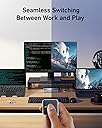
🚀 Elevate your workspace: Power, display, and control—seamlessly synced.
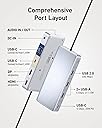
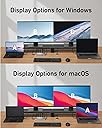
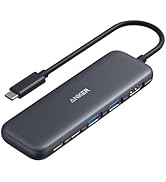
The Anker 554 USB-C Docking Station KVM Switch is a compact powerhouse designed for professionals managing two laptops. It supports dual 4K monitors via HDMI and DisplayPort, offers 100W charging to keep devices powered, and enables seamless switching between USB-C devices with one click. With 6 versatile USB ports and broad device compatibility, it streamlines your workspace for maximum productivity and connectivity.


| ASIN | B0C532J5JW |
| Amazon 売れ筋ランキング | パソコン・周辺機器 - 228,938位 ( パソコン・周辺機器の売れ筋ランキングを見る ) ノートパソコン用ドッキングステーション - 951位 |
| OS1 | ['Windows 10', 'Windows 7', 'macOS'] |
| UPC | 194644134969 |
| USBポートの総数 | 6 |
| USBポート数 | 6 |
| おすすめ度 | 5つ星のうち3.8 174 レビュー |
| カラー | グレー |
| データ転送速度 | 5 ギガビット毎秒 |
| ハードウェアインターフェイス | USB-C |
| パック数 | 1 |
| ブランド | Anker |
| ブランド名 | Anker |
| ポートの数 | 9 |
| メーカー名 | Anker |
| メーカー型番 | A83K1 |
| ユニット数 | 1.0 個 |
| 互換デバイス | MacBook Pro。, iPad |
| 付属品総数 | 1 |
| 品目寸法(L x W x H) | 17長さ x 7.2幅 x 2.4高さ cm |
| 商品の追加説明1 | KVMスイッチ。 |
| 商品の重量 | 0.62 ポンド |
| 商品外装素材 | プラスチック |
| 型番 | A83K1 |
| 対応デバイス | MacBook Pro。, iPad |
| 特徴 | KVMスイッチ。 |
| 色 | グレー |
B**L
Great device and very practical
It great, you just need to setup the keyboard/mouse wake up on your device. Charges both my laptops effortlessly, the butto is separate so you can stow away the wires in the back However, It came with a US plug rather than a UK plug, hence the 4 stars. You will need an adapter or alternative cable
C**L
Excellent customer service!
**Updated review: After my initial review, Anker immediately reached out to me to see if there was a way to resolve my issue. They ensured a full refund, if I was not completely satisfied and were willing to give me a discount if I would keep the unit in spite of my issues. I totally appreciated the responsiveness and empathy from their customer service. As an aside, I did check with my internet service provider (AT&T) and found out that my Wi-Fi settings were not optimized for video conferencing. Once those updates were made, I have had no issue with video conferencing using Wi-Fi connection only. It made me very happy that I was able to keep the Anker unit, because the only reason I was going to return it was because I thought I need to have an ethernet port. It is worth noting that the other KMV unit I was thinking of keeping had issues with one Dell monitor flickering. The Anker unit has no such issues with the same monitors and is very stable with switching between systems. Overall, the Anker KVM is much easier to set up, minimal wires, and I really like the little magnetized switch that I can stick to the front of my system for easy access in order to toggle between systems. Honestly, I am willing to go with a product even if I have to spend a little bit more when I know that the company stands behind it and is supported by a responsive customer service. It has been almost a month of using the item, and I am very happy. ---- For my consulting business, I need to toggle between my personal computer and my client computer. Because I work with data and large spreadsheets in both systems, a dual monitor set up is a must have. It was drama to swap wires several times a day--lag time to switch, wires would pop out. The Anker KVM switch fixed all of that. The lag time to switch between systems is negligible. Set up was intuitive with the quick start guide. I wished there was a couple more ports, or the option to order one with more ports -- I can't plug in my ring light and there is no ether port, which leads to my next issue. I previously was wired into my home Internet and subsequently, had a stable signal for video conferencing. I have already noticed that my video freezes several times during a meeting, tested both on Zoom and Teams so far. My job is 90% meetings, so to not have the ability to have a stable connection is a miss for me. I will be returning this unit and getting another that has an Ethernet port. If that's not something that matters to you, I highly recommend this product. It may seem pricey, but it delivers as promised.
L**A
Top!
Habe zwei Laptops für die Arbeit und zwei Monitore und das war der erste KVM Switch, an den man zwei Laptops per USB-C anschließen kann. Umschalten funktioniert einwandfrei und ich bin sehr zufrieden mit dem Switch. Wenn ich mir was wünschen könnte: ein oder zwei USB Anschlüsse mehr für Kamera, Headset etc. und evtl ein RJ45 Port. So habe ich einfach einen zweiten USB Hub angeschlossen und das klappt auch.
A**R
Works great with a MacBook Pro (M2) and a Dell XPS 15 (9570)
I am using it with a Macbook Pro (M2) and a Dell XPS 15 9570 and it has been going okay for my needs. My setup is with a single LG 34" ultrawide monitor connected via HDMI, with two Logitech wireless mice and a keyboard, all connected wireless via a single Logitech Bolt USB dongle. The second USB A port is connected to a webcam, and the remaining USB-A port is connected to a charging pod for my earbuds. I have one USB-C port free. I work with both laptops in clam-shell (lid closed) mode. Switching between the laptops works fine with all accessories getting picked up by both MacOS and Windows 11. I couldn't get the Macbook Pro to work until I allowed the USB dock to be connected via a notification in MacOS. After that things work except for the following issues: * I have to lift the Macbook Pro lid up to get the display to show on my external monitor, this is annoying but better than me having to unplug and plug the display cable from my previous Dell dock * Power delivery is not 100W, unless you have only one laptop connected to the KVM switch. This is actually mentioned in the product description, but I overlooked it. This makes Dell XPS 15 Windows 11 report "Weak charging stage, please check power charger" notification against the battery icon with a warning in the taskbar, and also will make the boot pause before Windows loads with a similar warning. I don't use the XPS for gaming or anything power hungry, and you could always just connect the power supply that came with the XPS. But other than, works great for me.
G**Y
Great piece of hardware.
Easy to set up and easy to use. The magnetic back on the switch is a handy feature - I just stick it to my monitor bezel. KVM ultrawide monitor, $500+. KVM dock, <$300 and I can use it with any monitor I like. I have an actual KVM monitor with a USB-C upstream port, and a USB-A upstream port + HDMI and I had to buy a separate USB-C dock with power and USB and HDMI to get the convenience of a "flick of a switch". This dock does it all easily.
Trustpilot
1 week ago
1 week ago