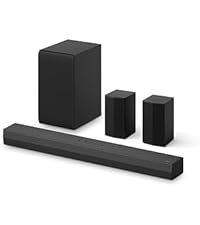
🎬 Elevate your home theater game — hear every detail, feel every moment!
The LG S60T 3.1 Channel Soundbar with Wireless Subwoofer (2024 Model) delivers cinematic-quality audio with Dolby Audio and AI Sound Pro technology. Featuring a sleek crest design and WOW Interface, it offers seamless control of your LG TV and soundbar with one remote. Its wireless subwoofer and Bluetooth connectivity provide a clutter-free setup, perfect for immersive movie nights, sports, and music streaming. Ideal for millennials seeking premium sound without the complexity of traditional home theater systems.


| ASIN | B0CX3Z2QYJ |
| Best Sellers Rank | #169,499 in Electronics ( See Top 100 in Electronics ) #518 in Home Audio Soundbar Speakers |
| Compatible devices | Home Theater, Smartphone, Television |
| Control method | Remote |
| Included components | Batteries AA x 2, Optical Cable, Remote, Wall Mount Bracket, Warranty Card |
| Is waterproof | FALSE |
| Item model number | S60T.CUSALLK |
| Item weight | 18.2 Pounds |
| Manufacturer | LG |
| Material | Metal |
| Model name | S60T.CUSALLK |
| Number of Items | 1 |
| Power source | Corded Electric |
| Product dimensions | 8.9D x 85.1W x 6.4H centimeters |
| Recommended uses for product | For Televisions |
| Speaker size | 3.5 Inches |
| Speaker type | Soundbar |
| Special features | Dolby Enabled, Hi Res Audio |
| Surround sound channel configuration | 3.1 |
| Unit count | 1 Count |
| Wireless communication technologies | Wi-Fi |
A**I
I love home audio, car audio etc. but I didn't want to break the bank, so this setup is perfect for our living room. Its not for everyone though, hope this review will help you out. During movies this setup is REALLY immersive. (Keep reading for details) MAKE SURE you change the audio setting to "Cinema" on the remote! I leave it on cinema all the time, even just watching TV or YouTube, unless I'm listening to music then I switch to the music mode. On our TV we were able to change the TV settings to allow the TV remote to adjust the volume of the LG system, and it also turns the TV off and ALL the speakers off with one button! Which is really convenient. I only use the LG remote to change the audio profile when switching from cinema to music. Its a wireless system, so of course that means Bluetooth enabled if you want to play music or maybe an audio book from your phone / tablet. Maybe you are cooking in the kitchen and have an open home layout you can watch the media on your phone and use the speaker system for the audio via Bluetooth. Use the sound bar or the LG remote to activate Bluetooth and just connect your device. This is NOT a system that requires a separate audio receiver with AM/FM. If you need to connect a vinyl player, and already have extra speakers you want to add in, then this is not the system for you. This system works great with smart TVs / projectors / game consoles / streaming devices etc. I've had no connection issues or dropped signals whatsoever and its been in use for a few months now, I'm really satisfied with the wireless setup. Even with multiple devices in my house, Xbox, PS5, PC, laptop, cell phones, tablets, wireless security cameras, even the refrigerator uses WIFI and we've had zero connection issues with this system. The subwoofer sounds great while playing music and movies, I can hear it thump from upstairs, it will fill your room with really loud sound, but it probably wont bother the neighbors. If you have the volume up a good amount you wont be able to talk with an "inside voice" to someone across the room very easily to give you an idea of how loud and powerful this setup is. Its not underwhelming in any stretch of the imagination, unless you are trying to fill a dance club with sound. With that being said this system would function very well for playing music during a reasonable sized house party with like 20 or so guests give or take. It works perfectly for my significant other and I, as we don't host often at all and its usually just us two watching the TV. We set the two satellite speakers on either side of the couch facing directly at the TV, and the surround effect sounds awesome while watching a movie or TV series. That is the optimal seating position, being directly between the left and right speakers on either side of you. If you have another couch that isn't directly facing the TV, the surround sound aspect may not sound as convincing from that position. If you always have a bunch of people in the room in different seating positions trying to watch a movie you probably need a 5.1 or 7.1 system instead. The subwoofer is powered / active so you will need to place it near an outlet, or run an extension cord, though I wouldn't want a passive subwoofer that doesn't require power as my main home theater sub. The two satellite speakers are wired together via speaker wire (L&R) and one power cord, but then they wirelessly connect to the subwoofer and sound bar. Directions are clear and easy to read with pictures and diagrams so you shouldn't have any issues. I think it's awesome having a clean looking setup without having to run speaker wire across the floor, or up the wall. Just the L&R speaker wire that is hiding behind the couch. Plenty of slack on the speaker wire about 10-20 feet if I had to guess. Once the speakers are set up and connected, you need some audio. First you need to plug an HDMI cable into the sound bar’s HDMI ARC port, then into the HDMI ARC port on your TV. That will allow audio / video to travel in BOTH directions from your TV and the sound system. Standard HDMI ports only allow audio / video to travel in one direction. If your TV is older and doesn't have an HDMI ARC port, I'm fairly certain you can use an optical cable instead, but I'm not positive as its been over 2 months since I set everything up. ***You may have to change the audio settings on your TV to activate the ARC setting from your TV*** If you have a game console / laptop / streaming device / DVD or Blu-ray player etc., you would then run a separate HDMI cord from said device into the sound bar's standard HDMI port. Then you should be good to go. I would highly recommend searching up a "surround sound test" video on YouTube at this point to make sure you have the speakers arranged correctly. If you are using a projector with Bluetooth capability, you can wirelessly connect the projector to the sound bar for your audio. If your projector does not have Bluetooth, you can use an Amazon Firestick with Bluetooth capability. You would just connect the Firestick to the projector, and then use the Bluetooth on the Firestick to connect to the sound bar for your audio. Note older Firesticks do not have Bluetooth. If your video is on a USB flash drive or some other USB drive, you should be able to connect the drive to your projector and then run an HDMI cord into one of the HDMI ports on the sound bar, though I have not tested this myself. In theory you should also be able to use a USB Bluetooth transmitter / receiver plugged into your projector to wirelessly connect to the sound bar for audio instead. From the optimal seating position, as explained above, the sound is awesome! You can hear a vehicle in a movie passing from left to right in real time, or gunshots that sound like they are ricocheting around you! Its really cool, in my opinion better than a movie theater because you get to sit in the perfect position at home and its more of an intimate experience if that makes sense. Another example is from "House of the Dragon" TV series (no spoilers), while the new dragon riders were down in the dragons pit, it was all quiet and eerie, then some small rocks fall down in the distance (you don't even see them fall on screen) and we had to look around our room for a second, as we thought something really fell down in real life! Such a cool experience! If you were watching that on regular TV speakers you wouldn't even notice those little details, with this setup it sounded like the rocks fell down right next to you. I wouldn't want to watch a movie without this type of experience moving forward because you are really missing out on a big part of the emersion.
V**H
Excellent sound bar, sounds is very Nice and clear, on full volume also clear sounds. Connectivity is easy and all mode of connectivity Rating 5/5
L**E
Paired with an LG TV, the AI sound pro setting pairs very well with this soundbar. I was worried when reading the reviews which said the sound quality and subwoofer bass was very low; however, you have to know how to use this unit. Using HDMI eARC produced really low quality sound and poor bass. However, using blue tooth and optical produced excellent sound and hard hitting bass. The issue could be caused by your TV's ARC sound processor or simply a low quality HDMI cable. You should test with all modes (optical, blue tooth, ARC) to see what works for you. Considering the cost I paid for this (currently on sale for under a hundred) it sounds very good. The only short coming I would say is the remote control itself. It is pretty difficult to navigate the sound setting using the remote alone and you really have to read the manual to know what you are doing. However, you can use the LG ThinQ app to control the sound modes via blue tooth so that helps a ton.
S**R
Punchy base, Very loud and clear sound. Quality of the product is next level with app support
A**S
The sound quality is quite impressive, and all the connections seem to be functioning smoothly. However, I did observe that the mid-channel (center channel) may not be as prominent, which may result in more instrumental sound than vocals and low dialogue volume in films.
Trustpilot
2 months ago
2 months ago