Desertcart purchases this item on your behalf and handles shipping, customs, and support to Senegal.
🚀 Elevate your dual-PC setup with one sleek switch—because your desk deserves smarter, not messier.
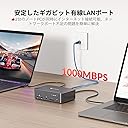
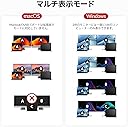
The AV Access iDock C20 is a 12-in-1 USB-C KVM docking station designed for professionals managing two laptops and dual monitors. It supports seamless switching between PCs with a single button, offers dual 4K monitor output (one at 60Hz, the other at 30Hz), delivers up to 60W power to each laptop, and integrates multiple USB, HDMI, Ethernet, and audio ports. Ideal for hybrid workspaces, it simplifies cable clutter and boosts productivity, though it does not fully support dual 4K@60Hz output or macOS dual extended displays.


| ASIN | B0D3KPXRY4 |
| Amazon 売れ筋ランキング | パソコン・周辺機器 - 42,541位 ( パソコン・周辺機器の売れ筋ランキングを見る ) 切替器 - 223位 |
| GTIN (Global Trade Identification Number) | 00850064145021 |
| UPC | 850064145021 |
| おすすめ度 | 5つ星のうち4.2 389 レビュー |
| カラー | ブラック |
| コネクタ | クランプ |
| コネクタタイプ | クランプ |
| スイッチのタイプ | イグニッションスイッチ |
| ブランド | v AV Access |
| ブランド名 | v AV Access |
| メーカー名 | AV ACCESS |
| メーカー型番 | iDock C20 |
| モデル番号 | iDock C20 |
| ユニット数 | 1.0 個 |
| 上位温度定格 | 45 摂氏 |
| 位置調節の数 | 1 |
| 作動電圧 | 100 キロボルト |
| 保証内容 | 2年間 |
| 動作モード | ON-OFF-ON |
| 動作電圧 | 100 キロボルト |
| 原産国 | 中国 |
| 取り付けタイプ | PCBマウント |
| 同梱商品 | KVM Switch |
| 商品の入り数 | 1 |
| 商品本体サイズ | 39 x 20.5 x 7.5 cm |
| 回路タイプ | 2-way |
| 定格電流 | 6 アンペア |
| 対応アイテム | Dell, HP, MacBook, Lenovo, Acer, ASUS |
| 接点のタイプ | a接点 |
| 接点の材質 | アルミニウム |
| 接触タイプ | a接点 |
| 操作モード | ON-OFF-ON |
| 消費電力(ワット数) | 60 W |
| 特別用途食品 | CE |
| 端末タイプ | スペード |
| 素材 | アルミニウム |
| 防水性 | IP00 |
| 電流定格 | 6 アンペア |
三**猫
4K@60Hz✕2画面には非対応で、片方が30Hzになります。他のDP MSTアダプタで4K@60Hz✕2画面できるPCでも、本製品通すとNGです。
4K@60Hz✕2画面には非対応で、片方が30Hzになります。 他のDP MSTアダプタで4K@60Hz✕2画面できるPCでも、本製品通すとNGです。 話が違います。 海外サイトの英語の取説をみると、 CPU内蔵グラフィクスではFHD@60Hzで使うように、 という、時代錯誤な記載が.... いや、12世代以降は普通に4K@60Hz✕デュアルがDP MSTで可能なんですが.... この製品の出来が悪いだけでしょう。Intelのせいにしないでください。 たぶんCPU内蔵グラフィクス直結のUSB-Cは、DP映像出力とUSB-C映像出力が両方乗ってくるので、 本製品の配分がまずくて(USB3.0を優先して)、 4K@60Hz✕2画面を通せなくなり、片側30Hz担ってるんじゃないかと思います。 これ、発売から1年経つけど、 海外にもちゃんとしたレビューがないんですよね。 本当にがっかりです。 各PCとの接続をUSB-Cに集約して4K@60Hzのデュアル構成で切り替えたい場合は、 4K@60Hz✕2に対応したDP MST HUBを2台のPCにつけて、 そこからHDMIx2のデュアル対応KVM SWITCHをつなぐしかないようです。 で、それをやると、配線がめちゃくちゃなことになります。 (HDMIケーブルX6、USBx2、ACアダプタx3, HUBx2) なので、本製品の意味があったのですが、 普通のPCでは 4K@60Hz + 4K@30Hz にしかならなりません。うぇ... それを承知で買ってください。
N**9
使い物にならない
・三叉コンセントなので変換器必要(日本人特に) ・macOS系使えない →これに関しては表記と事実が異なる事から、互換性の欄からmacOSは削除すべき。
F**H
Great Product, but please read.
First: This product does exactly what I need it to do. I have two laptops, and this unit keeps BOTH charged and running without going into "sleep" mode. The swap: It takes a few seconds to do a swap from one laptop to the other. This is expected, as the O/S takes a moment to figure out it has been plugged into a new USB with the two monitors and setup Windows. The bad (but not bad for me): I believe AV should have not have included the ethernet port, and instead bring the price down. Only one laptop can connect to that port at a time, so why bother? I don't want either laptop to lose their Internet connection, so mine are both connected to the WIFI. I would be interested on hearing about someone that would want this and not use the WIFI. That being said, the limitation is because only one USB can connect at time, so it is not a problem specific to this product, it is not possible "overall". I'm very happy with this purchase, though I did wait for the sale to happen. (The sale is frequent.) It does get a bit warm, but it is charging two machines at once. I have a mouse, keyboard, and headset / mic combination plugged in, and I have no problem using all three devices on the "active" laptop. (Probably not good to use this for a printer connection...) I do think the price is a bit high, but it is the only one I can find to suited my needs.
A**E
Great customer support
Works well. Switches between my two laptops in a couple seconds, one cable per laptop handles video, charging, and internet. Cleaned up my desk a lot. But honestly best part was the support. Had some initial issues I couldn't figure out on my own. Johnny helped me out and stuck with it until we had it all figured out. Thanks Johnny!
M**P
Switch between Samsung S20, which uses DEX and my laptop
I have a Samsung S20, which uses DEX. I switch between my laptop and phone all the time. The biggest reason is that Google Photos on my mobile does better editing than on the desktop.
J**E
Better than I expected
I picked this up to simplify my dual-monitor, dual-laptop setup and it’s been a game changer. Switching between my work and personal laptops is seamless — one button press and both monitors, keyboard, and mouse all swap over instantly. No more unplugging cables or juggling adapters. 4K output looks crisp on both screens, no noticeable lag or signal issues. Build quality feels solid, and the initial setup was straightforward. It also handles USB peripherals well, so my webcam and external drive switch along with everything else. If you’re running two laptops with a dual monitor setup and tired of the cable chaos, this is exactly what you need. Highly recommend.
I**T
Great KVM connectivity for my set-up!
The AV Access iDock C20 has been a bit of a lifesaver for my setup. I regularly switch between an M1 MacBook for work and a Windows gaming laptop, and finding a KVM switch that handles both consistently has been challenging. After trying several other options, I used to resort to two keyboards and mice alongside manually switching inputs on my main display. The real challenge always seems to be passing the EDID for the Mac through a peripheral, but just like the previous model, the C20 hasn't had that issue at all. It consistently passes accurate display information to the Mac without my open windows jumping around. This newer model has made an even bigger difference and freed up a ton of space on my desk. The setup was straightforward, and it works reliably with both machines. With both my MacBook and my Windows laptop connect to the dock it handles 4K video, data transfer, and power delivery with a single cable. I don't even need my laptop chargers on the desk anymore. Switching is fast and I haven’t experienced any connectivity issues beyond the expected brief moment for the keyboard and mouse to re-engage. I do want to mention how it handles dual displays, specifically for Apple users. The C20, like the C10, supports two external monitors, but because macOS doesn't support MST over a single USB-C connection, it only outputs a duplicated (mirrored) display from the Mac, whereas the Windows machine gets fully extended screens. Keep this in mind if you need extended monitors for your Mac. However, my set-up actually calls for a duplicated display because I send it to a projector to do video/media work in my home studio. So, the way this outputs from the Mac is actually a feature for me. I really appreciate the premium, compact aluminum design, which keeps my workspace highly organized. As a hub with 12 I/O connections, it handles all my peripherals. I really prefer a full mechanical keyboard, and this allows me to keep only one out—with a little special key remapping on my Mac, I seamlessly use the one I bought for PC gaming. The iDock C20 has been a solid addition to my setup and has upgraded my workflow. It’s definitely worth considering if you’re looking for a reliable, single-cable KVM switch for a mixed Mac and Windows laptop environment. For me, it's been a five-star experience, and a real relief to have found something that does exactly what I need without a lot of consternation. Would absolutely get again.
Trustpilot
2 days ago
1 month ago