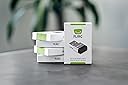
🎯 Master your media kingdom with one sleek USB wizard!
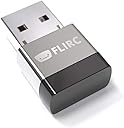
Flirc USB Universal Remote Control Receiver transforms any IR remote into a powerful keyboard controller for NVIDIA Shield, FireTV, Raspberry Pi, PC, and more. With easy-to-use cross-platform software, it enables custom button mapping, supporting a wide range of devices and media apps. Its compact design and universal compatibility make it the ultimate tool for consolidating your remote controls and elevating your media experience.


| ASIN | B01NBRBWS6 |
| Amazon 売れ筋ランキング | 家電&カメラ - 385,463位 ( 家電&カメラの売れ筋ランキングを見る ) AV・テレビリモコン - 8,692位 |
| UPC | 604776612469 090281102623 |
| おすすめ度 | 5つ星のうち4.3 1,706 レビュー |
| カラー | シルバー |
| コントローラーの種類 | iOS |
| サポートする機器の数量 | 10000 |
| ブランド | FLIRC |
| ブランド名 | FLIRC |
| ボタン数 | 1000 |
| メーカー名 | Flirc |
| メーカー型番 | FL-25626_SML |
| 互換デバイス | タブレット, ノートパソコン, パソコン |
| 互換性のあるストリーミングメディアプレーヤーモデル | NVIDIA SHIELD TV, NVIDIA SHIELD TV Pro |
| 商品の追加説明1 | ユニバーサル |
| 商品の重量 | 1 オンス |
| 型番 | FL-25626 |
| 外部機関認定情報 | Não aplicável |
| 対応デバイス | タブレット, ノートパソコン, パソコン |
| 対応デバイスの最大数 | 10000 |
| 接続技術 | USB, 赤外線 |
| 最大レンジ | 50 フィート |
| 特徴 | ユニバーサル |
| 色 | シルバー |
| 通信・接続インターフェース | USB, 赤外線 |
K**K
コンパクトで便利
素晴らしい😀👍 首を長くして待った甲斐がありました
F**I
メディアプレーヤーのキーボード操作を手持ちのひとつのリモコンで!
FLIRCは第1世代からのユーザーです。サイズが小さくなりデザインも洗練されたこともあって追加購入しました。 学習型のIRリモコンはよくありますが、FLIRCは逆の発想で、手持ちのリモコンでの操作を FIRCレシーバに学習させることで、リモコン操作をキー操作に置き換える装置です。 OSMC, WMP, iTunes, PS4, XBOX, FireTV など、USBキーボードが接続できて ショートカットが使えるAV機器のアプリであれば、 アプリのショートカットを手持ちのリモコンのボタンにマッピングし学習させることにより、 リモコンのボタンひとつでアプリが操作できるようになります。 リモコンはひとつで、FLIRCはAV機器の数だけ用意してUSBに挿しっぱなしにします。 パッケージには本体しか入っていませんので、flirc.tv のサイトからWindows/Mac/LinuxのGUIを ダウンロードしインストールします。 GUIを立ち上げFLIRCをPC/Mac/Linux機のUSBに接続し認識されるのを確認したあと、 キーボードとリモコンボタンをマッピングします。 キーボードは機器ごとテンプレートがいくつか用意されています。 迷ったらフルキーボードを選択すれば大丈夫です。これでマッピングの準備ができました。 マッピングは、「画面のキーボードをクリックしてショートカットを選択」 → 「リモコンをFLIRCに向けて、対応させたいリモコンのボタンをプッシュ」 を繰り返します。 間違った場合は [ERASE] をクリックしたあと、消去したいリモコンのボタンをプッシュします。 操作したいショートカットのマッピングが終わったら、FLIRCをAV機器に差し替えて完了です。 GUIのその他の機能は、ファームウェアの更新と、設定のセーブ・ロード・全消去になります。 いったん作成した設定は保存しておけば次回以降は学習ステップを省けます。 コンピュータベースのメディアプレーヤーを所持していて、キーボードがじゃま、 もしくはリモコンをひとつにまとめたいが、大仰な学習リモコンはちょっと…という人にお薦めです。 【利用例(動画参照)】 私はRaspberry Piの音楽プレーヤーのコントロールに利用しています。 LIRCのように、パッケージをインストールして、IR受光器を配線して、モジュールを追加して、 confを書き換えて…等は全く不要になります。 (具体的にはpiCorePlayerのJiveliteのショートカットを、 Squeezeboxの純正31ボタンリモコンに以下のようにマップしています) Key Jive Action Button ---- ------------ -------- [ go_now_playing Now Playing ; go_music_library Browse f go_favorites Favorites , shuffle_toggle Shuffle . repeat_toggle Repeat s sleep Sleep Q power Power / go_search Search h go_home Size p play Play SPACE pause Pause a add Add M mute Brightness z jump_rew Rew b jump_fwd Fwd = volume_up Volume Up - volume_down Bolume Down 0 play_preset_0 Ten Key 1 play_preset_1 Ten Key 2 play_preset_2 Ten Key 3 play_preset_3 Ten Key 4 play_preset_4 Ten Key 5 play_preset_5 Ten Key 6 play_preset_6 Ten Key 7 play_preset_7 Ten Key 8 play_preset_8 Ten Key 9 play_preset_9 Ten Key UP up Cursor Key DOWN down Cursor Key LEFT left Cursor Key RIGHT right Cursor Key
D**N
電波式リモコンの機器を赤外線の学習リモコンで操作
説明書も付属せず箱にも大した記述がないので自分で調べる能力が必要です。 電波式リモコンでしか操作できないFireTVやSHIELD TVのような端末を赤外線リモコンで操作することができるようになります。 PCのUSBに接続してアプリをWebから入手して赤外線リモコンの信号を特定のキーとして学習させた後で操作したい端末に差し替えて使うような方法になります。 一般的なUSBキーボードとして接続されるのでUSBキーボードをサポートする機器には使えます。
T**.
Best Device for Universal Remote Control – Works with Google TV & Kodi!
Hands down one of the best devices I have ever used. The FLIRC USB allows me to use any remote I want with my Google TV box, and it even works perfectly with Kodi. Programming it is straightforward and easy – even someone who isn't tech savvy will have no trouble getting it set up. You will not regret this purchase! I personally own two of them – one for my computer setup connected to my TV, and one for my Google TV box. With both set up, I can use a single remote to control all the features across all my devices. It's a total game changer for home entertainment. Highly recommend!
A**E
works well
Great little device - very easy to setup, works well on a NUC media player
T**R
Excellent Addition to my PI Media Centre
Won't bore you with a long review... Have a Pi Kodi / Media Centre setup and needed to add a remote to the situation so I bought this. Extremley easy to set up using any random remore control you have lying around the house in my case I used a old Android TV remote that is about ten years old because it had all the play, pause, rewind extra buttons on it. To set the FLIRC up you just plug it into your PC and it will ask you to program your remote by picking a on screen option and pressing the corresponding button on your remote control of choice... it genuinely could not be easier. Setup on PI was also very quick and straight forward and it just works perfectly. Really cannot fault this... fair price for a well made decent product that is easy to set up and use. 5 stars baby!!
C**O
Buen producto.
Es un muy buen producto. Es exactamente lo que buscaba cuando puse, receptor de infrarrojos universal en el buscador. Puedes programar cualquier mando a distancia que tengas por casa para que funcione en tu PC o cualquier aparato con USB compatible. Con un software muy sencillo lo programas y el aparato funciona de forma independiente. Lo compré para otra cosa pero también lo estoy usando para mando a distancia del Kodi, pero lo puedes usar con otros reproductores o para lo que quieras.
Y**X
Recepteur infrarouge pour pc, raspberry pi
Fait son job, et plutôt bien. Rien à voir avec la qualité du produit acheté, ce commentaire concerne certaines télécommandes qui sont mal foutues : certaines touches utilisent le même code infrarouge sur plusieurs touches, ce qui les rend inutilisables pour le recyclage. Utilisé sur un pc windows pour la configuration initiale, puis sur un raspberry pour l'utilisation de tous les jours. Cela me permet d'écouter des radios sur internet avec une belle interface graphique sur ma tv :) Bref, ce dongle flirc rend bien des services.
Trustpilot
2 weeks ago
2 weeks ago