


Desertcart purchases this item on your behalf and handles shipping, customs, and support to Senegal.
🎨 Elevate your creative flow—control like a pro, work like a visionary.
The TourBox Elite is a professional-grade wireless left-hand controller designed for creatives who demand speed and precision. Featuring dual Bluetooth 5.0 connectivity for simultaneous connection to two devices, tactile haptic feedback, and 11 fully customizable buttons and dials, it supports seamless workflow across major creative software like Premiere Pro, Lightroom, and DaVinci Resolve. Its ergonomic design enables eyes-free operation, making it an indispensable tool for video editors, photographers, and illustrators aiming to maximize productivity and creative control.
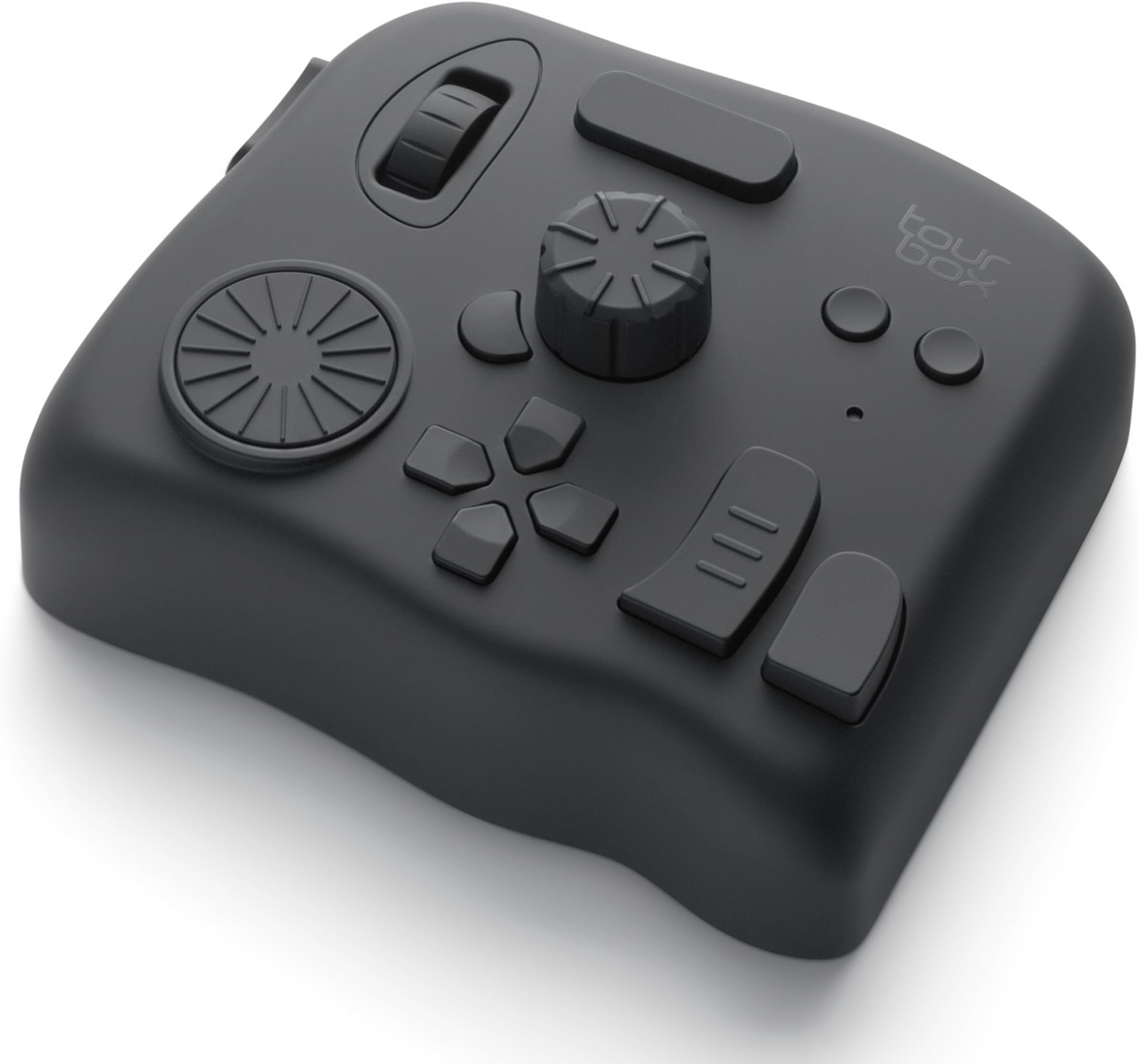


| ASIN | B0B5XCMFQD |
| Amazon 売れ筋ランキング | パソコン・周辺機器 - 10,299位 ( パソコン・周辺機器の売れ筋ランキングを見る ) グラフィックタブレット&ペン - 37位 |
| UPC | 850040209112 |
| おすすめ度 | 5つ星のうち4.3 610 レビュー |
| カラー | クラシックブラック |
| ブランド | TOUR BOX |
| ブランド名 | TOUR BOX |
| メーカー名 | TourBox Tech Inc. |
| メーカー型番 | TBECA |
| モデル番号 | TourBox Elite AMTBECA |
| 保証内容 | 1年間のメーカー保証, 30日間返金保証 |
| 原産国 | 中国 |
| 同梱商品 | TourBox Elite コントローラー |
| 品目寸法(L x W x H) | 11.6長さ x 10.1幅 x 4.4高さ cm |
| 商品のハイライト | 触覚フィードバック、精密ブラインド操作、動画編集・ポスプロ・色調補正、写真加工・イラスト・2Dアニメ、DaVinci Resolve・Adobe・FCP・CSP、板タブ・液タブ対応 |
| 商品の入り数 | 1 |
| 商品の寸法 | 11.6長さ x 10.1幅 x 4.4高さ cm |
| 商品の重量 | 376 グラム |
| 材質 | ポリカーボネート + ABS + TPU |
| 素材 | ポリカーボネート + ABS + TPU |
| 色 | クラシックブラック |
| 電圧 | 3 ボルト (DC) |
| 電圧(ボルト) | 3 ボルト (DC) |
M**O
イラストにお勧め
まだ使ってから1ヶ月程ですがなかなか良いです。 主にイラストで使っています。各ボタンの押し心地が良くほとんどのボタンの形が違うので押し間違いが少ないです。 それと2つのダイヤルがありますがこのエリートタイプではカリカリカリッとした疑似的感覚を調整でき、この感覚がまた何とも言えない快感を与えてくれます。 これから毎日使って耐久性のほうも見てみたいと思います。
藤**井
直感的に操作できる最高の左手デバイス!
Premiere Proで使用していますが、正直もっと早く買えばよかったと思えるレベルです。 特にタイムラインの移動やカット編集が圧倒的にスムーズになり、作業スピードが体感で2倍以上になりました。 ボタンのカスタマイズ性が高く、作業内容に応じて自分好みに割り当てられるのもポイント。 ダイヤルやノブの操作感もとても滑らかで、触っていてストレスがありません。 Bluetooth接続も安定していて、ラグもほぼ感じないです。 動画編を本気でやっている人には心からおすすめできます。「手がもう1本増えた」感覚を味わえます!
通**者
DaVinci Resolveでの動画編集が快適に。設定には少し慣れが必要
DaVinci Resolveでの動画編集作業を効率化するために購入しました。総合的な満足度としては星4つといったところです。 【良かった点】 タイムライン操作が直感的: ダイヤルやノブを使ってタイムラインの拡大・縮小やコマ送りができるため、マウス操作よりも作業スピードが格段に上がりました。 ワイヤレスで快適: Bluetooth接続が安定しており、デスク上のケーブルが減って作業環境がスッキリします。 触覚フィードバック: ダイヤルを回したときのカチカチとした感触が分かりやすく、カラーグレーディングなどの細かい調整時に非常に重宝しています。 【気になった点・注意点】 初期設定のハードル: 自分好みのショートカットを各ボタンに割り当てる作業(プロファイルの作成)に、最初は少し手間と時間がかかります。 ブラインドタッチまでの道のり: 「どのボタンに何を割り当てたか」を完全に指が覚えるまでは、数日程度の慣れが必要です。 【総評】 最初のカスタマイズと操作への慣れさえ乗り越えれば、動画編集において手放せない左手デバイスになります。導入直後から完璧に使いこなせるわけではないため星-1としていますが、作業効率を上げたいクリエイターには間違いなくおすすめできるツールです。
は**り
これが無いなんてもう考えられない
ここ数年で1番買って良かった製品です。 Adobe premier proで動画編集していますが これが無いと編集作業が出来ない身体になってしまいました。。。
K**様
キーボードショートカットが使えないなら即購入でもいい
クリスタで使用しています デフォルトでプリセットがついているため、すぐに使えるのはいいところ ただしどのボタンがどの機能に対応しているかは覚える必要があるため 初めからサクサクできる!とはいかないかもしれません また、プリセットはあらかじめあるものの、使いやすいようにするためには自分で変更する必要はあり その際、クリスタ用だとちょっとわかりづらさは感じました (ボタンに対して機能を振り分けるのがキーボードのショートカットになるので) PhotoShopであれば機能がそのまま振り分けられるので楽そうです また、USBケーブルは付属していないので注意です 私の環境ではペン付きのノートPCを液タブ代わりに使用してるため、キーボードショートカットを使用できない問題を解決してくれました 手触りもよく、使用感もいいため☆5とさせていただきます
つ**。
手が小さい人はちょっと苦労するかも
とても使いやすいのですが、大きさが手に合いませんでした(手の大きさは、子ども用手袋がちょうどいいくらいの大きさの者です)。 手が届かない箇所があるので、手を動かす→ノブを回してしまうという事故が多発。上記の理由で、ノブ回転単体のコマンドは入れられない悲しさ……。 もう少し、サイズ展開があったらなぁという感じです。けれど、逆に言えばそれ以外文句はありません。良い商品なので、星5です。
テ**ル
安定した接続が出来ず、使用を断念・・・
ボタンの組み合わせが多く、いろいろな機能の割り当てが出来るのが魅力です。 魅力なのですが、私のパソコンでは、なぜか有線接続でも安定してPCが認識せず、 常用に耐えられる状態ではなかったため、星3とさせていただきました。 きちんと使える環境の方ならば、とても便利だと思います。 少し調べても、似たような状態になっている方はいらっしゃるようでしたので、 何か共通の原因があるのかと思いますが・・・ 値段が高かっただけに、手痛い出費になりました。
ス**ト
Lightroomのプロセスが残る
Lightroom ClassicにてWindows環境で使用しています。 アプリケーション毎に各ボタンの割り当てが可能、つまりは起動しているEXEを掴んだような状態になります。 Lightroom Classicを起動中にファイル→新規カタログを選択すると、現在起動しているカタログを閉じて(一旦Lightroom Classicが終了し)、再びLightroom Classicが自動的に起動して新規カタログの設定へと移ります。 ただ、このデバイスを起動したままの状態で上記の操作を行うと現在起動しているカタログを閉じて(一旦Lightroom Classicが終了し)、そこからLightroom Classicの起動がありません。 タスクマネージャーで確認するとLightroom Classicのプロセスが残ったままになっています。 恐らくはこのデバイスが掴んでいるせいで、正常な動作が出来なくなっているものと思われます。 なので、Lightroom Classicでのやりたい作業によっては、意識的にこのデバイスを終了させてから 作業を行う必要があります。
P**T
Material de buena calidad pero una interfaz muy torpe y poco intuitiva !
Cuando recibes el producto es como abrir un producto de apple , pero una vez que empiezas a usarlo se convierte en una pesadilla , la manera en que indican cómo se instala es nos 100% acertada , Almenos en lo Mac mini M1 así lo fue , cuando intentas configurar es ahí donde no es intuitivo y es torpe , solo comandos y no botones ! , cuando intento programar ciertas funciones no me deja , siempre es una batalla ,también la conexión a Bluetooth no es tan buena cuado lo haces por primera vez , una vez que agarra entonces ahora si ya no tienes problemas , siento que pierde su propósito el producto cuando te hace perder todo el día configurándolo , debería ser de uso rápido y amigable pero no lo es , no lo recomiendo por la experiencia que tuve , lo que quería es dejar de usar el teclado por eso lo compre ,pero solo le agregué un aparato más a mi flujo de edición 😕 , estoy pensando en comprar otro de otra marca y a un precio similar , Ya lo regrese !
C**A
Practicidad
Es un dispositivo super útil para el flujo de trabajo en videos. Estoy muy contento con el producto y vale la pena la inversión. Es un dispositivo pesado, se siente de buena calidad y los botones vienen con pre ajustes que te facilita todo.
G**V
Product good. Seller does not send storage box.
Even though it is mentioned that they sell (with storage box), they don’t send it. The product is good.
A**R
Definitely worth it
I like this so much that this is my second unit
M**U
I love it!! Excellent user experience, highly customizable, amazing configuration companion app!
High-quality materials and construction, very heavy-weighted so it stays in place on the desk and feels solid. Haptic feedback is appreciated for feeling the dials' notches (and can be adjusted per button/dial mapping), but if you don't need that or Bluetooth connectivity, get the lower tier model. I love the concept of all buttons/dials having different shapes, positions and surfaces, it makes them all so much more unique and memorable. The TourBox Console companion app for configuring button/dial bindings is extremely well designed and easy to use. I love the fact that I can associate actions with pretty much any combination of buttons and dials, so I can get pretty creative on how I set it up for each application, and I don't feel like I can run out of mapping possibilities. That was a big criteria for me and they scored 100% there. I'm using it in Ableton Live (for audio editing and music composition), in Blender (especially for 3D sculpting) and in Affinity Photo (for hand drawing) as a complement to my Kamvas Pro pen tablet (which was bundled with Huion's Keydial Mini, but that just can't compare to the TourBox, given its even grid of similar buttons). The only downside is the price. It is slightly overpriced compared to other hardware of similar complexity (game controllers, keyboards, mice, etc), but I guess that being targeted to a rather narrow professional audience, it's probably something to expect. But even if it's rather expensive, I don't regret my purchase at all and would buy it again any time if I had to. Highly recommended to anyone involved with creative apps and workflows, with so many keyboard shortcuts to remember and trigger.
Trustpilot
1 month ago
1 week ago