

Haute42 U16 レバーレスアケコン レバーレスコントローラー 黒 ホットスワップ 格ゲ向 PC/Switch2/PS4対応 JZW-Shop
Product ID: 729244268
⚡Zero input lag for real-time precision
🌈Customizable RGB LED with 7 color modes
🎮16 programmable buttons for pro-level combos
Desertcart purchases this item on your behalf and handles shipping, customs, and support to Senegal.
🎯 Dominate every fight with precision and style — the ultimate leverless arcade controller!
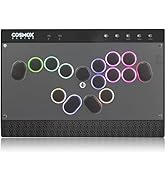
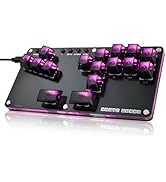
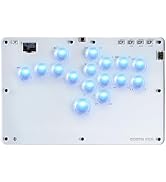
The Haute42 U16 is a professional-grade leverless arcade controller designed specifically for fighting games. Featuring 16 responsive buttons with optimized spacing, zero input lag, and hot-swap switch support, it delivers unmatched precision and customization. Compatible with a wide range of platforms including PC, Switch2, PS4, and Steam Deck, it offers plug-and-play convenience. Its slim, lightweight design makes it perfect for portable competitive gaming, while customizable RGB lighting adds a subtle, stylish flair.










| ASIN | B0DFXWJ2PT |
| Amazon 売れ筋ランキング | ゲーム - 545位 ( ゲームの売れ筋ランキングを見る ) PS4ハンドル・ジョイスティック - 6位 |
| カスタマーレビュー | 4.1 5つ星のうち4.1 (318) var dpAcrHasRegisteredArcLinkClickAction; P.when('A', 'ready').execute(function(A) { if (dpAcrHasRegisteredArcLinkClickAction !== true) { dpAcrHasRegisteredArcLinkClickAction = true; A.declarative( 'acrLink-click-metrics', 'click', { "allowLinkDefault": true }, function (event) { if (window.ue) { ue.count("acrLinkClickCount", (ue.count("acrLinkClickCount") || 0) + 1); } } ); } … |
| 原産国 | 中国 |
| 商品モデル番号 | HF-15 |
| 年齢対象 | 全年齢対象 |
| 梱包サイズ | 35.9 x 21.6 x 2.9 cm; 790 g |
| 発売日 | 2024/9/13 |
| 言語 | 日本語 |
初**者
初心者おすすめ
ストリートファイター6をやるために購入しました。格ゲーは初めてだったので手頃な価格のこちらの商品を購入しましたが、ボタンの押し具合や、多さ、ボタン配置の自由度がとても気に入っています。大きすぎず、小さすぎないちょうどいい形なのも気に入っています。
あ**あ
コスパ○
PADから転向しました。キースイッチなどの変更はしてません。 他のレバレスと比較できませんが設定などは細かくでき、躓くことはありませんでしたが不慣れな方だと難しく感じると思います。 ボタンに高さがあるので押し込む感じが若干あります。 チャタリングや反応しないなどの不具合は今のところ発生していません。 非常におすすめできますが、ボタンに少し高さがあるのとリムがあるのは1度考えるべきだと思います。
R**O
買ってよかったです!
今回はHaute42 U16を購入させて頂きました アケコン自体、持つのは今回が初です アケコン初心者、入門にすごくおすすめです まず、操作感、ラグもなし、 そして、ボタンを押す感覚が たまりません。 ゲームのロード時間でも カチャカチャと触っています笑 格ゲーのモチベーションにも繋がります サイズも薄型コンパクトなので 持ち運びにももってこいですね ただ、最初にアップデートなど 自分で調整する分には少し 手間取りました汗 まずps5でのプレイになるのですが 接続から約8分は普通に使えました。 だけど8分をすぎるとコントローラー自体切れてしまうという 8分認証?というものが働いて 8分毎にコンローラーの接続が切れてしまうという壁にぶつかりました‥ なので調べたところコンバーターという 中継機器を購入しなくちゃならない というものでした(僕が知識不足なだけです) 僕はBrook Wingman FGC Fighting Stick Converter ウィングマンFGCというものを使用してやっとの思い、今も何も問題なく プレイできています 少し壁に直面しましたが 買ってよかったと思います!
Y**S
21ボタンあるのに18種類しかキーボード割り当てできない
【メリット】スト6用に購入。Webアプリの不便さに目をつぶればお値段以上。質感は良く、軽いので膝置きが楽。SICD Last Winを設定できるのは大変ありがたい。【デメリット】キーを3つ以上重複配置しないと使えないボタンが出てくる。キーボード割り当てがXboxコントローラ(XInput)割り当てを経由しているため構造上無理。Webアプリはバグが多く、UIも使いにくい。【アプリのバグ】PIN17を別のXInputと重複させるとWebアプリ起動が不能になる(ドライバの再インストールで解決)。PIN割り当てのプリセットが機能していない(1しか使えない)。キーボード割り当ての反映に失敗することがある。SICD変更ボタンは割り当てても使用できない。【UIの問題】ボタン重複はPIN配列を見ながら調整が必須
A**ー
コスパよさげ
レビュー書くね 現在同じメーカーの13ボタンからの入れ替えで購入しました。 まず所管を言うと、とても良いって感想です。 ボタン配置がよく、1ボタン使ってないですが、上ボタン周りのボタンのオフセット具合がちょうど良かったです。 ボタンの打鍵感は普通で、音も静かめでよかったです。 天板自体も手首まで固定できて十分スペースはあります。 エンジョイで使用する分にはとても十分で、とてもいいです。 あと付属のusbが90度曲がりで凄く良かったです!
A**ー
安物買いの銭失い
ps5スト6で入力遅延がすごいです。 1台目は不具合かなと2台目も買いましたが変わらずこれなら奮発して三万円台のを買うのをおすすめします。
K**様
おすすめです
すごく良かったです 初めてのレバーレスにおすすめです、お値段もレバーレスの中では比較的手を出しやすく性能も申し分無いです、 使って3ヶ月目ですがボタンは全然元気です。 ただ設定の仕方が少し難しめです。 設定をしなくても充分遊べますが、ボタン配置を変えたりする時に少し手間取りました。 ですがサポートセンターの対応も丁寧で優しく教えてくださるのであまり知識が無い人でも設定できます。
し**ん
取り回し、操作感が良く、他レバレスより安価。
ストリートファイター6をPADでプレイしていましたが、レバーレスに移行するために本製品を購入しました。初めてのレバーレスとして購入しましたので、他のレバーレスとの比較は出来ませんのでご了承ください。 背面6箇所に50円玉と同等サイズの滑り止めがあります。膝起きしてもあんまりズレない印象です。 天面はアクリルだと思うので使ってくると指紋が気になりますが、拭けば問題ないレベルです。 全体サイズは表記があるのであらかじめ把握されていると思いますが、定位置に手を配置した時に手首がしっかり置けるくらいのサイズです。 肝心のボタンは、個人的な感想になりますが押した感があって好きです。レビューに動画載せておきますので参考までに。 ボタン周りにリムがあるので、高さはありますが弾き入力がやりやすいです。 ボタン配置やLEDのカスタマイズは、一応取り扱い説明書がありますが、設定画面へのアクセス方法程度しか書いてませんので、ネットで調べた方が早いと思います。LED設定は最初は苦労しましたが、慣れてくると簡単に変更できます。 値段もセール時1万円程度と、他のレバーレスに比べると安価です。 わたしはPS5で使用するため、コンバータ(BROOK Wingman FGC2)とセットで購入しましたがそれでも2万円くらい。 (本製品に直接関係ありませんが、コンバータはオフライン大会でCS機だった際にも使えるので持ってて損はないと思います。) 総評は、他と比較できないため申し訳ありませんが星4としています。とはいえかなり満足しています。 薄さや軽さなどの取り回しの良さ、操作性は高評価。 取説の「ネットで調べてね〜」感があるのは仕方ないかなといったところ。
W**N
A budget stick that puts most expensive controllers to shame
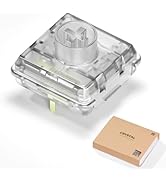
The fact that Haute42 was asking so little for a leverless pad that offers so much feels like a dream come true, especially if you are like me looking to give these controllers a shot for fighting games. Not only does this stick have every accommodation for your button needs, L3, R3, and Touchpad, just to name a few, all with the option to use a normal hitbox layout if you are already familiar, but also offers a more traditional WASD if you prefer that, say if you are coming from mouse and keyboard on PC games, which a lot of us have. There is also a built-in display, which you can customize the splash screen to be whatever you want, and also serves as a way to display the controller mode it is in, what the movement buttons are acting as (DPad, L Stick, or R Stick), what your SOCD setting currently is, and even acts as a button check, so you can just plug it in and use the stick itself to check if your buttons are working ok. Speaking of the buttons, to change them is a unique way to set them up. You have to press and hold the start button as you plug it into a PC, then in your browser, you type "http://192.168.7.1" to access the software that runs the stick. From there, you can change the LED mode, what each button does (no button is exempt, so go nuts), update the firmware, and so on. Just make sure you click save at the bottom left and then reboot at the top right of the window, then click reboot as a controller for your changes to work properly. This stick also gets points from me because it is a universal* stick. While the guide for what button to push for what mode is printed on the back, essentially guaranteeing immediate access to that information at all times, a bit of a setup is required depending on the console. While PC and Switch are plug-and-play, getting this to work on a PS4 requires some extra steps as long as you select the correct mode. Essentially, you need to rip the verification files from a genuine DualShock 4 controller and then put them into the stick software. While Haute does not provide you with those files or the means to dump them from a controller, they will show you how to upload those files once you do get them. You are just on your own on how to get them. All of this is to avoid the PS4's artificial 8-minute time out on controllers Sony does not explicitly approve of. I cannot speak to the compatibility to a 9th gen console due to not having either system, so look elsewhere for that kind of information. Artwork and key switches/button caps are also fully customizable, but what the T16 comes with out of the box is 30 mm red linear switches. This essentially means that there is no noticeable click halfway through the button press. It is just a smooth glide down to the bottom. The buttons are also super quiet and the button caps are super soft and smooth to the touch, compared to traditional keycaps/Sanwa arcade parts, which feel very harsh and plastic-y to the touch. Essentially cutting down on any finger pain you might have by extensive use. This stick comes with a full documentation paper, a key switch puller, a USB-C cable, a spare red linear switch, and in my case, 8 rubber feet instead of the listed 6. These can be placed anywhere alongside the bottom of the stick to avoid slipping around if you play it on a desk. Portability-wise, while I do have pictures of the measurements of the length and width, the height is also roughly a half inch. The actual size, save for the height, is only barely bigger than the size of normal printer paper, essentially making sure it fits in most bags for transportation purposes while offering plenty of wrist room for those who need it. The actual outside is made of acrylic. Offering something reasonably durable and lightweight. It does not compare to metal, and there is a chance you may hear it snap, likely due to it trying to settle outside of the box and in normal use. If that happens, your stick will likely still be 100% functional. Acrylic is not exactly easy to break by accident. There are other models, S16 and M16, that offer everything I have mentioned so far, but cheaper and smaller. If you are on a tighter budget and/or do not need that much wrist room, I would look to those rather than this. I have done nothing but sing praise of this thing. That is not to say I think this is flawless. The aforementioned acrylic shell does make it easy for your wrist to stick to it if you sweat a lot, but there is no apparent tournament lock switch to disable start/select/home. While you can set these buttons to do nothing on the settings page, it is not as seamless as just flicking a switch to disable them on the fly. This puts you in a situation where you would have to often enable and disable the long way around if you use this for tournaments and personal use. Otherwise, this fits right in with the tournament standard with built-in SOCD Neutral settings, and while it does offer Turbo, you can remove that from the labeled button, essentially perma-disabling Turbo. All and all, I do not think I can recommend a 16-button controller from Haute42 enough, and while this review is centered around the T model, 99% of everything mentioned here does apply to the rest of the 16 class sticks. All of these are stuff that brands like the Razor Kitsune or even Hitbox struggle with, while asking for at least 2-3 times the price. I cannot recommend these sticks enough. Buy them on sight.
F**G
Feels Great!
Feels like the best controller to start if your intro and also veteran too.
Z**A
Blind buy
Very good quality and size
B**W
pas mal
Ça fait du bien de l'utiliser sur ps5 avec tekken. Les instructions de configuration sont simples. Je l'utilise sur la ps5 avec "Mayflash Magic Boots 1.1 pour ps4" branché sur le côté. Mes seuls reproches sont qu'il se déconnecte ou se fige toujours de manière aléatoire une ou deux fois au cours d'une session de jeu de 3 heures. Et l’acrylique fait parfois des bruits de craquement tout seul.
P**L
Haduken!
Quickest dragon punch on earth and a ml. kick to fireball string is super fluid! I own other pads by some bespoke us manufacturers and this one is right up there regarding quality. Features far outweigh similar priced options. Grab a ps5 or xbox dongle and you're good to go.
Trustpilot
3 weeks ago
3 days ago