Desertcart purchases this item on your behalf and handles shipping, customs, and support to Senegal.
❄️ Stay cool, save smart — the future of air conditioning is in your hands!
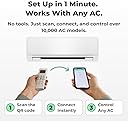
The Sensibo Sky is a sleek, Wi-Fi enabled smart AC controller compatible with iOS, Android, Amazon Alexa, and Google Home. Featuring 7-day scheduling, geofencing, humidity and motion sensors, it offers energy-efficient climate control with easy DIY installation. Its open API and IFTTT support empower seamless smart home integration, making it the ultimate upgrade for modern, eco-conscious professionals.


| ASIN | B01MU2YSR4 |
| Amazon 売れ筋ランキング | ホーム&キッチン - 1,338,471位 ( ホーム&キッチンの売れ筋ランキングを見る ) エアコン用リモコン - 5,747位 |
| BEEの星の数 | 3 Star |
| GTIN (Global Trade Identification Number) | 07290016037098 |
| おすすめ度 | 5つ星のうち4.2 2,794 レビュー |
| インバータのタイプ | インバーターなし |
| カラー | ストームグレー |
| コア材料 | 銅 |
| コントローラーの種類 | 音声コントロール |
| コンプレッサータイプ | rotary_scroll |
| コード・ケーブル長さ (m) | 1 メートル |
| ブランド | Sensibo |
| ブランド名 | Sensibo |
| メーカー名 | Sensibo |
| モデル | Sensibo Sky |
| ユニット数 | 1 個 |
| ワット数 | 1 W |
| 付属品 | Sensiboスカイデバイス x 1、電源 x 1。 |
| 保証期間 | 永久保証 |
| 冷却剤 | R-32 |
| 品目の寸法 (D x W x H) | 22奥行き x 32幅 x 7高さ mm |
| 商品の寸法 | 22奥行き x 32幅 x 7高さ mm |
| 商品の重量 | 0.15 ポンド |
| 回路数 | 1 |
| 型番 | SEN-SKY-01 |
| 季節エネルギー効率比 (SEER) | 3.2 |
| 季節的エネルギー効率比(SEER) | 3.2 |
| 屋外ユニットが必要です | いいえ |
| 期間消費電力性能 | 【貢献】省エネ |
| 特徴 | モーションセンサー |
| 特殊機能 | モーションセンサー |
| 管理方法 | アプリ, 遠隔 |
| 色 | ストームグレー |
| 規格 | ポータブル |
| 設置方法 | セルフインストール。 |
| 運転音 | 1 デシベル |
| 部屋タイプ | 多目的/ポータブル。 |
| 開始年 | 2018 |
| 電力レベルの数 | 1 |
| 電圧 | 140 |
| 電気 | はい |
| 電源 | バッテリー駆動 |
お**R
It's works well, even if your AC/Heater is very Old!
So far, I'm very much satisfied with the performance/quality of this product. Never lost the connection between the WIFI router and Sensibo, which is very important. Because most of the product with IoT functionality loses connection (based on my old experience with other IoT products) Still, the application is not yet evolved in its functionality. But that is the software part which can be received corrected with the application update.
L**L
素晴らしい製品です!
素晴らしい製品です!こんなに長い間これなしで生きてきたなんて信じられない!
K**J
Setup issues but works well once installed
It took a few tries and resets to get the wifi working properly. It was also unable to "learn" from my Daikin AC remote so I had to manually try each Daikin option (of 10 total) until I found one that worked. Once it was setup it's been working like a charm. There's a "Climate React" feature which uses the temp/humidity sensor to automatically control the temperature, which is cool, but needs an extra option to only operate while it detects someone in the home by mobile device location.
R**R
Can we add more gadgets or if we have two AC in same room
I will be more happy if I can add other gadgets beside AC from Sensibo
D**N
Alexaの反応が早い
Ratocの家電リモコンも使っていますが、こちらのほうが圧倒的に反応が早いです。寝ているときにちょっと寒いな、と思ってエアコンを消してと言うと、Alexaの反応よりも早くエアコンが消えます。(現状は英語でのスキルで使っています) アプリで外出先から現在の部屋の温度と湿度が正確にわかり、オンオフだけでなく設定温度やタイマーも設定できて便利です。 セットアップが英語で、少し苦労しましたが、サポートに問い合わせたらリモートで解決してくれました。もちろん摂氏で設定できます。 エアコンはダイキンのAN22PFS、付属のリモコンはARC469A25です。信頼性という意味ではRatocより優れていると思いますので、ペットなど温度管理が大切な部屋にはこちらを使った方がいいと思います。
M**O
便利です
とても快適に使っています。とても古いTOSHIBA RAS-255LVですが問題なく動いています。設定が少し大変でしたが、アプリは反応も良く使いやすいです。 全て手元で操作できるので便利です。タイマー設定も分単位でできるのは嬉しい。 部屋の温度を保ってくれる設定のところが英語なのが少し残念です。 この季節になくてはならない製品になりました!ありがとうございます。
G**N
Stay away
It worked for a while then I changed my remote control and it stopped working it’s been 3 months of customer service back and forth messages and I still haven’t been able to use it!! And worst part they don’t give you replacement or money back stay away
A**R
Does not work
I emailed customer service a bunch to try to resolve the issues. They just kept telling me it was internet settings and told me to keep resetting it. Needless to say I cant reset it every time I want to use it. I gave up on asking them to replace the device.
P**S
If I Could Give 6 Stars, I Would — Great Product + Amazing Service
The first impressions were good. The product is small, discreet, and nice-looking. Setting it up was extremely easy — I just followed the instructions. Simple, with no obstacles at all. And before continuing, I want to say that I have rarely seen customer service as good and precise as Sensibo’s. During the first use, I noticed that Sensibo would turn on the light display of my AC and change the temperature from °C to °F. The light display on my unit (a Windair heat pump) is very bright and makes the area where it’s installed quite illuminated, so I usually keep it turned off. I only turn it on occasionally to check the mode and temperature, and then I turn it off again, so this is important to me. The second point is that Sensibo kept switching the display from °C to °F, even after I set the app to Celsius. Every time I used Sensibo (whether the AC was on or off) the temperature unit would change. Any interaction between Sensibo and the AC would cause this switch. When I opened the customer support chat on Sensibo’s website, I explained both problems and sent a photo of my AC’s label, then waited in the queue for assistance. I eventually had to leave and closed the chat window, thinking, “I’ll deal with this another day.” To my surprise, later that same day I received an email saying the issue with the temperature unit had been fixed. And it actually worked! A few days later (after I had forgotten it) I received another email saying that the display issue had also been fixed. When I went to test it, I noticed that the app had been updated. There was now an option to turn the display light on and off. Both problems were solved, and I didn’t even have to speak with anyone directly. Normally, I use live chat because talking to a person is faster, but in this case, I closed the chat thinking nothing would happen (as it usually does with other companies). But the Sensibo support team actually read my message after I had left, understood the problem, and fixed it. Which company does that? Very few, very few. Bravo, Sensibo! That’s why I strongly recommend Sensibo. I’m a happy customer and have already started recommending the company to my friends and anyone who asks. If I could, I’d give them 6 stars.
D**A
Easily add WiFi control to Ductless AC!
Easy DIY set up. No need for electrician! All you need is your AC remote and your home WiFi. Amazing to have WiFi control on my ductless AC. Works great,
F**A
great product
instalation wasnt as easy but contacted costumer support and they fixed the issue in minutes they were great. product integration with alexa is great and their app is great. tood bad they charge you for extra fitures in their app.
L**.
Fantastico!
Ho acquistato questo dispositivo dopo aver provato il modello Ambi climate 2 che purtroppo ha smesso di funzionare dopo poche settimane. Anche questo prodotto, pur costando meno, ha un prezzo importante CONFEZIONE ⭐⭐⭐⭐⭐ Il packaging è ben curato anche se essenziale (da subito risaltano le dimensioni ridotte del device) All'interno della confezione trovate - cavetto di ricarica microusb con alimentatore ( vi sono due alimentatore sia per presa italiana che per presa inglese) - device - istruzioni CARATTERISTICHE ⭐⭐⭐⭐⭐ Il device è realizzato con buoni materiali. Le dimensioni sono estremamente compatte oltre ad essere estremamente leggero (più piccolo di una carta di credito) La parte superiore è caratterizzata da una superficie semitrasparente che garantisce l'uscita del segnale infrarosso. La copertura del segnale è di 180 gradi rispetto alla superficie di installazione. A differenza del modello Ambi questo dev'essere obbligatoriamente installato a parte in quanto non possiede supporti per poter essere appoggiato su di una superficie piana (tavolo, mobile etc..) Nella parte inferiore si trova: - port micro usb per collegamento elettrico - QR code per installazione Anche questo prodotto ha una codifica colore che si attiva solo n fase di ricerca ed abbinamento. Durante l'operatività non vi sono led di stato accesi PRINCIPALI FUNZIONI ⭐⭐⭐⭐⭐ Il device clona il telecomando del vostro climatizzatore Devo dire che la fase di installazione si è rivelata molto rapida e l'app molto pratica e stabile. Il comando viene trasmesso al clima con una latenza quasi inesistente. Devo ammettere che l'app è un vero punto di forza ed è maggiormente performante rispetto al modello proposto da Ambi. Priva di fronzoli, semplice e molto pratica nell'utilizzo INSTALLAZIONE ⭐⭐⭐⭐⭐ L'installazione è veramente semplice. Anzitutto è necessario collegare il dispositivo all'alimentazione e verificare che il led frontale lampeggi. Vi consiglio di installare il dispositivo prima di installarlo a parete (se utilizzate il biadeviso in dotazione), in quanto il QR code è presente nella parte posteriore e vi evita di cercare i codici seriali. Scaricare la app Sensibo dallo store (Apple o PlayStore) Avviare la app e seguire le istruzioni riportate. In buona sostanza il dispositivo attiva una rete wifi cui vi dovrete collegare con il device che controllerà il dispositivo. Una volta connessi l'app chiederà di selezionare la rete di casa inserendone la password. Il dispositivo sarà collegato. L'installazione comporta la registrazione al cloud Sensibo Il device dev'essere posizionato in modo che lo split sia "visibile" in linea d'aria (copertura 180gradi) ESPERIENZA DI UTILIZZO ⭐⭐⭐⭐⭐ Non utilizzo più il telecomando in dotazione in quanto comando tutto dalla app. Trovo comodissimo poter configurare il clima da remoto al fine di trovare un clima fresco al rientro in casa. ho interfacciato il sistema anche con Alexa, ma sinceramente lo utilizzo sempre in modalità app in quanto, a mio parere, è realizzata molto bene. CONCLUSIONI ✓ Materiali di qualità ✓ Design funzionale ✓ App veramente intuitiva e pratica Veramente ottimo dispositivo anche se il prezzo resta importante.
C**N
Funciona perfecto. Instalación sencilla
Adquirí este producto simplemente para poder apagar y encender el AC cuando estuviese fuera de casa y cumple perfectamente con su cometido. Además me ha permitido modificar la temperatura. Seguramente tendrá más funciones, pero con esto me basta. Sencillo de instalar. Funciona bien con iPhone
Trustpilot
2 weeks ago
2 weeks ago