Buy anything from 5,000+ international stores. One checkout price. No surprise fees. Join 2M+ shoppers on Desertcart.
Desertcart purchases this item on your behalf and handles shipping, customs, and support to Senegal.
❄️ Stay cool, stay ahead — the pro’s choice for silent, powerful PC cooling.
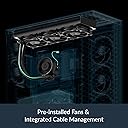
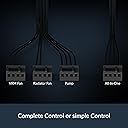
The ARCTIC Liquid Freezer III Pro 360 is a high-performance all-in-one liquid CPU cooler featuring a 38mm thick 360mm radiator with three advanced ARCTIC P12 PRO fans. It includes a PWM-controlled pump and an integrated VRM fan to optimize CPU and voltage regulator temperatures. Designed with integrated cable management and an optimized contact frame, it supports the latest Intel and AMD sockets, delivering superior cooling efficiency with minimal noise—ideal for demanding professionals and gamers seeking reliable, quiet thermal management.


| ASIN | B0DLWGG85P |
| Air Flow Capacity | 77 Cubic Feet Per Minute |
| Amazon Bestseller | #15,624 in Computers ( See Top 100 in Computers ) #63 in Computer CPU Cooling Fans |
| Brand Name | ARCTIC |
| Compatible Devices | Desktop, Gaming Console |
| Cooling Method | Liquid |
| Country Of Origin | China |
| Customer Reviews | 4.4 4.4 out of 5 stars (1,716) |
| Global Trade Identification Number | 04895265000249 |
| Included Components | Liquid Freezer 360 (Black) |
| Item Dimensions L x W x H | 39.9L x 11.9W x 7.4H cm |
| Item Weight | 2020 Grams |
| Manufacturer | ARCTIC |
| Material Type | Metal, Plastic, Rubber |
| Maximum Rotational Speed | 3000 RPM |
| Model | LFIII Pro 360 |
| Number of Items | 1 |
| Part Number | ACFRE00180A |
| Power Connector Type | 4-Pin |
| UPC | 840033402927 |
| Unit Count | 1 Count |
| Voltage | 12 Volts |
| Wattage | 3.96 W |
T**S
静圧が6.9mmH2Oという驚異的に高い優秀なFANを搭載し、厚めのラジエーターの能力を生かした高い冷却能力を誇る水冷AIO(All in One)=簡易水冷クーラーです 3つのFANの電源ケーブルはデイジーチェーンで1本にまとまっているので、何本もFANコネクタにさす必要がなく、見た目もすっきりしています 長時間高負荷作業時などしっかり冷やしてほしいときは100%、静かに作業したいときや軽負荷のときは40%程度にASUS AI Suite 3でFAN速度を調整しています ポンプの回転数は100%でも聞き取れないレベルなので100%で運用しています 個人的なファンノイズのレベルは以下の通り 30%(900rpm)ほぼ無音 40%(1200rpm)他のFANの音に埋もれて聞き取れない、耳を近づけたらわかる? 50%(1500rpm)ヘッドフォンをつけていたらわからないものの聞き取れる 70%(2100rpm)うるさい 100%(3000rpm)47dB かなりうるさい。ヘッドフォンをつけていても静かな曲だと気になるレベル 40%でも十分すぎるくらい冷えています(80W 53℃前後) マルチスレッド処理を5900x (12コア24スレッド) with PBOで220W動作させるときなどは安全と高クロック維持の為100%で使用していますが、かなりうるさくなります 普通の人は30~40%程度の静音で利用するので問題ないと思います HWiNFOなどでCPUの温度を確認しつつ各々にとってベストな回転数を模索しましょう VRMのFANやポンプのの回転速度も調整可能です 室温27℃、5900x PPT190W EDC180A TDC113A、ケース MONTECH KING 95 PRO、マザー ASUS ROG Crosshair VIII Dark Hero X570、において5分間テストして、76度でピタリと収まっていました EM(エレクトロマイグレーション)等でCPUが劣化するリスクも私の環境ではほぼ考えなくてすみそうです VRM温度も低負荷時47℃、高負荷時51℃で収まっていました RZ820やNH-D15 G2、ASSASSIN IV VCなどの空冷も気になっていたのですが、以下の理由でこちらにしました ・こちらの方が冷やせる ・ケース内のエアフローがすっきりする ・重さでマザーボードに負担を与えない ・VRM周りも冷やせる ・デザインが好き ・見た目の圧迫感が少ない ・ヒートパイプにも寿命がある ・Liquid Freezerシリーズの故障例をみつけることができず、水冷ではあるもののおそらく良いパッキンや可動部品を使用していて長寿命が期待できそう 他の簡易水冷とは価格、デザイン、VRMの冷却が可能なこと、故障報告の少なさ、FANケーブル周りがすっきりする設計、冷却能力とFANノイズのバランスからこちらにしました 虎徹MarkIIを使っていて高負荷な処理をするときにCPUが冷やしきれなくて性能が出しきれなかったことや安全性が気になっていましたが、こちらに変えて静かであり、かつ、いざとなったら冷やせるという環境が得られて、非常に満足しています
I**S
冷えるし静かだし非常に満足 光らなくていい人はこれがベストでは!
D**Y
購入より幾分か時間が経過しましたので詳細をば。 【CPU】 ・Ryzen 9950X(SMT運用) PPT:240W~256W EDC:232A~248A TDC:162A~192A 【Mobo】 ・ASUS TUF-GAMING B650E-Plus Wifi CPU Loadline Calibration:Level2~Level3運用 C-State Limitterの解除状態:Auto Clock Stretch(Core/L3 Cache):Disabled Spread Spectrum:Disabled [VRM for CPU] レスポンス:UltraFast VRMスイッチ速度:450kHz(MAX) 電力供給方式:Extreme(電圧バランス優先) 電流上限:100% [VRM for SoC] VRMスイッチ速度:450kHz(MAX) 電流上限:100% 【今回使用したCPUグリス】 ・ARCTIC MX-7 まず初めにファンの静音性についてですが 流石に3000RPMまで行くと結構ゴワァアアアアアアアっと音がしますね 結構ビックリするくらいな音出して来るのでなれない人は不安に思うかも知れませんね ただ、2200RPM台であれば他の360mmと比較したとしても結構静かなモンです まぁこちらは正直同社が発売しているP12 Proまんまなので そちらのレビューを参照したほうが早いですね 性能はもちろん良いです。 では本題へ。 まず9950Xを冷やしきれる、その時点でとても素晴らしいです デフォルトPBO状態はさることながら CPUに関して結構無茶な熱を加えるASUS製のMoboでも CPU電圧は1.456v PPTは256W TDCは192A EDCは240A まで耐えてしまいます 最高温度はCCD1の96.3度で 限界である115度まで11度程マージンがあります。 俺は溶損が嫌なので90℃でスロットルする設定でやってますが 最高性能を発揮させたい方にはこちらか、場合によっては当製品の上位グレードである 420mm版を購入すれば間違いないと断言しておきます。 ちなみに上記のスペックシートに記入した最小値の方のPBO設定では 最高温度がCCD1の91.3度でした こちらもまずまずの成果です スロットルが効くまでのタイムラグを減らしたいようであれば マザーボードにあるプリセット回転数に+10%程盛ってやれば ほぼほぼ指定した温度と合致する形で温度を制限しにかかってくれます。 おすすめのPBOでのTjmax値はやはりと言うべきか85℃。 この設定であればほぼ間違いなく95度には到達しないので 溶損から貴方のCPUを保護してくれるでしょう。 なお、CPUクーラーとしては言わずもがなGPUクーラーとしてもポテンシャルは高いです。 某ドイツのエンスージアストの方を筆頭に、まれに当製品をGPUクーラーとして扱う人も居る模様。 全体的に素晴らしいですが、一つ難点が。 取付が非常にしづらい… 正直ここは改善して欲しいですね、マジで 9950Xのヒートシンクにガリ傷はいっちゃいましたもん ほんっとに締め付けが難しい 今まで水冷ヘッド取り付けて慣れてる人間からしても難しい こればっかりは悪い点として言及せざるを得ないです… ですが、本当にクーラーとしてはいい製品なので-1を打ち消して★5評価にさせてもらいます。 以下、温度の大まかな概要を記載し 当レビューを終了とさせていただきます。 また何かあれば追記いたします。 【アイドル時】 ・Curve Optimizer無し:39.2℃(室温25度以上) ・Curve Optimizer無し:38.8℃(エアコン有り、室温20度) ・Curve Optimizer有り@平均-24mv:38.4℃(エアコン無し) ・Curve Optimizer有り@平均-24mv:36.8℃(エアコン有り) 【低負荷時:目測の為バラツキあり】 ・CO無し:45℃~53.4℃ ・CO有り:41.4℃~49.6℃ 【中負荷時:目測の為バラツキあり】 ・CO無し:63.2℃~66.5℃ ・CO有り:58℃~63.8℃ 【高負荷時】 ・CO無し:78~96.3℃程度 ・CO有り:73~91.3℃程度 【上記温度計測時のPBO/Tjmax/電圧各種指定値】 ※CPU温度に影響する物のみ記載 ・Tjmax:95℃ ・Boost Clock Override:+200MHz <CCD1:5950MHz> <CCD2:5650MHz> ・PBO Scalar:x2 ・電力制限:上記レビューの最上位に記載 ・VRM速度/フェーズ:利用出来る限界値/常時フルオン ・ProcHot VRM Throttling:Enabled ・Disable Peak Limitter:Disabled(つまり上限設定あり) ・CPU voltage:Auto =Default Behavior for Auto Overcloking VID. AMD Official. ・SoC voltage:1.135v 実観測値1.120v~1.125v。±10mv~15mv。 LLC設定:無。BIOS内項目が存在せず。 ・VDDG CCD Voltage min:0.900v max:0.960v ・VDDG IOD Voltage min:0.900v max0.960v ・CPU VDDIO:1.232v-1.280v(HWinfo読み) BIOS内指定値は1.200v~1.250v。 1.4vは危険と判断。 最高でも1.350vが妥当。 プラスオフセットが強めなのでIODへの損害が予想される為。
V**N
Ryzen 7 7800X3D との組み合わせで使用中。 総合的に見て、冷却性能とコスパのバランスが非常に優れた簡易水冷クーラーです。 CPU温度の安定感は圧倒的で、Cinebench連続30分でも最大65℃前後。 真夏の室温でも余裕を感じるほどの冷却力があります。 取り付けは非常にスムーズで、マウントの精度も高く、ネジがズレたり噛んだりすることもなし。 チューブは柔らかく、天面・前面どちらにも無理なく設置できます。 さらにヘッド部分にVRMファンが内蔵されているため、マザーボード上部の発熱も抑えられるのが大きなポイント。 TOMAHAWK系のマザーボードとの組み合わせも抜群で、見た目の統一感も良好です。 静音性も基本的には優秀ですが―― 高負荷時にファンの音がやや目立ちます。 風切り音というより、ファンが回り始めたときの低い唸り音が少し気になる程度で、静かな部屋だと存在感があります。 BIOSにてファンの回転数を調整することで上記の問題は解決できます!(説明書にも詳細に記載されてあります。)
L**U
Good performance
My i7-14700k has not reached more than 50°C yet. I am very happy with it. It was a bit scary to remove the original socket from the Motherboard, but I did it following the online steps.
ロ**ド
取り付けが難しいこと以外過去最高のクーラーです。
チ**イ
9950X3Dに使いましたが良く冷えてます ベンチでも75℃いきません VRMまわりもGOODです でもファンが非常にうるさいので調整は必要です
E**E
Legit
Installation was a bit annoying as I installed the motherboard with chipset first then mounted the cooler at the top of the case before attaching to the cpu - so the hoses felt unwieldy. Would have been nice to have the thermal paste applied as well. However, running real smoothly and very quiet after adjusting fan curves.
M**A
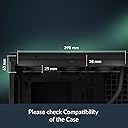
Se avete seguito l'evoluzione dei dissipatori AIO, sapete che Arctic è una garanzia, ma con questa serie III hanno superato se stessi. L'ho scelto per raffreddare il mio nuovo Intel Core Ultra 7 265K e i risultati sono semplicemente sbalorditivi per questa fascia di prezzo. Una delle novità più interessanti è l'inclusione del contact frame specifico per il socket LGA 1851/1700. Invece del solito sistema a staffe, si sostituisce direttamente il meccanismo di ritenzione della scheda madre. L'installazione richiede un minimo di manualità in più, ma garantisce una pressione perfetta sul processore, eliminando i problemi di curvatura del chip. Sulla mia B860-Plus si monta perfettamente, anche se lo spazio intorno ai VRM è millimetrico. Per quel che riguarda prestazioni termiche e silenziosità l'Arctic brilla. Mantiene l'Ultra 7 a temperature incredibili: in idle siamo sui 30°C e sotto carico pesante in rendering non ho mai visto la CPU superare i 75-78°C. Il radiatore da 360mm ha una massa radiante generosa e la ventolina dedicata sulla pompa non è solo marketing: aiuta davvero a tenere fresche le fasi di alimentazione della scheda madre, cosa fondamentale se non usate una top di gamma. Il design è molto "industriale" e massiccio, deve piacere. Un enorme pro è la gestione dei cavi: le ventole sono già pre-cablate lungo i tubi e arrivano alla pompa, quindi avrete solo uno o due cavi da collegare alla scheda madre. Un paradiso per il cable management. Cosa sapere prima di comprare: - Spessore: Il radiatore è più spesso della media (38mm + ventole). Assicuratevi che il vostro case abbia spazio a sufficienza sul top, altrimenti rischiate che tocchi le RAM o i dissipatori della mobo (io ho dovuto tagliare un angolo dell'AIO per questo motivo) - Tubi: Sono belli rigidi e di qualità, ma richiedono un po' di spazio per essere piegati correttamente. Difficile trovare di meglio, anche spendendo il doppio. È potente, silenzioso e risolve alla radice i problemi di contatto dei nuovi processori Intel. Se avete spazio nel case, è la scelta definitiva per chi cerca prestazioni da workstation senza il rumore di una turbina.
B**N
Ürün sanırım yanlış sipariş etmişim 1151 soket uyumlu değilmiş ama elime ulaştı fakat ulaşırken kargoda kaybolma süreçleri felan oldu ama sonra bulundu
L**E
Wow, what an improvement over the old dual air cooler. I7 14700k cinebenched 34,000 (could only get 24,000 anir cooled) and stayed a cool 90° at full load. For those who review it as loud, take the time to set up fan curves in bios, once tuned it is really quiet, even when gaming. The only time it gets old is during bench testing.
C**N
Dobrze się spisuje.
J**N
I’ve been running the ARCTIC Liquid Freezer III Pro 360 for a bit now and I’m genuinely impressed — it’s a proper bit of kit and, for the money, it’s an absolute cracking AIO. Cooling performance has been excellent. The big 38mm radiator clearly makes a difference compared to a lot of standard 27mm AIOs, and it pulls heat out fast under sustained loads. In both gaming and heavier CPU workloads the temperatures stay consistently under control, with no sudden spikes or “heat soak” behaviour that cheaper units sometimes suffer from. Noise levels are another strong point. The PWM pump and fans ramp smoothly and don’t have that annoying whine or rattly tone you sometimes get at certain RPM ranges. You can set a sensible curve and it stays quiet in day-to-day use, only really spinning up when it actually needs to. A standout feature is the little VRM fan on the pump block. It sounds like a gimmick, but it’s genuinely useful — especially if you’re pushing power limits, running long sessions, or you’ve got a case with less airflow around the socket area. It helps keep the surrounding components cooler and just adds to that “thoughtfully engineered” feel. Installation was straightforward and the included mounting for AM5/AM4 and Intel LGA1700/LGA1851 is a big win for compatibility. The included contact frame (for Intel) is a nice touch as well — it shows ARCTIC are thinking about real-world results, not just spec sheets. Build quality feels solid throughout: the radiator, tubing, and block all feel premium, and once fitted it looks clean and purposeful in black without trying too hard to be flashy. Overall: if you’re looking for a high-performing 360mm AIO that doesn’t cost the earth, this is one of the best value options out there. For the price, it’s a cracking AIO — quiet, powerful, well-designed, and clearly built by a company that knows what it’s doing. Highly recommended.
Trustpilot
2 weeks ago
1 month ago