Desertcart purchases this item on your behalf and handles shipping, customs, and support to Senegal.
โจ Elevate your viewing game with Samsungโs smartest, sleekest 55" QLED yet!
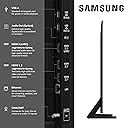
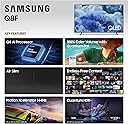
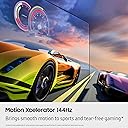
The Samsung 55-Inch QLED Q8F (2025) Smart TV delivers breathtaking 4K UHD visuals powered by the Q4 AI Processor and Quantum Dot technology, ensuring over a billion vibrant colors with perfect accuracy. Its ultra-slim AirSlim design complements any space, while built-in Alexa and Samsung Vision AI personalize your entertainment. Enjoy seamless access to 2,700+ free channels and premium apps without subscriptions, plus smooth 4K 144Hz gaming and sports performance. A perfect blend of cutting-edge tech and minimalist style for the modern professional.


| ASIN | B0DYVPQZRH |
| Additional Features | Built-In Speaker, Game Mode |
| Annual Energy Consumption | 192.72 Kilowatt Hours Per Year |
| Antenna Location | Entertainment, Gaming |
| Aspect Ratio | 16:9 |
| Audio Input | HDMI |
| Audio Output Mode | Surround |
| Base Depth | 9.4 Inches |
| Base Width | 35.8 Inches |
| Battery Type | Alkaline |
| Best Sellers Rank | #1,528 in Electronics ( See Top 100 in Electronics ) #19 in QLED TVs |
| Bluetooth Version | 5.3 |
| Brand | Samsung |
| Built-In Media | Power Cable, Remote Control, Stand, User Manual |
| Color | Black |
| Compatible Devices | Smartphone |
| Connectivity Technology | Bluetooth, Ethernet, HDMI, USB, Wi-Fi |
| Connector Type | Ethernet, HDMI, USB |
| Content Sharing Direction | TV to Mobile |
| Contrast Ratio | High |
| Control Method | Remote |
| Controller Type | Remote Control |
| Customer Reviews | 4.4 out of 5 stars 980 Reviews |
| Display Backlight Configuration | Edge LED |
| Display Backlight Setting | Supreme UHD Dimming |
| Display Backlight Technology | LED |
| Display Language Options | English, French, Spanish |
| Display Refresh Rate in Hertz | 60 |
| Display Size Class | 55 Inches |
| Display Technology | QLED |
| HDR Format Supported | HDR10+ |
| Hardware Interface | Bluetooth, Ethernet, HDMI, USB |
| Integrated Surround Sound Format | Dolby |
| Internet Applications | Netflix, Prime Video, YouTube |
| Item Dimensions D x W x H | 9.4"D x 48.5"W x 30.2"H |
| Item Weight | 31.5 Pounds |
| Item Weight Without Stand | 30.6 Pounds |
| Manufacturer | SAMSUNG |
| Maximum Display Brightness | 485 Nit |
| Mfr Part Number | QN55Q8FAAFXZA |
| Model Name | SAMQN55Q8F |
| Model Number | QN55Q8FAAFXZA |
| Model Series | Q8F |
| Model Year | 2025 |
| Motion Enhancement Technology | Motion Xcelerator 144Hz |
| Mounting Type | Wall Mount |
| Number of Audio Channels | 2.0 |
| Number of Batteries | 2 AAA batteries required. |
| Operating System | Tizen |
| Parental Control Technology | V-Chip |
| Picture Quality Enhancement Technology | Q4 AI Processor |
| Power Consumption | 131 Watts |
| Refresh Rate | 120 Hz |
| Resolution | 4K |
| Screen Mirroring Technology | SmartShare |
| Screen Size | 55 Inches |
| Signal Format | ATSC |
| Size | 55-Inch |
| Smart Home Compatibility | Smart Home Compatible |
| Speaker Description | 2CH |
| Speaker Maximum Output Power | 20 Watts |
| Special Feature | Built-In Speaker, Game Mode |
| Specific Uses For Product | Entertainment, Gaming |
| Total Number of HDMI Ports | 4 |
| Total USB 3.0 Ports | 2 |
| Total Usb Ports | 2 |
| Tuner Type | ATSC |
| UPC | 887276999142 |
| Unit Count | 1.0 Count |
| VESA Mount Standard | 200 x 200 mm |
| Video Encoding | HEVC, VP9 |
| Warranty Description | 1 Year Manufacturer |
| Warranty Type | Limited |
| Wireless Technology | Bluetooth, Wi-Fi |
J**M
Good TV
Very nice TV overall. If you are in the market for a smaller TV, don't hesitate to pull the trigger on this one. This is my first Samsung TV. I have only gone with Sony or LG in the past. This Samsung has a very nice picture quality and relatively easy set up. Samsung also includes a lot of included apps including Samsung TV. So if you are without cable or other paid subscription service, you can access some very nice content through the Samsung App. Paired this TV with the affordable Samsung S60D soundbar for a very nice second TV. Very happy with this set up so far.
P**R
We Love Samsung TVs!
This Samsung 50 inch QLED Q8 Smart TV has been an excellent purchase. It is sooo easy to set up right out of the box. The remote is good and easy to use, and the on screen directions are helpful. The screen is good and easy to adjust, and it is a great value for the cost. This is the second Samsung TV we have purchased this year. Although this one had to be a little smaller to fit where we were placing it, it is just as excellent a product as our bigger one. It works well with our Dish Network, Sony Blu-ray player, Samsung Soundbar, and streaming apps.
R**D
Great family tv for family movie night
Great tv looks and sounds amazing perfect tv for my gaming and movies the size is perfect and the picture is crisp I love the remote donโt have to replace batteries it recharges it self and family loves how big it is and how good movies and tv shows look on it and it didnโt break the bank
S**E
Screen Quality is Wonderfully clear and crisp; great color
Quality of picture screen is incredible. Details of everything; clarity of color and line; brightness can be controlled to give you several options - color can be as dynamic as you'd like. We bought this during Black Friday; so the price was absolutely right. The reputation of Samsung is solid; and we hope this will prove to be true with this as well. We do not use the sound from the television itself; so I cannot speak to this - we have a sound bar. We don't notice any sort of distortion when viewing the screen from various angles - color and picture stay true. CONS: the remote control is very slim; which is nice - but for anyone who may have trouble reading VERY small print - this could be a problem. Also; if you use another remote for streaming - which is often recommended - the remotes do not necessarily 'talk to each other' - and we have noticed the 'sound control' on the Samsung remote is a bit wonky. Using all the bells and whistles provided by the programmed purchase can be a bit of a chore - I am still trying to understand how to Cast pictures stored on Google; and then - where to find it after I have already 'found it' - sometimes then, navigating the entire system is challenging. Most people; I realize simply have a few items; apps - etc. they regularly use and so many of the 'extras' go unused. Because my husband and I are not tech-nerds; I am pretty certain we don't use all of this new televisions capabilities. But for the quality of picture alone - we are happy with this purchase. Of course; all the user manuals and such are online; which really turns into an AI 'chat' and then....well; it's rather a bust - really no humans to talk to anymore. But we'd recommend this to others based on upgrading to a quality screen.
S**N
Great video...meh sound...until you add a sound bar...
I decided it was time to replace my 20 year old Sony 52" TV, and upgrade to today's smart TV technology. As with most consumer electronics, the quality and features continually advance at any given price point. No exception here...I paid hundreds less for this Samsung 55" smart TV than I did for that Sony 20 years ago. And what a difference in quality, resolution, colors, and overall capability...wonderful and wondrous to behold. This is "only" a mid-range Samsung, but it is still impressive. My one nit pick was with the sound...it was seriously lacking in depth and richness...i.e., it was just adequate for watching the news, or such. I solved that with an add-on Samsung sound bar. Now the sound matches the picture in quality. But even with the basic sound, you won't go wrong with this one...and you can always add that sound bar (and it doesn't HAVE to be a Samsung, either).
B**E
Awesomely fast and smooth, beautiful picture
Bought this to replace a 6 month old vizio. The Vizio had a terrible response, some apps just gagged and did not work, and you could not remove and reload, This TV works right out of the box, and the apps work smooth and perfect. You can download a boatload of them from the Samsung site.
I**Y
Very pleased Thus Far with this Purchase
Just had this set delivered and unpacked.. I chose the delivery and unpacking option, which was convenient (and only required perhaps, a solid twenty minutes). Still getting aclimated to this model (particularly since settings are quite a bit different than my older model, which was a 46 inch Samsung. 50 inch was just a bit more suitable for my needs than going with a slightly larger 55 inch model. Colors look considerably better (lol, and they should right?), in comparison to my previous LED model (which I ran continuously, without experiencing any hiccups other than my allowing a screen burn to work itself in). It will require a day or two to get accustomed to the settings layout, obviously, but thus far, I'm quite satisfied overall. Disappointed however, with the remote, because I got used to the luxury of pressing one button to switch back to a previous channel, which this solar cell remote doesn't support (and yes, I've researched all kinds of online 'so-called' solutions to this which haven't worked). No problem with hooking up the Samsung soundbar (that I had purchased for my previous Samsung TV, roughly 5-6 years back) and it works just fine. Price wise, I am comfortable with what I paid and quite glad I took the time to look over a couple dozen similar models (some which were more alluring, but cost considerably more). So far, so good. Update: It's been a couple months now and I'm still very much liking this purchase. This certainly improves (considerably), over my previous 46 inch Samsung tv, making watching television more enjoyable. Still happy with my purchase decision. Took several days to get accustomed to the various settings, which differed from my older Samsung, but that's to be expected. Too bad the remote doesn't have a previous channel button that my previous tv remote had, but it is what it is. I upgraded my older Samsung sound bar to the Q600F and placed it on my electric fireplace directly in front of my tv. Barely had room, but it fits. Unfortunately, the sound bar was just high enough that it interfered with my tv remote. So, I purchased the AX WABER Universal TV Stand (AX10TB02), which was priced nicely, is certainly sturdy to the feel, well packaged and fully capable of holding several size tvs. Installing this stand appears simple and straight forward (you'll need a Phillips head screw driver however). I paused on installing the tv stand because I noted that the two sets of holes on the back of the tv (where you mount the stand's brackets which then attach to the stand's legs), just didn't seem wide enough apart. The tv is roughly 43 inches across yet one pair holes was 16 1/2 inches from the left edge of the tv while the other side was 18 1/2 inches in from the other edge. The spacing between both sets of holes is only 8 1/2 inches apart, which seems kind of odd. One would think that the placement of those holes would have been further apart (i.e. 10 1/2 to 12 inches or so). Though the weight of the tv isn't an issue, the fact that the legs on my tv stand would only be 8 1/2 inches apart (given the width of the tv), kind of raises an eyebrow. The tv's rear side is flat, so why Samsung didn't space the rear holes wider apart seems a tiny bit puzzling. They may do the job as intended, but it still seems odd. In the meantime, I set the tv on a riser to resolve the issue where my soundbar was interfering with my tv remote. Although the riser is 7 inches high (about three inches higher than what I needed), it works. Still very much recommend this tv (and the AX WABER TV Stand (AX10TB02)), as well. update number 2: Let's face it, most of us don't exactly focus our tv purchase decisions on where the mounting holes on the back of a tv are. Granted, some folks may do so, but most folks, including me, don't. Although I prefer to install the AX Waber tv top stand (which I previously mentioned), I only held off doing so because Samsung chose to space the mounting holes on the back of the tv only 8.5 inches apart. I attached a photo here, laying down a couple pencils to give you an idea where Samsung's rear sets of holes are located. Visually, it just seems odd that Samsung would space those rear side holes only 8.5 inches apart (as opposed to something like 12-14 inches apart in view of the tv's width). It's only my personal observation, but 8.5 inches apart just doesn't exactly inspire an abundance of confidence in mounting a tv top type stand. It may work fine to attach my stand to it, but visually, that 8.5 inch distance still leaves a tiny bit of doubt. Overall, I still enjoy the tv (and my Samsung Q600F soundbar), however. While Samsung's standard tv legs are nicely and proportionately spaced out, which is great for most display needs, Samsung didn't apply that same logic to spacing out the rear side mounting holes on this tv (in my opinion). Something that some customers might consider.
J**J
Great picture, but the forced Samsung account is annoying
Solid TV with a sharp, vibrant 4K QLED picture and plenty of smart features. My one real frustration: you have to log in to a Samsung account just to use the apps - I'd rather not be required to create or sign into an account to reach my streaming services. Aside from that it's been a good TV and the picture quality is great. Docking one star for the account requirement.
Trustpilot
1 day ago
2 days ago