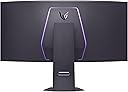
Desertcart purchases this item on your behalf and handles shipping, customs, and support to Senegal.
🎮 Elevate Your Game with the Ultimate 5K2K OLED Powerhouse
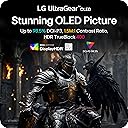
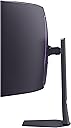
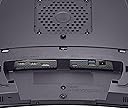
The LG 45GX950A-B is the world’s first 45-inch 5K2K OLED curved gaming monitor, delivering ultra-wide 5120x2160 resolution with 1300 nits peak brightness and a 1.5M:1 contrast ratio. Featuring a blazing 0.03ms response time, Dual Mode refresh rates up to 330Hz, and compatibility with NVIDIA G-SYNC and AMD FreeSync Premium Pro, it offers tear-free, ultra-smooth gameplay. Its 800R curve and 21:9 aspect ratio provide immersive visuals, while DisplayPort 2.1, HDMI 2.1, and USB-C with 90W power delivery ensure versatile connectivity. Certified for low blue light and anti-glare, it’s designed for long gaming sessions with ergonomic adjustments and built-in speakers, making it a premium choice for serious gamers and professionals alike.


| ASIN | B0DYG9DKX8 |
| Adaptive Sync | FreeSync Premium Pro, G-Sync Compatible |
| Additional Features | Anti Glare Screen, Built-In Speakers, Curved, Dynamic Action Sync, Height Adjustment, Swivel Adjustment |
| Aspect Ratio | 21:9 |
| Best Sellers Rank | #3,763 in Electronics ( See Top 100 in Electronics ) #161 in Computer Monitors |
| Brand | LG |
| Brightness | 275 cd |
| Color | Black |
| Color Gamut | 98.5 |
| Connectivity Technology | DisplayPort, HDMI, USB Type C |
| Contrast Ratio | 1500000:1 |
| Customer Reviews | 4.3 out of 5 stars 621 Reviews |
| Display Resolution Maximum | 5120 x 2160 pixels |
| Display Technology | 5K WUHD |
| Display Type | OLED |
| Hardware Connectivity | DisplayPort, HDMI, USB Type C |
| Image Contrast Ratio | 1500000:1 |
| Included Components | Display Port Cable, HDMI Cable, Monitor, Power Cable, USB-C Cable |
| Item Dimensions D x W x H | 13.46"D x 39.04"W x 26.2"H |
| Item Weight | 30.9 pounds |
| Manufacturer | LG Electronics Inc. |
| Model Name | 45GX950A-B.AUS |
| Model Number | 45GX950A-B.AUS |
| Mounting Type | Wall Mount |
| Native Resolution | 5120x2160 |
| Number of Component Outputs | 3 |
| Picture Quality Enhancement Technology | DisplayHDR 400 TRUE BLACK, HDR10 |
| Pixel Pitch | 0.2 |
| Power Consumption | 66 watts |
| Refresh Rate | 165 hertz |
| Resolution | 5K UHD 2160p Ultra Wide |
| Response Time | 0.03 milliseconds |
| Screen Finish | Matte |
| Screen Size | 44.5 inches |
| Screen Surface Description | Matte |
| Shape | Curved |
| Specific Uses For Product | Desktop, Entertainment, Gaming |
| Total Number of HDMI Ports | 2 |
| Total USB 3.0 Ports | 2 |
| Total Usb Ports | 3 |
| UPC | 195174115862 |
| Viewing Angle | 178 degrees |
| Warranty Description | 2 Year Manufacturer |
| Warranty Type | 2 Years Manufacturer Warranty |
A**S
OLED is superior
I have a 55" OLED from LG and that inspired me to get an OLED monitor for my computer. For the foreseeable future it will be OLED only for me. I have this paired with a RTX 5080, displays games beautifully. The high refresh rate is amazing, I was looking for something that was at least 120hz with VRR. This fit the bill perfectly. There is VERY light compatibility support when it comes to video display through websites/apps. Unless you find a workaround (they are out there) you will have black bars sometimes around the image, even if the image received is 21:9, it may show up smaller in the center. For Mac there are apps to expand the image to fill the screen (after using the fullscreen function and it doesn't fill the screen) but for Windows I genuinely haven't looked for a solution. The HDR functions well when using DisplayPort or USB-C, there can be on/off flickering when using HDMI input. This seems to be throughout LG products. Can't determine what would be at fault, could be the monitor, cable, or source. But my 55" LG OLED had the screen flashing on and off each time you transitioned into a new scene in game while using Xbox Series X with HDR on. Whatever the issue was, it was very similar to this weird behavior coming from the HDMI to HDMI situation I just experienced with the Mac mini and this display. I had issues with the HDR flickering on/off when using a Mac Mini, HDMI to HDMI and it did NOT like that. USB C from the Mac mini into the USB C port on the display works phenomenally. All in all this monitor is great, OLED is expensive, but from my personal experience it has been worth it.
R**N
I was blown away,going from Alienware 3225qf
So far it's a great monitor. So first of the sound.... Never had a monitor with speakers but these are loud and sound good. Not great like a headset but good enough when you want to give your ears a break. They are a little muffled due to beaing in the housing. Picture quality... It amazes me at the quality and sharpness of games even on 2560x1080 330hz mode. I have always wanted a widescreen 4k monitor when I seen this at another store on display I had to try it especially when it was on sale for 25% off. It didn't look as good in the store as it does at home. Search online for the best color settings and this monitor will surpass the DW3225qf in gaming. On paper the colors of a WOLED aren't as good as the QD OLED, but if you only use it for gaming that won't make a noticeable difference. The colors are still vibrant even in hdr. Final thoughts.... For some reason gsync doesn't work on the 3225QF as well as this monitor. Games at 240hz on the 3225QF had stutter and tearing. All the games I tested on this monitor are silky smooth. At 2560X1080 Battlefield 6 runs at 600 fps, almost 2x the refresh rate, but it's still smooth and no tearing. This is an amazing widescreen monitor I am glad I purchased.
G**O
This monitor is amazing; pros/cons for non-professional users
I've been using it for 4 months now and when I first set it up, it was stellar. The difference was incredible. It's very immersive and just a great screen. I'm not going to go into all the details that others do, but I'll highlight a few things: Pro: - It's big. The curvature is just about right if you're about 3 feet away. - The HDR is a nice change and very noticeable. - Refresh is fine - 165Hz is more than enough if you can push it there. - 2 HDMI, 1 DP, 1 USB-C is nice. - I get 165Hz with both DP 3M (what is now Green Jiss CABLE-54532587 (?)) and HDMI 2M (Ubluker UB222) cables from Amazon. - USB-C port provides power/video to a MacBook, if that's what you're using. - It's packed very well (and huge, as you would expect). Con: - Other reviews mention not coming out of sleep. I had the same issue. I just changed the settings to not go into deep sleep and it's been fine. - Would have preferred a different way to switch between inputs than pulling up the menu with that small nipple-like joystick. I imagine that it will eventually fail. - Firmware update is a mess to do. Don't know if I needed it or not but did it anyway (the sleep issue noted above). - The USB-A ports on the monitor are only fed by the USB-C input. Kinda disappointing. If you have a MacBook attached via USB-C but want those USB-A ports for a different machine, nope. - It's big (pro and con depending on your setup). I think the USB port thing is my biggest gripe. Would be nice to have the USB-C video but not have the USB-A hub/ports tied to that input. One more USB input for the hub with a toggle on which to use would have made it perfect. Anyway, overall, I can ignore the cons and say that this is an amazing monitor.
M**E
Beautiful, immersive, demanding of GPU
[Updated after ~200 hours of use] I am coming from a ~7yr old Asus 2k 144hz monitor that had been great, and purchased the LG Ultragear 5k2k model mostly for gaming, with a little bit of work/productivity on the side. The display is beautiful. Zero regrets there but for transparency I am not an experienced videophyle scrutinizing every facet of color gamut, brightness and contrast ratio. Immersive This word is used a lot by other reviewers and I agree but will also add a warning - if you are susceptible to visual disorientation this might not be a good thing. The experience is kind of "VR lite", or in other words gives you the sensation of movement when you are still. For some (me) this enhances the gaming experience but for many others could lead to feeling queasy. Just be aware of and think about your susceptibility to that before ordering. If you can get a little experience with a VR headset that is probably a good (albeit more extreme) indicator of how immersive and/or disorienting it will be for you. GPU demands A one year old high $ PC (i7, RTX5080, 64Gb RAM, etc) seems capable of pushing enough pixels to this monitor but at lower end settings. In more practical terms - I see 100+ FPS in Battlefield 6 but also see less detail at far out distances on the "map". The bad news is that this monitor requires a very expensive PC, the good news is that (hopefully) GPUs will grow into the capability over the next few years, making the monitor a good "investment" (not really but you get what I'm saying). [Update] I upgraded to an RTX5090. From what I could tell the 5080 bottleneck was at VRAM since it was using nearly 100% of its 16Gb during gaming. The visual symptom of it was that the "draw distance" of fine details was too close in/near. I could easily see "blocky" details in far distances due to the monitor's screen size and pixel density. The 5090 seems to have corrected that but at high cost. Other details The monitor shape has a funny side effect of echoing your voice back onto you. Minor nuisance while on voice/work calls that is easy to work around by moving your head out of the "dish" focal point. The inclusion of speakers allowed me to trash my little junk external speakers that I barely use (normally on headset for games). [After 200+ hours] 80-90fps with RTX5090 on Crimson Desert. I experience an occasional bug where the monitor is on, the PC input is selected but the display is black. It seems to occur most after switching inputs or being in power save mode and usually self corrects after a couple minutes. Still happy with the purchase but the monitor has ruined my experience with all other displays in the house. 77inch OLED TV seems tiny by comparison, because of the distance I sit from it.
T**S
Genuinely great monitor. Don't buy it unless you like ads and spyware.
Probably the best gaming monitor I've ever owned. Wanted to upgrade from an Alienware DW34 OLED to this. Don't buy it if you own a Windows system, or LG's products in general right now. On Windows systems, this LG product will piggyback an installation through Windows updates that will download literal adware and spyware to your device without your consent or knowledge, giving you ads for things like McAfee directly to your computer, and being able to track your inputs and (in the case of their Smart TVs) listen to people around it to sell that data to whoever they want, possibly in violation of several wiretapping laws and multi-party consent states. This is a disgusting business practice that needs to be stopped. I don't want my neighbor to know what I am doing in my own home, it's why I have four walls and curtains on my windows separating me from everyone else. I sure as hell don't want some multi-billion-dollar company and whoever can pay them the most money to know either. Data breaches are commonplace. There is daily proof that absolutely no one can protect that sensitive information forever. Nowhere in the product's description as of the date of writing this does it mention this practice, provide a ToS, or any kind of consent request, nor do I think the practice will actually hold up in courts as legal once it is challenged, even with those warnings added. I paid for a $2000 gaming monitor. And yet LG wants me to continue to make them money after that purchase by pushing ads to the monitor and harvesting my data? A good image quality isn't worth compromising my safety, security and privacy. If you, fellow customer, want more information on what I mean, I suggest you check out GamersNexus' video on this exact subject on Youtube and their website.
T**S
Insanely immersive
⭐⭐⭐⭐⭐ This monitor has completely transformed my setup. The 45-inch 5K2K display provides an incredible amount of screen space, and the OLED panel delivers stunning colors, deep blacks, and amazing contrast. Everything from gaming to productivity looks fantastic. I was coming from a 27-inch 1440p IPS monitor, and the difference is night and day. The immersive curve makes games feel much more engaging, and the ultrawide aspect ratio gives you a huge field of view in supported titles. The image quality is outstanding, motion is smooth, and text clarity has been better than I expected at this size. It took a little tweaking in some games to get settings dialed in, but once everything was configured, the experience was incredible. If you’re looking for a premium ultrawide OLED monitor that excels at both gaming and productivity, this LG 45” 5K2K display is absolutely worth it.
T**.
Blows me Away But Has Problems
First let me start off by saying congratulations if you are reading this review. You are looking at a product that is truly something special. A 1700$ monitor is pretty wild when you think about it. Personally, I can't afford it but I bought it anyway. Why you might ask? Because I only buy the best for myself despite being low income. I felt this monitor would be keystone to the PC I built in November where again, I spared no expense. My initial reaction to this monitor was dear God please don't let me break it taking it out of the box. The screen bezel is very small and you dont want to be wrapping your fingers around this monitor. Bad things will happen. Once I read the extremely vague and poorly translated instructions(More on this topic later) I had the monitor on the desk without having anything bad happen. I felt lucky this was the case. The way this thing was packaged felt like an accident waiting to happen. But I digress. On to the good stuff. The monitor is absolutely stunning and beautiful and almost every imaginable way. Visually it has me looking up from my pillow at night thinking "Damn Daniel." Once properly set up I soon realized I was dealing with a huge leap forward in picture quality and color representation from my nearly 13 year old 1080p BEN Q monitor. I mean...Que Owen Wilson Voice here..."WOW" Its gorgeous. Gaming has been super fun on this bad boy (Or girl) not sure what the monitor identifies as. Personally I believe the finest things in life are female. Like a ferarri. Ya that's right. This thing is a Ferrari of monitors compared to the Lexus I had been using for so long. But I feel there's some things I'm a little worried about. Here are some of my negative things to say and this is why it's not a perfect 5 stars. The documentation with the monitor seems very lacking. I didn't find a real owners manual explaining things in great detail. I even looked online and that also wasn't anything impressive or super helpful. I'm trying to better understand what it means to own an OLED. A type of screen known for it's issues with Burn in. That's right. The documentation is vague and unhelpful when it comes to burn in. They have no problem saying they won't cover burn in with their warranty but it's ok for the consumer to drop nearly 2 grand on something with a user manual translated by God only knows. LG your "Long periods of time" advice for preventing burn in is very vague in my opinion. You should also offer burn in protection. Im not talking about the obvious situations. I dont expect to have a monitor replaced if I freeze frame on Pedro Pascals face for 12 hours and it destroys the screen. But this is a gaming monitor. I dont play a single game that does not have static HUD elements present. These are objects which do not move or go away during play. How long until one of these in game elements damages my gaming monitor? I only have a vague answer for that. Big Problem. Additionally is seems like cleaning this thing is going to be interesting. The monitor has technologies for keeping it healthy, but again; The information on them and how often they should be run is pretty vague in my opinion. In closing, this is a fantastic product that I have my fingers crossed that it works out to my expectations. So far is has only impressed and changed my opinion completely on curved displays and 1440p resolution gaming. I hope if you order one it comes in good condition. My box was a little banged up and that had me worried but alas all is well so far. Only time will tell whether I made a good choice in going with an OLED or if I have doomed myself by spending so much on a monitor that wont make it 13 years like my 600$ LCD. To anyone who braves the water and buys one I wish you all the luck. Fly safe.
A**Y
Amazing upgrade for everyday work & gaming
Before your read this review, I am not a super serious gamer. I bought this monitor mostly for work and to play non-fps intensive strategy games like EU5. Eye fatigue, screen real estate, and resolution quality drove me to splurge on this monitor, and I am so glad I did. This monitor is insanely good and worth the price. I had an 49in UW Odyssey G9 before but this 45in Ultragear is leagues above that in almost every way. Resolution, screen real estate, ergonomics are all much better than any UW or even Apple monitor. First, the resolution makes a massive difference for someone like me who stares at a screen all day and night. My eye fatigue is significantly less at the end of the day since the 5k makes everything so sharp. I compared the resolution with my friends Apple 32in Pro Display XDR and some colors render richer, but not enough to matter for someone like me while also sacrificing screen real estate for much more money. Second on screen real estate, the 21:9 aspect ratio blows away any UW with 32:9. Your overall real estate is not just larger but the space is much more useful, especially if you are doing work on this monitor. And not having to twist your neck consistently to see the left or right windows is massive for ergonomics. Watch out though, this monitor will make every other monitor feel small and pointless, even the 32in Pro Display XDR. You won't be able to go back. So if you're reading this review, plan to use this monitor for the same things I do, and dancing around getting it because of the price - just do it. I wish I had done it months early instead of procrastinating about it. I have this connected to my MacBook Pro via USB-C and the compatibility is great but you need to use the BetterDisplay app for MacOS to get the best resolution. I can't speak for this monitors performance on fps-intensive games, but if you're staring at a screen all day for work and gaming at night, this monitor will make your life significantly better. I have never regretting paying to upgrade to the 5k2k Ultragear.
T**M
Amazing Ultrawide
Amazing. This is my first monitor going into high res, ultra wide,and OLED. Absolutely stunning display. There is a review here where they suggest settings to really bring out the display and they really work. Stand is quite heavy and all metal. The super thin design makes it almost invisible on my desk. Speakers are ok for listening at soft volume but not much else. The 800r curve does take some getting use to but after a week, it feels odd using a flat screen after. 5k res looks so good. Really good pixel density. The main reason I jumped on this monitor was the shape I hate the typical ultra wide narrow rectangle. Especially when watching a movie or video because of the large black bars on the sides. This monitor has the best large screen. It also has extensive features in place to keep the screen in good shape and prevent burn in. 2 year warranty. My only complaint so far is that I think it should be brighter to keep up with Samsung and I wish the led backlights were brighter. Overall extremely happy with this. Try to snag it on sale for maximum value!
C**E
Not 5k2k oled
Becareful this is not 5k2k screen! Its the older model
A**O
Esta bueno el monitor
Excel te producto estoy muy contento por la compra
A**S
Impresionante
Nice, llegó con líneas pero una limpieza de pixeles y todo perfecto aunque luego duele la cabeza
T**O
The most beautiful display once you make these tweaks.
I see a few people saying this monitor looks washed out or faded out of the box but that’s just LG playing it safe for VESA compliance. It’s calibrated to pass certification, not to wow you. Here’s what you need to do the moment you unbox it for HDR On the hardware side (monitor settings) Gamer 1 profile Change Black Stabilizer to 25-30. The default is 50, and it makes everything look flat and hazy. Set Brightness to 100 and Peak Brightness to High. Sharpness : 50 Run the Windows HDR Calibration Tool. Minimum Luminance :0 Max luminance :1260 Full Frame Luminance: 270 (Optional): Run a manual screen refresh once if you notice banding out of the box. If you want more visual punch, switch to Gamer 2. but personally, I find it too oversaturated. Gamer 1, with the tweaks above, gives you clean contrast, natural skin tones, and sharp text clarity without sacrificing realism. After calibration, this panel looks stunning. The 800R curve is immersive... sit about 31 inches (80 cm) away for the best experience. Too close = eye strain, too far = immersion breaks. I came from a Samsung G9 OLED, and at first this didn’t look as punchy. But once I made these changes? It won me over. And unlike my G9, which failed just after the warranty expired, I feel much more confident with LG’s build. If you’re hesitant or waiting for Black Friday I got mine on Prime Day, and I have zero regrets.
Trustpilot
3 weeks ago
2 months ago