Buy anything from 5,000+ international stores. One checkout price. No surprise fees. Join 2M+ shoppers on Desertcart.
Desertcart purchases this item on your behalf and handles shipping, customs, and support to Senegal.
💾 Upgrade your vintage tech with silent speed and dual storage power!
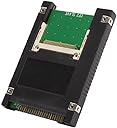
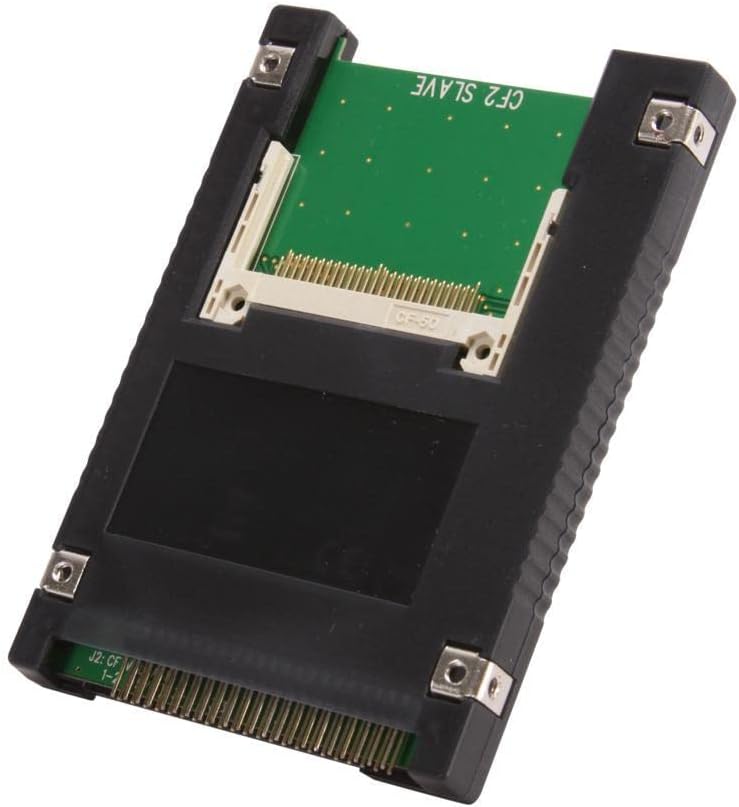
The Syba SD-ADA45006 is a sleek black 2.5" IDE/PATA adapter enclosure featuring dual CompactFlash Type 1 card slots, supporting UDMA IDE interface for faster data transfer. Designed to fit standard 44-pin IDE connectors, it revives legacy laptops like Apple iBook and PowerBook by replacing noisy hard drives with silent, energy-efficient CF storage. With OS-independent compatibility and smart LED indicators, it offers a practical, plug-and-play solution to extend storage and boost performance in vintage computing setups.


| ASIN | B0036DDXUM |
| Best Sellers Rank | #344 in Enclosures |
| Brand | Syba |
| Built-In Media | 2.5” IDE to Dual Compact Flash Drive^User Manual |
| Color | Black |
| Compatible Devices | Desktop |
| Connector Type | 44-pin IDE/PATA |
| Customer Reviews | 4.2 out of 5 stars 327 Reviews |
| Finish | Black |
| Global Trade Identification Number | 00810154014248 |
| Input Voltage | 5 Volts |
| Item Dimensions | 5.23 x 1.92 x 5.19 inches |
| Item Type Name | Syba SD-ADA45006 Dual Compact Flash to 44 Pin IDE 2.5" Adapter Enclosure, Black |
| Item Weight | 0.2 Pounds |
| Item dimensions L x W x H | 5.23 x 1.92 x 5.19 inches |
| Manufacturer | Syba |
| Mfr Part Number | SD-ADA45006 |
| Model Number | SD-ADA45006 |
| Number of Items | 1 |
| Number of Ports | 1 |
| Package Quantity | 1 |
| Power Plug Type | No Plug |
| Smart Home Compatibility | Not Smart Home Compatible |
| Specific Uses For Product | personal |
| UPC | 810154014248 |
| Unit Count | 1.0 Count |
| Warranty Description | 1 year |
D**T
Works in my iBook clamshell model.
I bought this to revive and improve an Apple iBook clamshell model, the Firewire Special Edition Key Lime G3 466mhz/DVD iBook. The drive in it was noisy, small (10GB), and a power hog. The product specs say both that this is OS-independent, and that it is compatible with various Windows versions and Linux. No mention of Mac compatibility, System 9.x or OS X. I took a flyer on it. And it does work--it is compatible with Mac OSes. Its form factor meant that I didn't have to tape it down or jury-rig the installation; it fits perfectly in the iBook's hard drive bracket and space. The single hitch is that the iBook's HD connector has one connector pin hole blocked, so this didn't fit stock. I girded my loins and snapped the single pin off the adapter by bending it a few times, and hoped it would work. It does. I put a 16GB 400x card by Transcend in the Master position. Then I put the adapter in the drive space. Put the iBook back together. Put OS X 10.2 in the DVD drive. Booted up from the DVD drive. And installed the OS. There was one abortive installation; not sure why it happened. But the second try worked. I'll be updating the OS to 10.4 Tiger ASAP. (That's the last version of OS X that is PowerPC compatible.) So it works--it boots fairly fast, it makes the previously very noisy computer *completely* silent, is much cooler, performs much better than the hard drive, and extends battery life by (at my current estimate) another 50% (about two hours). Also, unlike some other IDE-CF adapters I've read about, with this one, the iBook can successfully wake from sleep. Note that there is a red LED on the drive that glows through the iBook's case and keyboard. But it is very subtle, unnoticeable in a lighted room and visible only in darkness. So I'm very happy with it. And if I ever want to, I can expand my storage space simply by adding another CF card (okay, the two-hour teardown and rebuild isn't that simple, but it's doable). I don't see why it wouldn't work elsewhere just as well, so, five stars.
R**N
Works with my PowerBook G3 Lombard
I bought this to replace the IDE HDD drive in my G3 Lombard. So far it's been working well. Speeds are good, considering the IDE interface limitations. I haven't had any weird compatibility issues, like some more complicated SSD to IDE adapters have. The installation is easy; just plug and play. The dual card support mounts one drive as 'Master' and the other as 'Slave'. This is nice to provide additional space. I use the second drive as a paging/scratch drive to reduce reads and writes on the main drive when I can.
G**.
Worked for old oscilloscope restoration, only minor complaints
I used this adapter to clone a 26 year old hard drive in an Agilent 54810A Infiniium Oscilloscope with a Windows 98 Operating System. This adapter works perfectly! Except it is not perfect out of the box. Similar to other reviews, the PATA connector on this adapter includes Pin 20, and that is NOT standard for PATA pinouts. However, this isn’t a big deal. You can cut this pin with flush cutters and the adapter works flawlessly. My main gripe is by making it necessary to cut this pin, there is a chance you may cut the wrong one. Be very careful! I would have given this 5 stars were it not for this.
B**R
Good for replacing internal HD on Sound Devices 744T
I recently bought a used Sound Devices 744T recorder for my sound bag. I can't afford the latest and greatest recorders, but the 744T is built like a tank. Mine is the model that had the IDE internal 40gb HD. First thing I did was replace that hard drive with this. They don't recommend using an SSD for the 744T, so a compact flash card is the next best thing. I like this adapter because it fits in place of the original HHD perfectly. The only thing is that it's difficult to plug in the IDE connector on the 744T into this. The internal chip board is in the way by less than 1mm. I used a credit card to very slightly bend the first row of IDE pins. This allowed just enough clearance for me to work the IDE connector to get clear of the lip created by the board, but I had to go slow and be careful. And it was still a tight fits. But it's certainly not going anywhere now that I got it in there. If you're using this on another computer or device, you may not have this problem. Still, I think they could have made the internal board so it didn't stick out underneath the IDE pins. I chose to just use one 64GB CF card, I wasn't sure my recorder could handle two of them on the internal drive. Not to mention I have another 64GB CF card in the external slot of the recorder, AND an SSD hooked up to the FireWire port on the 744T. So I'm covered when it comes to backup file recording. If you've got a Sound Devices recorder like mine, this is a good option to give you solid slate recording on your internal drive. Just take care when plugging in the IDE connector, as I mentioned. Also, replace your internal AA rechargeable battery at the same time.
J**T
Works but is over-sized
I bought this to replace the hard drive in a fit-PC Slim fit-PC Slim Linux so it would run in silent, no-moving part mode. Visually the adapter looks like right size, but when compared to the Fujitsu 60GB drive it replaced, it is both thicker (9.5mm vs 9.0 mm) and effectively longer. In my fit-pc the thickness prevented the adapter from sliding in to the space vacated by the hard drive - there is a slot on the right inside cover where the adapter would not fit in. (To make it fit, I had to remove the top black plastic cover.) Although the actual overall length is the same (100mm), when the cable connector is attached (and I had to bend all of the pins away from the circuit board to get the connector to 'seat'), the connector still sticks out to extend the length of the unit. This is the same connector that allowed to Fujitsu hard drive to fit perfectly. Doubtful another connector would work better as the connector did seat against the black angle pin block. Remember, the fit-pc is very small and its IDE connector is also, so I think Syba just didn't consider this in the size (pin length) and placement (relative to the circuit board) of the angle pin connector block. So I had to trim off the last 1.5mm of the bottom cover. I tried to just put the circuit board into the fit-pc without any of the black cover, but the circuit board was just a little too free to flop around from side-to-side without it. However, after all the modifications, the adapter did indeed work with 4GB Sandisk Ultra Compact Flash card SanDisk SDCFH-004G-A11 4GB 30MB/s ULTRA CF Card (US Retail Package) . I was able to boot Linux from a USB drive and install to the CF-adapter 'IDE hard drive' and the fit-pc works (quietly!) So, if you are planning to use this adapter in a space-limited (tight tolerance) location, I'd reconsider the purchase unless you don't mind modifying the adapter (likely voiding the warranty) and likely your connector cable. I have not tried installing a second CF into the slave slot, but I expect it to work. The slave card installs on the bottom and is flush with the bottom plastic cover (which I left on) so it should fit physically. Had the adapter fit both in thickness and length (or rather, had the connector fit properly and seated far enough in to not require modification, I would have rated this 5 stars.
D**D
Tried two different cards, both with problems
I tried this adapter with a Sandisk Extreme 32GB first on my Dell Inspiron 700m with XP. The card was very fast. However, many programs would not load. When I deleted files they did not go to the trash bin, they just deleted. When I tried to save files they didn't show up and put bugs in the drive I tried to store them on. Next I tried the Verbatim 4GB card. It work better, but very slowly, and unlike the Sandisk it was recognized as an internal drive rather than as an external drive. I also tried the cards on a desktop without success. My conclusion is that this setup is not ready for prime time. I'm going back to the old drive. If the old drive fails I have several other old drives that work. Also, when I tried to log on with the Sandisk, it hung up on the Windows XP welcome screen. Through trial and error, I discovered I could get past the welcome screen by pressing "CTL + ALT + DEL" together once. It seem programs closely associated with Windows, like MS Office 97, won't load, possibly something to do with a swap file not being available. Programs not closely associated with Windows, like Coral Office, load fine. Overall, there are a lot of bugs that need to be remedied before this hardware should be sold. I felt like I got ripped off for about fifty bucks. On the positive side. Amazon delivered the products early. I gave the product one star because that was the lowest available rating. Maybe it will work for you. I took a gamble and lost.
S**E
Cheap SSD for Laptop HDD replacement
Nifty little adapter makes a Compact Flash card look like a 44-pin 2.5" notebook drive. Has LED-s on it to show power and disk activity. Caveats: This device can be plugged in "upside down" with likely disastrous results. Make sure you "mind Pin1". Pin 1 is denoted by a square pad for the copper on the Printed Circuit Board. You may have to break off one of the pins of the 44-pin connector to fit the the socket. Examine the drive you are replacing carefully to note which pin to break off. Again, make sure to mind your pin1 to insure you do not accidentally have the drive upside down. Formatting for DOS 6.20: Remove the old HDD, replace with this module. I used a SanDisk "ULTRA" CF card. You want a fast one, and you want one with the wear-leveling issue addressed. The File Allocation Table takes a lot of hits, and EEPROM-based Flash technologies have had a history of write endurance issues. I have already had volleys of Email with SanDisk over this. Their ULTRA series incorporate advanced wear-leveling algorithms that keep me from killing the FAT area. As you know, if the FAT is corrupted, the data becomes inaccessible, as the OS has no idea where it is. Incidentally, the ULTRA series CF cards have a lifetime warranty. Boot up under a bootable floppy, having at least the system, command.com, fdisk.exe, format.com. Using FDISK, delete the existing NON-DOS primary partition ( actually, it is formatted FAT32, but the early FDISK does not know anything about FAT32 ). Create a new primary partition. On my machine, I had a 8GB CF card installed. FDISK only saw 1GB. I went ahead and created a 1GB FAT16 primary partition. Reboot. Again, using FDISK, delete the 1GB partition you just made, but now, FDISK should see all 8GB of space. Create a 2GB primary partition, and a 6GB extended partition. Mark the primary partition active. Create three more DOS drives of 2GB each in the extended partition. Remember, the old BIOS and DOS does not recognize anything over 2GB. If you take this back further, you may not even be able to format even this much. You can now format C:/S to format the primary partition as C:, and transfer the system files to it. You now need to do a FDISK /MBR to copy the Master Boot Record to the C: drive. At this point, you should be able to boot directly into DOS from your new CF based SSD! Go ahead and format D:, E:, and F: . You now have 4 drives of 2GB each! One thing about SSD drives, such as this. You will never need to defrag it. "Seek time" is the same, no matter where the OS points the next sector to. Have fun. And pat yourself on the back for getting the fast CF card. Other reviewers have noted some mechanical discrepancies. In my case, the physical sizes of the populated CF drive and the drive it was replacing were similar. Yes, the pins were about 1/16" longer than the pins on the HDD they were replacing. As far as the mounting holes on the side of the plastic case, they were different than was on my HDD, but since the mounting hardware I had has slots, it wasn't an issue for me. For keeping old dinosaurs alive, this little gadget is hard to beat.
J**A
9.5MM standard, works fine on a Compaq Contura Aero, mounting holes not standard complete.
I was rebuilding a vintage Compaq Contura Aero 3/44c. The original drive used a very unusual screw layout (both side and bottom holes towards the center of drive!)...this enclosure didn't comply with that...but no modern 44-pin IDE drive would have either...so I don't fault them! I ended up desoldering PIN 20 and removing the hole pin for a clean look (although I didn't need to as the system I was using had no blank for pin 20 anyway)...but this helps you retain orientation! Finding it was easy, pin 19 (on the bare PCB) solders into the center of a tiny X-looking track, right under that is the pin 20 track...which leads...nowhere..just a via for soldering. I installed two used Cisco 256MB Industrial CF cards. Now IDEDIAG registered BOTH cards, but the very old BIOS only knows what a master is...so DOS/Win3x will only sees the master. However (theoretically) Windows 9X and greater will directly probe the controller and SHOULD find the slave...but whatever I knew the risk. Worked great for DOS and such. Given the CHS values and the Diag partition there is really no way to correctly align the drive for optimal R/W...but I found the speed great for the speed of the machine anyway. Outside of desoldering the pin, it was plug & play!
R**K
Four Stars
Good
C**T
Efficace
Fonctionne très bien pour les anciennes machines, testé sur un Amiga 1200 et sur un Atari Falcon 030. Cependant les supports d'époque n'ont pas les trous de fixation au bon endroit. Ce n'est pas un défaut du produit mais juste que les standards ont évolué avec le temps. Le résultat reste beaucoup plus propre qu'avec les modèles nus moins chers. Testé avec une seule CF card uniquement ; la majorité des CF ne fonctionnent qu'en mode Master donc en mettre deux ne marche souvent pas.
D**Y
Festplattenersatz für Roland VS-880 V Expanded
Passt als Ersatzlaufwerk für die Festplatte im VS-880 V Expanded. Ersetzt die Festplatte durch eine eingesteckte CF-Card (hier 4GB). Diese Card ist jedoch dann "fest" verbaut. Will man Sie evtl. entnehmen, um mit den Daten am Computer was anzustellen (so das geht), so muß man das Laufwerk ausbauen. Ich erwähne dies, weil ich an und für sich der Meinung war, man könnte das ganze so installieren, daß man jederzeit, quasi "hotswapping" an den gesteckten Datenspeicher rankommt. Ist so nicht der Fall, aber was geil ist: Der Rekorder ist jetzt mangels mechanischer Harddisc, lautlos.
J**E
Excelente relación costo calidad
Llegó antes de lo esperado
J**.
FINALLY. working cf /ide adapter
ALlows me to boot off CF card for my old laptop. I bought a Sinloon one that was DOA. Honestly, this is still a low quality device but at least it works. You WILL require modificaiton of the extra pin. Triple check that you are cutting off the right pin and remove the board from the plastic case (held together by screws). Although double the price of the Sinloon adapter; the extra plastic /size of the board allows easier removal/insertion in a laptop. Now... I just hope it lasts.
Trustpilot
5 days ago
1 month ago