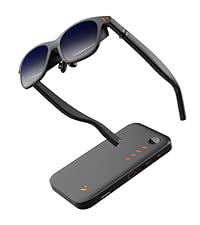
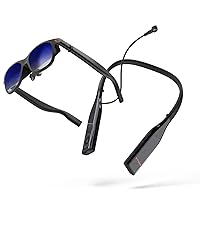
I’ve been loving my original Viture One XR glasses since they arrived because they gave me back my ability to enjoy TV, movies, and videogames comfortably again after some chronic neck pain I’ve begun experiencing. When I heard there was a new model coming out I knew I needed to get a pair right away! Since the original version has been so good, I’ll recap what’s stayed the same: The glasses are the exact same comfortable size and form factor, they weigh about the same, and they come with the same nice hard-shelled travel case. They continue to use the same reliable magnetic connector instead of USB-C, which is a very good thing because that type of connector isn’t designed to be robust enough for constant movement and slowly becomes loose and unreliable over time. This is based on my experience with my old Rokid Air glasses which were amazing for about a month until the connection started to become unreliable and began constantly cutting out whenever I moved my head at all. DO NOT buy glasses that use USB-C if you value your money! In addition, the new Pro glasses remain compatible with all the original Viture accessories I have on hand like their extension cable and play-and-charge adapter. It’s also still natively compatible with the generic USB-C Thunderbolt extension cables I’ve tried, and you’ll probably need one if you plan to use these with a desktop computer. Input lag remains near-zero; I could swear these actually display content very slightly ahead of my phone’s built-in screen, but that.. shouldn’t be possible, right? Probably just my eyes getting tricked somehow. The main things that have changed are the viewing size of the projected display, the maximum brightness, and the maximum refresh rate. Of these changes, the brightness and refresh rate are the standout improvements by far. I can tell the field of view is a bit wider but it doesn’t jump out at me; it’s nice to have, but that feature alone isn’t worth upgrading for. I gave my old and new XR glasses to a friend to compare and he didn’t even notice that the new version has a larger picture, but the much greater brightness stood out to him right away and the greater motion fluidity was obvious. And it’s a little thing, but one of my favorite improvements is the addition of an on-screen display for brightness and volume adjustment. One other very welcome improvement is that they appear to have corrected the original version’s incompatibility with generic HDMI to USB-C adapters. On my PC at least, I can now use a cheap $20 adapter instead of Viture’s own adapter. I’m very happy to see this! Your mileage may still vary though - I can’t speak for every adapter out there. The much greater brightness seems to be facilitated, at least on Steam Deck, by accepting an HDR signal and tone-mapping it onto the displays’ native 8-bit panels while taking advantage of their incredibly wide brightness range. This does result in some color banding if you’re looking for it, but overall the effect is really outstanding and could easily be confused with true HDR. HDR videos from my Pixel 8A look great too. And speaking of phones, you should consider a smartphone copy of Alien: Isolation and a gamepad clip to be a mandatory purchase with these glasses! The experience is almost as good (BAD! TERRIFYING!!!) as playing it with the virtual reality mod on PC! Although the displays are native 1080p, they can also accept a wide range of other resolutions all the way down to 640x480, making them broadly compatible with just about any device you plug them into. The new 120hz option at 1080p is really fantastic. In addition to the obvious ability to play at higher FPS, this new high refresh rate is also evenly divisible for gaming at 30 FPS, 40 FPS, and 60 FPS, all with reduced input lag and no screen tearing. For movies and TV shows, 24 FPS also evenly divides into 120hz which should eliminate judder. The only thing I’d like to see added here is a 720p 120hz option for added convenience in some niche cases. On Steam Deck, be sure to enter the Settings -> Display menu and specify the output to be 1080p @ 120hz or else you won’t get the benefit of the higher refresh rate. Steam will still automatically limit games to displaying at 720p unless you adjust their launch properties, but relatively few games actually run well at higher resolutions on the Deck so I’ve rarely bothered with this. Unfortunately Steam OS (especially the current beta version as of the time I’m writing this) does have some annoying issues with external displays, but from what I can tell Valve’s aware of this and it should hopefully be fixed soon. Currently you’ll need to manually select 1080p @ 120 after you put the glasses on, then remember to set it back to 800p (or below) BEFORE unplugging them or else the Deck gets confused and fails to re-activate the built-in display. As far as I know, this specific issue isn’t a problem with the current “stable” version of Steam OS though. Just as with Windows, some games also don’t like it when display outputs are changed, so don’t count on being able to plug and unplug the glasses without restarting your game. One of the things I was most excited about with AR glasses was my expectation that they’d improve mobile devices’ battery life. After all, with the big built-in screen turned off, surely battery life would be better… right? Unfortunately this doesn’t appear to be the case. With my Steam Deck OLED completely idle in offline mode and simply viewing a full-screen screenshot in my Steam gallery, here’s how many watt-hours were consumed over the course of an hour: Internal display, max brightness: 5.94 Wh Internal display, min brightness: 5.45 Wh Viture One, max brightness: 6.23 Wh Viture One, min brightness: 5.73 Wh Viture One Pro, max brightness: 6.46 Wh Viture One Pro, min brightness: 6.23 Wh As you can see, at maximum (non-HDR) brightness, the built-in screen actually used the least power, and even at their minimum brightness the Pro glasses still use more battery life than the Deck OLED’s built-in screen at maximum (non-HDR) brightness. I’m quite surprised and honestly more than a little disappointed at my findings; I even repeated the tests to be sure I hadn’t recorded my numbers wrong, but they’re correct. To be fair, the perceived brightness of the XR glasses right in front of your eyeballs is quite high, so “low” on the glasses might be comparable to “high” on the built-in screen. On the upside, Steam Deck OLED has a 50 Watt-hour battery (Deck LCD = 40 Wh) so the reduction in battery life won’t actually be very large, probably only ever measured in minutes. It seems there must be a lot of busy electronics crammed into these tiny glasses. If you want to improve battery life, I highly recommend picking up Viture’s play-and-charge adapter which allows you to plug in an external power supply or battery while keeping the glasses connected. It doesn’t cost very much and completely eliminates battery anxiety. Since I now have two pairs of Viture glasses I also got their splitter hub which happens to include a sizable built-in battery pack of its own. After using this with my friends a few times I can strongly recommend picking up this accessory if you can afford it. It’s terrific for local multiplayer games or sharing a movie whether you’re on a couch at home or, as I found, on rainy days while camping. The only thing I’d change with the splitter hub is to add more output ports. Two is nice, but four would be perfect for party games or watching movies together as a family. I still highly recommend it, and the built-in battery adds considerable longevity to portable PCs or Nintendo Switch. Since these glasses are so good now I can really only nitpick or suggest improvements that current technology doesn’t yet allow: The built-in speakers are good but could be a bit louder to help with very quiet content. Some way to adjust IPD would make the glasses usable by a much wider range of face shapes, though it would also add undesirable bulk, so offering a few different chassis sizes might be a better option in the long run. Rather than including multiple different-sized nose cushions in the box, I’d prefer a built-in adjustment knob (similar to the existing myopia correction knobs) that raises or lowers the glasses’ bridge somehow. It might be hard to make this robust enough without adding too much bulk, but would help to make the glasses even more universal. The ability to tilt the front of the glasses up or down would help with viewing angles depending on the user’s face shape. A competing pair of XR glasses already has this feature so it’s certainly a possibility. Variable refresh rate on the glasses would be the holy grail of portable displays and it would completely eliminate this common gripe with the Steam Deck. Higher resolution like 1440p or the addition of true native HDR and 10-bit displays would, needless to say, be a terrific upgrade whenever these displays become available. Something I’d really like to see that should be fairly easy to add (maybe even in a firmware update?) is a built-in display scaling feature for people whose face shape means they can’t easily see all four corners of the screen. I seem to be a lucky one - my face shape allows me to easily see all four corners of the Viture Pro display perfectly, but two of the people I shared them with had difficulty with this. Pretty much any device you plug these into will offer output scaling as an option you can adjust anyway, but it would be a nice quality-of-life improvement to have your screen size preference saved to the glasses directly and never need to be adjusted once set, similar to brightness or volume. Now the big question: should you buy these? Personally, I see XR glasses as being the eventual replacement to televisions and monitors. They’re comfortable, they work ridiculously well, and the price is less than half that of the cheapest OLED television you can buy today despite offering a similar or better viewing experience. However, you’re going to be gambling that they work well for your face shape, which is far from guaranteed. You’ll notice the reviews for XR glasses rarely fall in the middle, they’re always “THESE ARE AMAZING!” or “THESE ARE TRASH!”, and different face shapes are the reason for this huge polarization. Steam Deck and most other things you plug them into offer the option to shrink the viewable display if need be, so if you can’t see the whole screen comfortably you can always make use of that option. But if your interpupillary distance (IPD) is simply too wide or narrow, they’ll probably be useless to you. Your IPD should be near the human average (63mm) for optimal comfort and usability, but plus or minus a few millimeters shouldn’t be a problem. I personally think it’s absolutely worth the gamble to try a pair, especially with Amazon’s free return policy. The Pro model is definitely the better product overall, but its upgrades don’t benefit all use-cases. If you already have the original Viture XR glasses, it’s a tough call. The slightly larger viewable display with the Pro model comes with the downside of the screen appearing to be slightly lower resolution, so if your primary use is productivity then I’d say no, stick with the base model. Rather than selling mine, I plan to keep my original Viture glasses semi-permanently connected to my PC for this very reason. The Pro model’s increased brightness, color vibrance, and refresh rate is such a huge improvement for visuals that I think they’re the perfect upgrade (or first-time purchase) for primarily entertainment users - and that’s why my Pro pair will probably be connected to my Steam Deck for the foreseeable future. They’re both excellent but have different strengths. Whichever you feel suits your needs better, definitely buy a pair. It probably sounds silly, but these changed my life. My chronic neck pain is gradually easing as the months roll by, since I can finally both work and relax in comfort again. It’s rare I’ll be a shameless cheerleader for a product, but this is one I’d absolutely recommend to anyone.