

Desertcart purchases this item on your behalf and handles shipping, customs, and support to Senegal.
🚀 Elevate your workspace with LG’s 4K powerhouse — clarity, comfort, and connectivity in one sleek package!
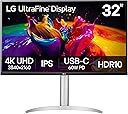
The LG 32UP83AK-W is a 31.5-inch UltraFine 4K UHD IPS monitor delivering stunning 3840x2160 resolution with HDR10 support and 350 cd/m² brightness. Designed for professionals, it features USB Type-C with 60W power delivery for streamlined connectivity, an ergonomic stand with height, tilt, and pivot adjustments, built-in speakers, and eye-friendly Reader Mode. Ideal for multitasking, creative work, and immersive media consumption, it combines premium visuals with practical comfort.


| ASIN | B0DQXKKBDF |
| Adaptive Sync | FreeSync |
| Additional Features | Built-In Speakers, Dynamic Action Sync, Height Adjustment, High Dynamic Range, Pivot Adjustment |
| Aspect Ratio | 16:9 |
| Best Sellers Rank | #5,510 in Electronics ( See Top 100 in Electronics ) #206 in Computer Monitors |
| Brand | LG |
| Brightness | 350 cd |
| Color | White |
| Color Gamut | 0.95 |
| Connectivity Technology | DisplayPort, HDMI, USB Type C |
| Contrast Ratio | 1000:1 |
| Customer Reviews | 4.4 out of 5 stars 159 Reviews |
| Display Resolution Maximum | 3840 x 2160 pixels |
| Display Technology | IPS |
| Display Type | LED |
| Hardware Connectivity | DisplayPort, HDMI, USB |
| Image Contrast Ratio | 1000:1 |
| Included Components | HDMI Cable, Monitor, Power Cable, USB Type-C Cable |
| Item Dimensions D x W x H | 9.4"D x 28.1"W x 23.5"H |
| Item Weight | 8.3 kg |
| Manufacturer | LG |
| Model Name | 32UP83AK-W.AUS |
| Model Number | 32UP83AK-W |
| Mounting Type | Wall Mount |
| Native Resolution | 3840x2160 |
| Number of Component Outputs | 3 |
| Picture Quality Enhancement Technology | HDR10 |
| Pixel Pitch | 0.18 |
| Power Consumption | 55 watts |
| Refresh Rate | 60 hertz |
| Resolution | 4K UHD 2160p |
| Response Time | 5 milliseconds |
| Screen Finish | Matte |
| Screen Size | 31.5 inches |
| Screen Surface Description | Matte |
| Shape | Flat |
| Specific Uses For Product | Multimedia |
| Total Number of HDMI Ports | 2 |
| Total USB 3.0 Ports | 3 |
| Total Usb Ports | 1 |
| UPC | 195174101513 |
| Unit Count | 1 Count |
| Viewing Angle | 178 degrees |
| Voltage | 240 volts |
| Warranty Description | 1 Year Parts & Labor |
| Warranty Type | 1 Year Manufacturer Warranty |
J**W
Very good value for a very good monitor
I am a data developer - not a gamer. If you need a review based on gaming, look elsewhere. I am very impressed with this monitor for my purposes. The image is vivid, sharp, and flicker-free. The sound from the built-in speakers is surprisingly good for both videoconferencing and music streaming. The size and resolution allows me to place multiple windows on one screen. I am able to have my development environment with the requirements documentation right next to it. The monitor can be rotated on the included stand. The stand has a decent range of height adjustment, and it is narrow enough that it fits under the monitor in portrait mode. I found it well worth the price I paid, and I'm likely to buy another to use one in portrait orientation next to the other in landscape.
A**R
Good quality product.
Excellent picture quality as expected. Stand is a tad flimsy but not enough to take a star off. Highly recommend.
T**P
IPS > VA
Nice monitor with a built in USB-C dock (supplying 60W power for a laptop), built-in speakers, and a nice, bright, crisp display with good color representation and HDR. I got this as a replacement for the equivalent LG VA display (32UP550-W), which has the same features but was otherwise awful (washed out colors, poor viewing angle, which is really a problem at the edges of a large display), so I returned it. Totally worth the extra $30. I don't understand why they even make the VA version.
J**Y
Great Monitor! But Stand Legs Detract…And Black Screen Problem Circumvention
I’ve owned this for about ten weeks now. Rating is really 4+ or 5-. Best monitor I have ever owned. Good picture and good size! I am using it for development (Xcode) and it’s great. Connected to an Apple M1 Mac Mini. I don’t do gaming, so the 60 Hz versus higher rates is not a negative. (This model Mini doesn’t go higher anyway.) Built-in speakers are convenient. The one really frustrating thing is the design of the base legs. They are semicircular. It is hard to keep all the stuff under the monitor I need (Mini, Apple DVD, Anker USB-C hub, pencil tray, et cetera). I have a lot of et cetera and not enough desk space, so this is probably a nit for neatniks, but for us Odd Couple Oscars, it could be better. But I don’t regret the purchase! Update July 2024: My monitor began. exhibiting the occasional black screen noted in some other reviews. The screen would go black for 1-2 seconds, then resume. This was very frustrating, since it often happened when I was concentrating on code. Research indicated a *lot* of people had reported the same issue - seemed proportionately more from M1 Mac Minis. As an experiment, I reset the display refresh rate to 30 Hz rather than 60. There is a very slightly perceptible lag, but not enough to be disconcerting. This seems to have removed the problem, as I haven't seen any black screens since that change. The LG MacOS app doesn't seem to do anything under Tahoe on an M1 with this LG monitor. So I don't have an easy way to determine if a firmware update is needed. Leaving at four stars - still a great monitor, but with some warts.
T**.
LG 4k 60fps... and at a reasonable price
if you are here, then what are you doing? its an LG panel its real, it works its IPS, it runs as advertised, and is as high quality as you can get from something like this. LG's rep speaks for it self some rando on amazons word is nothing to go on, that said this monitor is fine, it does exactly what it says and has been my daily driver for a couple months as of this review. if you want a good 4k panel that's not VA then snap it up, you'll like the results.
A**R
Amazing 32 flat screen Monitor.. Best in class.
stunning picture..
M**M
On-screen menu joystick is terrible.
Monitor works very well and looks great. Taking away two stars for how difficult it is to use the tiny joystick at the bottom of the monitor for the on-screen menu. Definitely the worst on-screen menus control I've ever used.
B**N
When it comes to displays. You can’t cheap out
If I’ve learned anything, it’s that you can’t cheap out on a monitor. The colors are accurate, beautiful from all viewing angles. Feels like a display should. A screen, not something your eyes have to fight to interpret!
J**I
Muy buen monitor para edición.
Tengo poco más de un mes con el monitor. Me parece buenísimo. Lo uso para edición de fotografía y también para trabajo de oficina. El tamaño es fantástico. Estuve a punto de comprar uno de 37" pero ahora que tengo este, creo que el de 37" hubiera sido excesivamente grande. Este es de 31.5" y es el máximo tamaño a mi parecer en el que puedo trabajar gusto sin tener que voltear notoriamente a un lado o otro o hacia arriba. Lo tengo junto a otro monitor de 27" de otra marca (Sceptre). El Sceptre es bueno, pero este tiene mejor color, seguramente porque cubre un mayor rango de colores. El brillo es perfecto para la habitación en cualquier iluminación (luz de día, o de noche). Los puertos que trae son súper útiles. A la Mac mini M4 la conecto por medio de USB-C. y HDMI. La PC la conecto por Display Port y HDMI. Tiene puertos USB que puedo usar para conectar drives externos o cualquier cosa. Tiene muchísimo mejor sonido que mi otro monitor, aunque no uso sus bocinas. Me gusta el joystick que tiene por debajo para los ajustes del monitor. Un único punto en contra. El Sceptre tiene auto detección de entradas, el LG no. Tengo que cambiar manualmente el puerto de entrada con el joystick. No es mucho problema pero es raro que el otro monitor siendo económico lo tenga y este no. Mal ahí LG. Me gusta su base, no es intrusiva y te deja espacio en la mesa. De todos modos le compraré un brazo VESA, pero la base es bonita y no estorba. La compré a finales de mayo a un precio bastante más bajo de lo que aparece ahora, pero bueno, así suben las cosas. Muy recomendable.
Z**K
Excellent produit !
Normalement tout le monde le sait, C’est LG !! L’écran est très qualitatif, qualité d’image parfaite, taux de raffermissement excellent, couleurs à 100% en tant que graphiste c’est exactement ce qu’il me fallait ! J’aurais aimé un écran OLED mais j’ai pas les moyens pour l’instant 😅 Je recommande vraiment ce produit.
O**R
Tips for best colour quality for Apple MacBook users
Overall good quality. Tips for best colour quality for Apple MacBook users: Step 1. Macbook System Settings -> Displays -> Disable High Dynamic Range Step 2. On LG monitor, Settings -> Picture -> Picture Mode -> sRGB, you may also want to adjust Settings -> Picture -> Picture Adjust -> Brightness Step 3. Macbook System Settings -> Displays -> Color profile, select sRGB IEC61966-2.1, this will provide better quality compared with the auto selected profile of LG HDR 4k.
D**E
Great value when on sale!
Works great out of box and performs like expected!
S**M
I love it …
Top class …
Trustpilot
5 days ago
2 weeks ago