Buy anything from 5,000+ international stores. One checkout price. No surprise fees. Join 2M+ shoppers on Desertcart.
Desertcart purchases this item on your behalf and handles shipping, customs, and support to Senegal.
🔐 Your Home’s Silent Guardian, Always On, Always Private
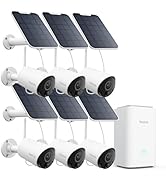
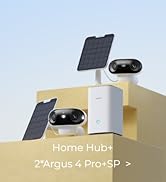
The Reolink Home Hub is a dedicated centralized controller compatible exclusively with up to 8 Reolink battery WiFi cameras and doorbells. Featuring dual-band WiFi (2.4/5GHz), AES-128 encryption, and a pre-installed 64GB SD card with expandable storage up to 1TB, it offers secure offline recording without monthly fees. The hub delivers smart event summaries, instant siren alerts, and easy app-based management, making it an ideal privacy-first security solution for modern homes and rental properties.


| ASIN | B0DP9MYNQ5 |
| Battery Cell Type | Lithium Ion |
| Best Sellers Rank | #5 in Surveillance Video Recorders |
| Brand | REOLINK |
| Built-In Media | 1m Network Cable *1, 64GB microSD card*1, Power Adapter *1, Reolink Home Hub*1 |
| Color | White |
| Compatible Devices | Alexa, Reolink wifi/poe camera |
| Connectivity Technology | Ethernet |
| Control Method | App, Remote, Voice |
| Customer Reviews | 4.1 out of 5 stars 278 Reviews |
| Item Dimensions | 3.75 x 3.75 x 6.38 inches |
| Item dimensions L x W x H | 3.75 x 3.75 x 6.38 inches |
| Manufacturer | Reolink Didital |
| Manufacturer Warranty Description | 2 Year Manufacturer |
| Mfr Part Number | Reolink Home Hub |
| Model Number | Reolink Home Hub |
| Smart Home Compatibility | Smart Home Compatible |
D**M
Works Great. Cheap, Fast, Easy
I have a Ubiquiti system at my office and home, but I needed something at one of my rental units. This little gadget is perfect. It's basically a hard-drive with a tiny little app that lets you log in remotely and check video clips from reolink cameras. I got a couple of those solar ones and just popped them up on the edge of the roof and the hub picked them right up. No muss no fuss. I can hit them from my phone right now. Honestly, it was so much cheaper and easier than my ubiquiti (although not nearly as comprehensive) that I'd recommend them to anyone.
G**H
Great product, but probably turn off the wifi feature.
If you have multiple cameras this is exactly what you want. Similar to an nvr, just easier and simple. It's able to produce 2.4 and 5ghz wifi just for the cameras, but it's only recommended to do this if the hub is closer to the cameras than the router, but a lot. You don't want it's wifi interfering with your router wifi. I have it with 2 cams and it works great. I plan to get 1 or 2 more cams and the hub will be perfect for this. Just be careful when you change wifi settings, because once the cams are installed and the wifi disconnects because of a wrong pass or something, you will be forced to pull the cam off the wall and plug the ethernet back into your lan and redo the entire initial setup again. It's so egregiously ridiculous, after having to do that once, I was tempted to chuck it out the window and buy another brand, but it's so good that I just make sure that will never happen again. Reolink it you are listening, your initial setup process regarding wifi is ridiculous. I have never owned or seen another wifi camera that ever had to force a user to yank it off the wall outside and be forced to plug it into the router with ethernet all over again when something goes wrong with the wifi. It's egregious. Please fix it, there's 0 excuse to do this to your customers.
G**.
Ease of Setup
The setup for my 3 Reolink cameras, that Ive owned for a year, to the Hub was completed in less than 10 mins. I highly recommend the Home Hub for security. The directions were easy to follow.
E**8
CHECK COMPATABLILTY BEFORE YOU BUY THIS EXCELLENT PRODUCT
Just be sure before you buy that this hub is compatible with your existing Reolink cameras. I LOVE MY REOLINK CAMERAS but found that this WONDERFUL idea (a hub to store all information) is only compatible with the newer cameras and I don't feel any need to replace the old ones that work. It set up beautifully in the Reolink app and I feel is likely is a wonderful product. I just could not use it so taking off one star. I should have checked before purchasing.
B**B
One ring to rule them all?........Er.....No!
Both this device (and mainly Reolink) are flawed. If you are thinking about buying this device then hold your hope very tightly in your grubbly paws as you pull the trigger on it. Let's start with Reolink's (so called) compatibility list. Stick your tongue very firmly in your cheek while you read it because some camera's on the list as working do not, and some listed as "possibly not" do. For example; I have 3 camera's. 1 is an Argus Eco Listed on the Reolink Home Hub Compatibility page as working doesn't. It needed a firmware update, except when I tried to update I got a message telling me the firmware was up to date. In the meantime that camera was not monitoring anything! I wrote an email to Reolink support and waited. And waited......... I eventually ended up spending part of a morning resetting both the camera and the Home Hub so I could use it again as a standalone camera (there's another catch to this.) Eventually...... I got a response from Reolink........ Deep Joy........Err no! The response after 4 days was..... "Whether you would like our technical team to investigate the issue?" Well d'oh. Problem was that the question was phrased in such a way that I was wondering whether their team wanted remote access? So another 24 hours go by while that issue is clarified. And...........24 hours later another email arrives...... You are getting the picture! Eventually after a full 8 days they "pushed" a new firmware update to the camera which solved the problem. I said earlier that there was a catch and here it is! If you leave the sd card in the camera then the recording is on the camera not the Home Hub (something Reolink, are not clear about) so of course I removed it before attempting to add it (unsuccessfully remember?) Reolink don't seem to understand that you bought the camera for security so while you are aging and dying waiting for your once a day email to repair the situation your camera may not be providing you with that security because you do not have a video stream or the ability to record any incidents. As far as I am concerned the Home Hub is is a case of Reolink shooting themselves in their own foot but their customer feels the pain. What's the point of a compatibility list if it's not accurate? The idea is also a little half baked. As it stands it's a good idea, the fatal flaw with many security camera's is that if someone steals the camera they've also stolen the recording! This does prevent that. By half baked I mean, it looks like someone had a great idea but no one thought it through. The Home Hub is about the size of a Sonos speaker. I cannot imagine that there isn't enough room in that box for some batteries as backup during a power cut. The current situation is that all of my camera's are powered by rechargeable batteries but if I have a power cut at my house the camera's will still work but unless I have battery backup the hub will shut down and stop recording. As I say; not thought through!
S**Y
UPDATE, Better than 1st thought. (purchased another)
Update; FTP does work. You setup the general FTP settings (address, folder name, user & pwd) on the hub, then set the type FTP upload (image/video and schedule on the individual cameras. Changing from 3 stars to 5 stars. Original review “This is a great idea but fails to function for a good surveillance backup. It limits FTP us to where you can’t name your own files. It uses very long file names making it a pain to use with FTP clients. It doesn’t work with all cameras in the compatible list”
L**Y
Reolink Home Hub, Home Security Systems, Expandable Local Storage, UP to 16MP Motion Recording & Playback, Encryption Algorithm, 2.4/5 GHz WiFi6, 64GB microSD Card Included, No Monthly Fee This is absolutely awesome. What does it do? Ability to manage 8 reolink cams and store all 8 cameras' footage into your hub locally. You own the data. Encrypted. The nonpro model (this one) is just a hub that takes 2 micro SD cards. (pro hub lets you connect more than 8 cameras and takes a hard drive instead o SD). It does come with an 64gb high endurance card. I put the sandisk 512GB card in the second slot. This hub allows you add to your reolink ecosystem and associate REOLINK cameras with the hub. Check if your reolink cameras can work with this hub (see the reolink site). The hub can manage up to 8 reolink cameras. It allow ALL reolink footage to be stored to your local home hub (rather than the cloud) thus eliminating the need to subscribe to cloud space --> of course the benefit of uploading to cloud is obviously for the fact that the data is safe from fire and in a different location. The hub connects via ETHERNET to your switch/router. so long as your cameras are on the same network as the hub (same subnet), it is able to connect to your hub and store the data. In fact this hub association with solar powered cameras such as the two that come with this kit, is actually better for batterylife on the solar powered cams becasue the hub manages when and how footage is sent, reducing unnecessary wake-ups and conserving battery. Also he hub acts as a local relay, minimizing power-hungry Wi-Fi activity thus saving battery life as well --> it was found in some forums that you get a huge power savings using the solar power cams with the hub rather than without the hub. Now how does this work when cameras have SD card install in standalone mode and then you join the camera to the hub? what would be the point of keep SD card in the camera itself? Well it acts as redundancy. If network is down, and cannot reach the hub, then footage is stored in the sd card directly in the camera. if your home uses power, and hub is down, then the solar powered battery cams still operate and footage is stored on the sdcard installed in the camera itself. So yes theres still a good reason to keep sd card in the camera itself, even when you have huge storage in the home hub. Something i immediately noticed when using reolink cameras with the home hub is that i can connect to each camrea quicker . Something i didnt expect but was a pleasant surprise. If you have more than 8 cams on your property you could actually buy a second one. Manage two sets of cameras in your home. Example: use one hub for front yard cams and another one for back yard cams. Buying one hub is a nice low cost of entry (compared to the home hub pro which is pricier). Most homes you'd just need one hub. But for more elaborate properties you might either upgrade later on to a home hub pro to get more than 8 cameras... or just expand youir existing setup with another 8 cams with a second home hub. ------------ Anyway, i'm impressed. i absolutely floored by the reolink hub. Thus far i've got nothing but great news on this system. VASTLY superior to main stream camera systems. Adding home hub imo is a total MUST HAVE. It adds a lot of value to the setup for very little cost. Saves you from needing a cloud subscription . I can easily recommend this one.
T**S
Perfecto,.llegó rapidísimo, superó las expectativas debido a que mis cámaras no grababan bien los eventos del dia, ahora todo está en orden, fácil de instalar.
M**K
Reolink Argus PT Ultra (wifi ソーラー充電式) と組み合わせて使用。PCブラウザからカメラを制御が一番の目的だったので購入。 Reolinkアプリから、設定>デバイス情報>ネットワーク詳細情報>サーバー設定 に進むとサーバー基本ポート、RTMP、HTTP、HTTPS、RTSP、ONVIFの各ポートが設定があります。 Pros: (1) ホームネットワーク上のpc/携帯ブラウザ(safari, chrome、edgeなど)からでもHome Hubを経由してカメラライブ、PTZ(カメラ角度の調整)および録画の確認ができるようになる。ただし、最初にReolinkアプリから設定が必要。 Cons: (2) Reolink wifiカメラは、直接Home Hubの専用ネットワークに繋がるのでHome Hubの無線が届く範囲に置く必要がある。(3) Home Hubの有線LANポートは2.5Gb未対応と思われる(ASUSのルーターの2.5Gbポートに繋ぐとポート異常で低速(100Mb)でしか繋がらなかった)。
V**R
Excellent quality.
リ**ム
Reolink製カメラの映像を一元管理・ローカル保存するために導入しました。 ハブとしての機能や安定性に不満はありませんが、海外で既に販売されている上位モデル(Home Hub Pro)が、日本ではまだラインナップされていないのが非常に残念です。 スペック的にPro版の方が魅力的だったので、選択肢があれば間違いなくそちらを選んでいました。 日本市場でもタイムラグなく、最新の商品展開をしてくれることを切に望みます。
Trustpilot
2 months ago
1 month ago