Desertcart purchases this item on your behalf and handles shipping, customs, and support to Senegal.
๐ Unlock your laptopโs full potential with the ultimate 14-in-1 USB-C docking station!
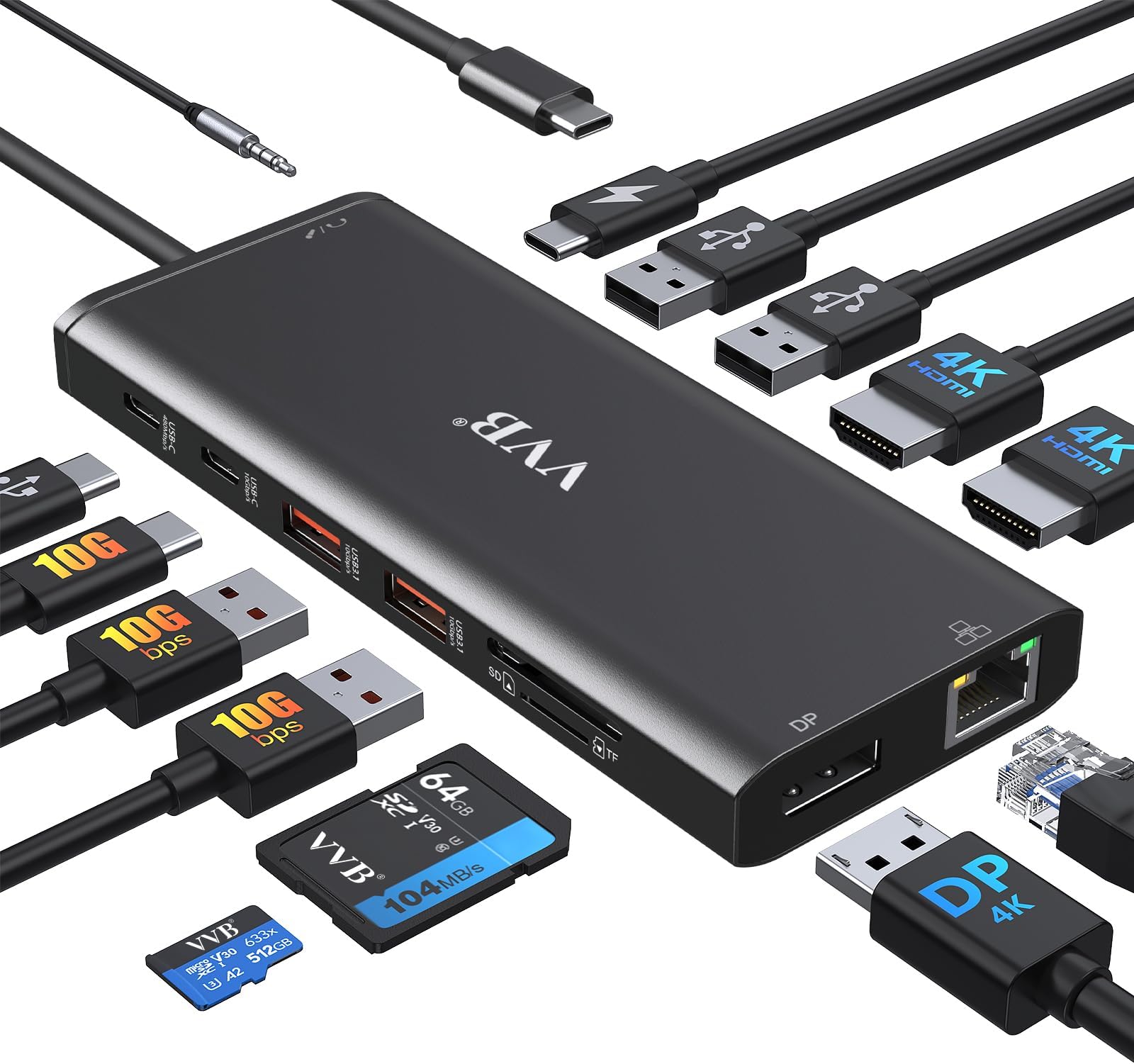
The VVB 14-in-1 USB-C Laptop Docking Station is a powerhouse multi-adapter that expands a single USB-C port into 14 ports, including dual 4K HDMI and DisplayPort outputs, 100W power delivery, gigabit Ethernet, multiple USB ports, and SD card readers. Compatible with a wide range of professional laptops, it delivers seamless multi-display support, ultra-fast data transfer, and reliable wired networking, making it an essential hub for modern professionals seeking to maximize productivity and connectivity.


| Additional Features | Fast Charging, Powered |
| Asin | B0DJ6YJSDJ |
| Best Sellers Rank | #131 in Computers & Accessories (See Top 100 in Computers & Accessories) #13 in Laptop Docking Stations |
| Brand | VVB |
| Color | Black |
| Compatible Devices | All Laptops and Phones with a Full-featured USB Type-C port (support DisplayPort,charging,data transfer protocol), such as iPhone 15 Series,Dell latitude 5530/5430/5431/5420/7390/5540/5420/5500/7490;XPS 9380/13/15/17;Dell Inspiron 5420/7420/7425;Dell Precision 5470/77680/7780;Dell Vostro 5410/5620; Lenovo T14/s/T480/T490s/ThinkPad X1 Carbon/Yoga Gen6/7/8; HP Elitebook 630/640/645/650/655 G9; Elitebook 840/850 G6/G7/G8/G9;Elitebook 845/Elitebook 830 G7/G8/G9/G10; EliteBook x360 830 G9/G10; EliteBook x360 1030 G2/G3/G4/G7/G8; HP EliteBook x360 1040 G5/G6/G7/G8/G9/G10; Elitebook X2; HP Probook 440 G6;445 G7;450 G5/6/7/9/10;455 G9/10;650 G8/HP Zbook Firefly 14/15 G7/G8/Zbook 15 G3/HP Spectre x360; Surface Pro X/9/8/7,Surface Laptop 3/4/5,etc; Mouse/Keyboards,Smartphones |
| Customer Reviews | 4.2 4.2 out of 5 stars (1,105) 4.2 out of 5 stars |
| Data Transfer Rate | 10 gigabits_per_second |
| Enclosure Material | Plastic |
| Hardware Interface | DisplayPort, HDMI, USB 2.0 Type A, USB 3.0 Type A, USB 3.1 Type A, USB Type C |
| Manufacturer | VVB |
| Model Number | DK005 |
| Number Of Items | 1 |
| Number Of Ports | 14 |
| Operating System | Windows |
| Total Usb Ports | 4 |
| Unit Count | 1 Count |
| Warranty Description | 1 Year |
User
One Plug to Rule Them All (and Finally Clean Up My Desk)
I finally got tired of playing "musical chairs" with the two USB ports on my laptop every time I sat down to work. I picked up this 14-in-1 USB-C Docking Station, and it has completely transformed my workspace from a tangled mess of wires into something that actually looks like a functional office.The "Everything Everywhere All at Once" Port Selection The sheer number of ports on this thing is impressive. I have two monitors hooked up via HDMI, my keyboard, mouse, a backup hard drive, and an Ethernet cable for a stable connectionโall running through a single USB-C cable into my laptop. It even has SD card slots, which is a lifesaver for quickly moving photos and videos without hunting for a separate dongle.Performance & Setup Setup was about as "plug-and-play" as it gets. My laptop recognized both external monitors immediately, and the picture quality is crisp with no noticeable lag. The 100W Power Delivery (PD) is a huge win, tooโit charges my laptop while I work, so I can leave my actual power brick tucked away in my travel bag.A Few "Pro-Tips" from My Setup:Check Your Port: Before you buy, make sure your laptop's USB-C port actually supports "DisplayPort Alt Mode" or video output. If itโs just a basic data port, the HDMI wonโt work, and youโll be left wondering why your monitors are dark.Heat: Like most high-powered hubs, it can get a little warm when you have ten things plugged in at once. Itโs nothing alarming, but Iโd recommend keeping it in a spot with a little airflow rather than burying it under a stack of papers.The "Screw" Factor (Again): While there aren't literal screws here, the connection is snug. Just be gentle with the main cable; since everything relies on that one plug, you want to treat it with a bit of respect.The Verdict If youโre looking to turn a single laptop into a full-blown desktop workstation with dual monitors, this is a fantastic value. Itโs sturdy, reliable, and has enough ports to satisfy even the most gadget-heavy setup. My desk is finally organized, and I only have to plug in one cable to get to work.
User
Functional and friction-free
It works so well I bought a second one. I have Lenovo, HP and Microsoft laptops and this docking station works on all of them. High marks for compatibility as Iโve ordered another one that didnโt handle the various laptops. I plug the USB-C power delivery cord for my laptop into this device and then just plug the USB-C from this dock into my machine when I open it on the desk. I get access to my wireless keyboard and mouse, both of my monitors and an 8TB SSD that I keep plugged into the device. This is one of those little things that just takes that bit of friction out of the way and gets me productive faster.
User
Perfect for my needs!
This item fulfilled all of my needs and works perfectly. I have multiple monitors and lots of devices to change and plug in. I like that it has an SD card slot, as I take lots of photos and don't have to have an additional card reader. The quality seems good, but I have only had it a week. I ordered the item in the evening, and it was delivered early the next morning. Very impressive.
User
HDMI Outputs Stopped Working
**Update** I have to give credit to the supplier. They read my review and offered a full refund. They clearly stand behind their product.HDMI outputs stopped working within a week or so. Can't get them to reconnect. I plugged the monitor directly into the computer and it worked fine, I used a different docking hub I had bought previously and it worked too.Sadly, this happened after the return window, so I'm stuck with the loss. I wouldn't buy this product if I were you.
User
Works as advertised
I can't say anything negative about it. It connects and works exactly as designed.
User
Rearch Various Amazon Options For Adding External Monitors To My HP Laptop
I wanted to add a second external monitor to my HP Laptop. My son in Houston researched Amazon's choices of docking stations that supported dual external monitors and at the same time provided a number of other ports that accomodated the various USB connection points I needed for external hard drives, USB Sticks, and Read/Write CD-R disk drive. Upon receipt and the instruction book, I was able to mount the docking station, connect both HDMI external monitors and through my laptop "settings" reset/rename the three monitors that allow them to operate seperately or all together.Now i am able to open three programs at the same time and move my mouse cursor across all three monitors. Resetting and renaming the three monitors was the most time consuming to meet my desired viewing needs.
User
It's barely OK
I bought this to use as a dock for a HP Latitude 7450. If you plug the HP power supply into the correct USB C port, you'll get 87 watts out of the built in dongle to your PC. With two HDMI monitors plugged in, my PC goes into "slow charge" mode, or the system slows for lack of power. My work computer I mostly check email and other low power office apps, so it's no big deal.The form factor is not as convenient as I had hoped. A big spider thing takes up a lot of desk space. I could velcro it under the desk, but I switch my good camera back and forth sometimes, and I'd rather not do that. It's just something to think about.The price is right on this thing, but if you're looking for a serious port replicator / dock, you get what you pay for. Pay special attention to the power it puts out and how much your USB C laptop needs.Update: This thing is pretty unreliable. My HDMI monitors just blink off randomly. My monitors are self powered. I'm going to check for firmware updates, but it's three stars for now.
User
Great alternative to a thunderbolt docking station.
This works great with my HP laptop. So far works as well as the thunderbolt docking station. The only thing is that there is not a power on button. You have to open up the laptop and turn it on when needed. Have been using for a few months with no issues.
Trustpilot
3 weeks ago
4 days ago