Desertcart purchases this item on your behalf and handles shipping, customs, and support to Senegal.
📼 Digitize your past, own your nostalgia—before it’s gone!
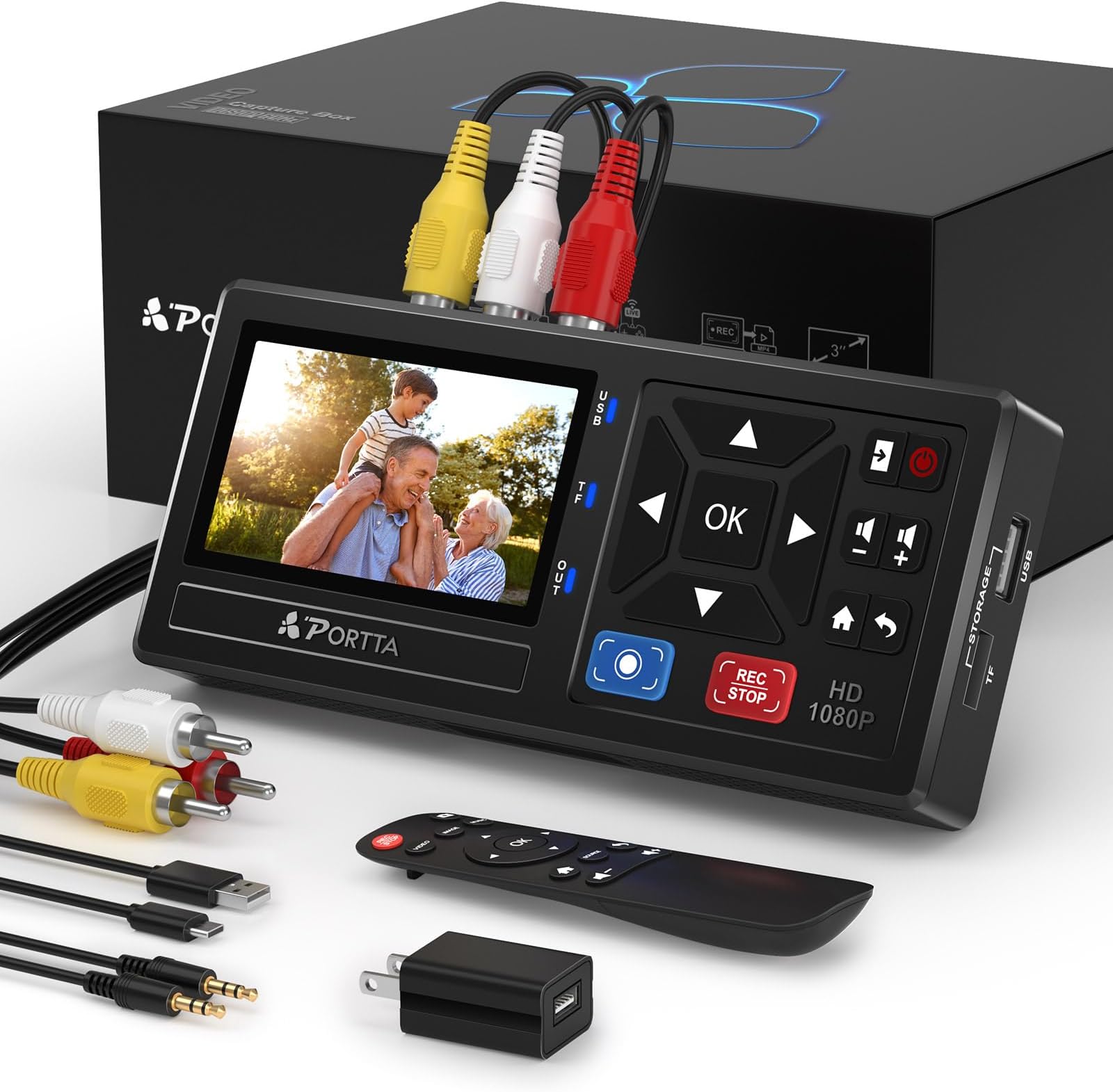
The PORTTA VHS to Digital Converter is a plug-and-play device that converts analog video and audio signals from VHS, VCR, DVR, DVD, Hi8, Mini DV, camcorders, and gaming consoles into high-quality 1080P digital MP4 files. Featuring a 3.0" preview LCD, built-in speaker, and support for unlimited USB/SD storage, it enables instant playback and easy recording without a PC or software. Backed by a 2-year warranty and lifetime support, it’s the ultimate tool for preserving your vintage media collection.


| ASIN | B0D8XGYZ8L |
| Audio Output Mode | Stereo |
| Best Sellers Rank | 2,348 in Electronics & Photo ( See Top 100 in Electronics & Photo ) 18 in Video Converters |
| Brand | PORTTA |
| Compatible Devices | Gaming Console, PC, Television |
| Country Of Origin | China |
| Customer Reviews | 4.5 out of 5 stars 1,910 Reviews |
| Interface | RCA |
| Interface type | RCA |
| Item Dimensions L x W | 15.8L x 7.5W centimetres |
| Item Weight | 6.5 Ounces |
| Manufacturer | PORTTA |
| Manufacturer Part Number | VD10 |
| Minimum Supply Voltage | 5 Volts |
| Minimum supply voltage | 5 Volts |
| Model Number | VD10 |
| Mounting Type | Free Standing |
| Mounting type | Free Standing |
| Number of Channels | 2 |
| Number of Pins | 3 |
| Number of channels | 2 |
| Number of pins | 3 |
| Product Warranty | 2-year warranty |
| Unit Count | 1.0 count |
L**E
Easy, reliable and multi use.
Brilliant! After finding the family VHS collection of about 100 tapes i decided to give this a go to digitise everything. This is far superior to those cheap USB devices that are unreliable and have lag and audio mismatch. This is perfect! Just plug it into the VHS player, add a memory card. press play and record on the devices and wait until the tape is finished. The only downside is that it cuts the recording into segments of about one hours each so i have to go back and join it together to make one video.
M**R
Great VHS to digital converter.
Great device, which we have used to convert dozens to VHS tapes. Easy to use and output quality is good (considering the input is VHS). Only minor issue is that there doesnt seem to be a way to get it to stop recording when the tape ends, so you have to be around for the whole process.
K**L
Brilliant bit of kit! Saved me hundreds of pounds!!
Exactly what I needed to convert old Mini DV & Video tapes to a digital format. I’d been looking at sending the tapes off to a third party to transfer the many, many tapes we had but all of the prices were unaffordable. I decided to see if there was a way I could transfer them myself and I came across this. This device was a fraction of the cost of sending the tapes off to a third party and I didn’t have to worry about them getting lost or damaged! You do need a working VHS player or video camera to use with this device (which I have so wasn’t an issue) but worth bearing in mind if you don’t have access to either. Really easy to set up, good quality video (which can be adjusted to suit your needs) and great sound quality too. It does take a little while to transfer the video but only because it is essentially recording from the VHS tapes or video camera tape so if you’ve got a 3 hour video it will take 3 hours to transfer. This wasn’t really an issue for me - I just set it up, pressed record and left it to it. Simple! It’s great to know I now have digital copies of all of the videos from my childhood & of family holidays - Even found footage of family members who long since past and great to know that footage is now safe & secure!
C**E
Brilliant
Works perfect , and easy to use,,, grade A product
S**E
V. solid multi-function recording device
Great bit of kit. Managed to copy VHS & (S)VHS-C with adapter from a VHS video player. Plus 8mm Super directly from the camcorder. Using a Scart adapter with appropriate out/inputs. Had problems with audio when using S-Video cable. Otherwise the only other downside is the rather basic UI on the device. Worth the cheaper cost though if you are just looking to do basic recovery. Was paired with a generic external desktop HDD with its own power cable.
S**N
A very useful gadget.
This item is a godsend. I have VHS-C and mini DV cassettes. I fear one day that the tapes will get chewed up, become damaged or they'll be nothing to play them on so I wanted to find a way of converting them into MP4's. I didn't know there was such an item until I randomly checked here a few weeks back. I took a chance and bought it. It's doing a fabulous job converting both cassette types. A few useful configurations in settings but not much to really make a difference to the output quality. Sometimes you can see a few unwanted small effects on the output video of VHS-C's but nothing to make the quality really noticeable that it is bad. Who's to say it's this gadget though because the DV cassettes output is fine. I just wish it had a higher quality output resolution than the max 1920 x1080 so I could test the quality difference. It is worth noting though, this is not an upscalling device so I doubt there would be. I doubt that, if the resolution was even 3250 x 1920, there would be any difference either. I have tested the lower resolution and the output is pretty poor so needs to be set to 1920 x 1080. It will obviously downscale but not upscale. In my opinion, the output recording will only be as good as the cassettes recording anyway. Unless there's a signal at the beginning, it won't record. You can miss the 1st 1 or 2 seconds of a video because of this. I prefer to press record and off it goes. If you lose signal whilst it's recording, it seems to carry on and not stop which is good. On occasion, it seems to get itself in a pickle as it can take ages to save the recording onto the USB stick, sometimes won't save at all. This could be for a number of reasons not associated directly with the device. Most of the time it's almost instant. This device it an absolute godsend in my eyes. No, it isn't cheap but it does the job very easily and does it well. Simple to use and is made of pretty good quality materials. The screen is very convenient because this means you don't have to watch videos on the tv only. Also, I think it's the perfect size.
M**N
Quick to set up
Nice little unit, easy to set up. I bought a connecting cable to attach my camcorder to it and a flash drive to output to. Press play on the camcorder and record on the unit(remote control included). The camcorder takes 8cm discs, the output to the flash drive when played back(mp4) had a squashed look. Not sure if that is to be expected or if I'm doing something wrong.
P**L
Worth it's weight in gold
I wanted to copy eight 20 year old mini DV tapes onto a USB stick. I found a reasonably priced camcorder on Ebay and then bought one of the cheaper converters with 4 stars on Amazon but it would not connect due to an unresolvable software driver issue (seems a common problem) I checked out an independent review of the Portta converter on Youtube (Tech to remember) - this gave a warts and all description and a fools guide on how to use one. The Portta and a new high speed 128 Gb USB stick arrived next day. Within an hour or so I was happily copying videos onto the USB stick and reviewing them on my computer. Video quality was much better than you might expect from such old tapes. The joy of watching our daughter enjoying Orlando Disney in Florida when she was 11 years old made this item well worth the price however videos of our son's wedding reception and various family trips abroad were literally priceless. If you are hesitating I would say do a little bit of research and give it a whirl - you can always return it if it doesn't work for you. If your camcorder or VHS player has S-video cables (for better quality images) this model can connect to them whereas the more expensive model doesn't seem to. I have the option of a Firewire connection (for higher quality) on my camcorder but sadly this converter isn't set up for it - it relies on a 3.5 mm plug which thankfully came with the camera. I am now planning to dig out an ancient VHS Video Recorder as I have found some big old camcorder tapes from the early 90s - wish me Luck.
角**ブ
オフタイマーが便利です
1時間のハイエイト動画を4mbps 128kHzで録画すると、2ギガくらいのファイルになりました。オフタイマーでセットし、ビデオを見ていなくても録画が自動で終わるので、楽ちんです。買って良かったです。
E**S
Enkelt att överföra gamla video band till usb minne
Bra kvalitet, enkel att hantera och att överföra video till usb minne .Jättenöjd
A**L
It needs better manual for explanation
It is very good device. I recorded 5 old DV cassette. Then I had a problem with my old camera . Then I fixed my camera. It is working now. The manual is difficult to read . It needs much better explanation as I spent one day to make porta to work again after fixing my camera .
A**I
ممتاز وسهل الاستخدام
ممتاز سهل الاستخدام وتم تحويل كل ما ارغب في تحويله إلى فلاش ميموري يعمل على اعلى جودة انصح بشرائه
J**M
Simple et efficace
Je suis d'accord avec la majorité des commentaires : cette machine est incroyable ! De l'électronique comme on en rêve : on branche et ça fonctionne ! J'ai d'abord relié le boitier au secteur avec l'adaptateur fourni. On peut alors accèder à un menu simple facile à mettre en français. Le menu permet de faire quelques réglages : j'ai tout mis en qualité maximum, je ne sais pas si c'est totalement nécessaire. Ensuite, d'un côté avec les prises RCA j'ai branché mon camescope acheté il y a 30 ans, de l'autre une clé USB formatée en NTSC. J'ai appuyé sur "PLAY" du caméscope puis sur "REC STOP" du boîtier. Une fois la lecture de la cassette terminée, j'ai réappuyé sur "REC STOP" pour arrêter l'enregistrement : et c'est tout ! J'ai obtenu instantanément un fichier mp4 (environ 4,5 Go pour une heure en qualité maxi) directement lisible sur la télévision. Alors, on peut peut être obtenir des images de meilleure qualité en utilisant un autre système ou en passant par un professionnel. Pour moi, les images obtenues sont vraiment correctes et de qualité nettement suffisante (vidéos de famille) et surtout c'est tellement simple. Le mini écran et le haut-parleur sont vraiment qualitatifs. Si on veut plus grand pour visionner les images (à plusieurs par exemple), avec ou sans enregistrement, on branche tout simplement le boîtier avec un câble HDMI sur un téléviseur. Sur le site internet de PORTTA on trouve un fichier de mise à jour système (une archive zip) que j'ai téléchargé mais que je n'ai pas réussi à installer sur le boîtier. J'ai copié les fichiers à la racine d'une clé USB et j'ai utilisé le menu de mise à jour. Je n'ai pas trouvé comment faire dans la notice jointe ni sur internet. Si quelqu'un a fait cette mise à jour pourrait-il partager la procédure à suivre ? Merci d'avance.
Trustpilot
2 months ago
2 weeks ago