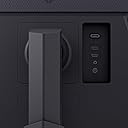
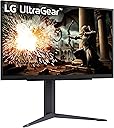
🎮 Level up your game with LG UltraGear — where speed meets stunning clarity!
The LG 27GS75Q-B is a 27-inch QHD (2560x1440) IPS gaming monitor featuring an ultra-fast 180Hz refresh rate (overclockable to 200Hz) and 1ms response time for smooth, blur-free gameplay. It supports NVIDIA G-SYNC and AMD FreeSync technologies to eliminate screen tearing, while HDR10 and 99% sRGB color gamut deliver vibrant, true-to-life visuals. Designed with gamers in mind, it offers ergonomic tilt, height, and pivot adjustments alongside a virtually borderless display and multiple connectivity options including HDMI and DisplayPort.


| ASIN | B0DFZZHK6X |
| Adaptive Sync | G-Sync Compatible |
| Aspect Ratio | 16:9 |
| Aspect ratio | 16:9 |
| Box Contents | Monitor, Power Adapter |
| Brand | LG |
| Brand Name | LG |
| Colour | Black |
| Compatible Devices | Laptops, Desktops, Gaming Consoles |
| Contrast Ratio | 1000:1 |
| Customer Reviews | 4.6 out of 5 stars 220 Reviews |
| Display Technology | IPS |
| Display Type | IPS |
| Hardware Connectivity | DisplayPort, HDMI, USB Type C |
| Has Color Screen | Yes |
| Image Brightness | 300 cd/m² |
| Image contrast ratio | 1000:1 |
| Item Dimensions D x W x H | 25.4D x 61.5W x 57.7H centimetres |
| Item Weight | 13.2 Pounds |
| Manufacturer | LG |
| Maximum Display Resolution | 2560 x 1440 Pixels |
| Model Name | 27GS75Q-B |
| Model Number | 27GS75Q-B.AUS |
| Mounting Type | Wall Mount |
| Native Resolution | 2560x1440 |
| Network Connectivity Technology | DisplayPort, HDMI |
| Picture Quality Enhancement Technology | HDR10, 99% sRGB color gamut |
| Product Features | Height Adjustment, High Dynamic Range, Pivot Adjustment, Tilt Adjustment |
| Refresh Rate | 200 hertz |
| Resolution | QHD Wide 1440p |
| Response Time | 1 Milliseconds |
| Screen Finish Type | Matte |
| Screen Size | 27 Inches |
| Screen size | 27 Inches |
| Screen surface description | Matte |
| Series Number | 75 |
| Shape | rectangular |
| Specific Uses For Product | Gaming |
| Total HDMI Port | 2 |
| Total USB Ports | 1 |
| Total Video Out Ports | 2 |
| UPC | 195174084908 |
| Viewing Angle | 170 Degrees |
A**R
LG UltraGear 32GS75Q-B: A Highly Capable Gaming Monitor
After using the LG UltraGear 32GS75Q-B (31.5" QHD IPS gaming monitor) for about a month, I am thoroughly impressed with its performance. I upgraded from a previous LG VA panel that exhibited noticeable ghosting and trailing behind fast-moving objects, such as the mouse cursor. This issue stemmed from the slower gray-to-gray (GtG) response times typical of VA panels compared to IPS. With this UltraGear model, featuring a 1ms GtG response time, those artifacts are completely eliminated, delivering crisp and fluid motion.While the static contrast ratio is 1200:1 (lower than the 3000:1 on many VA panels), the IPS technology provides superior overall image quality, with excellent viewing angles and color accuracy (sRGB 99% typical). The VESA DisplayHDR 400 certification ensures solid HDR performance, producing vibrant highlights and satisfactory dynamic range for gaming and media consumption—far better than I expected for an entry-level HDR implementation.A standout feature is its compatibility with both AMD FreeSync and NVIDIA G-SYNC Compatible technologies, making it future-proof for my planned upgrade to an NVIDIA GPU while delivering tear-free gameplay on my current setup.The primary minor drawback is the pixel density of approximately 93 PPI at 2560x1440 resolution on a 31.5-inch panel. At very close viewing distances, individual pixels become faintly visible, which could bother users sensitive to such details. However, at typical desktop distances (around 2–3 feet), this is imperceptible, and it poses no issue during gaming or video playback.Other aspects are excellent: the On-Screen Display (OSD) menu is intuitive and responsive, and the stand assembles quickly while offering height, tilt, and pivot adjustments for ergonomic comfort. Connectivity includes two HDMI 2.1 ports and one DisplayPort 1.4, providing ample bandwidth for the QHD 180Hz specification (though the higher versions are not fully utilized at this resolution).P.S.: For Linux users interested in HDR, note that robust support is currently limited to recent versions of KDE Plasma (Wayland session) and GNOME (starting with version 48 or via experimental flags in earlier releases). Additional libraries or extensions may be required for full functionality, and some setup tweaks could be needed. In contrast, Windows 11 enables HDR seamlessly out of the box via the display settings.Overall, the LG 32GS75Q-B offers outstanding value for QHD gaming, with responsive performance, reliable adaptive sync, and impressive visuals that make it an easy recommendation.
G**O
Have two, want more! Recommend!
Good monitor. I have two: one at home, one at office. I bought second to replace my existing UltraGear 27inch qhd at home. 27 inch was too small for me. Also, I can say that 32inch might be big for tables less than 60cm deep. But if you have 80cm table - 32 inch with qhd is best choice, even you have a good vision (I have about -0.65) I use it for programming and gaming, watching shows and movies - very satisfied. No designer’s specific tasks, but colors, in my opinion, are great. I verified all declared refresh rate up to 144hz, and HDR support. I was able to verify a VRR (FreeSync). It works, but I have several PC’s connected thru a KVM which supports everything (g-sync, freesync). In my case I was able to use FreeSync (HDMI connection) only via laptop with AMD’s CPU (integrated GPU). All other devices (even claimed support) are not able to use VRR (thru KVM?) by an unknown reasons. But monitors are supported VRR, verified. I think better to mount it on a clamp, but stand is perfect, actually. It doesn’t use much space, and I keep xbox controller between stand’s legs, looks good :)
T**E
Beautiful vivid screen
I love this monitor. It has a beautiful screen. It's easy to setup. I'm using it right now for my Xbox. The graphics arebeautiful and I love that it has a sight that I can use, especially with guns that don't have sights. It helps me with my aim. The only thing I wish it had was a remote so that I don't have to guess at the settings. The controls are under the monitor wich makes it hard to change between hdmi 1 and hdmi 2. I wish they put the controls on the side of the monitor so that I don't have to guess which button is which. But it really doesn't affect how the monitor functions. This is a really good monitor, whether you use it for a gaming system, computer, or a firestick, or onn box. I also have this connected to my onn box. It does not have sound built in, but you can easily buy a set of computer speakers to pair it using bluetooth. I have just ordered a set of speakers and they arrived yesterday. I have not yet hooked them up. Overall, it has a beautiful screen with vivid graphics, it easily set up to my Xbox. I like how you can adjust the height of the screen and you can turn it left or right. The monitor is on a thick base that appears pretty durable and doesn't feel cheap. It comes with cables which is nice for setup right away. The only 2 cons are the controls are on the bottom of the monitor so you can't see what you're doing, and it doesn't have any sound. But those are not a deal breaker on this monitor. You can easily raise the monitor up for easier access to the controls also. I hope this helps somebody on their decision on whether to buy this monitor. LG makes very good quality items, whether it be a monitor, or tv. Buy this monitor you won't regret it!!
S**L
Monitor is Amazing.
I have 2 of the older versions of this monitor, and needed another. Specifically I wanted this one for portrait mode, to be the side monitor. It can fit the bill to be the main, or secondary screen very easily. I have not tested it over 300 FPS, because I typically game capped at 120FPS. I cant notice the difference, and power consumption at the crazy end of the spectrum is not worth it. At least for those of us that are actually paying the utility bills. This monitor displays 4K just fine at reduced frame rates. It would probably not take 350fps at 4K. But again that's not my cup of tea. When I game, I actually prefer playing at 1080P 120fps. For windows or Netflix, I bump it up to 4K 120hz. It looks stunning. Historically, I have been all Sony (pre-2000), followed by all Samsung(pre-2020). With this family of ultragear, specifically those with G-sync, I am now all LG. I still love the other 2 brands, but their value is slipping. LG is still what I would consider to be a good price point for workstations and armature gamers on a budget. You will want to note, that if you are an Nvidia GPU user, you need to make sure the one you pick has G-Sync. If you are an ATI GPU used, you will need to make sure the one you pick has V-Sync. I think that they are planning on making the next generation of screens with both. But in the end G-sync is better because Nvidia is better then ATI. (which is junk IMO) I have been a network administrator for 30+ years. And have purchased somewhere north of 1000 CRT's, LED's and LCD's over the years. These are not Premium OLED screens. But for the price point, they are superb. If money was not an option, OLEDs are the way to go. Faster, brighter, less prone to glare. a 10% boost for a 300% price increase. I highly recommend these screens. Also 32" is the new minimum size. I stopped buying 27" about 5 years ago. All of my employees thank me for it.
H**M
Great choice for FPS games.
I like it and the UI is easy. one thing I wasn't aware of that you can't lower it a lot. it is designed for the monitor to stay 25 CM above the desk. It is effecient and good for its price and its 180 refresh rate.
Trustpilot
2 weeks ago
1 month ago