Buy anything from 5,000+ international stores. One checkout price. No surprise fees. Join 2M+ shoppers on Desertcart.
Desertcart purchases this item on your behalf and handles shipping, customs, and support to Senegal.
๐ฎ Dominate your digital domain with lightning-fast, ultra-reliable WiFi!
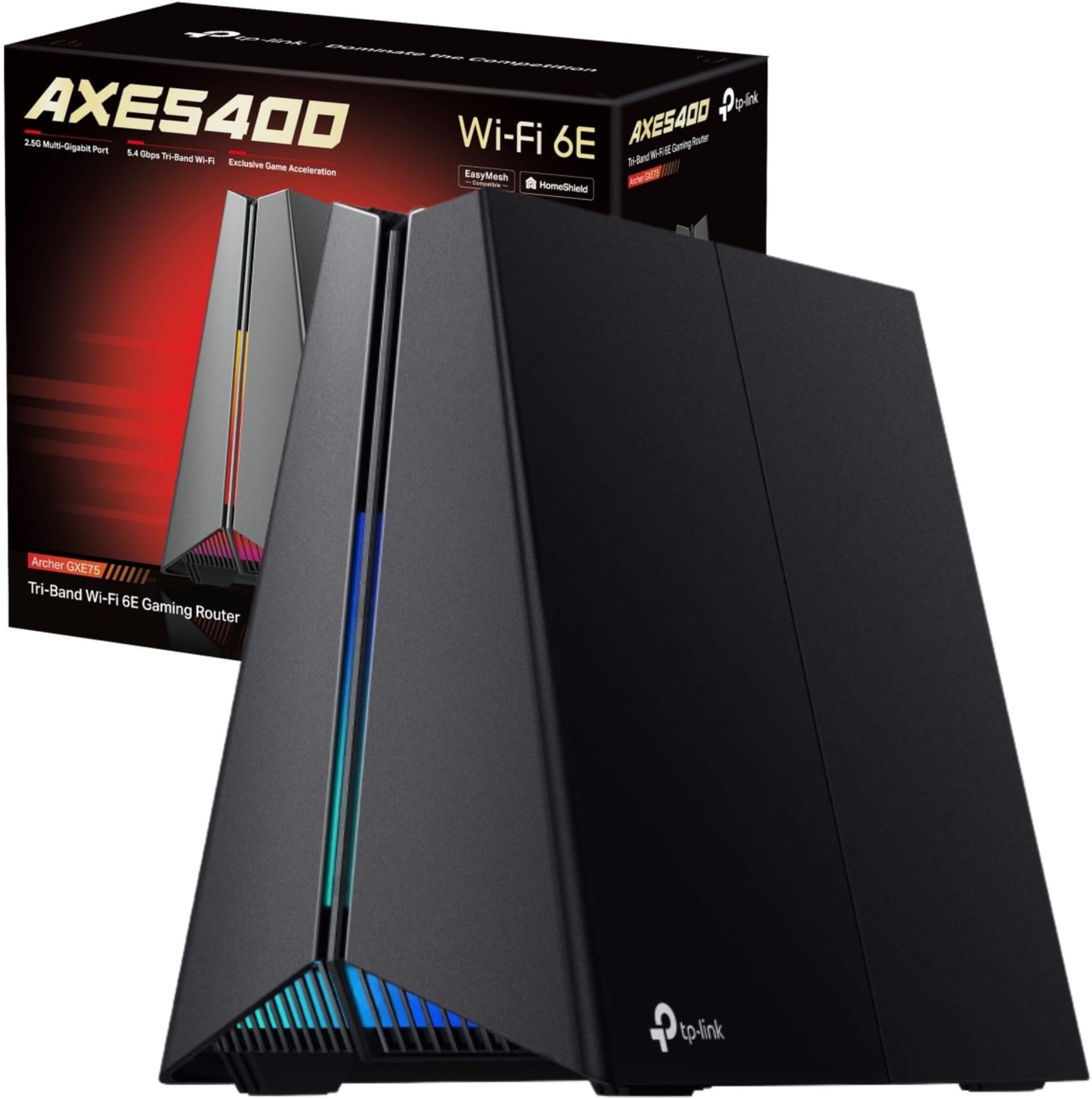
The TP-Link Archer GXE75 is a cutting-edge Tri-Band WiFi 6E router delivering up to 5.4 Gbps speeds with a dedicated 6 GHz band, a 2.5G WAN port, and four 1G LAN ports. Designed for gamers and high-demand households, it features four optimized antennas with Beamforming for whole-home coverage, a dedicated gaming panel for real-time network control, customizable RGB lighting, and robust security via TP-Link HomeShield. EasyMesh compatibility ensures seamless mesh networking, making it perfect for professionals and gamers seeking ultra-fast, stable, and secure connectivity.


| ASIN | B0DLL5W4HR |
| Antenna Location | Gaming |
| Antenna Type | Internal |
| Best Sellers Rank | 12,774 in Computers & Accessories ( See Top 100 in Computers & Accessories ) 113 in Routers |
| Box Contents | Power Adapter, RJ45 Ethernet Cable, Wi-Fi 6E Gaming Router Archer GXE75 |
| Brand | TP-Link |
| Brand Name | TP-Link |
| Colour | Shadow Black |
| Compatible Devices | Gaming Console, Personal Computer, Smart Television, Smartphone, Tablet |
| Compatible devices | Gaming Console, Personal Computer, Smart Television, Smartphone, Tablet |
| Connectivity Protocol | Wi-Fi, Ethernet |
| Connectivity Technology | Ethernet, Wi-Fi |
| Control Method | App, Touch |
| Controller Type | App Control, Push Button |
| Coverage | whole home |
| Customer Reviews | 4.1 out of 5 stars 173 Reviews |
| Data Transfer Rate | 5400 Megabits Per Second |
| Frequency | 6 GHz |
| Frequency Band Class | Tri-Band |
| Frequency band class | Tri-Band |
| Has Internet Connectivity | Yes |
| Has Security Updates | Yes |
| Is Modem Compatible | No |
| Item Dimensions L x W x H | 23.7L x 13W x 19.3H centimetres |
| Item Weight | 1.07 Kilograms |
| LAN Port Bandwidth | 574/5400 Mbps |
| Manufacturer | TP-Link |
| Manufacturer Part Number | Archer GXE75 |
| Maximum Upstream Data Transfer Rate | 2500 Megabits Per Second |
| Model Name | Archer GXE75 |
| Model Number | Archer GXE75 |
| Model name | Archer GXE75 |
| Number of Antennas | 4 |
| Number of Ports | 5 |
| Operating System | Tenda OS |
| Other Special Features of the Product | Access Point Mode, Alexa Compatible, Beamforming, Parental Control, QoS |
| Security Protocol | WPA2-Enterprise, WPA3 |
| Special feature | Access Point Mode, Alexa Compatible, Beamforming , Parental Control, QoS |
| Unit Count | 1.0 count |
| Wi-Fi Generation | Wi-Fi 6E |
| Wireless Compability | 802.11a, 802.11ac, 802.11ax, 802.11b, 802.11n |
| Wireless communication standard | 802.11a, 802.11ac, 802.11ax, 802.11b, 802.11n |
P**P
Not just for gamers... Amazing Router Changed My Life!
First of all the looks... even bigger and uglier than the photos (taste dependent). I'd prepare a hiding place! Installation... simplicity itself. It connected via bluetooth for the setup and was almost completely automatically. The web interface was easy to fine tune settings to my preferences. Since then... Perfect! The coverage is amazing, it easily gets into every corner with rock solid stability that I hasn't cut out once yet! Everything just works perfectly, speed is amazing even at distance, connectivity is the best I have seen, even through multiple walls and objects. Three networks keeps the traffic seperated. Dual ethernet aggregation to the NAS drive in a busy house is an unexpected bonus. Negatives? The app needs a bit of polish and more options to match the web interface. Some options, such as QOS do not go into as much detail as I might have wanted, offering slide bars for action priority such as downloading or gaming. A couple of other brand gaming routers have way more options... which is usually a good thing, but in this case I find TPLink has made this so efficient and easy, I simply haven't needed to touch setting since initial setup! I use this constantly connected to over 30 devices not including 20 smart lights, and have not had a hiccup yet, this is a fantastic router that is perfect for people with high device and online usage... not just gamers!!
M**T
Very, very reliable streaming
Seems very nicely made, it was easy to setup (though noting I'm in IT professional) but primarily - it works extremely well. We have 3 people working from home, video streaming most of the day, loads of devices connected on wired and WiFi and this has been completely robust and stable delivering excellent bandwidth even over WiFi. We are using it with 600Mbps Virginmedia cable broadband. haven't had to reboot it once since I commissioned it several months ago now. It isn't cheap, but worth every penny to get stable performance.
P**S
Brilliant upgrade from Virgin Superhub
Hooray, everyone has stopped complaining about WiFi! I just wish I had done this years ago instead of persevering with the Virgin Hub. Simple to install, great value at ยฃ210, and really strong signal. Easy to manage from a browser or the Tether app, both are much faster and more reliable than the VM equivalents. It has 8 ports so I have also dispensed with a separate switch. Just about perfect but I have to subtract one star because it is huge and hideous. Also no WPA3 and no Whitelist or Blacklist on the content filter.
W**Y
This is a Beast
So let me set the picture, I previously had a BT Home Hub 6, with 8 wired connections and 9 wireless connections (IoT house!), I was finding bottlenecks with the speed to some devices, and this changed on a daily basis, some wired devices used Ethernet Power adapters to the remotes of places in the home, I often heard "It's clicked off again" or "Internet is down"... I have been looking at this router for a while conscious of price, however with Xmas money and a slight reduction in price I bought this... This report is 2 weeks in using the devices, and I think it's the best home network device I have owned, for example, 2 5ghz Wireless connections which range quite far, you can tether you mobile to the device to see what's going on, it has a built in speed test (I would state the bt wholesale speed test gives a realistic representation, but this isn't far off), you can also enable the onboard Antivirus, Intrusion Prevent System and Infected Device Quarantine. One of the best features is through QoS you can priorities applications or devices, so for example, a device on you home network timing out? you can set that devices to be top priority.. preventing down time. As mentioned before I have a lot of things connected to the internet (I have 80mb download and 20mb upload) I can manage them all and since I have this router I can priorities what I need to. If anyone else has a ISP modem/router and thinking about getting this you can turn your ISP router/modem to just a modem, simply turn off your Wifi devices, remove all your network cables from the ISP box to your TP-Link, connect a Ethernet cable from Port 1 on your ISP devices to the "Internet" connection on your TP-Link.
R**T
Awful Performance
I bought the GXE75 to replace an AXE75 due to the GXE75 having a 2.5gbps wan port. I was hoping to get increased speeds because I have a 1.5 gbps internet connection and it caps out at 850mpbs on the AXE75 due to having only 1gb ports. The GXE, using the same settings as the AXE75, was substantially slower and worse in every possible way compared to the AXE75. The 6ghz was unusable. The 5ghz wifi was only getting 500MBPS downloads and the even over wan I was only getting 600mpbs, which is odd and doesn't make any sense considering the port is meant to be a "gaming port". My latencies were 60ms vs the 21ms I get on the AXE75. I suspect that because the antennas are nested inside the router that it just has pathetic broadcasting abilities. After this experience I will never buy another TpLink product. The AXE75 is also a mediocre router.
B**L
Better than my wired connection
I am really impressed with the router (C5400X MU-MIMO Tri-Band) and my only regret is that I bought it a few days before the price was reduced by ยฃ22. I have been using it now for more than a month and I can't find any fault. Is very stable and the WiFi signal is impressive. I have just moved into a new block of flats on the 4th floor and my phone connects from downstairs, outside of the building...can't get any better than this. It also packed with advance feature that allowed me to use it instead of my ISP modem and deals directly with the internet connection. I just hope that it will continue working flawsley as it has been so far. I will definitely recommend it even though is a bit pricey will be a long term investment.
P**R
Infrequent firmware releases, support response on tplink forums is poor
Had i wrote this review sooner, it would have been very different. The first 2 months I was using this router were great, where i would say that it's been the most stable router ive ever had with the best wifi performance, up to that point. I then performed a firmware upgrade as recommended by the router. Since then, the wi-fi has been incredibly unstable with regular periods where the router intermittently fails to route internet traffic via wifi meaning your devices then think that wifi connection has no internet and disconnects you. At the same time the router appears to still route via ethernet, ive logged it with TP link, though no solution was found. Ive also raised it on the TP link forum where a couple of other people appear to have exactly the same issue. Due to this being a premium product, reported errors are likely to be low, so far theres no sign of a new firmware to correct the issue. Ive now found that disabling the 2nd 5G wifi frequency stops the router having this management issue where it periodically has a fit for several minutes. It seems rock solid again with just 2.4ghz and 5ghz1 enabled. This said..... Ive paid big money for something which now won't perform in the way it was intended. In general quite a few people on the forums are complaining at the lack of firmware releases for this router, i wish id checked this before buying. This is a concern for when any security vulnerabilities need addressing. Trend micro will offer some protection... Though this will be chargeable to the consumer after i think 2yrs. I certainly hope trend micro feature wasn't added so that tp link can absolve itself of its vulnerability responsibilities, only time will tell. Overall next time ill do even more research before settling on a router. Update 26/9/20 still no fix in sight or acknowledgement of the issue from tp link despite several users on their forum with exactly the same issue and user identified workaround of disabling the 3rd wifi band. Update 22/1/21 still no fix from TP link on the above issue. No new firmwares released either. Router working much better with only 2 of the 3 bands turned on. If your buying on the premise that only two thirds of the advertised bands will be usable whilst maintaining a reliable device then go ahead, if not look elsewhere. 17/2/2021 Still no further updates from tplink, a few more users have come forward on the thread over the last month or so.
R**.
Happy
Very happy with it I can connect my pc to the WiFi 6 no problem without getting distracted so yh go for it and get yourself a WiFi 6 card in your pc
Trustpilot
1 month ago
3 weeks ago