Desertcart purchases this item on your behalf and handles shipping, customs, and support to Senegal.
🚀 Elevate your desk game with dual 4K power and all-in-one connectivity!
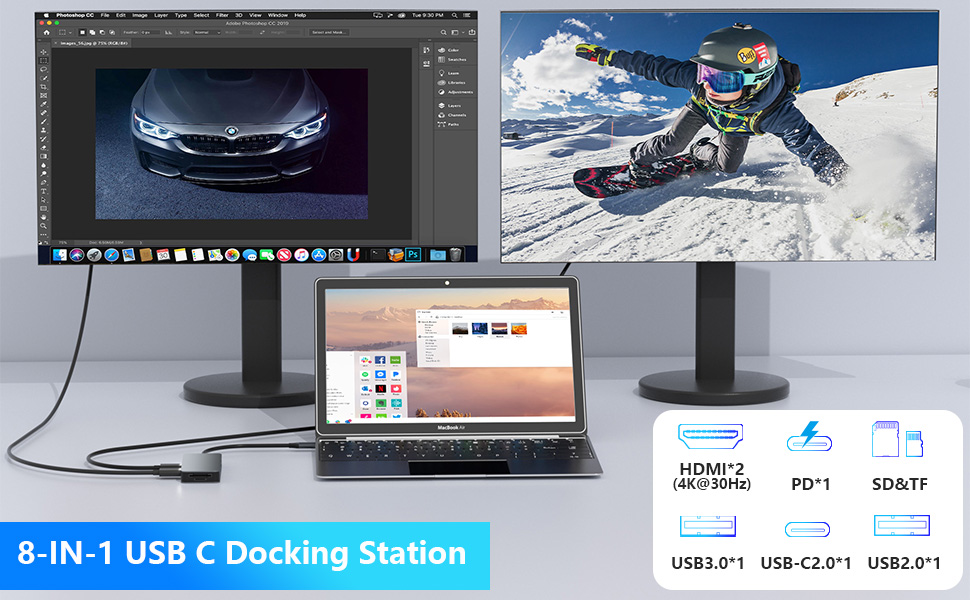
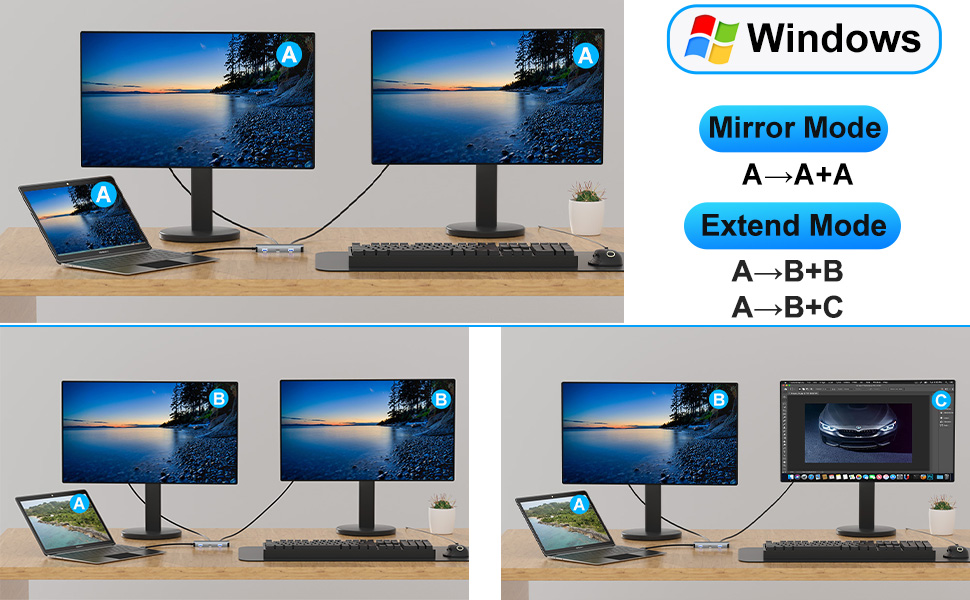
This 8-in-1 USB-C docking station transforms a single Thunderbolt 3/4 or USB-C port into dual 4K HDMI outputs, multiple USB ports, SD/TF card readers, and 100W power delivery charging. Compatible with Dell, HP, Lenovo, Mac, and more, it offers plug-and-play ease for professionals seeking a sleek, efficient multi-monitor and multi-device setup.


| ASIN | B0DHPGP6BH |
| Additional Features | Compact |
| Best Sellers Rank | #942 in Computers & Accessories ( See Top 100 in Computers & Accessories ) #108 in Laptop Docking Stations |
| Brand | Aibilangose |
| Color | Gray |
| Compatible Devices | Laptop with a fully function(support charging, data transfer and video output) USB-C port or Thunderbolt 3 portLaptop with a fully function(support charging, data transfer and video output) USB-C port or Thunderbolt 3 port Compatible Devices Laptop with a fully function(support charging, data transfer and video output) USB-C port or Thunderbolt 3 portLaptop with a fully function(support charging, data transfer and video output) USB-C port or Thunderbolt 3 port See more |
| Customer Reviews | 4.3 out of 5 stars 318 Reviews |
| Data Transfer Rate | 5 gigabits_per_second |
| Enclosure Material | Plastic |
| Hardware Interface | HDMI , MicroSD, USB 2.0, USB 3.0, USB Type C |
| Item Dimensions L x W x H | 3.4"L x 1.6"W x 0.6"H |
| Item Weight | 2.24 ounces |
| Manufacturer | Aibilangose |
| Mfr Part Number | Hx202 |
| Model Number | Hx202 |
| Number of Items | 1 |
| Number of Ports | 8 |
| Operating System | Windows, macOS |
| Special Feature | Compact |
| Total USB Ports | 4 |
| Total Usb Ports | 4 |
| Unit Count | 1 Count |
| Warranty Description | 1 Year |
J**L
Clean Desk Setup with Reliable Dual-Monitor Support
I snagged this docking station mainly to run two monitors off my laptop without having to deal with a bunch of dongles, and honestly it’s been a nice little upgrade to my desk setup. It’s got the essentials — two HDMI outputs that handle extended displays, a couple of USB-A and USB-C ports for peripherals, plus SD/TF card slots and pass-through power delivery so my laptop stays charged while I’m plugged in without needing a separate charger. It’s a pretty simple plug-and-play experience: just hook it up to the USB-C port on your laptop, and bam — dual screens and extra connections without a headache. � Tiendamia Now, it’s not perfect, but for the price it punches above its weight. Dual monitors work solidly as long as your laptop supports video output over USB-C (you’ll need Thunderbolt 3/4 or DP Alt Mode on your port) — otherwise the displays won’t light up. � The build feels decent, though it’s not super rugged or premium, and I’ve had to wiggle a cable here and there to get everything recognized one time or two. Still, it’s been reliable enough for daily work, browsing, and multitasking, and it’s cut down on cable clutter nicely. Could it be higher-end? Sure — but for a budget docking station that actually drives two monitors and expands your ports, it’s a solid value. �
R**W
Works Perfectly
I recently purchased the Docking Station Dual Monitor for my Dell and HP laptop, and I’m absolutely thrilled with how it’s transformed my workspace! This 8-in-1 USB-C hub is a game-changer, letting me connect two monitors via dual HDMI ports with crystal-clear display quality. Setup was a breeze—literally plug-and-play—and it works flawlessly with my laptop, boosting my productivity by allowing me to multitask across multiple screens without any lag or glitches. The versatility of this docking station really stands out. Beyond dual HDMI, it has USB ports, a PD charging port, and SD/TF card slots, which cover monitors, printers, speakers, and the like. We’ve all got these cards lying around, and it’s nice to be able to just plug and play. I love how compact and sleek it is, too—it doesn’t clutter my desk and feels sturdy enough to last. Overall, this docking station has exceeded my expectations, and I can’t recommend it enough! It’s perfect for anyone looking to expand their laptop’s capabilities, whether using a Dell or an HP.
R**L
worked as advertised
WORKED HOW I EXPECTED. WAS ABLE TO USE TWO NEW SCREENS AND MY LAPTOP. STILL USE IT TODAY
N**N
great device for my Chromebook and smartphone
great device to connect TV to my Chromebook and phone. works as it should. also has a way to connect charging cord to it so you can charge while using it. very handy. definitely what I was looking for. it's quick, stable connection , and definitely worth the money!
J**O
Lots of ports, works almost 100% of the time if you leave it alone
I’m happy with it overall. There are some times that the monitors will black out for a second if the dock is moved a certain way, but if it’s untouched it works perfectly.
A**D
Does NOT support dual extended monitors
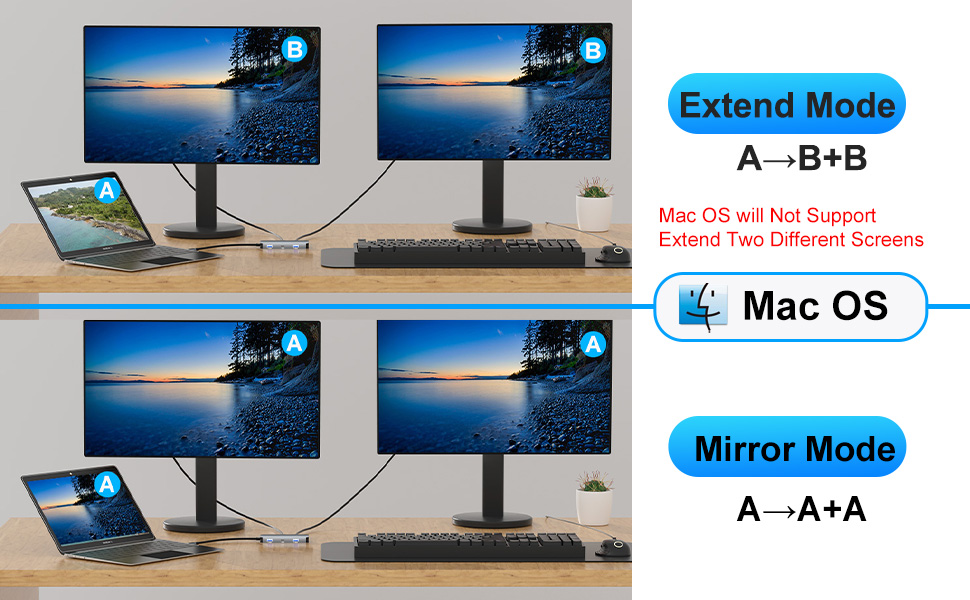
Even though it’s an “8‑in‑1” hub, it only supports one external display through HDMI. The second HDMI port (if it has one) is usually mirroring only, not true dual output, but this is the case for almost all inexpensive USB‑C hubs unless they specifically use DisplayLink or MST (Multi‑Stream Transport) technology. The HX202 does not include either.
R**D
2 HDMI ports
We had several of these from other manufacturers but needed one with two hdmi ports to run two monitors. This was reasonably priced and works flawlessly. The laptop can be powered through this as well. No lag and the video looks great on both monitors. There are plenty of ports for whatever you could need to hookup. Takes up almost no space and works well.
M**L
Will not support even a single monitor
Worthless. Got this to be able to use dual monitors on a work laptop at home and it cannot even run a single extra monitor. Went through all the diagnostics, monitors are all new and work when connected directly, laptop works with a different hub at work, cables are not the problem. It will not allow the signal to get to any monitor. *edit* they contacted me once after I left the review, so I replied. Then radio silence, no more communication at all. Past the return window, so I just get to eat it now. Yay.
I**E
Excellent
Muito bom
C**E
Useful docking station
This multiport dock makes my workspace easier to access - I only have to plug one connection into my laptop when I sit down, and I have access to many devices/connections. Solid construction. Seems durable - and show no signs of any connection issues at all
C**S
Good for multiple connectivity
This is a great docking station with good versatility for connecting multiple devices. I have a couple of these as they enable me to keep my workspaces tidier while still getting the power needed in one hub. I like the variety of ports and have used almost all except for the SD card. They work well and remain connected. I have tried this on a couple different laptop brands and it is also working with my PC.
M**X
Perfect docking station
This 8-in-1 USB-C Docking Station is absolutely fantastic! It has everything I need to run a dual monitor setup seamlessly. The dual 4K HDMI ports deliver crisp, vibrant visuals with no lag, making multitasking and productivity a breeze. The variety of ports is perfect—USB 3.0 for fast data transfer, USB 2.0 for peripherals, and even SD/TF card slots for extra flexibility. The build quality is solid, and it’s compact enough to carry in my laptop bag without adding bulk. Setup was super simple—plug and play with no hassle. I was especially impressed by how well it handled multiple devices without overheating or slowing down. It’s an excellent choice for anyone looking to maximize their laptop’s functionality. Highly recommend!
K**M
A must have for your USB-C laptop
This review is for the Docking Station for Laptop Dual Monitor - 8 in 1. This USB hub will allow you to use up to 8 different interfaces through the USB-C output of your Windows or Mac laptop/ipad air. Time was when your computer came with a variety of plug interfaces, but I suppose it was much cheaper to manufacture a computer with a single interface and then sell you different interfaces for the input/output you needed. Then they devised a hub, such as this one. With a single USB-C input into this hub, you can hook up 2 hdmi monitors, 1x100 watt USB-C PD input, 1xUSB-C data transfer socket, 1xUSB-A 2.0 and 1x3.0, and finally on the end of the hub is an sd socket and a TF socket. So far I have used both USB-A sockets, and the micro sd socket on my iPad Air. It has worked perfectly reading video and pictures off a thumb drive and an SD card. The hub is well constucted with an aluminum alloy and ABS case. Just be sure before ordering, that your device has a USB-C socket that is compatible with this hub. They list quite a bit of information on the Amazon advertisement about what to look for in a compatible device. I’m very pleased with this hub and recommend it for those looking for a USB-C hub.
Trustpilot
3 weeks ago
1 week ago