Desertcart purchases this item on your behalf and handles shipping, customs, and support to Senegal.
๐ฅ๏ธ Elevate your desk game โ see more, do more, be more.
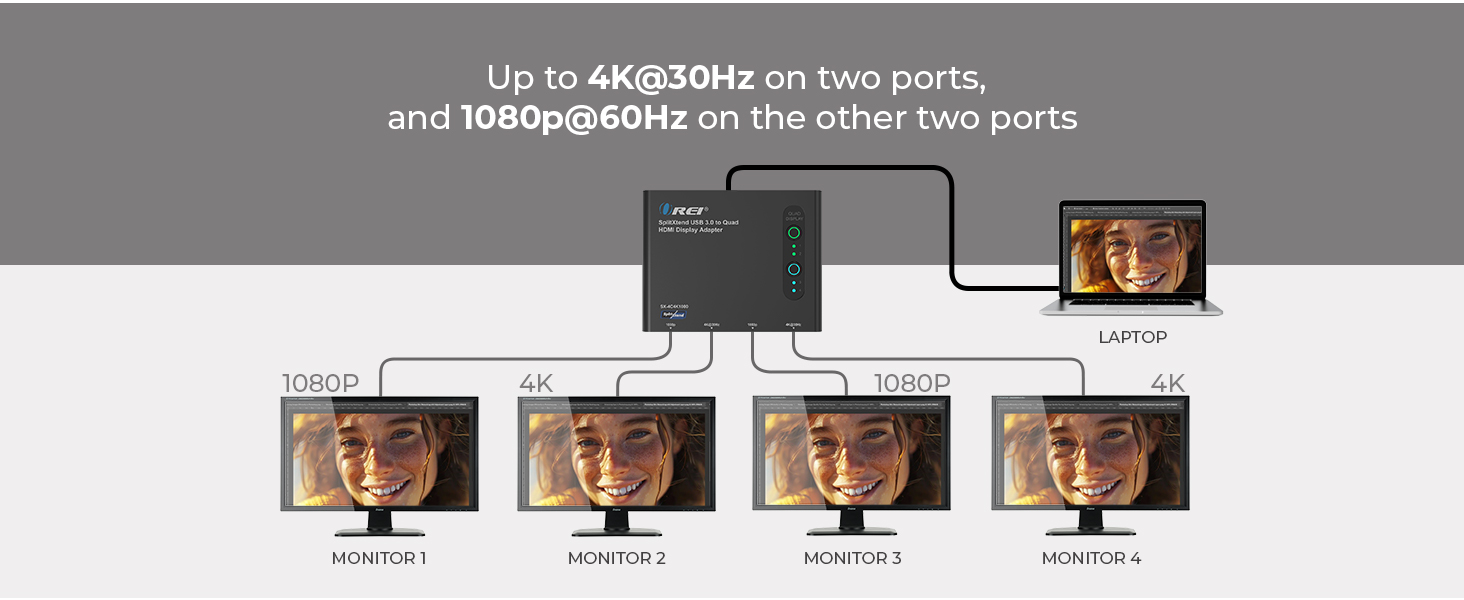
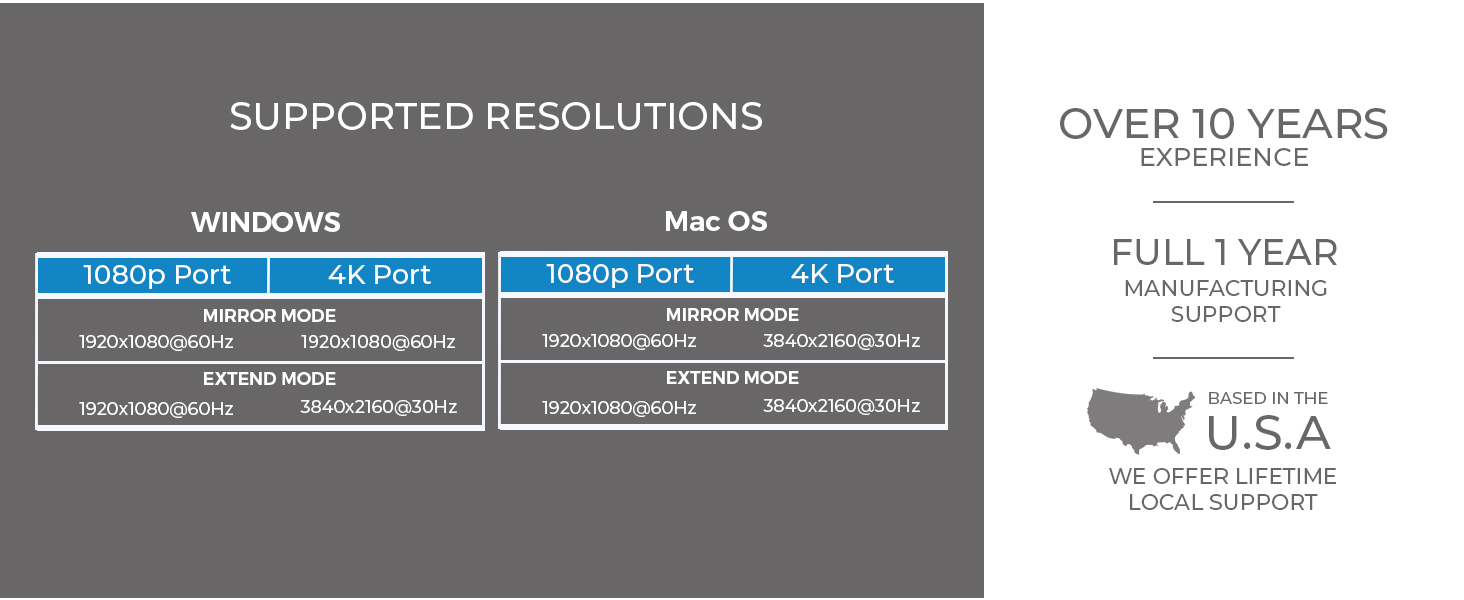
The OREI SplitExtend HDMI Splitter is a USB-C to HDMI multi-monitor adapter that supports up to 4 external displays (2x 4K@30Hz + 2x 1080p@60Hz) for extended desktop setups. Compatible with Windows, macOS, and ChromeOS, it requires Silicon Motion driver installation for stable performance, making it ideal for professional multitasking and productivity enhancement.


| Asin | B0DG9PZDYL |
| Best Sellers Rank | #495 in Audio & Video Connectors & Adapters |
| Brand | OREI |
| Color | Raven Black |
| Compatible Devices | Laptop, Monitor |
| Customer Reviews | 4.3 4.3 out of 5 stars (352) 4.3 out of 5 stars |
| Hardware Interface | HDMI |
| Input Voltage | 5 Volts |
| Item Weight | 4.94 Ounces |
| Manufacturer | OREI |
| Mfr Part Number | SX-4C4K1080 |
| Minimum Required Operating System Version | Windows 7 |
| Model Number | SplitXtend 4 Extended Display |
| Number Of Ports | 4 |
| Smart Home Compatibility | Not Smart Home Compatible |
| Total Number Of Hdmi Ports | 3 |
| Total Usb Ports | 2 |
| Unit Count | 1.0 Count |
| Upc | 810162900175 |
| Warranty Description | 1 years warranty |
| Wattage | 120 |
User
A bit pricy, but worth it.
Reliable, rapid, and comes with updates. Suitable for office, home, gamers. Handles 3 monitors in HD and supports high speed USB/C.
User
Easy set up
Hooked to my computer and 3 monitors. Easy set up and works great.
User
Great product
Small compact and works just great
User
Pure magic
I love my Mac and buy a new one every 5 years or so leaving me with a working "legacy" model cause Mac's die tough. The one in my picture is a 2019 MacBook Air in a 13" model. So the native capabilities of this Mac for multiple extended displays was natively limited to one. Not sure if the limitations of the video card or it only has (2) thunderbolt ports and one is the charge port. Anyhow, I have (3) monitors from my work setup having recently retired and wanted to put them to use as they are fairly new 32" curved monitors. Very simple to setup and to my surprise, worked like magic even on the older limited video capabilities of my old Mac. I see some who left mixed reviews and I was hesitant but did not see much in anything even close with (4) extended screen plus use of my laptops screen (so capable of (5) total screens!). Especially not at this price. I am completely thrilled. There is a little flicker or buffer for a couple seconds only when I first wake up my laptop while it allocates the signals to generate the 3 screens I'm using but it's brief and then it does not do it again. Works fantastic for me. Super fast shipping. Amazon has a great policy with vendors for return and I have always been happy with Amazon, so I decided to purchase and am completely satisfied, thrilled matter of fact. Great product, great solution. I was not payed or otherwise received anything for this review but when I find a great product or get great service, I take the time to say so. Super fast shipping too
User
Great product. Doing what I wanted it to do.
So far I am very happy. I have this running three displays for my Mac Mini M1 and Thinkpad E16. Four displays for the ThinkPad if you include the laptop screen. It seems well made, it was nicely packaged. The quick start guide was well written, and it works! The host cable could be a bit longer.Historically I am a PC guy. I've been computing on Windows since Windows 2.0. I teach Computer Science and Cybersecurity in college and typically have a bunch of students on Macs who sometimes struggle getting some software packages installed and running properly on their Macs. I could help, but I didn't have the experience on a Mac that I do on a PC. And my wife is a Mac girl, always has been. So I finally took the plunge and got a renewed M1 here on Amazon not long ago.It took a little while to get it set up so I like it, but I do. The problem is I like multiple displays. And I wanted to bounce back and forth between the Mac and the PC. I bought a Lenovo specific USB-C dock which worked great for the PC, but the displays were mirrored on the Mac which is useless for computing. After a little bit of reading I decided on this product.After driver installation, which was a breeze, I plugged everything in. I have the three HDMI cables plugged into the adapter and I have that plugged into a 10 Gbps port on the Lenovo dock and it worked! To move between both machines I have to move only one cable. There are KVM switches that would work, but they are quite expensive. So I will use this for now and see how it works out. SO far I am very happy with it.
User
Does Not Stay Connected (Even with Driver Installed)
I don't know if It's on my end or if it's the product itself but it does not stay connected. The first day or so it functioned just fine (with easy set up) but then it started disconnecting. Thought it was due to the USB-A connection so switched it up to USB-C but that didn't solve the problem. Thought it was because one of the HDMI cords was different than the other so I got another 8K wire. Both under 7 feet. That didn't solve the problem. So then I tried downloading and installing the driver in hopes that That would finally fix the problem. But it did not. So I am not sure why this problem persists and if there is a way to fix it or if I have a faulty product. Or if for some reason it just doesn't work for my system set up? Can't imagine it being overheated because it disconnects sometimes after just a few minutes vs a few hours. But it is very disappointing considering the price. So I am going to have to find another brand.
User
Works well, heats a lot
Works as expected, very useful. The only downside is that it heats a lot, if you touch it, it's burning even with the screens in rest mode. I guess that's its natural way to dissipate heat, since it doesn't have a cooler; but it's a bit concerning that it's going to be working almost all day burning from the moment you turn it on.
User
Taking your workspace into Control Room or NASA views!
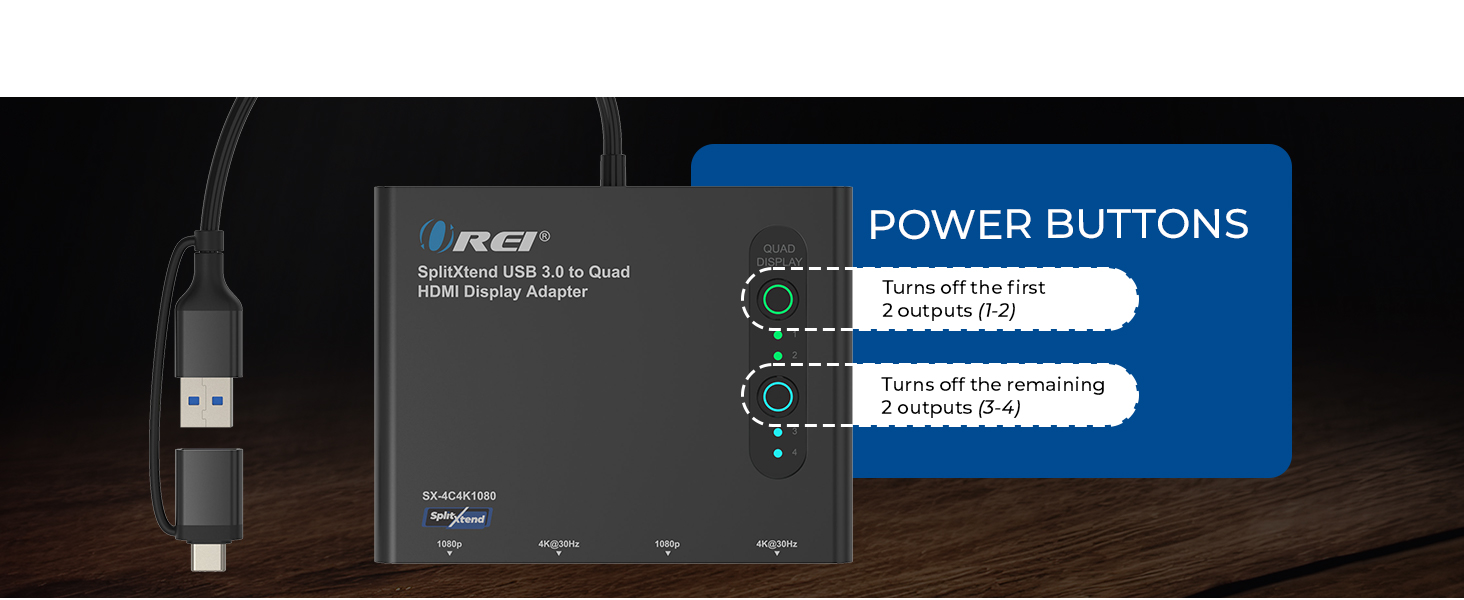
This setup has turned what was an amazing setup before (triple screen) into NASA or Control Room territory. This setup allowed my workspace to have 5 displays extended - all independent of each other! My setup is a 2x2 array plus one larger screen to the right (my screenshare screen). So much easier to keep control of everything I have to manage on my screens during my workday! And you can control them in groups of 2 or all 4. Super easy to work with - download went really easy and is super quiet. Very little lag. I'm usually using all 5 screens all day long. The size of this device would fit in one hand, maybe half an inch high. Do make sure you have a power connection directly to this splitter/extender. I had a COX representative here earlier this week who was absolutely amazed at my setup!
User
A slow journey to a bitter end
Not happy at all. It worked fine for a couple of weeks but then displays started not coming on and then they would randomly blink off and on. I went to pull the cord out to try in a different USB-C port and the whole tip pulled out of the housing. I tried using just the USB three and but none of my displays would come up. I noticed also that the unit was very hot to the touch.
User
Easy Setup
Easy setup straight out of the box once the appropriate driver has been downloaded. work extremely well, I would highly recommend it
User
Awesome
This is awesome. Please go for it and it's working on Mac & Windows.Mirror - YesExtend to all the 4 external monitors - Yes. Hence cumulatively, we're getting 5 different displays.
User
Monitor me twice.
Great product, useless manual.Tried setting up from manual, no success.Got the neighbours 6 year old round & he cracked it.Moral of this story, next time Iโm going back to my twin Abacus set-up.
User
Heats up real quick, barely lasts a month
Deserves no stars at all. It heats up with five minutes of use, then the display colour begins to switch from pink to yellow, after which it begins to go off and on in the middle of important work until finally it dies on you and will not come back on - no matter what. All under one month. Making contact with Oreo, fingers crossed, they'll remedy the situation...it's quite pricey for such a poor experience
Trustpilot
1 week ago
3 weeks ago