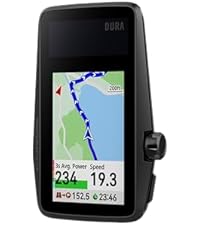
🚴♂️ Ride smarter, last longer, and never miss a turn with COROS DURA Solar GPS!
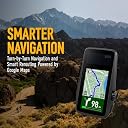
The COROS DURA Solar GPS Bike Computer delivers industry-leading 120-hour battery life enhanced by solar charging, a vibrant 2.7" MIP color touchscreen optimized for all lighting conditions, and advanced dual-frequency GPS for pinpoint accuracy. Designed for serious cyclists, it offers seamless turn-by-turn navigation with smart rerouting, fast data syncing, and compatibility with top fitness platforms like Strava and Komoot—empowering you to conquer long rides and multi-day tours with confidence and style.




| ASIN | B0D6TQWRCN |
| Battery Average Life | 120 Hours |
| Battery Type | Lithium Ion |
| Best Sellers Rank | #20,113 in Sports, Fitness & Outdoors ( See Top 100 in Sports, Fitness & Outdoors ) #1 in Cycling GPS Units |
| Brand | COROS |
| Brand Name | COROS |
| Colour | Black |
| Connectivity Technology | Bluetooth |
| Customer Reviews | 4.6 out of 5 stars 368 Reviews |
| Display Size | 2.7 Inches |
| Display Type | Always-On Memory LCD |
| Global Trade Identification Number | 00810005783200 |
| Human Interface Input | Touchscreen |
| International Protection Rating | IP67 |
| Item Dimensions L x W x H | 5L x 1W x 8H Millimeters |
| Item Type Name | COROS DURA Solar GPS Cycling Units |
| Item Weight | 102 Grams |
| Manufacturer | COROS |
| Manufacturer Part Number | COROS DURA Solar GPS Bike Computer |
| Model Number | COROS DURA Solar GPS Bike Computer |
| Mounting Type | Handlebar Mount |
| Native Resolution | 480x240 |
| Product Dimensions | 5L x 1W x 8H Millimeters |
| Screen Size | 2.7 Inches |
| Sensor Type | GPS Sensor |
| UPC | 810005783200 |
| Unit Count | 1.0 Count |
| Whats In The Box1 - Whats In The Box3 | COROS DURA GPS Cycling Units |
U**L
Best Cyclometer in Budget - Blindly Go For IT!!
Got this cyclometer after too much research. Initially I thought of going with Garmin cyclometer, but trust me they are quite costly and have less battery life. The basic aim of taking a cyclometer is when you aim to train well and go for endurance cycling not casual ones. Hence the battery plays a very important role. This cyclometer has solar charging. I am writing this review after almost one month, and I had only charged it on day 1 after receiving the product. Till date the battery stands at 76%. Trust me I am a person who does a great deal of research and only thing is that this brand has not gained that kind of popularity like Garmin, but this cyclometer is the best and perfect for budget also considering its features. Will update in future if I find and cons, presently only one thing you’ll have to take a heart rate Ant+ sensor to broadcast heart rate to the coros dura. I am presently owning an Apple Watch and you can’t broadcast heart rate through Apple Watch to this device.
G**R
The battery and accuracy.
This is one of the best in class, especially the battery life and solar power. Each time I ride it outdoors, it charges back 30% and hardly loses 6% in three hours of riding. The tracking is very, very accurate, and the auto pause works nicely. I sometimes find a sync delay of a few seconds, but that's manageable. The brightness is pretty good, even in a bright day.
S**A
Unbelievable Battery
Works perfectly and unbelievable battery life. I used it for a 7 day tour from Mumbai to Goa and had to charge only once (that too as a precaution as it was nowhere close to being discharged). The solar function seems to be of limited use though. I am a normal user who records the days activity with a heart rate and cadence sensor. Worked perfectly!!
V**U
Battery life
Excellent device with amazing battery life! I think one can do 1000kms without recharging the battery if driven in day light and dark conditions combine too as solar recharge does work
A**R
COROS DURA Bike Computer – Long-Term Review (6000+ km | 3 Months of BRM Riding)
COROS DURA Bike Computer – Long-Term Review (6000+ km | 3 Months of BRM Riding) I’ve been using this bike computer extensively for the past 3 months, covering over 6000 km including multiple BRM rides, and I can confidently say it offers excellent value for money. The biggest highlight is the battery performance. Even after riding such long distances, I hardly needed to charge it. The solar charging feature actually works well in real conditions, especially during long daytime rides, helping extend battery life significantly. For endurance cyclists, this is a huge advantage. The touchscreen is smooth and responsive, making it easy to navigate even while riding. The interface feels simple and practical, which is important during long-distance events. Audio alerts are another useful feature. They are clear and help you stay informed without constantly looking at the screen, improving overall riding focus and safety. Overall, after testing it in real BRM conditions, I feel this device delivers reliable performance with minimal hassle. Pros: * Outstanding battery life with solar support * Smooth and responsive touchscreen * Useful and clear audio alerts * Great for long-distance and endurance rides * Strong value for money Cons: * Navigation/maps can still improve slightly If you are into long-distance cycling or BRMs, this is a solid and practical choice. Less charging, more riding — exactly what endurance riders need.
S**R
Best Bike Computer in Amazon.in
Accuracy is top notch and works without any lags even on congested areas. Battery life obviously the best in the market and with solar-panel, it's even more better. Value for money!
A**K
Wrong choice
Don’t buy this if you want to use it for long rides. As the device get switched off and disrupts your ride and navigation.
T**O
Outstanding
Amazing battery life. Perfect for long rides. Saves you from carrying the power bank. Rode for 16 hrs the other day and got home with 93%. Highly recommend. One thing I wish for is rerouting without connecting to the app.
N**I
Qualità e autonomia
Qualità prezzo vincente. Preciso, chiaro, semplice nei menu. Autonomia pazzesca. Compatibilità perfetta con ogni accessorio (cardio, potenziometro, sensori cadenza, radar posteriore). Consigliato come ottima alternativa a Garmin 540/840
D**K
Coros Dura
So far this Dura bike GPS has been great. I also own the Garmin Explore 2 (Garmin E2) to compare it to. I just bought the Coros Dura in August 2025. And it installed the latest update upon turning it on. It has Firmware v 3.1011.0 dated Jul 28, 2025. I understand the earlier versions had issues that were resolved in later releases. I have no experience with the old Dura software, only this July 28, 2025 version. So my comments may differ from others that bought the device in 2024. The battery on the Dura so far appears great, no complaints. So far i have 37.5 hours of use on the first charge. I have not charged it after the first charge yet. Given it has 70.8% battery left, I will not charge until it gets below 50%. I think if I put it in the sun when not riding it would never need to be charged with AC. Solar charging while riding is dependent on sun and angle of the sun. I find when I ride I'm rarely riding into the sun for any length of time. When the sun is behind me the solar panel is shaded. The most sun it gets is when I stop for a break. Then I angle it into the sun and get good solar charging. The maps lack street names on the Dura device but i find I don't really need or use them. It does show the street name to turn on about 500 ft early. That's all I find I need. Also, while the Garmin has street names, it only displays some street names and sometimes no street names. I never really noticed it on the Garmin while on the trail until I watched for it. Typically bike paths and most streets are not labeled on the Garmin while in route. The routes on the Dura are much better than the routes on the Garmin. I know everyone says they use the same maps and routes but that has not been my experience. The Garmin will route me on streets with a 45mph speed limit and no shoulder. That's crazy when there are local streets that will take you to the same location. I feel the Garmin routing is based closely on their car routes. The Dura has routed me on local 25mph streets and bike paths. And surprisingly it has routed me on some short cut bike cutaways between streets, thru parking lots, etc. I'm amazed at the routes it finds. I have been on some crazy great short cuts. Not sure how it knows about them, I didn't know them. On the other hand garmin will route around underground tunnels built for bikes. Not sure why it misses those great shortcuts that are much safer to cross a road. And fun to go thru. I had gone off route a few times already with the Dura. The Dura rerouted me quickly and on a decent route, not a fast busy road. I think it uses the phone to reroute but no issue and fast. I'm not sure what all the reroute complaints are really about. I always have my cell phone with me and of course the app is running. It does not drain the battery anymore than any of my other 100 apps. I say the reroute is no issue in this version of the firmware. Obviously if you bike in a no cell phone signal area you would lose the reroute ability for those moments but you might lose GPS signal too. Once you get back into range you can reroute. I'm never really in any zone with no cell coverage and certainly not for any great length of time. The Garmin E2 had been a major headache to use. It is a very difficult to use device, particularly when all you want or need is a GPS for navigation. I already have an odometer, speedometer, and time on my bike. I have miles, calories, heart rate, temp on my watch. Only need Navigation. The Garmin has this incredibly complicated user interface. Full of features I would never use. I don't care about calories or what it thinks I burned or energy I used. I'm all about riding no matter how many calories. The first few times using the garmin i had to abort using the gps. My later adventures with the Garmin were better but still frustrating. For example, at one point i took a long break at a restaurant. I could not get the Garmin to turn off to save battery. For some reason it thought i was still riding. But I did stop the navigation so it was confusing. And the timer on the Garmin requires too much hand holding. Great for cheating on route time but why cannot the GPS figure out the timer why do I need to be involved. The Dura does all the timer stop/start activity on its own, like a computer should. The Garmin has major issues in routing friendly paths and roads. I don't like the routes from the Garmin. And the rerouting keeps wanting to take you back to the original route. It does not like to find a new route forward unless you stop the current route and plan another from your current location. And usually it directs you on a busy high speed street. Very flustrating. While the screen size on the Dura is 2.75" the map space is larger than the garmin explorer 2 with its 3" screen. The Garmin E2 has a block on the top of the map and a block at the bottom. Dura uses all the screen for the map and only uses the top of map to show the road to turn on when you are 500 ft away. Both GPS units have the same screen resolution of 240 x 400 pixels. Both look clear and have good graphics images. Garmin Explore 2 Steps to get to the Map: Open app, there is a home page with 5 links on the bottom. Home Challenges Calendar News Feed More Oddly to get to the Map you need to choose More. Why more on a GPS ?? Seems like Calendar or News Feed would be a More… After choosing More, then there are around 15 items to choose from. Need to choose Training & Planning down into the menu. Then another menu is displayed with 6 items to choose from. Choose Courses and that takes you to a listing of courses you have created. Need to click on Create Course, then choose a Course type among 7. I chose Gravel/Unpaved Cycling. That takes you to another menu of 2 choices. Choosing Custom will finally bring up a Map. My question, why so menus to get to a map on a navigation GPS? That is crazy. At that point you need to choose a starting point. Dura just assumes the current location and you can change it if you want. Not on the Garmin, you need to pick it. Then there is no address entry so you need to zoom out and move around to find your final location. On the Coros app, it has 4 menus on the bottom of the main page. Progress, Activities, Explore, and Profile. Explore is the map, I would have just called it Map but ok Explore works. Click on the Explore option and yes, it takes you right into the map. Looks like Google Maps It is that easy to get there. Put in an address or choose Create Route and then move around the map and drop an end point. What a relief to see it just make the mapping easy enough. Taking a 12 mile route on both Dura and Garmin yield different results. The Dura has lots of side streets, many turns on various roads. Looks ok to me at a glance. The Garmin takes the least number of roads but looking at it, it chose a great route for a car. On streets that are 50 MPH and other main streets. No idea why it chose that route but no way, not on a bike. I would not take that route. You can create a route street by street. But it takes time and if you venture off course Garmin will be happy to route you back on a main high speed street. And with all this Garmin nonsense, it was 4 miles longer. Just confusing for a navigation GPS made for a bike. If you live in a rural area and the number of roads are limited then the Garmin would likely choose the only possible path and all is great. But with lots of side streets around it does not make use of them. Garmin just seems to use the routing it has on their car GPS’s. One other area of different between Garmin E2 and Dura is the data transfer. The Garmin Explore 2 only has bluetooth and it is very slow to download and install a firmware update. The last update I installed this year took me 3 days. In the first day it ran for an hour and I had to run so I stopped the download. I started it back up later and let it run for 2 hours and had to stop it for a call. It was on the final and third day I let it sit until it was done but it took a very long time. I feel the process is too slow, but it does work. The Coros Dura has both bluetooth and wifi. The wifi is much faster. The firmware update I did only took a few minutes. That is how this should work. Bluetooth is just too slow for transferring data. If I had to pick one thing to like about the Dura it would be the routing. The routes are crazy good for bikes. No high speed roads, lots of bike only routes. It chooses a better path than I could. The battery use and charging are great too. But it is the routing that amazes me the most. The screen on the Dura is very good during the day. I have not been on a night ride with it yet. The Garmin screen is as good. No issues with either unit. Have no idea why Garmin cannot use the same routes. I have sat and picked the same routes on Dura and Garmin side by side and Garmin always chooses some high speed road for 10 miles or so. I hate that. The Dura just picks a great biking route. Bike paths whenever it can and low speed roads when needed. I am very happy with the routing on the Dura. I have compared to other apps like Komoot and Strava. Although those both nag you about a monthly feed. Getting thru that, they still choose bad routes down busy high speed streets. I like whatever Coros Dura is doing with their routing. After using the Dura for a few weeks I have some further comments. Surprisingly I have not charged the Dura since the initial charge. Thats is really good. There is no need to worry about the charge on this guy, just go biking. The zoom level by default is one level out too far. When you come up to a turn and there are several streets that could be turned on, the map is hard to tell which one at the default zoom level. If you zoom in one level then no problem. It would be nice if that was defaulted. Trying to change the zoom level while riding is a challenge. The road is bumpy and riding one handed sometimes feels like riding a bull. And in general, I find changing screens a challenge while riding too. And the zoom level cannot be changed after the upcoming street is displayed. Also, the zoom level is reset after a turn. If on a smooth street then all is good but those smooth streets are rare in my area. Creating routes, one day I tried to create a new route on the road and in the rain. But the device kept saying I had too many routes and need to delete a route to make room. I was not sure where this action was needed, on the app or device. And removing one route on each it still did not work. After removing a few routes I was able to get a new route on Dura. Flustrating in the rain. Would have been nice to just replace the oldest route and not show any error message. Interestingly, last week a new software update came thru and it said it fixed the limited routing. I'm not sure if that is the same routing issue or not but good to hear.
A**.
Amazing
Battery life is unbelievable, navigation, strava live segments, very good reports after.
G**E
Autonomie de fou
Un compteur avec une autonomie de fou. Je ne l’ai toujours pas recharger et il est toujours à plus de 70% après quelques semaines.
Trustpilot
1 month ago
1 day ago