Buy anything from 5,000+ international stores. One checkout price. No surprise fees. Join 2M+ shoppers on Desertcart.
Desertcart purchases this item on your behalf and handles shipping, customs, and support to Senegal.
✨ Elevate your workflow with every touch 🖐️
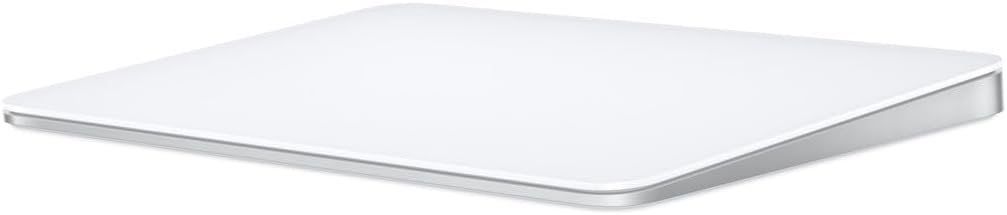
Apple's Magic Trackpad offers a premium wireless, rechargeable input device featuring advanced Multi-Touch and Force Touch technology on a spacious edge-to-edge glass surface. Designed for Mac users, it delivers precise, pressure-sensitive control with effortless pairing and over a month of battery life, making it an essential upgrade for enhanced productivity and ergonomic comfort.
| Brand | Apple |
| Color | White |
| Compatible Devices | Mac |
| Connectivity Technology | Bluetooth |
| Special Feature | Lightweight, Portable, Rechargeable, Touch Scroll, Wireless |
A**I
Didn’t know I needed this…
I used my Magic Mouse for everything; however, it can become uncomfortable after a few hours. So, I got this trackpad because I wanted to try something different, and I wasn't disappointed. It can be configured in many ways and helps reduce wrist and hand stress. For tasks that require more precision, I have no problem using the trackpad, but would a mouse be easier? That depends on your workflow. The battery life is good, and it goes to sleep when not in use. You also have the option to switch it off when not using for an extended time. You can alsl charge it and use the trackpad at the same time. When I opened the product, it instantly connected to my Mac. Of course, it is sleek, and its aesthetic is great. I chose the lightning connector since I felt that the $149 cost was overpriced, so the value for the money made the comfort worth it. It is not a lightweight product and seems to be of good quality.
M**Y
Excellent Trackpad, worth the price!
Very satisfied with the trackpad. It was very easy to set up and works really well. If yo9u are used to the trackpad on the MacBook Air, you will easily be able to use this. I am using this with my Mac Mini and it is better to use than the magic mouse.
H**H
A Must-Have for Mac Users
If you own a Mac, the Apple Magic Trackpad truly feels like a natural extension of your system. The multi-touch surface is incredibly responsive, and the gestures are smooth and intuitive — making navigation, switching between apps, and managing multitasking an absolute breeze. I primarily use mine while working from home, and it’s been a game-changer for productivity. The wireless connection is flawless, the battery life is excellent, and it charges quickly with the included USB-C to Lightning cable. I also love the larger surface area compared to a MacBook’s built-in trackpad — it gives me plenty of space without feeling bulky. The black finish looks modern and professional, and pairs nicely with other Apple accessories. It’s also much more ergonomic for long work sessions than using a traditional mouse, especially if you’re already used to Mac gestures. It’s not cheap, but worth every dollar for the quality, design, and integration with macOS. If you’re a Mac user — especially someone working remotely or doing creative work — this is an upgrade that genuinely improves the experience.
R**C
Simply Magical!
We’ve been using our Logitech MX Ergo (see image) for years on our Desk/Laptop PCs and MacBooks, appreciating its 0°-20° angle option. However, it doesn’t play well with our Mac Mini. To overhaul our DAW functionality, we ordered this Apple Magic TrackPad 3 (stand purchased separately) to solve our connectivity (and ergonomic) issue. Surprisingly, several days of using the TrackPad was a smoother transition from the trackball than expected as it reminds us of a more capable Apple Magic Keyboard pad. The connectivity & lag issues were immediately resolved! The size is just large enough to be fully functional & the smooth tactile feel is what Apple is known for. This item has been such a game-changer, it's a shame we didn't get one sooner! We opted for "Like New" to try it out and have discovered it's a solid value for the money.
M**K
Brilliant piece of hardware
Absolutely brilliant and a game changer for my set up which incorporates an iPad Pro and Magic Keyboard. Debated this track pad vs the mouse and could not be happier with my decision in opting for the track pad, such a brilliant piece of kit and worth every cent. Works flawlessly with my iPad and has changed the entire experience. Apple products are top notch and are worth the high price point, as the age old saying goes, you get what you pay for.
A**E
Swipe Right: Unleashing MAGIC with the Apple Magic Trackpad
Darlings, let's talk about the Apple Magic Trackpad, the epitome of sleek sophistication and functionality. Clad in smooth, lustrous aluminum, this trackpad is not just a peripheral—it's a statement piece for your chic workstation. First off, the touch surface is like butter, darlings. Effortlessly gliding your fingers across feels as luxurious as a spa day. Whether you're scrolling through memes or editing photos to perfection, the Magic Trackpad responds with grace and precision. Oh, and can we talk about the gestures, honey? It's like having a secret handshake with your Mac. Pinch to zoom, swipe to switch between apps—it's all so intuitive, you'll wonder how you ever lived without it. And those edges? So sharp, they could cut through the drama of a thousand Real Housewives episodes. But wait, there's more! The Magic Trackpad plays well with others, too. Pair it with your iMac or MacBook, and suddenly, you've got the ultimate power polycule. The Bluetooth connection is as strong as your brunch game on a Sunday morning. Now, kittens, let's address the bear in the room—it does come with a daddy-level price tag that might leave budget-conscious beauties feeling a tad flustered. Fear not, though, because where there's a will, there's a way ;) Pros: Stunning aluminum design that screams sophistication Effortless touch gestures for a seamless user experience Compatible with a range of Mac devices for ultimate versatility Bluetooth connectivity that's as reliable as your BFF Cons: Your friends might get jealous of how fabulous your setup looks Costs too many coins
T**M
Premium Trackpad That Just Works - Classic Apple Quality
This Magic Trackpad is great - like any other Apple product, it just works seamlessly. The Multi-Touch gestures and Force Touch technology are incredibly responsive and intuitive, making navigation feel natural and effortless. The large glass surface provides plenty of room for gestures, and scrolling and swiping feel smooth and precise. It pairs automatically with my Mac without any setup hassle, and the battery life easily lasts a month or more between charges. The build quality is premium with noticeable weight to it, giving it a solid, high-end feel on the desk. The black finish looks sleek and modern. While it's expensive compared to other trackpads on the market, you're paying for that Apple ecosystem integration, reliability, and refined user experience. It connect easy to any mac or apple product you have and there is no lag between the device and your machine. If you're already invested in Apple products and prefer trackpad navigation over a mouse, this delivers the polished experience you'd expect from Apple.
B**D
Works on linux
The magic trackpad works out of the box on linux. Specifically, it works on the distribution release I use, ubuntu 22.04.3 LTS. I tried two other trackpads with usb receivers, logitech and perixx. The logitech was very flaky, but I bought it used, and it may have been defective to begin with, or damaged by its previous owner. I also don't think logitech makes it any more. The perixx was a reasonable deal given the price, but it required a touch that was a bit heavy and did not always pick up movement or taps. The magic trackpad, although not perfect, has a smoother surface, takes a lighter touch, and is more responsive and consistent in its behavior. The battery in my case lasts one to two months before I have to recharge — YMMV. The trackpad behaves the same way as the builtin touchpad on my laptop, supporting single, double, and two-finger taps, and it allows me to drag objects around the screen. There is a third party driver on github which enables three-finger gestures. I don't remember the name. I'll make some recommendations regarding the trackpad setup on ubuntu, using a combination of gui and terminal utilities. If you only want to use a gui interface or are not interested in a slightly off-label configuration, or if you don't use ubuntu or any of its derivative distributions (or maybe if you don't use apt or a gnome desktop), you can disregard the rest of the review. Configuration and usage recommendations for ubuntu: The open source bluetooth driver package included with debian and debian-based linuces, such as ubuntu, is called "bluez". Ubuntu LTS (long-term support) ships with bluez 5.64, in spite of the fact that stable debian (version 12, code-name "Bookworm") ships with 5.66. I'd recommend an upgrade to the later version. The easiest way to pair a new device is to use the settings/bluetooth page in the (gnome) gui desktop. Once paired, the system retains the definition, but the connection is lost during a reboot or suspend. If you are using bluez 5.66 or above, you can force a reconnection just by pressing down on the trackpad to produce a click (just tapping won't do it). The click inserts a bluetooth icon in the panel at the top the screen. After a few seconds, the pointer responds to additional trackpad events. Click-to-reconnect works both before and after login. Pointer movement and clicks work on the login page; taps are post-login only. If you are using bluez version 5.64, you will have to explicitly reconnect after logging in. In my opinion, the easiest option is to reconnect with a shell script. Obtain the trackpad's mac address by clicking on the "magic trackpad" link in the settings/bluetooth device listing, or by executing "bluetoothctl devices" in a terminal window. (I'll use A1:B2:C3:D4:E5:F6 as a sample address — obviously, you should substitute your own.) Create a shell script with the single line, bluetoothctl connect A1:B2:C3:D4:E5:F6 and move or copy it to a directory in the path. For the script file name, use something short and suggestive, like "tpad". Then, whenever you reboot, or wake up from suspension, open a terminal window with the keyboard shortcut, ctrl+alt+t [control, alt, and the letter T], then type "tpad", and press return. If for some reason you want to disconnect and stay live, create a script containing the line, bluetoothctl disconnect A1:B2:C3:D4:E5:F6 The simplest way of manually upgrading to bluez 5.66 is to search online for the package's file name, download, and install locally. If you're using an intel or amd PC with a 64-bit OS (and you probably are), the name is bluez_5.66-1_amd64.deb If you have a different architecture, search for debian packages stable admin and follow the link. ("admin" refers to the administrative utilities page.) Find "bluez (5.66-1)" on the admin page and click on the link. Go to the bottom of the package page and select the architecture of your choice. After the download, in a terminal window, change to the download directory and install the package with sudo apt install ./bluez_5.66-1_amd64.deb Normal apt upgrades will not replace 5.66 until a later version is added to the repository. To see what you have on your system, execute dpkg -l bluez
Trustpilot
2 months ago
1 month ago