Buy anything from 5,000+ international stores. One checkout price. No surprise fees. Join 2M+ shoppers on Desertcart.
Desertcart purchases this item on your behalf and handles shipping, customs, and support to Senegal.
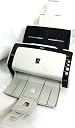
๐ Elevate Your Scanning Game!
The fi-6140Z Sheetfed Scanner is engineered for high-performance scanning, capable of handling continuous hard and embossed cards up to 1.4mm thick. It features advanced ultrasonic double-feed detection to prevent image loss and an intelligent multi-feed function for efficient processing of overlapped documents, making it an essential tool for any professional environment.
| ASIN | B006MI6M7E |
| Best Sellers Rank | #738,099 in Office Products ( See Top 100 in Office Products ) #841 in Document Scanners |
| Brand | Fujitsu |
| Color Depth | 24 bpp |
| Connection Type | USB |
| Connectivity Technology | USB |
| Customer Reviews | 4.1 out of 5 stars 171 Reviews |
| Global Trade Identification Number | 00975643078436 |
| Item Weight | 13.7 Pounds |
| Manufacturer | FUJITSU IMAGING (SCANNERS) |
| Media Type | Embossed Card, Receipt |
| Minimum System Requirements | Windows 7 |
| Model Name | fi-6140Z |
| Optical Sensor Technology | CMOS |
| Resolution | 600 |
| Scanner Type | Document |
| Standard Sheet Capacity | 50 |
| UPC | 097564307843 975643078436 097564308536 |
| Unit Count | 1.0 Count |
| Wattage | 38 watts |
B**N
Great little scanner
Very fast scanner I will take mixed originals and make them into pdf. Works great on Windows or Mac OS X. The disk that come with the scanner only supports Windows. If you want it for your mac I use fScanX software. also get the latest drivers from Fujitsu website. Can save a lot of connection issues. Also there was a model fi-6130 the only difference that I can find beside the price is they now do not include adobe acrobat. Which was nice to have so if you order this scanner you might also want to grab a copy of Adobe acrobat from amazon at the same time. I have purchased around 30 to 40 of these little scanners. and I would say the only issue i have had was 1 power brick that was DOA. Which I just sent it back and they sent off another.
T**C
Awesome Scanner. Really worth the cost!!
I bought this scanner after reading a lot of online reviews as well as talking to Fujitsu. The only bad thing I have to say is about Fujitsu is that they understand that they have a really good product and so they package TWAIN drivers at a premium. The cheapest Fujitsu TWAIN scanner is $650 which is kind of ridiculous when you have $80 TWAIN scanners in the market place. They should have TWAIN on all models, its become industry standard. The scanner is really good, really fast and compact. I scanned 8000 print photos that I had into my pc and it took me a day and a half (most of the time was in sorting the pictures). The duty cycle is excellent and since I don't scan that much on average, I expect a long life of this product. I recommend this to anyone that is looking for a high speed scanner. The software is ok, really complicated. I use an organizing software called File Center with this scanner and Im getting rid of 80% of the papers in my office.
P**N
I have several Mac enabled Fujitsu scanners that are slower but great. They work with my iMac
I purchased this scanner since it was high speed and I'm trying to digitize my records prior to retirement . I have several Mac enabled Fujitsu scanners that are slower but great. They work with my iMac. No where in the advertisement does it say that it is very incompatible with Mac. Once I tried to set up I realized this. Checked the advert to see what I might have missed. The advert should have made this very clear since all the other 3 scanners I have are Mac friendly. The company has deigned to take it back w/ a 25% repackage fee. Maybe $185.00 I will not use Tech Data again, and am going to be less likely to use Amazon since they were elf no help in this rip-off of almost 200 bucks
C**C
Excellent Scanner w/ caution for Mac users
I previously owned a Fujitsu ScanSnap S5100M <http://www.amazon.com/Fujitsu-ScanSnap-Instant-Sheet-Fed-Macintosh/dp/B001XWCQO2/ref=sr_1_3?ie=UTF8&qid=1338652128&sr=8-3>, and while its software support for Mac, and even better, its integration with Mariner Software's Paperless is excellent, the ADF is not robust, and it failed within a year. By the time I contacted Fujitsu, they were very accommodating about repair (seriously, their responsiveness was excellent), but out of warranty, it would cost only $64 less to repair than to replace. So, I decided to upgrade to a more robust scanner. Shamefully, as mechanically and optically excellent as the 6130Z is, Fujitsu provides zero (and I do mean zero) software support for the Mac, as if there are no small offices running Macs that could benefit from this excellent scanner. I knew this going in, so I was prepared for this shortcoming. I tried three solutions on a 2011 iMac 21.5 running Lion 10.7.4 with 16gb RAM: (1) the open source SANE approach, which was not difficult to set up, and it worked okay with the Mariner Paperless software (Paperless seemed to crash with some frequency, and I attribute this to the SANE setup, as I had not had that experience before; (2) a commercial package called fScanX which can run in demo mode with a watermark; and Accordex's DocKeep, also available in demo mode. Both these commercial packages cost $149, though Accordex has more sophisticated versions that cost $495 and up, with FileMaker integration and features. I ended up choosing DocKeep as another reviewer recommended. Accordex is in the Mac office support business, and they sell bundles with Fujitsu scanners and their software. As I mentioned, with the SANE backend, Paperless crashes too much, and further, its control of the scanner, especially on multi-page scans is erratic, which defeats some of the reason for investing in the 6130Z. fScanX works, and appears well-developed, but not as feature-rich as DocKeep. DocKeep works well, is designed for "production scanning," and is well-supported. So, Mac users, save yourself the frustration, get the scanner and DocKeep, which together coincidentally cost about what the previous package of this scanner cost (when IIRC, Fujitsu did supply Mac support). Somewhat ironically, using DocKeep makes setup such a breeze that none of the difficulties other reviewers describe with Fujitsu's software need to get in your way. With DocKeep, setup is so easy, if it were offered by Fujitsu with the scanner, as a Mac user, I would rate it 5 stars. Scan Speed: as specified, and very fast. 5 stars. Scan Quality: excellent, 5 stars Convenience: small size & ease of use with DocKeep, 4-5 stars Dock one star for lack of Mac (and other platform) support UPDATE 20130122: I have been flogging the Fujitsu daily since the review, sometimes for several hours. It has never failed. With it, I have been able to scan, and then shred, the equivalent of 4 HON 4-drawer file cabinets. DocKeep runs reliably on the most recent beta of Mac OS X Mountain Lion. I wish it was easier to do batch scans and then save individual pages with a different workflow, but I did not pay for that privilege included with the more expensive version of DocKeep.
M**C
Love the Fujitsu 6130Z
I just moved into an area prone to forest fires and decided I had better scan in my children's baby and childhood pictures so there was a digital record of them. I have 10,000 plus pictures. Looking at online retail services, it was going to cost me about $0.30 to 0.40 minimum per picture to have them scanned. WAY too cost prohibitive (plus the risk of my originals getting lost during shipping. Next plan was that I bought what I thought was a printer which would supposedly scan pictures....it doublefed and curled the pictures back on themselves while feeding which left a curl. You could only feed a small stack and it was slow. Next try was to put 3 pictures face down on the printer and scan them. The software would recognize them as 3 separate pictures, but the time involved to scan pictures was a couple of minutes per set of 3. My son (who was helping me) and I were frustrated. A friend suggested the Fujitsu 6130. AMAZING device. WONDERFUL device. I can't rave enough about how easy and fast this device was in scanning stack after stack of photos. The scanned quality is excellent. In the first 8 hours alone, we got through ~6,000 photos. What a difference this device has made. We will finish up the photos and then go on to scan all of those pieces of childhood artwork, report cards, and the like. This device does it all and simply. I can't recommend this enough if you have high volumes to scan.
C**.
Changed the way we do business for good!
I've been using a Cannon MFC8350cdn for scanning for years. It's an impressive looking laser printer. It doesn't have automatic duplex, but that's OK since software can accomplish duplexing. Still -- with this printer, I had to manually flip and reload the papers that I was scanning. And the Cannon CONSTANTLY jammed. Not to mention the scans ALWAYS came out skewed when using the ADG. The MFC8350cdn is a slow, inefficient, POS all-in-one laser printer/scanner that has been driving me nuts for YEARS. I just received my Fujitsu fi-3130z today and set it up for testing. WOW -- WHAT A DIFFERENCE! It scans incredibly fast, and has not jammed a single time. I've scanned about 250 pages so far and it's 10X faster than dealing with my old Cannon. As a test, I loaded up about 100 pages of various sizes paper. Some were LTR, but some utility bills were about 6.5x8" and double-sided. The scanner was able to successfully scan duplex, and didn't have any problem with the smaller pages randomly placed throughout the stack of documents. I intentionally loaded the originals with some upside down at random. When the scanner finished, ALL of the documents were scanned correctly, right-side up, correctly rotated by the TWAIN driver, and auto-cropped with skew corrected! WOW! I am *impressed*! I am incredibly relieved to have a high speed scanner for our office. We don't do paper here, so when we get documents in the mail or printed documents, we immediately scan and process them digitally. This scanner is PERFECT for that. It will save us HOURS of wasted time that we would have normally spent fighting with our Cannon Multi-Function. If you combine this scanner with Lucion's FileCenter, you've got a completely automated digital filing system. Now I just have employees open the mail, scan it, and then the appropriate person can deal with the digital files from wherever they may be at the time. If you don't have a document management package for digital filing, I can't recommend FileCenter strongly enough. It's very inexpensive and incredibly powerful. It makes dealing with a digital filing system a piece of cake. If you deal with a lot of paper and are trying to go digital with an All-In-One printer/scanner/fax that is driving you nuts, TRY THIS SCANNER! It's going to change my world!
R**H
You get what you pay for
We've had one of these in our office for 4 years and it's amazing. It rarely jams, we'll feed pages with stuff taped to it and all, and it keeps on going. Speed is great. Our old one has 80,000 scans on it and still going great. We've ordered 2 more after trying the Xerox 200 series and being disappointed (although those are a 3rd of the cost). It's expensive, but if you do a whole lot of scanning, it's a great little machine.
A**A
The scanner works as expected except it was cosmetically damaged ...
The scanner works as expected except it was cosmetically damaged, which is rather unfortunate, because we spent so much money on it and there was nothing listed that said it was damaged!
C**N
Excelente
Es un producto de muy buena calidad y que funciona muy deprisa.
Trustpilot
1 week ago
2 weeks ago