Desertcart purchases this item on your behalf and handles shipping, customs, and support to Senegal.
📅 Elevate your family’s organization game—because chaos is so last decade!
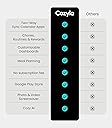
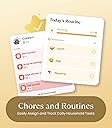
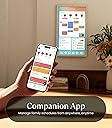
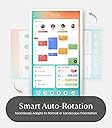
The Cozyla Calendar+ 2 is a premium 32-inch smart digital wall calendar featuring an HD touchscreen with rotatable mount, two-way sync with major calendar platforms, and a customizable dashboard supporting Google Play Store apps. Designed for busy families, it integrates schedules, chores, and meal planning into one interactive hub, complete with a chore reward system and meal planner. With no subscription fees and UK-compatible power adapter, it’s a stylish, all-in-one solution to streamline home management and keep everyone effortlessly connected.


| ASIN | B0DHCF53R6 |
| Best Sellers Rank | 163,292 in Stationery & Office Supplies ( See Top 100 in Stationery & Office Supplies ) 6,222 in Wall Calendars (Stationery & Office Supplies) |
| Brand | Cozyla Mate |
| Brand Name | Cozyla Mate |
| Country of Origin | China |
| Customer Reviews | 4.5 out of 5 stars 301 Reviews |
| Format | Digital |
| Item Dimensions W x H | 73.3W x 43.2H centimetres |
| Manufacturer | Cozyla Mate |
| Material | Plastic |
| Model Number | CD-7V541F |
| Model Year | 2026 |
| Model year | 2026 |
| Mounting Type | Wall Mount/Desk Mount |
| Part Number | CLD-32-White-UK |
| Product dimensions | 73.3W x 43.2H centimetres |
| Size | 32 inch |
| UPC | 792105798042 |
S**P
Happy with our new Home Hub and faux fireplace
We have been thinking about getting a digital photo frame for some time, but we didn't like the idea of buying a frame only to have to pay for a subscription. We're also a busy family, and I've been using a paper diary until now (yes, very old-school), and finally decided to take the plunge and use a digital diary so we can all input our activities and see them in one central place. The Cozyla Calendar +2 promised to do all that. But did it? Short answer: YES, it did. Which one? We decided to stretch ourselves and get the 24-inch model, and I'm so glad that we didn’t go for the smaller 15 SE one. Unboxing and installation. The device and accessories were really well presented (quite Apple-like packaging). It came with all the tools, templates and wall mounts to install it. It did come with wall fixings, but as we were mounting it on a plasterboard ‘dab and dot’ wall, we bought some heavier-duty screw-in fittings as the supplied ones didn’t work for our needs. Positioning. We use the Cozyla in landscape, but you can rotate it to portrait and back again as often as you like on the rotatable wall mount. WHAT WE LOVE… I hadn't quite realised how many features we were getting beyond a photo frame and digital calendar. It truly has become our one-stop home hub, and I can't imagine how we function without it, to be honest. I really hope it doesn't break, as there's no going back now! - We do have an iPad, but in a busy family, I love the fact that the Cozyla is physically attached to the wall, so no one can walk off with it or forget to charge it! - Displaying all our individual family members’ diaries in one place. You can even sync it with external calendars by adding the URL of the kids’ school Google Calendar. - Adding events to the calendar on the tablet itself is simple. When you're away from it, the Cozyla app on your phone is really helpful. Whatever events you enter into the built-in Cozyla Calendar (in the app or on the tablet) will appear in Google Calendars as well, and vice versa. You just have to make sure you set it up correctly to enable that function, and remember to tick the box below the person’s name each time you input a new event to enable it to sync with Google Calendar. - You can even take a photo of a birthday party invitation or screenshot of an email, and Cozyla will cleverly glean all the details (date, time, location, etc.) without having to type a thing! - A selection of built-in screensavers. Our favourite is having a roaring fireplace (with crackling sound effects). It makes the living space feel much more cosy (no pun intended). - Apps from the Google PlayStore can be added. Our particular favourites are using the device as a central music player - it links with our Amazon Music, Sonos and YouTube playlists. It’s great to have the Ocado app and add items to our shopping list as we need them. - Widgets can be added to the home screen. We start our day with the weather forecast updates from BBC Weather, motivational quote apps, daily to-do lists, etc. We have our Ring doorbell set up so that movement notifications pop up on screen and an audible doorbell chime plays when someone calls. - Chores list and meal planning/recipe saving feature hasn’t been used by us yet - not sure I have the energy for that right now. HURDLES - Time and patience needed for setting it all up - but worth it. The tablet itself is pretty intuitive if you've used tablets before. Like any new device, particularly one with lots of useful features, there was a commitment of time and patience required to set it up. I did a lot of research and found most of the answers and tips on the Cozyla Facebook Group (set up by users, I believe). I also emailed the Cozyla customer service desk. Both were equally helpful and gave speedy replies. It was a steep learning curve going from paper diaries to Google Calendars and the Cozyla all in one go, but if you're already using Google Calendars, you'll probably find it a lot easier to link the two. - The built-in SPEAKERS aren't amazing, but it's pretty simple to connect to a Bluetooth speaker which we have sat nearby. This works really well for us. - We were really disappointed that Amazon’s main app for shopping is not compatible with the Cozyla. At first, I cursed Cozyla, but it turns out Amazon no longer makes its app compatible with Android tablets, full stop. That said, you can just open a Google Chrome browser on the Cozyla, and it functions just like the app, so it's not a huge deal for us. - Our biggest frustration is the photo frame function. You can plug a USB stick in or use Google Photos, which is great, but whichever you choose, you can't get the photos to appear randomly because there's no shuffle feature. I think this is a real oversight, and it's really annoying for us because every time the screen is touched and goes back into screensaver mode, it restarts from the beginning, so you end up seeing the same photos over and over. Apparently, there is an external app you can download from the Google Play Store, but it seems like such an obvious and simple function to include if you're marketing it as having a photo frame. For us, we really didn't want our family photos to be accessed by some random app company. We're hoping that Cozyla will bring this feature at a later date. It's not a dealbreaker because the device has been so useful on all the other levels, but we found that niggle disappointing all the same.
J**A
There best digital calendar. Believe me, I've tried a few!
If you put the high cost of the device (which is far too much in my opinion) to one side, then it is brilliant. The Cozyla apps work fine, but its best strengths are when you use it directly with the Google Calendar app installed on it. It just works, and that is exactly what is needed. Then you can use the Google Playstore to install any app you like. We put the Tesco app on it (a gamechanger for shopping lists and ordering groceries), Flight Radar, our CCTV app, news apps and the Sonos app. The latter is like having a jukebox in your house. It is very customisable, just like any other large Android tablet, and easy to use as well. You could easily use this to watch TV on via Netflix etc as well (just don't expect a lot from the speakers!). The build quality is great. The display is nice and bright with an anti-glare finish. The wall mount is very well designed with the display being only 3-4 mm off the wall and looks great. Cozyla would sell loads of the 15.6" model if it had the Google Playstore on it. Currently it is only available in the UK on the 32" and this 24" model. Cozyla, please bring this back to the 15.6". Overall I think this is probably the best digital calendar out there. I've tried 4 different models from different manufacturers and they all are compromised in one way or another with missing features or similar. This Cozyla has none of those problems and will be used by my family for years to come, keeping us organised!
A**R
It's the anchor in our daily sea of chaos
Our Cozyla 32 inch device has become the staple of our kitchen. As a family we are still in the setup stages, we are building our routines and chores, which is bringing our family together as we do it. The kids are excited to do their chores for the first time ever, as they now have a visual list of what they need to do with clear rewards if they accomplish the task. We recently renovated our kitchen and wanted to replace our paper calendar and notice board with something modern and more pleasing to the eye and the Cozyla has given us that. We love that we can download apps to the Cozyla, allowing us to use the device as a television, so we can watch our favourite programmes whilst cooking and eating. The only negative I have to highlight is the fact that the Cozyla comes as a blank canvas and you do need to source everything, very time consuming, however once we have it tailored to support our families needs this would be forgotten as a negative. Our whole family love our Cozyla best purchase in a very long time as it has something for each one of us.
S**E
Returned for refund
As per other reviews I had issues with the touch screen quality and speed of device. Returned due to these issues for a refund.
M**U
Solve Wife’s Need with Some Good Surprises
We’ve been using the Cozyla Smart Calendar for a few days, and it’s been a great addition to our home. We installed it in my wife’s office/training room, right next to her mirror, and the setup process was smooth and surprisingly delightful. The included screwdriver is an unexpected gem—seriously high-quality and the kind of tool you’d actually want to keep in your toolbox. That was a great surprise and a thoughtful touch. Once set up, the calendar fit perfectly into the space. It makes managing daily schedules and shopping lists super easy, which has been a huge help for keeping things organized. One standout feature is the screen mirroring. Even though it’s an Android-based system, it supports Apple AirPlay flawlessly, so my wife can mirror her iPhone during yoga sessions with no hassle. It also handles Android devices effortlessly. With it placed next to her mirror, it feels like she has a high-end studio setup at home. As a heavy Apple user, I did have to get a little creative to integrate it into our workflow. I added a shortcut to the main screen that directs my wife to her iCloud.com page, so she can easily access her Notes and Reminders. It works well enough, but I hope future updates can offer better Apple integration to make this even smoother. One minor drawback is that it doesn’t have a built-in battery, so it always needs to stay plugged in. For us, this hasn’t been a big issue since it’s in a fixed spot, but it could limit placement options for some users. Additionally, the power cord design could be improved. The cord currently comes out of the bottom, which can make cable management tricky, especially if you rotate the device often. If the cord came out near the middle of the back, it would be much easier to hide and manage. Overall, the Cozyla Smart Calendar has exceeded our expectations with its practicality, thoughtful extras like the screwdriver, and seamless mirroring. If you’re looking for something to keep your family organized or enhance your office or training room, it’s worth considering. With a few tweaks in future versions, it could become even better!
P**N
The Best Digital Calendar On The Market
I have been looking to buy a digital family calendar for months. I'm already a fan of Cozyla products, so when I saw they had a family calendar of their own, I was excited to get mine, and it doesn't disappoint. At 32-inches, it is the biggest calendar screen I've seen on the market. The competitors are good too, but I really love the size of this one. There is plenty of room to see everything on the screen, especially the calendar which can have a lot of things on it. The screen is bright, responsive, and easy to use. In some ways, it acts just like a tablet, and that is where the biggest divide will be for customers. Those wanting are more seamless, all in one experience, may not appreciate that fact. Since it acts like a tablet, it is incredibly customizable, if you don't like the chores app, you can download others until you find what works for you, same with the calendar, the shopping lists, etc. Some people may not want to put in that effort or work, but if you don't mind a little trial and error, you can make your calendar experience exactly what you want it to be. I personally found some of the apps on the calendar a little lacking, so I went and found what I wanted. It took a little while, but again, I didn't mind, I was making it to be exactly what I wanted. You get out, exactly what you put into it. The Cozyla Calendar+ boasts no subscription fee, which is great! With the competitors, you have to pay anywhere from $40 a year up to $240 a year to use the calendar's features, depending on the model and subscription you buy. The Cozyla Calendar+ uses Google products, Gmail, Google Tasks, Google Calendar, etc to keep the service free. I found the Tasks app to be a little lacking for chores and shopping, so I had to search to find what I wanted. There are free apps you can replace them with, but others you may have to pay for IF you want to. Again, you don't have to pay a dime on any subscription fees with the Cozyla Calendar+, but you may find yourself looking for an app or two that can do more, and you may have to pay for it. A bonus feature is the Cozyla Calendar+ comes on a swivel mount. You can turn it from portrait mode to landscape mode. In landscape mode, you can treat it like a TV. It can play Disney+, Netflix, and other streaming services. Not necessary for a family calendar, but it is a nice little perk! It is the most expensive calendar on the market, and that price point may turn some people away. However, it is also the largest digital family screen out there. It is also highly customizable, so in a sense, you are getting what you pay for. If you want an Out-of-the-box experience, you may find the Cozyla Calendar+ lacking. If you don't mind the price point, like the bigger screen (I absolutely do!!!!), and you are ok putting in a bit of trial and error to find the right apps that work for you and your family to keep you organized, then I cannot recommend this calendar enough. It can do everything its competitors can do, and a so much more! Try it for yourself!
S**I
No Power Adapter options
So far the only issue is that we had no option for a AUD power supply, because the transformer is within the power adapter we could not find a replacement. I contacted the seller and I have not had a reply, it's been a week.
E**S
Amazing Product for organizing your life
We’ve been using the Cozyla Digital Family Calendar for a couple weeks and honestly, we don’t know how we managed without it before! As a married couple juggling full-time jobs, community events, meal planning, and everything in between, our schedules were constantly clashing—or worse, forgotten altogether. Cozyla has completely changed that. It’s like having a digital command center in our home. What we love most: • Automatic calendar sync: It pulls from both of our Google calendars, and updates in real-time. No more “I told you I had that meeting!” moments. • Chore charts & meal planning: We’ve started dividing household tasks more evenly, and planning weekly meals right on the screen—super helpful during hectic work weeks. • Photo frame + entertainment: When we’re not using it to organize life, it rotates through our favorite vacation photos or plays youtube music while we cook together. • Touchscreen and ease of use. Also, we were pleasantly surprised to find out there’s no monthly subscription like with other similar devices. It’s just a beautiful, functional piece that works straight out of the box. The bottom line? Cozyla has brought more order, less stress, and better communication into our daily life. If you’re a couple—or a family—trying to stay organized without feeling overwhelmed, this is 100% worth it.
A**N
Amazing Digital Calendar!
We love our Cozyla Digital Calendar and use it constantly! It has become a staple in our day-to-day for our busy family. We don’t know what we’d do without it! We’ve integrated this Calendar into our daily lives wholeheartedly, and life runs smoother with it. The large display is perfect for everyone in our household and the incorporated apps cover everything you need to keep organized. We highly recommend this Calendar and Company!
Trustpilot
3 days ago
1 month ago